AI in Project Management: Use Cases, Benefits & Implementation Guide
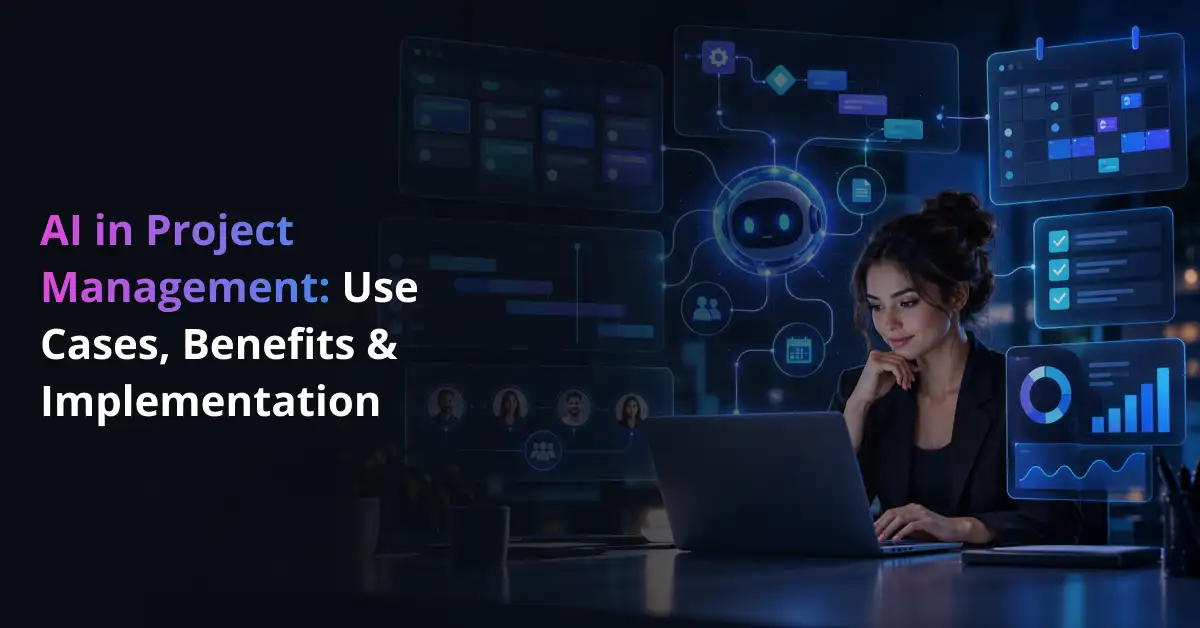
AI in project management is the use of artificial intelligence to help teams plan work, forecast risks, allocate resources, create reports, and automate routine project tasks. It combines technologies such as machine learning, natural language processing, generative AI, predictive analytics, and AI agents.
Its role is broader than using ChatGPT to draft an email or meeting summary. When connected with project and business systems, AI can analyze schedules, budgets, task histories, documents, and resource data to support decisions during planning and delivery. Organizations can use AI integration services to connect these capabilities with existing software and data sources.
AI adoption in project work is already moving beyond experimentation. PMI found that 43% of surveyed GenAI users applied it to more than half of their project tasks, while the number of organizations using GenAI on at least half of their projects increased by 86%.
This growth reflects a wider shift toward AI in the workplace and practical applications of AI in business. Still, adopting AI does not automatically make projects more successful. Its value depends on the quality of project data, the workflow being improved, and the level of human review built into the process.
Bring AI Into the Project Work That Slows Your Team Down
Prismetric helps automate reporting, risk analysis, knowledge retrieval, scheduling support, and repetitive project workflows around your existing systems.
Explore AI for Project Management
Why Is AI Becoming Important in Project Management?
Projects now generate information across task boards, schedules, budgets, risk registers, meeting notes, emails, and enterprise systems. The challenge is no longer just collecting that information. Project managers need to understand what is changing, what may go wrong next, and where attention is required.
Traditional project management software mainly records and organizes work. AI adds an analytical layer that can help teams answer questions such as:
- Which milestone is most likely to slip?
- Where is a resource bottleneck starting to form?
- Which project risk requires attention first?
For example, AI-powered business intelligence can bring together schedule, cost, and resource data to reveal patterns that may be difficult to see in separate dashboards.
PMI’s research also suggests that more frequent use of GenAI is associated with stronger reported outcomes among project professionals:
| Reported Outcome |
High GenAI Adopters |
Low Adopters |
| Greater productivity |
93% |
58% |
| Better problem-solving |
89% |
46% |
| Greater effectiveness |
88% |
50% |
The difference matters because it points to a practical lesson: occasional use of an AI chatbot is not the same as integrating AI into project workflows. Greater value usually comes when organizations connect AI with useful data, clear processes, and specific business goals.
That requires more than selecting a tool. Teams need reliable information, governance, defined success measures, and an AI strategy that links technology to real project-management problems. Where repetitive activities are already well defined, AI workflow automation services can support processes such as status updates, approvals, task routing, and data synchronization.
The practical impact becomes clearer when looking at how AI is used across planning, scheduling, risk management, reporting, resource allocation, and portfolio decisions.
Role of AI in Project Management: Use Cases and Benefits
AI supports project managers at different stages of the project lifecycle, from early planning to portfolio reviews. The strongest AI project management use cases are usually those where teams already have usable project data and spend significant time analyzing information, preparing updates, or repeating routine work.
PMI’s research shows this pattern clearly. Among 500 project professionals surveyed, GenAI usage reached 64% for data analysis, 53% for summarizing and reviewing content, 46% for planning and monitoring, 37% for risk identification and management, and 32% for budgeting and cost management.
Rather than treating these figures as proof that every PM activity should be automated, they show where AI already fits most naturally into project work.
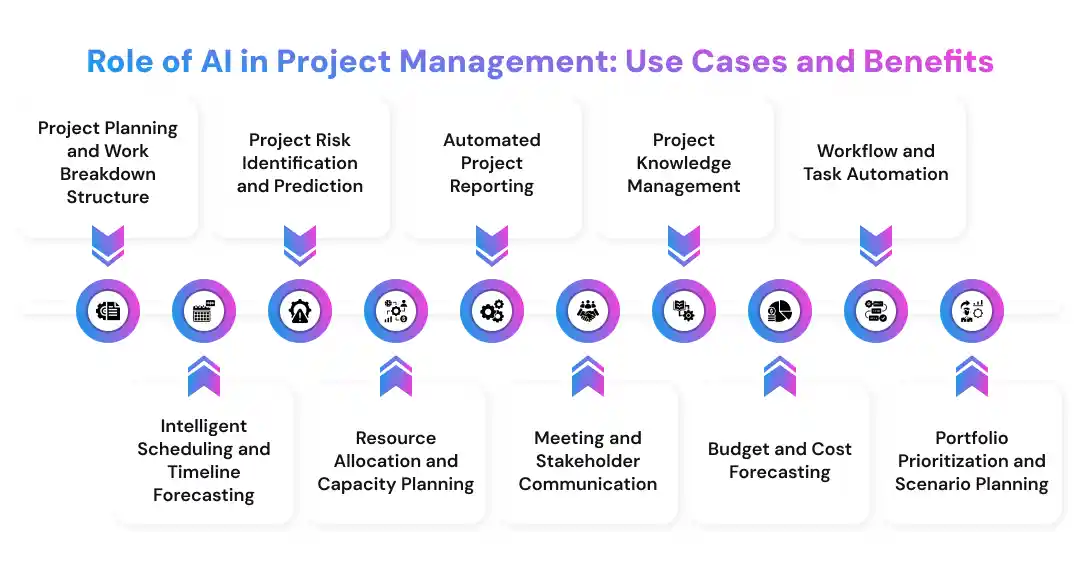
1. Project Planning and Work Breakdown Structure
AI can help turn project requirements into an initial structure. It can review scope documents, identify deliverables, divide work into tasks, suggest milestones, and highlight dependencies that need attention.
For example, a project manager can provide the project objective, timeline, major constraints, and available roles. AI may then draft a work breakdown structure (WBS) and preliminary responsibility assignments. An AI workflow discovery process can also help organizations decide which planning tasks are suitable for AI and which should remain fully human-led.
The output still needs review. AI may understand the written scope but miss informal stakeholder expectations, political dependencies, or assumptions that were never documented.
2. Intelligent Scheduling and Timeline Forecasting
AI-powered scheduling goes beyond placing tasks on a calendar. By comparing task dependencies, previous completion times, team availability, and current progress, it can highlight where a schedule is becoming unrealistic. Organizations with enough historical project data can also develop machine learning models for more specific forecasting needs.
A system might, for instance, notice that testing regularly takes longer when two development milestones overlap. Instead of waiting for the delay to appear, the project manager receives an earlier signal and can review the timeline.
3. Project Risk Identification and Prediction
Risk management is one area where predictive analytics in project management can provide practical value. AI can scan changing project information and identify combinations of signals associated with previous delays, overruns, or delivery problems.
It can help teams look for signs such as:
- repeated slippage in dependent tasks,
- rising resource pressure across critical activities,
- scope changes that begin affecting cost or delivery dates.
PMI found that 26% of surveyed project professionals used GenAI to identify potential risks and uncertainties, while 24% used it to monitor and evaluate risks during a project. The reported impact was higher than usage for several of these tasks, suggesting room for broader adoption where suitable data and controls exist.
The recommendation itself should remain reviewable. Explainable AI can help teams understand why a model produced a particular signal, while structured AI model testing helps check whether the model performs reliably before it influences live project decisions.
4. Resource Allocation and Capacity Planning
AI can compare skills, workloads, planned leave, project priorities, and future demand to show where capacity problems are developing. If two projects need the same specialist during the same sprint, for example, the system can flag the conflict before both schedules depend on an unavailable resource.
This does not make resource allocation automatic. Managers still need to consider experience, team chemistry, development goals, and client expectations—factors that may not exist in structured workforce data.
5. Automated Project Reporting
Weekly reporting often involves more collection than analysis. Project managers pull information from task boards, finance systems, spreadsheets, meeting notes, and team updates before they can explain what changed.
Generative AI can shorten that flow:
Project data → AI-generated draft → PM validation → stakeholder update
The distinction matters. Generative AI can create a readable narrative from approved information, but the project manager remains responsible for confirming that the numbers, risks, and explanations reflect the actual situation.
PMI’s survey gives this use case additional context: 28% of respondents used GenAI to create project-performance reports, while 34% used it to summarize project documentation and reports.
6. Meeting and Stakeholder Communication
Meetings contain decisions, commitments, open questions, and deadlines, but that information often ends up scattered across recordings, notes, chat, and email. AI can transcribe conversations, create summaries, extract actions, and prepare different versions of an update for different audiences.
For instance, the delivery team may need detailed decisions and task owners, while an executive sponsor may only need progress, major risks, and decisions requiring approval. Organizations with specialized requirements can develop language-based AI applications around approved internal workflows rather than sending sensitive project information through disconnected tools.
7. Project Knowledge Management
A project may generate hundreds of documents before delivery ends. Requirements live in one repository, decisions in another, and lessons from previous projects may be buried in archived files.
Retrieval-augmented generation, or RAG, helps solve this problem by retrieving relevant information from approved business sources before the model creates an answer. Companies can, for example, connect LLMs with enterprise databases so project teams can ask questions against internal information rather than relying only on the model’s general training data.
A PM could ask, “Why was this integration approach rejected during the previous rollout?” The system may retrieve the earlier architecture decision, meeting summary, and technical note before answering. For more controlled enterprise environments, a RAG-based knowledge layer can support this type of grounded retrieval.
8. Budget and Cost Forecasting
AI can combine planned budgets, actual spending, labor use, procurement data, and schedule progress to find cost patterns that deserve attention. It does not need to wait until the total budget is exceeded; it can flag smaller changes that may lead to an overrun later.
A practical cost-monitoring view could look like this:
| Cost Area |
What AI Can Monitor |
What the Project Manager Reviews |
| Labor cost |
Hours used versus planned effort |
Whether staffing or scope has changed |
| Vendor spend |
Purchase orders, invoices, contract limits |
Whether additional spend is justified |
| Schedule-related cost |
Delays affecting dependent work |
Whether recovery options cost less than delay |
| Scope cost |
New requirements and change requests |
Budget and business impact of approving the change |
| Forecast variance |
Actual spend compared with expected burn |
Whether the forecast assumptions remain valid |
PMI reports 32% overall GenAI usage for budgeting and cost-management tasks in its survey. Within that group, 19% used it to manage project budgets and 18% to identify potential budget risks.
This is where AI-based cost analysis can support earlier investigation rather than simply producing another end-of-month report.
9. Workflow and Task Automation
Some project work does not require prediction at all; it simply requires the same actions to happen reliably. Project management automation can reduce this manual effort by connecting rules, AI models, and project systems.
Depending on the workflow, AI can:
- create a ticket from an approved request,
- route an issue to the right owner,
- prepare an escalation when a critical task becomes overdue,
- update connected systems after an approved status change.
More advanced agentic process automation can coordinate several of these steps instead of completing only one action. An organization might also build task-specific AI agents when the workflow needs custom tools, permissions, and approval points.
The more authority an agent receives, the more important access controls, monitoring, and human approval become.
10. Portfolio Prioritization and Scenario Planning
AI becomes especially useful when a PMO must evaluate several projects competing for the same budget, people, or technical resources. Instead of reviewing each initiative in isolation, the system can compare dependencies, strategic priorities, capacity, cost, and delivery risk across the portfolio.
Consider a simple scenario: Project A needs three additional engineers for six weeks, but the same people are assigned to Project B. AI can model the likely schedule and capacity effect of moving those employees before leaders make the change.
This kind of portfolio analysis is one example of how enterprise AI can support different operational environments without taking final accountability away from project and business leaders.
Taken together, these use cases show that AI for project managers is most useful when the system has a clear job: analyze a risk, summarize a report, forecast an outcome, retrieve information, or complete a defined workflow. The technology handles information and repetition well; managers still provide context, judgment, and accountability.
Key Benefits of AI in Project Management
The benefits of AI in project management are not limited to saving time. When AI is connected to reliable project data and clear workflows, it can change how quickly teams detect problems, how consistently information is shared, and how much administrative effort is required to manage a growing portfolio.
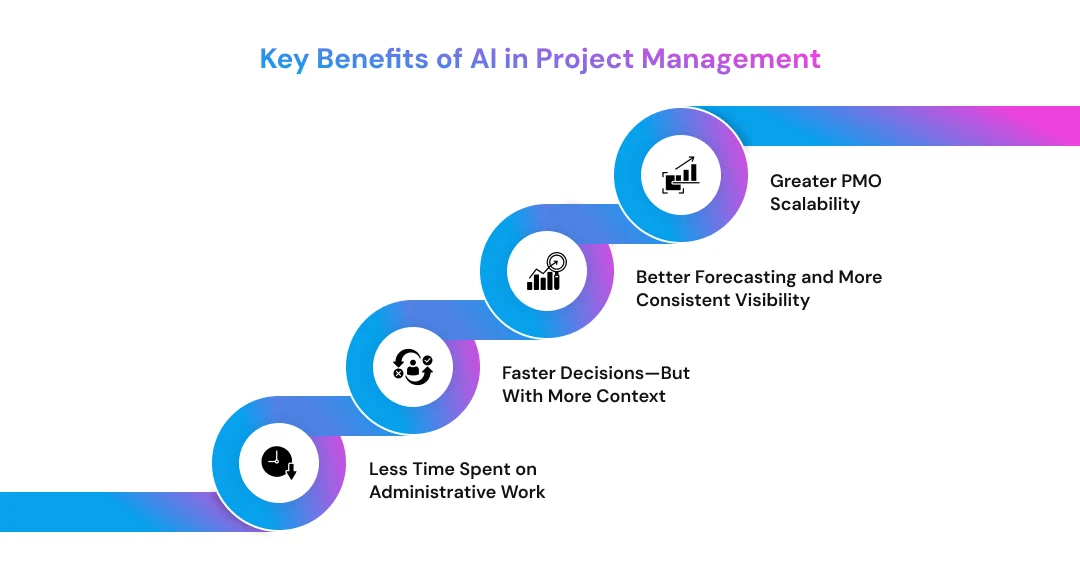
Less Time Spent on Administrative Work
Reporting, meeting summaries, task updates, reminders, and document review can consume time without necessarily requiring senior project-management judgment. AI workflow automation tools can take on parts of this repetitive work, leaving project managers with more time for planning, coordination, negotiation, and exception handling.
Faster Decisions—But With More Context
AI can review far more project information than a manager can reasonably scan before every meeting. That does not mean AI should make the decision. Its value is often in narrowing attention: showing which schedule, cost, or resource changes deserve human review.
PMI’s 2024 research illustrates the difference between occasional and deeper adoption. 93% of high GenAI adopters reported greater productivity, compared with 58% of low adopters; 89% versus 46% reported better problem-solving, and 88% versus 50% reported greater effectiveness.
The numbers point to a broader lesson: value tends to come from integrating AI into useful work, not merely giving employees access to a chatbot.
What Changes in Practice?
| Benefit |
Without Strong AI Support |
With Well-Designed AI Support |
| Risk visibility |
Risks may surface during scheduled reviews |
Signals can be monitored as project data changes |
| Resource planning |
Managers compare capacity manually |
AI can highlight conflicts across people and projects |
| Forecasting |
Forecasts depend heavily on manual analysis |
Models can compare current data with historical patterns |
| Reporting |
PMs collect and rewrite updates |
AI can prepare a draft for validation |
| PMO scalability |
Administrative effort grows with project volume |
Routine monitoring and summaries can be partly automated |
The table highlights an important point: AI usually improves the process around a decision, not the need for the decision itself.
Better Forecasting and More Consistent Visibility
When schedule, resource, and cost information is connected, teams can see relationships that are difficult to detect in separate systems. For example, a slipping milestone may look manageable until AI also shows increasing overtime, delayed vendor work, and declining capacity on the next phase.
Organizations should still measure whether these capabilities create enough value to justify their cost. An AI automation ROI framework can compare implementation and operating costs with outcomes such as hours saved, reduced manual processing, faster reporting, or better exception detection.
Greater PMO Scalability
As project volume grows, manually reviewing every schedule, update, and risk register becomes harder. AI can summarize portfolio information and surface exceptions, allowing PMO teams to direct attention toward projects that need intervention.
For larger organizations, this may eventually require enterprise AI systems built around existing data and workflows rather than several disconnected AI tools. The benefit is not automation for its own sake; it is maintaining useful oversight as project complexity and volume increase.
Connect Project Data With AI for Smarter Decisions
Bring schedules, budgets, documents, resource data, and project history together so AI can surface risks, forecasts, and actionable project insights.
Discuss Your AI Integration
AI Project Management Tools and Technology Options
AI project management tools generally fall into four groups: AI-enabled project platforms, general-purpose generative AI assistants, meeting and knowledge tools, and custom enterprise AI systems. The right option depends on what the organization needs to automate, what data the system must access, and how much control the business requires.
| Tool Category |
Examples |
Best Suited For |
| AI-enabled project platforms |
Jira with Rovo, Asana AI, monday AI, ClickUp Brain |
Planning, task management, status updates, workflow automation |
| Generative AI assistants |
ChatGPT, Claude, Gemini, Microsoft Copilot |
Drafting plans, summarizing information, brainstorming, document analysis |
| Meeting and knowledge tools |
AI transcription, enterprise search, knowledge assistants |
Meeting notes, action items, project-document retrieval |
| Custom enterprise AI |
Private copilots, predictive models, RAG systems, AI agents |
Organization-specific workflows, integrations, governance, and project data |
Current platforms are already moving beyond simple text generation. Jira’s Rovo, for example, supports natural-language project search and automation, while Asana AI can help create project structures and subtasks. monday.com is also adding AI agents to project workflows.
Tool selection should start with the workflow rather than the brand. Teams comparing packaged software with a tailored system can evaluate the trade-offs between custom AI and off-the-shelf AI, including deployment speed, data control, integration needs, and customization. The underlying AI model and broader AI technology stack also matter when accuracy, privacy, or system integration becomes important.
Standard AI project management software may be enough for reporting or task assistance. Organizations with proprietary data or complex workflows may instead need to plan a tailored generative AI approach or validate the idea through a focused AI proof of concept before committing to a larger rollout.
Future of AI in Project Management
The future of AI in project management is likely to move from isolated assistance toward AI systems that understand project context and perform connected tasks. Project managers may increasingly work with copilots and agents that monitor information continuously instead of waiting for a user to request every action.
PMI currently highlights a Gartner forecast that 80% of project management tasks will be run by AI by 2030. Project Management Institute The figure refers to tasks, not the disappearance of project managers. PMI’s 2026 AI standard also keeps human oversight at the center of AI-supported project work, especially where judgment and accountability matter.
Several changes are likely to shape this shift:
- More context-aware copilots: AI will draw on approved schedules, documents, risks, and project history when answering questions or preparing recommendations.
- Greater use of AI agents: Agentic AI use cases will expand from simple reminders to multi-step project workflows.
- Continuous risk monitoring: AI can watch changing project signals instead of relying only on scheduled reviews.
- Faster scenario planning: PMOs can test resource, budget, and timeline changes before applying them.
- More emphasis on human judgment: leadership, negotiation, ethics, and stakeholder decisions remain difficult to automate responsibly.
For organizations, this shift is part of a broader AI transformation rather than a simple software upgrade. Moving from isolated experiments to governed project workflows may also require structuredAI implementation support as data, integration, security, and oversight requirements grow.
Steps to Implement AI in Project Management
Successful AI implementation in project management starts with a defined business problem, not with choosing a model or buying another tool. Organizations need to know what they want AI to improve, whether suitable data exists, how the system fits current workflows, and which decisions still require human approval.
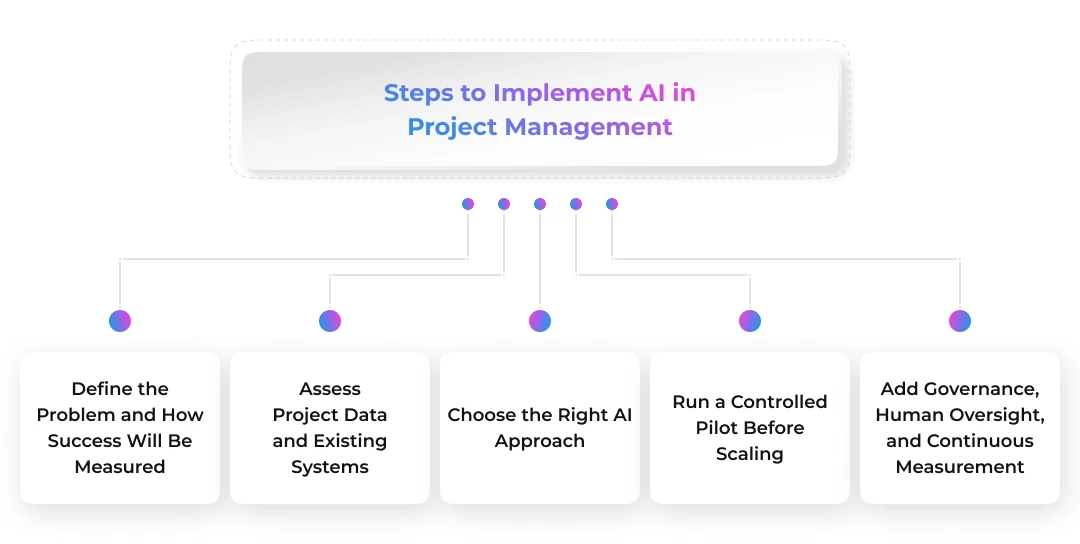
1. Define the Problem and How Success Will Be Measured
Start with one project-management problem that has a visible operational cost. It could be slow status reporting, inconsistent risk reviews, poor resource visibility, or too much time spent searching project documents.
A useful first use case should have three things: repeatable work, accessible data, and an outcome that can be measured. Organizations exploring possible starting points can review common enterprise AI PoC use cases before deciding whether a project workflow is suitable for testing.
Set the baseline before introducing AI. If weekly reporting currently takes six hours, for example, record that figure so the pilot can later show whether the process actually improved.
2. Assess Project Data and Existing Systems
AI is only as useful as the information it can access. Teams should map where schedules, budgets, project documents, timesheets, risks, employee capacity, and stakeholder updates are stored. They also need to check whether that data is complete, current, correctly permissioned, and available through APIs or other integration methods.
Organizations with fragmented or complex datasets may need specialized data science support to prepare information for forecasting and model evaluation, while teams that need unified dashboards can build reporting and analytics layers around project data.
This preparation matters because AI maturity remains low despite rapid adoption. PMI reports that only 1% of organizations believe they have reached GenAI maturity. Project Management Institute The gap suggests that access to AI tools is much easier than building the data, governance, skills, and workflows needed to use them reliably.
3. Choose the Right AI Approach
Not every project problem requires the same technology. A meeting-summary use case may work with an existing generative AI assistant, while delay prediction may need machine learning trained on historical projects. Knowledge retrieval may require RAG, and multi-step automation may call for AI agents.
Organizations should compare approaches such as prompt engineering, fine-tuning, and RAG based on the actual task rather than assuming that a more customized model is always better.
Deployment also affects privacy and control. A cloud versus on-premise LLM assessment can help teams evaluate infrastructure, security, cost, and data-location requirements. If general models cannot handle specialized project terminology or output requirements, organizations may choose to fine-tune a model for domain-specific behavior.
4. Run a Controlled Pilot Before Scaling
A pilot should test one workflow with a limited user group and clear success criteria. Good starting points include project-report generation, meeting summaries, document search, risk-register assistance, or PMO portfolio summaries.
The AI PoC development process helps answer a basic question: Can this idea work with the available data and constraints?
A simple technical flow may look like:
Project systems → approved data/connectors → AI model or RAG layer → project workflow → human review → approved action
If the proof of concept works, teams can then decide whether they need a broader product. Understanding the difference between an AI PoC and AI MVP helps separate technical validation from a solution ready for real users. Organizations can then turn a validated pilot into an AI MVP with the integrations, security, interface, and monitoring needed for production use.
5. Add Governance, Human Oversight, and Continuous Measurement
AI should not receive the same authority for every project activity. A system may automatically summarize a meeting, while changes to budget, scope, staffing, or contractual commitments should normally require human approval.
Define four questions for every AI-supported workflow:
- What can the AI do on its own?
- When must a person review the output?
- Who can approve or override the recommendation?
- How will the team know whether the workflow is performing better?
PMI’s 2026 AI standard places human-in-the-loop oversight throughout the AI lifecycle and also covers governance, data quality, risk, ethics, and accountability.
For more autonomous workflows, teams should also evaluate accuracy, failure cases, tool permissions, and escalation behavior. An AI agent evaluation can help assess whether an agent behaves consistently before its role expands. Where several approved steps can safely be automated, organizations may automate connected project workflows while keeping higher-impact decisions under human control.
Challenges of Using AI in Project Management
AI can support project work, but it also introduces risks that traditional project software may not create. The most common problems involve weak data, inaccurate outputs, security, integration, bias, and excessive trust in automated recommendations.
| Challenge |
Why It Matters |
Practical Control |
| Poor data quality |
Incomplete schedules or outdated records weaken predictions |
Validate and govern project data before model use |
| Hallucinations |
Generative AI may produce plausible but incorrect information |
Ground outputs in approved sources and require review |
| Privacy and security |
Project files may contain confidential business or customer data |
Apply role-based access, encryption, and approved deployment models |
| Integration complexity |
AI has limited value when important information stays isolated |
Use a clear AI integration architecture for legacy systems |
| Bias and missing context |
Historical data may not reflect current business conditions |
Test outputs across scenarios and allow human override |
| Overautomation |
AI can miss stakeholder dynamics and undocumented constraints |
Keep people responsible for high-impact decisions |
Data privacy also affects model choice. Organizations handling sensitive project information should compare private and public LLM deployment before deciding where prompts, documents, and generated outputs can be processed.
Governance becomes even more important when AI influences decisions rather than simply drafting content. Teams need clear accountability, auditability, usage policies, and compliance controls; broader AI regulation and compliance requirements may also affect how systems are designed and monitored.
The practical goal is not to remove every AI risk. It is to understand which risks each workflow creates, apply controls proportionate to their impact, and keep project professionals accountable for decisions where context and judgment matter. PMI similarly emphasizes that AI can inform decisions, while people remain responsible for interpreting outputs and their consequences.
Validate One Project Workflow Before Scaling AI Across the PMO
Start with reporting, document search, risk monitoring, or portfolio summaries, measure the results, and expand only when the pilot proves business value.
Start Your AI Project Management PoC
Implement AI-Powered Project Management Solutions With Prismetric
Off-the-shelf AI project management software can work well for common tasks such as meeting summaries, report drafting, and task assistance. A custom approach becomes more useful when project data is spread across ERP systems, internal databases, collaboration tools, or organization-specific workflows.
Prismetric can help businesses move from a defined project-management problem to a production-ready AI solution. Depending on the use case, this may involve predictive machine learning, generative AI, RAG-based knowledge retrieval, workflow automation, AI agents, or integrations with existing project and enterprise systems.
The right approach also depends on data sensitivity, integration complexity, expected users, governance needs, and how much control the AI receives. Organizations comparing potential partners can use practical criteria for choosing an AI development company, including technical experience, security practices, integration capabilities, and post-deployment support.
A sensible starting point is one measurable workflow rather than a company-wide rollout. For example, a business might first automate weekly project reporting or build a project-document assistant. Once the pilot proves accuracy, adoption, security, and business value, the same foundation can expand to other project workflows.
Frequently Asked Questions
AI in project management is the use of artificial intelligence technologies to support planning, scheduling, reporting, risk management, resource allocation, forecasting, and workflow automation. AI analyzes project information or generates outputs, while project managers remain responsible for context, approvals, and important business decisions.
Organizations use AI across both administrative and analytical work. Common applications include:
- creating initial project plans and task structures,
- predicting schedule or budget risks,
- matching resources with project demand,
- summarizing meetings and generating status reports,
- automating routine project workflows.
The exact use case depends on available data, project complexity, and the level of automation the organization is comfortable allowing.
AI can reduce repetitive administrative work, identify project risks earlier, improve forecasting, support resource planning, and speed up reporting. These benefits are strongest when the AI has reliable data and is integrated into an existing workflow rather than used as a disconnected tool.
ChatGPT can assist with project-management tasks, but it should not be treated as the accountable project manager. It can draft plans, summarize documents, generate meeting notes, suggest risks, or prepare communications. It does not automatically know current project data, organizational priorities, stakeholder relationships, or approved decisions unless that context is provided through secure integrations.
AI is more likely to change the work of project managers than remove the role. It can handle more reporting, analysis, documentation, and routine coordination, but project leadership still requires negotiation, judgment, accountability, conflict resolution, and stakeholder management. The practical model is therefore AI-assisted project management, where technology handles information-heavy tasks and people remain responsible for decisions.
A business should begin with one clear project-management problem rather than trying to automate everything at once. The best starting point is usually a repetitive, measurable workflow with accessible data.
A practical starting process is:
- identify a high-effort task such as reporting, risk review, or document search,
- define the expected outcome and baseline performance,
- run a small AI pilot with a limited team,
- measure accuracy, time saved, adoption, and business value before scaling.
This approach reduces implementation risk and gives the organization evidence before investing in a broader AI rollout.
Tasks that depend heavily on judgment, accountability, negotiation, or sensitive stakeholder relationships should usually remain human-led. AI can provide information or recommendations, but it should not make every decision independently.
Examples include:
- approving major scope, budget, or contract changes,
- resolving conflicts between teams or stakeholders,
- making sensitive staffing decisions,
- committing to deadlines without human validation,
- accepting major project risks on behalf of the organization.
AI works best when it supports these decisions with relevant information rather than replacing the person accountable for them.
The cost depends on the use case, number of users, data sources, integrations, security requirements, and whether the organization uses an existing platform or builds a custom solution. A simple AI reporting assistant may require limited configuration, while a custom system with RAG, predictive models, enterprise integrations, and AI agents can require a larger investment.
Businesses should compare implementation cost with measurable outcomes such as reduced reporting time, fewer manual steps, faster risk detection, and better resource visibility.
Businesses can measure AI ROI by comparing the cost of implementation and operation with improvements in project-management performance. Useful metrics include time saved on administrative work, report preparation time, forecast accuracy, schedule variance, resource utilization, early risk detection, adoption rates, and the percentage of AI outputs that require correction.
ROI should be measured against a pre-AI baseline. This makes it easier to determine whether the system is producing real operational value rather than simply increasing AI usage.