Top AI Workflow Automation Tools in 2026
Key Takeaways
- AI-driven automation can increase productivity by up to 40 percent and reduce costs by 30 percent, making it essential for businesses in 2026.
- Unlike rule-based systems, AI workflow platforms adapt, learn, and make decisions using real-time data and contextual understanding.
- Tools such as Zapier, Make, and Relay enable no-code automation, while Lindy.ai and Relevance AI focus on custom AI agents.
- Platforms like n8n and AgentFlow provide low-code environments with flexible and scalable workflow orchestration.
- Modern workflow tools automate tasks like LLM-powered processing, document parsing, email routing, and meeting summaries.
- Security remains critical, with leading platforms offering role-based access, encryption, audit logs, and GDPR and SOC 2 compliance.
2026 isn’t just another year in tech. It marks a turning point where AI isn’t just helping with automation, it’s driving it.
In the past, automating tasks meant setting rules and hoping they worked. Today’s AI-first tools are different. They read, learn, adapt, and act. They analyze PDFs, take notes, summarize meetings, route emails, generate reports, trigger workflows, personalize customer responses, and optimize decisions in real time. They do all of these without human input.
According to McKinsey, companies using AI-driven automation have seen productivity increase by up to 40% and costs drop by 30%. Gartner predicts that by the end of 2026, 80% of business workflows will involve AI agents in some form. That’s not the future. That’s happening now.
This guide gives you everything you need to understand, evaluate, and choose the best AI workflow automation tools in 2026 with real examples, use cases, pricing, and actionable tips to get started.

What Are AI Workflow Automation Tools?
AI workflow automation tools are software platforms that use artificial intelligence to automate multi-step business processes with minimal human input.
Unlike traditional automation tools that follow rigid, rule-based triggers (like “if this, then that”), AI-powered tools can understand context, make decisions, and adapt in real time. They don’t just move data from one app to another. They interpret it, learn from it, and act on it.
Think of them as digital team members. They can:
- Read and extract data from documents
- Summarize customer support chats
- Draft personalized email replies
- Trigger follow-ups based on sentiment or behavior
- Coordinate tasks across apps and departments
How We Chose the Right AI Workflow Automation Tools?
Not all automation tools are created equal. Some are fast but rigid. Others are flexible but complex. Our goal is to highlight tools that strike the right balance between being smart, simple, and scalable.
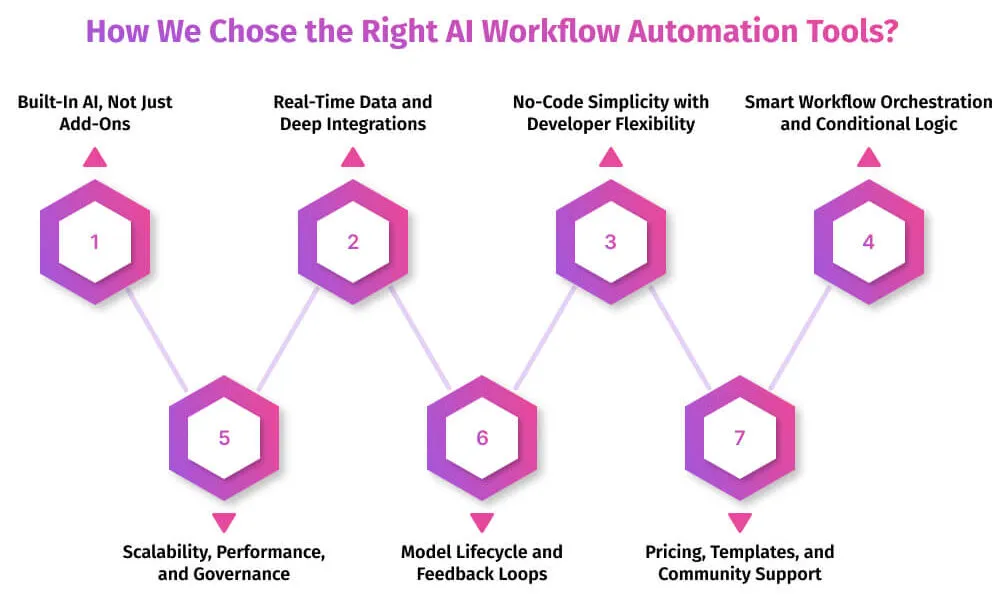
Here’s what we looked for when curating this list:
1. Built-In AI, Not Just Add-Ons
True AI workflow tools are designed with intelligence at their core. We prioritized platforms that offer native AI features. These are tools that can analyze content, understand intent, and adapt workflows without relying on external plugins.
They don’t just include AI for marketing value. They use it to power real functionality like auto-tagging, smart routing, natural language input, and intelligent decision-making.
2. Real-Time Data and Deep Integrations
Speed matters. So does connectivity.
The best tools integrate deeply with the apps you already use, such as CRMs, databases, calendars, and email platforms. They don’t just pull data. They sync it, react to it, and trigger the right actions instantly.
We looked for platforms that offer two-way data flows, real-time triggers, and support for webhooks. This keeps your workflows accurate, current, and responsive.
3. No-Code Simplicity with Developer Flexibility
Automation should be accessible to non-technical teams without limiting technical ones.
We focused on tools that offer drag-and-drop builders for beginners, along with robust APIs and scripting options for developers. The best platforms make it easy to get started and powerful to expand.
4. Smart Workflow Orchestration and Conditional Logic
AI workflow tools should do more than move data from one step to another. They need to understand the bigger picture.
We looked for platforms that support advanced orchestration. This includes branching paths, conditional triggers, approval steps, delays, and loops. These features help you design workflows that adapt to real-time inputs and decisions.
The best tools make it easy to build logic that mirrors how your team actually works.
5. Scalability, Performance, and Governance
A good tool should grow with your business.
We prioritized platforms that can handle large volumes of tasks, support multiple teams, and maintain speed under pressure. Scalability also means staying organized as your workflows become more complex.
Security matters too. Role-based access, data encryption, and detailed activity logs are essential for teams handling private or regulated information.
6. Model Lifecycle and Feedback Loops
Smart automation doesn’t stop after deployment. It should learn and improve over time.
We focused on tools that support feedback loops. These systems allow the AI to adjust based on what works and what doesn’t. This is especially useful for workflows that involve autonomous decision-making.
If a tool can learn from outcomes, it becomes more accurate, efficient, and useful over time.
7. Pricing, Templates, and Community Support
Even the smartest tools need to be usable.
We selected platforms with clear pricing, helpful onboarding, and pre-built templates that make setup easier. Good documentation and a strong user community also help reduce learning curves.
Top 10 AI Workflow Automation Tools (2026)
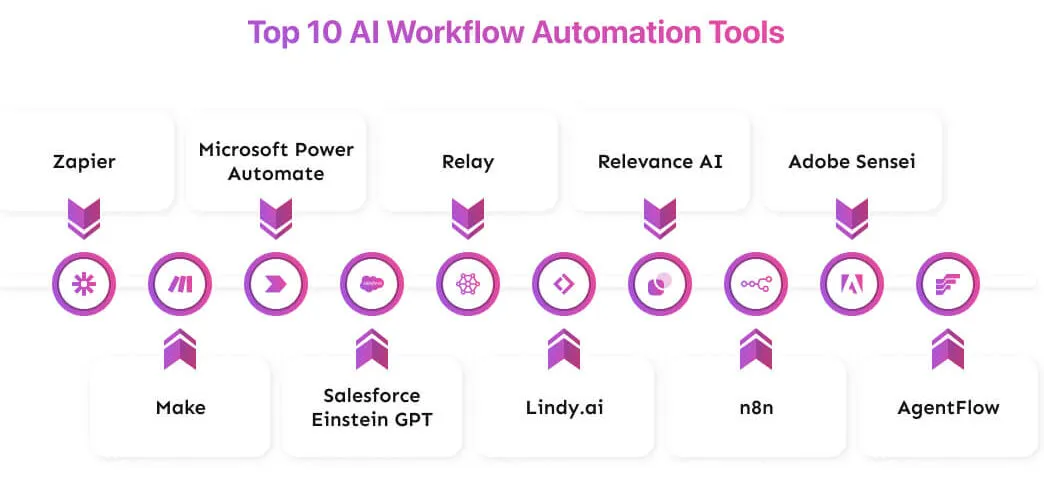
Below is a curated list of the top AI workflow automation tools making an impact in 2026.
1. Zapier
Zapier connects with over 8,000 apps and recently introduced AI-powered features like prompt steps, AI agents, and support for natural language commands. It’s built for simplicity but offers powerful customization through filters, delays, and multi-step flows. Great for teams that want speed without the complexity.
Best for:
Startups, solopreneurs, freelancers, and small teams who want to automate everyday tasks without writing code.
Pricing:
Free plan available for up to 100 tasks per month. Paid plans start at $19.99 per month for more tasks, premium integrations, and advanced features.
Their Official Page for Current Pricing:https://zapier.com/pricing
Example use cases:
- A marketing coordinator sets up an AI-enhanced workflow that captures leads, scores them using ChatGPT, and sends tailored email sequences.
- A virtual assistant auto-summarizes client feedback, organizes it into categories, and creates follow-up tasks in Trello.
- A finance consultant extracts client data from PDFs and pushes it into Google Sheets, with automatic alerts for anomalies.
2. Make
Make provides a powerful visual drag-and-drop interface and robust automation features. It supports branching logic and complex data transformations. You can plug in LLMs or Gen AI to add intelligence to workflows. Make gives more control for teams that need precision and flexibility.
Best for
Freelancers, small teams, and growing companies that want fine-grained workflow design without heavy coding.
Pricing
Free plan available with limited credits. Paid plans start at around $9 per month for higher credit allowances and advanced features.
Example use cases
- A marketing team builds a branching campaign that reacts to lead behavior and engagement.
- Ops teams combine CRM, support tickets, and billing data, summarize issues with AI, and route tasks automatically.
- HR automates onboarding by validating new hire info, provisioning access, and notifying teams.
3. Microsoft Power Automate
Microsoft Power Automate lets you build workflows across cloud apps, desktop software, and legacy systems. It includes AI-powered features like Copilot, which helps you create flows using natural language. It also supports robotic process automation (RPA), process mining, and integrates seamlessly with Microsoft 365.
Best for
Mid-market to enterprise teams using Microsoft tools who need scalable, secure automation across departments.
Pricing
Free tier available for basic flows. Paid plans scale based on number of users, flows, and RPA needs. Their Official Page for Current Pricing: https://flow.microsoft.com/pricing
Example use cases
- Automate employee onboarding with tasks sent to HR, IT, and payroll systems.
- Use AI to extract data from forms, validate entries, and update internal databases.
- Analyze bottlenecks in business processes and optimize them with process insights.
4. Salesforce Einstein GPT
Einstein GPT brings generative AI directly into Salesforce. It helps teams create workflows, generate content, and suggest next actions using natural language prompts. The system pulls in real-time customer data and connects with Flow Orchestrator for advanced process control.
Best for
Sales, marketing, and service teams already using Salesforce who want to automate personalized customer experiences.
Pricing
Pricing varies by Salesforce edition and AI feature set.
Their Official Page for Current Pricing:https://www.salesforce.com/editions-pricing/
Example use cases
- A sales manager types a prompt and gets a full follow-up campaign generated and launched automatically.
- Customer service uses AI to summarize support cases and trigger the next best action.
- Marketing teams generate personalized content and route it through an approval flow without manual input.
5. Relay – Automate workflows with built-in AI and human-in-the-loop collaboration
Relay combines smart automation with human oversight. It features AI assistance, branching workflows, and conditional logic. Its simple interface makes it easy for non-technical teams to build powerful workflows quickly. Relay integrates with over 100 popular tools.
Best for
Small to mid-sized teams that need a balance of automation and manual review, such as customer support, HR, or internal operations.
Pricing
Free tier available with basic features. Paid plans start at an affordable rate for more workflows and premium functionality. Their Official Page for Current Pricing: https://relay.app/pricing
Example use cases
- A support team uses AI to extract key info from customer emails, routes tickets, and escalates when needed.
- An operations team tracks upsell triggers and sends tasks to the sales team when customer activity matches specific criteria.
- HR automates expense approvals where AI pre-screens receipts and sends to a manager only if needed.
6. Lindy.ai – Build custom AI agents for task automation, no code required
Lindy.ai lets users create intelligent agents that handle complex, decision-driven tasks. It’s no-code, flexible, and designed for automation that goes beyond simple workflows. It’s ideal for repetitive tasks that require context, judgment, or structured output.
Best for
Freelancers, startups, and teams looking to automate tasks like email triage, calendar management, or content generation without hiring developers.
Pricing
Free plan available with limited credits. Pro plans start around $49 per month and unlock more advanced agent features. Their Official Page for Current Pricing: https://lindy.ai/pricing
Example use cases
- A freelancer sets up an agent to read emails, summarize attachments, and schedule meetings.
- A sales team automates lead research and gets real-time alerts when a contact matches a target profile.
- A small business builds a daily AI assistant to collect industry news and generate a leadership briefing.
7. Relevance AI – Build your AI workforce with no-code agents
Relevance AI allows you to create teams of AI agents that automate tasks, make decisions, and adapt over time. It supports natural-language triggers, context-aware flows, and scalable logic without writing code. This platform is built for more than task automation it’s about process intelligence.
Best for
Mid-sized companies, innovation teams, or operations leaders who want to build and scale AI agents without relying on developers.
Pricing
Free tier available for basic agent creation. Paid plans vary based on usage and number of agents. Their Official Page for Current Pricing:https://relevanceai.com/pricing
Example use cases
- A marketing team deploys agents that monitor social comments, detect sentiment, and trigger follow-up actions.
- A business intelligence team automates competitive research and delivers weekly briefs with AI-summarized insights.
- A service company automates document processing, extracts key fields, and only involves a human when needed.
8. n8n
n8n offers a visual, node-based workflow editor that supports both no-code and low-code automation. It integrates with over 400 apps, allows self-hosting for full data control, and includes AI-ready nodes to add intelligence to your workflows. It’s flexible, secure, and developer-friendly.
Best for
Tech-savvy teams, startups, and mid-market companies that need customizable automation without being locked into a proprietary ecosystem.
Pricing
Free to self-host. Cloud plans start at approximately $20 per month. Their Official Page for Current Pricing:https://n8n.io/pricing
Example use cases
- A developer team builds an internal AI agent that pulls data from legacy systems, processes it, and triggers real-time alerts.
- A marketing team creates a workflow to monitor brand mentions, analyze sentiment, and notify relevant team members.
- An operations team uses n8n to link internal databases, automate status updates, and reduce manual reporting.
9. Adobe Sensei
Adobe Sensei is the AI engine built into Adobe Creative Cloud, Experience Cloud, and Document Cloud. It automates tasks like image tagging, content generation, personalization, and predictive analytics. It blends creative, marketing, and document workflows with intelligent automation that saves time and enhances quality.
Best for
Creative teams, marketing departments, and enterprise users already using Adobe tools who want to boost productivity with intelligent automation.
Pricing
Adobe Sensei is not a standalone product. It is included within various Adobe cloud solutions. Their Official Page for Current Pricing:https://www.adobe.com/sensei
Example use cases
- A marketing team automatically tags thousands of images in a digital asset library, saving hours of manual work.
- A content strategist generates multiple ad variations and tests which copy performs best across channels.
- An analytics team identifies customer behavior anomalies and triggers targeted follow-up workflows.
- A legal team extracts key data from scanned contracts and routes flagged documents for review.
10. AgentFlow
AgentFlow empowers teams to build and manage AI‑driven agents that coordinate tasks across departments. It blends decision‑making logic, natural‑language triggers, and workflow automation into a unified platform. With AgentFlow you craft agents that do more than follow scripted rules. They interpret inputs, decide next steps, and trigger actions across systems.
Best for
Technology teams, operations teams and innovation teams who want to build intelligent assistants or agent networks that span multiple workflows and systems.
Pricing
Free trial available. Paid plans scale based on number of agents, tasks and integrations. Their Official Page for Current Pricing: https://agentflow.io/pricing
Example use cases
- An operations leader deploys an agent that monitors supply chain alerts, predicts delays using AI, and triggers alternative sourcing workflows automatically.
- A customer‑service manager builds an agent that reads support chat transcripts, categorises issues, assigns to correct teams and escalates high‑priority cases.
- A sales enablement team creates an agent to track pipeline changes, generate personalised outreach drafts and notify reps with next‑best action suggestions.

Automate Your Workflows With Prismetric AI Services
At Prismetric, we help businesses simplify, scale, and innovate through intelligent AI workflow automation services . Whether you’re a startup or an enterprise, our solutions are designed to eliminate repetitive tasks, improve decision-making, and accelerate growth.
We don’t just automate tasks, we build smart systems that think, learn, and adapt.
What We Offer:
- Custom AI Agent Development
Build intelligent agents that handle tasks, make decisions, and optimize workflows.
- AI-Integrated Workflow Automation
Automate multi-step processes across departments with context-aware logic and real-time data handling.
- Seamless System Integration
Connect your existing tools, CRMs, ERPs, and databases to create unified, efficient workflows.
- End-to-End AI Solutions
From planning to deployment, we deliver tailored automation solutions with measurable ROI.
Why Choose Prismetric?
- Proven expertise in AI, ML, and automation
- Scalable solutions built for your business goals
- Dedicated support and flexible engagement models
Ready to automate smarter? Let Prismetric turn your workflows into intelligent systems that work for you.
Traditional workflow automation follows static, rule-based logic. You define a trigger, set a few actions, and the system runs the same steps every time. It’s useful, but limited.
AI workflow automation takes it further. It adds intelligence.
Instead of relying on fixed rules, AI tools can:
- Understand unstructured data like text, images, or voice
- Learn from past interactions
- Adapt to changing conditions
- Make decisions based on context
For example, while a traditional tool might send the same email to every new lead, an AI-powered workflow could analyze the lead’s profile, assess intent, and generate a personalized message automatically.
AI workflow automation tools are transforming how businesses operate. They save time, reduce errors, and help teams focus on what matters most. Here are some of the top tools making an impact in 2026:
- Zapier
- Make
- Microsoft Power Automate
- Salesforce Einstein GPT
- Relay
- Lindy.ai
- n8n
- Relevance AI
- Adobe Sensei
- AgentFlow
Absolutely. AI workflow automation isn’t just for big companies with large budgets. Many modern tools are built specifically for small teams, offering no-code interfaces, affordable plans, and fast setup.
Choosing the right tool starts with knowing what you need. Not every platform is built for the same use case, so focus on these key questions:
- What tasks do you want to automate?
- Are you looking for no-code simplicity or developer-level control?
- Do you need deep integrations with your current tools?
- How important is data security or self-hosting?
- Do you want AI agents, smart triggers, or decision-making workflows?
Start with clarity. Know what problems you’re trying to solve.
AI automation tools vary in features, complexity, and pricing. To make the right choice, ask yourself:
- What tasks take up the most time in your workflow?
- Do you prefer no-code tools or want deeper customization?
- Which apps do you need to integrate with?
- Do you require on-premise hosting or advanced security controls?
Yes, but it depends on the platform.
Reputable AI workflow tools invest heavily in security, offering features like:
- End-to-end encryption
- Role-based access control
- Audit logs and version tracking
- Compliance with standards like GDPR, SOC 2, and HIPAA
If your workflows involve personal, financial, or medical data, always check the tool’s security documentation. Look for encryption in transit and at rest, regional data storage, and access policies.