AI for Small Business: Use Cases, Benefits, Costs & How to Start
Key takeaways:
- AI creates the most value for small businesses when it is tied to a clear, repeatable workflow rather than used as a general-purpose tool.
- The strongest use cases include customer service, marketing, sales, accounting, workflow automation, data analysis, forecasting, ecommerce, and internal knowledge support.
- Small businesses do not need to start with a custom AI system. Existing software and subscription tools are often enough for simple tasks, while custom development makes more sense for proprietary workflows, integrations, or stricter security needs.
- Cost should be judged against measurable business value. The right metrics may include hours saved, faster response times, lower processing costs, fewer manual steps, or improved output consistency.
- Human review, data quality, privacy, and governance determine whether AI can be used safely and reliably as the business scales.
- The best way to start is with one measurable problem, establish a baseline, run a limited pilot, review the results, and expand only when the workflow clearly performs better.
AI for small business means using artificial intelligence to help with everyday work such as customer communication, content creation, reporting, data analysis, and repetitive administration. The most useful applications of AI in business usually save time on a specific task rather than trying to automate an entire company.
For a small business, that distinction matters. A team may use AI to draft an email, summarize a meeting, organize customer requests, or analyze sales information in minutes. Generative AI in business workflows can support writing and research, while other AI systems help with forecasting, automation, and customer service.
66% of surveyed U.S. small businesses reported using AI in 2026.
The U.S. Chamber of Commerce says adoption has nearly tripled from the level reported in 2023, showing how quickly AI is becoming part of normal business technology.
Growing adoption does not mean every AI investment creates value. A useful system still needs a clear problem, suitable data, human oversight, and a way to measure results.
This guide explains where AI at work can help small businesses, what it may cost, which risks to consider, and how to start without adding unnecessary complexity.
Find the Right AI Use Case for Your Small Business
Prismetric helps identify where AI can save time, reduce repetitive work, improve response speed, and create measurable value without unnecessary complexity.
Explore AI Opportunities
Why Should Small Businesses Use AI?
Small businesses should use AI when it can solve a frequent, measurable problem more efficiently than the current process. Common examples include answering routine customer questions, processing documents, preparing first drafts, analyzing business data, and moving information between software tools. These benefits of AI for business can help a small team handle more work without increasing manual effort at the same rate.
AI is also easier to access than many earlier business technologies. Companies no longer need a large internal data-science team to test every use case. Cloud software, subscription tools, and AI features built into existing applications allow businesses to start with one task, measure the outcome, and then decide whether wider adoption makes sense.
Adoption is also happening much faster than before. JPMorganChase Institute found that its 2025 cohort of small businesses reached a 10% paid-AI adoption rate in about six months. Its 2019 cohort took more than six years to reach the same level. The study measures payments to AI-related services, so it captures a narrower form of adoption than surveys that include free or embedded AI tools.
The business case still depends on the workflow. AI tends to work best when a task happens often, follows a reasonably consistent process, and produces an output that employees can review. Used this way, companies can see how AI improves efficiency and potentially reduce operating costs with AI without treating automation as a substitute for human judgment.
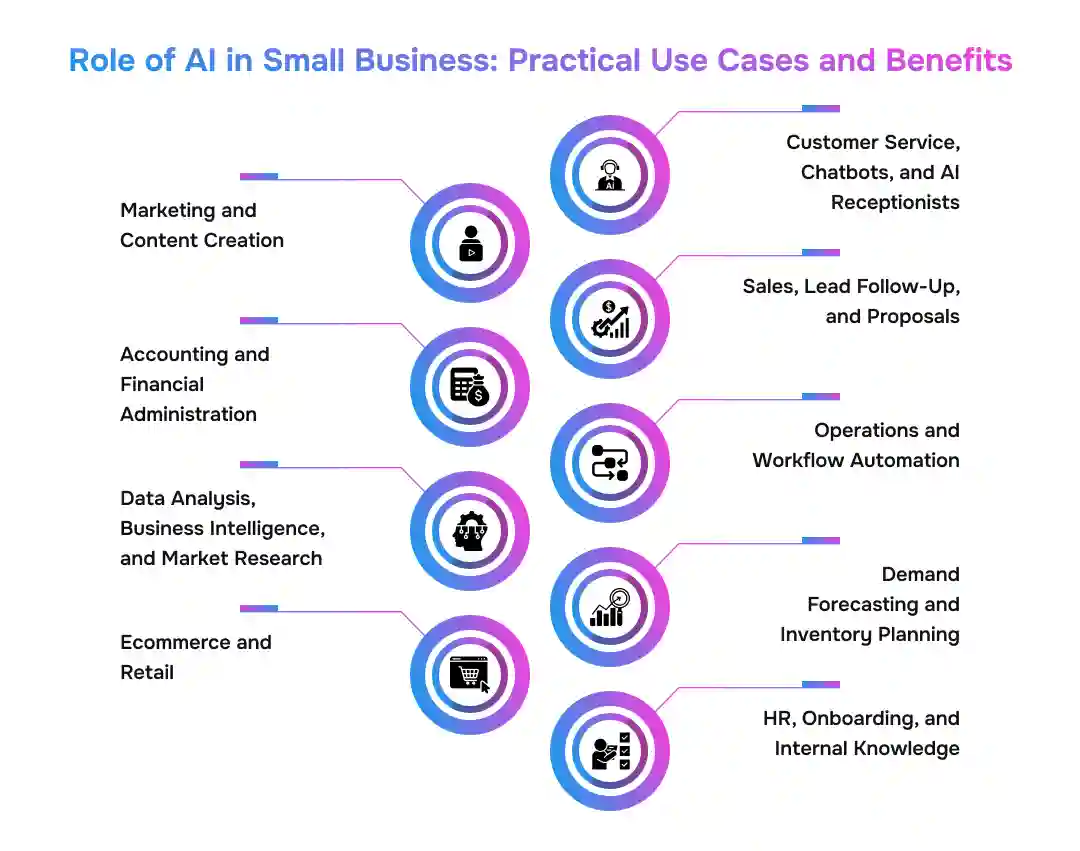
Role of AI in Small Business: Practical Use Cases and Benefits
AI is most useful when it supports a clear business task. Small companies can use it to answer routine questions, prepare first drafts, process documents, analyze data, and automate repeatable steps. The value comes from reducing manual work while keeping people involved where judgment matters.
QuickBooks’ July 2026 U.S. survey found that 80% of businesses with 0–100 employees use AI regularly. Marketing, customer service, and data processing were the three most common tasks, and 41% of AI users reported using it for marketing.
1. Customer Service, Chatbots, and AI Receptionists
Customer service is one of the most practical AI use cases for small business because many requests are repetitive. Customers often ask about opening hours, appointment availability, delivery status, pricing, or return policies. Businesses can use AI in customer experience to respond to these questions faster while keeping employees available for more complex conversations.
An AI chatbot for customer support can answer FAQs, collect lead information, summarize conversations, and route requests based on topic or urgency. Phone-based businesses can take a similar approach by building an AI receptionist that handles basic inquiries or appointment booking outside normal working hours.
For example, a dental clinic could let an AI system answer routine calls about opening times and available appointments, while transferring questions about treatment or billing to staff. Businesses with more specialized requirements may build a customer-facing AI assistant or use voice AI to handle calls and appointment requests. The aim is faster service, not removing human support where context or judgment is needed.
2. Marketing and Content Creation
AI for small business marketing can reduce the time spent creating first drafts and adapting the same idea for different channels. Generative AI for marketing can help teams turn a campaign brief into several content variations, while AI-assisted customer acquisition can support audience research and lead-focused messaging.
Common tasks include:
- drafting email subject lines and social posts;
- creating product descriptions and ad variations;
- repurposing a webinar, article, or campaign into shorter content.
The benefit is speed rather than hands-off publishing. Businesses using AI for content creation still need to review facts, tone, originality, and customer relevance. A company with proprietary content, approval rules, or several data sources may instead build a tailored generative AI capability around its own workflow.
3. Sales, Lead Follow-Up, and Proposals
Sales teams can use AI to handle administrative work around customer conversations. It can turn meeting notes into CRM summaries, prepare follow-up emails, organize lead information, and create a first version of a proposal.
Consider a small consulting firm that receives ten similar inquiries each week. Instead of writing every follow-up from scratch, the team can use generative AI for sales workflows to prepare a draft based on the prospect’s requirements. A salesperson still checks pricing, scope, and commitments before anything reaches the customer.
This can shorten response time without giving AI control over negotiation or commercial decisions.
4. Accounting and Financial Administration
Much of accounting involves structured information moving between documents and software. That makes some tasks suitable for AI assistance, particularly when an employee reviews the final result.
Businesses exploring AI in accounting can use it for tasks such as:
- extracting invoice and receipt data;
- suggesting expense categories;
- matching documents with transactions;
- summarizing financial reports;
- flagging unusual records for review.
Generative AI can also make financial reporting and analysis easier to interpret by explaining changes in revenue, expenses, or cash flow in plain language. More specialized businesses may develop finance-focused AI workflows that combine information from several systems.
AI can reduce administrative work, but financial statements, taxes, payments, and other high-impact decisions still need qualified human review.
5. Operations and Workflow Automation
Operations is where AI automation for small business can move beyond individual prompts. Instead of helping with one document at a time, AI can become part of a repeatable process.
For example, a business may receive service requests by email. An automated workflow can classify each message, extract customer details, update the correct record, assign the request, and prepare a draft response. AI in business process automation is useful when several predictable steps need to work together, whileAI workflow automation can add capabilities such as document interpretation or text generation.
A useful productivity signal: QuickBooks found that 24% of surveyed AI-using businesses said AI had shortened their workdays, compared with 12% that said workdays had become longer. It also found that 19% reported employment increasing because of AI, versus 4% reporting a decrease.
When a process crosses several applications, businesses may need AI workflow automation services to connect systems and define where human approval belongs. Others may use outside expertise to automate repetitive operational processes. In either case, automating a confusing process rarely fixes it; the workflow should make sense before AI is added.
6. Data Analysis, Business Intelligence, and Market Research
Small companies often have useful information in spreadsheets, CRM systems, accounting platforms, and ecommerce tools but limited time to analyze it. AI in business intelligence can help teams summarize performance, find patterns, and ask questions about business data using everyday language.
For instance, a retailer could ask why sales fell in one product category, compare performance across locations, or identify products with unusually high return rates. AI tools for data analysis can make this type of exploration faster, while AI in market research can organize competitor information, research reports, and customer feedback.
Businesses with data spread across several systems may need to turn operational data into decision-ready insights through integrated reporting. AI can point to a pattern, but managers still need to check whether the data is complete and whether the explanation makes sense in the real business context.
7. Demand Forecasting and Inventory Planning
Demand forecasting uses past sales and other relevant data to estimate what customers may buy next. With AI in demand forecasting, a retailer might compare previous holiday sales, recent demand, promotions, and seasonal patterns before deciding how much stock to order. Businesses with enough historical information can build predictive models from business data for more specific forecasting needs. These forecasts can support inventory planning, but new products, poor records, or sudden market changes can still make predictions less reliable.
8. Ecommerce and Retail
AI can support both the customer-facing and operational sides of an online store. AI in ecommerce can help businesses recommend products, analyze reviews, segment customers, improve product information, and support merchandising decisions.
An online apparel store, for example, could analyze purchase history to suggest related products while using AI tools for ecommerce workflows to speed up repetitive catalog work. If standard ecommerce platforms cannot support a particular recommendation, inventory, or support workflow, the business may need to add AI capabilities to its ecommerce operation.
The technology should follow the goal. A recommendation engine intended to increase relevant product discovery needs different data and success measures from an AI customer-support assistant.
9. HR, Onboarding, and Internal Knowledge
Small teams can use AI to make policies, training material, and internal knowledge easier to find. AI in HR can support onboarding guides, policy summaries, job-description drafts, and employee FAQ systems.
A new employee, for example, could ask an internal assistant how to submit an expense claim instead of searching through several documents. This reduces routine HR questions without giving the system authority over sensitive employment decisions.
Hiring, compensation, performance reviews, and disciplinary decisions require much stronger controls because errors or bias can directly affect employees. In these situations, AI should support people rather than make the final decision.
Start With AI That Fits Your Budget and Workflow
Choose between existing tools, integrations, workflow automation, or custom development based on your data, business rules, security needs, and expected ROI.
Plan Your AI Approach
How Much Does AI Cost for a Small Business?
The cost of AI for small business depends on how deeply the technology is used. A company may pay nothing extra for AI already included in software it owns, subscribe to a standalone tool, connect several systems through automation, or invest in a custom application. Users, usage volume, integrations, data preparation, security, and maintenance all affect the final cost.
| AI Approach |
Typical Cost Model |
Works Best When |
| AI inside existing software |
Included in a plan or available through an upgrade |
The business needs common features such as writing, summaries, or basic analysis |
| Standalone AI tool |
Monthly subscription, often per user |
One team needs a defined AI capability without major integration |
| Workflow automation |
Software + usage + setup/integration costs |
AI must work across several business applications |
| Custom AI system |
Development + infrastructure + ongoing maintenance |
The workflow, data, controls, or integrations are specific to the business |
1. AI Already Included in Existing Business Software
The least expensive starting point may be software a business already pays for. Email suites, CRM platforms, accounting tools, customer-support systems, and ecommerce software increasingly include AI features.
This option works well for common tasks such as summarizing meetings or preparing first drafts because it requires little new setup. The trade-off is less control over how the AI works or how deeply it fits a specialized process.
2. Standalone AI Subscriptions
A business that needs more capable writing, research, analysis, or image tools may choose a separate subscription. AI as a service makes these capabilities available without requiring a company to host and maintain its own AI infrastructure.
JPMorganChase Institute reports that entry-level generative AI subscriptions commonly cost about 20–30 per month. Its transaction data also puts median monthly AI spending among AI-paying small businesses at roughly $28 in 2025. These figures describe observed spending on dedicated AI services, not the total technology budget of every small business.
That distinction matters: an inexpensive subscription can be a low-risk way to test a use case, but price alone does not show whether the tool saves enough time to justify keeping it.
3. AI Workflow Automation and Integrations
Costs become less predictable when AI needs to connect several systems. Beyond the AI tool itself, the business may pay for:
- automation or integration software;
- model or API usage;
- connections to CRM, accounting, or other systems;
- setup, testing, and monitoring;
- ongoing maintenance when workflows change.
For example, automatically processing a sales inquiry may require email access, customer-data extraction, a CRM connection, response generation, and task creation. A useful AI automation ROI calculation should therefore include the full workflow cost, not just the subscription fee.
4. Custom AI Development
Custom AI becomes relevant when off-the-shelf tools cannot support the required workflow, company data, security rules, or integrations. The main AI development cost drivers usually include data preparation, model or API selection, application development, system integrations, user permissions, testing, security, and ongoing monitoring.
Generative AI projects may add other requirements. For example, connecting an assistant to approved company knowledge can require document processing, retrieval systems, evaluation, and access controls. Reviewing generative AI development cost factors helps explain why two projects that both use an LLM can have very different budgets.
The decision is therefore less about whether custom technology is “better” and more about fit. Comparing custom AI with off-the-shelf AI can help determine whether existing software already solves the problem. If the workflow is proprietary or needs deeper system integration, it may make sense to develop a custom AI application.
Software price is only part of the calculation. Training, data cleanup, employee review time, model usage, integration work, testing, and maintenance can all add to the cost.
A simple starting formula is:
AI ROI = (value created + costs avoided − total AI cost) ÷ total AI cost × 100
The formula is useful only when the business knows its starting point. Measuring current processing time, labor cost, error rate, or response time before implementation makes it possible to see whether the AI system actually improves the process.
Risks and Limitations of AI for Small Businesses
The main risks of AI for small business are inaccurate outputs, privacy problems, bias, poor data, and unnecessary software complexity. These issues do not mean businesses should avoid AI. They mean each use case needs clear rules for data access, human review, and accountability.
The U.S. Chamber of Commerce reported in 2026 that six in ten small businesses worry about higher litigation and compliance costs from a patchwork of state privacy and AI laws. That matters because even a low-cost tool can create new risk when it handles customer, employee, or proprietary information.
- Incorrect output: Generative AI can produce answers that sound convincing but are incomplete or wrong. Businesses should verify facts, calculations, customer commitments, and other high-impact results. Testing AI outputs before production use helps expose recurring failure cases.
- Privacy and confidential data: Employees should not enter customer records, contracts, financial data, or proprietary information into tools that have not been approved for that type of data.
- Bias and sensitive decisions: Hiring, lending, pricing, and similar decisions need stronger controls because biased inputs or model behavior can affect people directly.
- Poor data and weak integrations: AI cannot reliably fix incomplete records or a badly designed process. It may simply move incorrect information faster between systems.
- Subscription and vendor sprawl: Several inexpensive tools can create duplicated features, fragmented data, and rising monthly costs.
Businesses should also monitor relevant AI regulation and compliance requirements as adoption expands. The SBA similarly advises small businesses to review AI-generated work and consider security, intellectual-property, customer-trust, and ethical risks.
Steps to Start Using AI in a Small Business
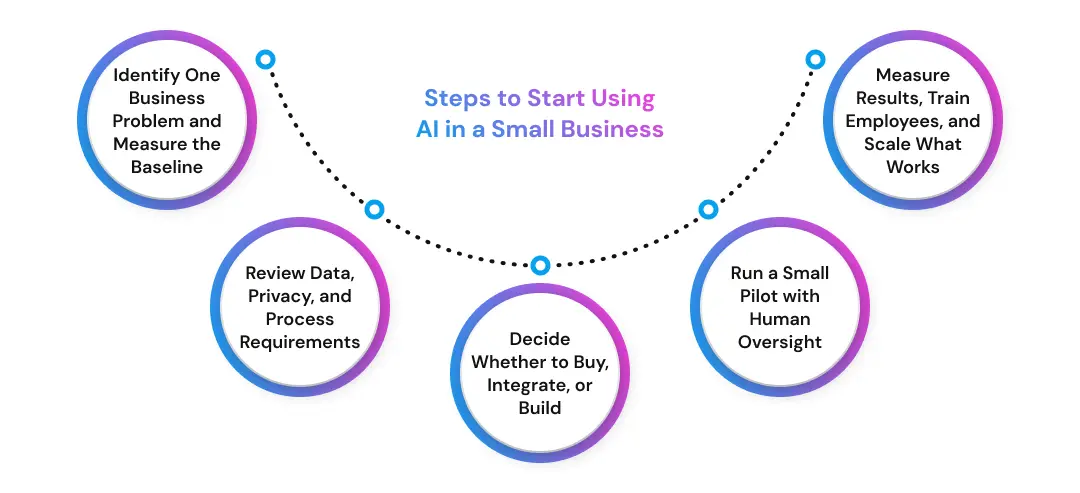
The safest way to start using AI in a small business is to choose one measurable problem, test a limited workflow, and expand only after the results are clear. This approach keeps cost and risk manageable while showing whether the technology actually improves the process.
A practical sequence: Problem → baseline → data check → buy, integrate, or build → pilot → human review → measure → scale.
1. Identify One Business Problem and Measure the Baseline
Start with work that already causes a visible problem, such as repeated customer questions, slow follow-up, manual document processing, or time-consuming reporting. An AI workflow discovery checklist can help separate useful automation candidates from tasks that are too rare or unclear.
Then record a baseline: hours spent, cost per task, response time, error rate, backlog, or another relevant KPI. This keeps the broader AI strategy tied to measurable business outcomes.
2. Review Data, Privacy, and Process Requirements
Identify what information the AI needs, where it comes from, and who can access it. Customer records, employee data, and financial documents require more control than public marketing information.
When requirements are unclear, AI consulting support can help assess data needs, integration points, and where human approval belongs.
3. Decide Whether to Buy, Integrate, or Build
Use existing software when a standard feature already solves the problem. Integration makes sense when AI must work across current systems. Custom development becomes more relevant when the workflow depends on proprietary data, unusual business rules, or tighter security controls.
A practical AI implementation guide can help compare these options without assuming that custom development is always necessary.
4. Run a Small Pilot with Human Oversight
The SBA recommends starting small and testing whether an AI tool adds value before expanding its use.legacy.sba.gov Keep the pilot narrow:
- one defined workflow;
- one person responsible for the test;
- one or two success metrics;
- a human approval point for exceptions.
Businesses that need to test technical feasibility can compare an AI proof of concept with an MVP before a larger build. A focused AI proof-of-concept engagement can check whether the required data, model, and integrations work together.
5. Measure Results, Train Employees, and Scale What Works
Compare the pilot with the original baseline. Useful measures include hours saved, cost per task, response time, acceptance rate, and error rate. If the system saves time but creates heavy correction work, the workflow may not be delivering real value.
Employee training matters too. The U.S. Chamber reported in 2026 that 95% of small businesses using AI are working to upskill employees, including 47% providing on-the-job AI training. This shows that adoption is also a people and process change.
Once a pilot consistently meets its target, businesses can connect it to other systems through AI integration services and expand to adjacent workflows.
Test One AI Workflow Before You Scale
Start with a focused pilot, measure time saved, cost per task, response speed, and error rates, then expand only when the results prove the value.
Start Your AI Pilot
How Prismetric Can Help Small Businesses Implement AI
Not every small business needs a custom AI system. Existing tools can often handle common tasks such as drafting emails, summarizing meetings, or answering routine customer questions. Custom development becomes more relevant when AI needs proprietary data, several system integrations, business-specific rules, or stronger security controls.
Prismetric helps businesses assess suitable use cases, plan the implementation approach, and connect AI with existing systems. Its AI implementation services support companies moving from a validated idea to a working solution, while generative AI consulting services can help with model selection, data requirements, access controls, and output evaluation.
Businesses can also work with Prismetric based on their regional requirements. Companies seeking custom AI development support in the USA can build solutions around local operational and technology needs. Prismetric also supports Australian businesses developing AI solutions and companies in Germany planning custom AI systems.
The goal remains practical: solve a defined business problem, measure the result, and scale only when AI creates clear operational value.
FAQs About AI for Small Business
There is no single best AI tool for every small business. The right choice depends on the task, required integrations, data sensitivity, budget, and level of control needed. A marketing team may need a writing assistant, while a service business may benefit more from a chatbot, AI receptionist, or workflow automation tool.
The best approach is to start with the business problem and then choose the technology that fits it.
Common examples include:
- AI chatbots for routine customer questions;
- writing tools for emails, social posts, and product descriptions;
- meeting and document summarization;
- invoice and receipt processing;
- sales follow-up and proposal drafting;
- business data analysis;
- demand and inventory forecasting.
The most useful examples tend to involve repeatable tasks where employees can review the result and measure whether the system saves time or improves the process.
AI costs vary widely. Some features may already be included in existing software, while standalone tools often use monthly subscriptions. Costs increase when a business needs several integrations, higher usage volumes, custom workflows, proprietary data connections, or dedicated development.
The more useful question is whether the AI creates enough measurable value to justify its full cost, including training, integration, review time, and ongoing maintenance.
A small business can start with a simple process:
- choose one repetitive and measurable problem;
- record the current time, cost, or error rate;
- review data and privacy requirements;
- decide whether to buy, integrate, or build;
- run a limited pilot with human oversight;
- compare the result with the original baseline;
- expand only when the workflow performs consistently.
Starting with one use case keeps the investment manageable and makes it easier to judge whether AI is actually improving the business.
Yes. Many small businesses can start with AI features already built into tools they use for email, accounting, CRM, ecommerce, marketing, or customer support. A technical team becomes more important when AI needs custom integrations, proprietary data, automated workflows, stronger security controls, or business-specific logic. For most businesses, the best starting point is a low-risk task that can be tested with existing software.
AI should not independently handle decisions where an error could create serious financial, legal, customer, or employee consequences. Examples include hiring decisions, tax filings, contract approval, large payments, credit decisions, or sensitive customer complaints. AI can still assist by summarizing information or preparing a draft, but a qualified person should review the result before action is taken.
A small business can measure AI ROI by comparing the workflow before and after implementation. Useful metrics include hours saved, cost per task, response time, error rate, sales conversion, and the amount of employee review required. The business should first record a baseline, then compare the results after a pilot. An AI tool that saves time but creates heavy correction work may not deliver meaningful value.
Most small businesses should start with an existing AI tool when the problem is common and the software already supports the required task. Custom AI becomes more relevant when the business depends on proprietary data, unique workflows, several system integrations, or tighter control over security and outputs. The decision should be based on workflow fit, total cost, integration needs, and expected business value rather than customization alone.