Customer Portal Development in the USA: A Complete Guide for Businesses

Key Takeaways
- Customer portals help customers complete routine tasks such as checking orders, downloading invoices, managing accounts, and tracking support requests without waiting for an agent.
- CRM, ERP, billing, and help desk integrations connect the portal with business data and can automate repetitive business workflows.
- SSO, MFA, role-based access control, and account-level permissions should be defined before development starts.
- SaaS, low-code, and custom portals suit different levels of workflow, data, and integration complexity.
- Portal performance should be measured through customer adoption, self-service completion, support demand, processing time, and data accuracy.
Customer portal development is the process of building a secure, authenticated platform where customers can manage accounts, access documents, track orders, pay invoices, and handle support requests using data from connected business systems.
Many businesses already store this information in CRM, ERP, billing, and support platforms. The problem starts when customers cannot access it directly. Employees then spend time retrieving invoices, checking order status, updating account details, or moving customer requests between disconnected systems.
Customer demand also supports the shift toward self-service. Salesforce reports that 61% of customers prefer self-service for simple issues, while self-service channels resolve an estimated 54% of customer issues at organizations that use them. This indicates that a well-designed portal can reduce routine support demand while giving customers faster access to information.
For US businesses with custom workflows, the portal often needs more than a login and dashboard. Teams may need to build and integrate custom software that connects customer actions with CRM records, ERP data, payments, documents, and support workflows without creating another isolated database.
When standard portal software cannot support complex account structures, permissions, or integrations, custom application development gives businesses greater control over how customers access information and complete tasks.
Build a Customer Portal Around the Tasks Your Customers Actually Need
Prismetric helps design secure self-service portals for orders, invoices, documents, account management, support, and other high-value customer workflows.
Discuss Your Portal Requirements
Why Businesses in the USA Need Customer Portal Development
Customer portal development in the USA gives customers direct access to account information and routine services while reducing work that would otherwise pass through support or operations teams.
One Secure Place for Customer Accounts and Information
A portal brings orders, invoices, documents, service requests, and account details into one controlled environment. This can improve the customer experience by reducing reliance on emails and disconnected systems.
24/7 Customer Self-Service
A customer self-service portal lets users complete common tasks outside support hours. A clear website user experience helps customers find information without opening another support request.
Fewer Repetitive Support Requests
When customers can download invoices, update account details, check order status, or track tickets themselves, support teams spend less time on routine questions and more time handling exceptions.
Better Visibility Across Orders, Billing, and Support
A connected portal gives customers a current view of activity across business functions. Progressive web app capabilities can make important portal functions easier to access across devices.
Better Insight Into Customer Behavior
Portal activity shows which tasks customers complete, where they leave a process, and which issues create repeated requests. Businesses can turn this data into operational insights that guide service improvements.
The value comes from combining self-service with accurate data, clear permissions, and workflows that reduce manual steps.
Why Customer Portals Need CRM, ERP, Billing, and Support Integrations
A customer portal works best when it connects with systems that already hold customer, order, billing, and service data. Without integration, it can create more manual work.
- Duplicate data entry: Employees may copy the same information between the portal and internal systems, increasing inconsistency.
- Inconsistent customer records: Changes made in one system may not appear elsewhere, so users can see different information.
- Manual workflow handoffs: Portal requests may still require staff to re-enter data between CRM, ERP, billing, and support tools.
- Limited visibility: Disconnected systems make it harder to show accurate status, history, and next steps.
For example, a customer may update a billing address in the portal, but the next invoice can still use the old address if the billing system does not receive the change. API connections help applications exchange updates automatically.
Billing workflows may require payment gateway integration, while commerce portals often need eCommerce API integration for order data. A clear web application architecture helps this information move predictably between systems.
A customer portal should act as a secure access layer over trusted business systems, not another isolated database.
Which Business Systems Should a Customer Portal Integrate With?
A customer portal should connect with systems that already own customer, transaction, service, and document data. The portal becomes the access layer rather than a separate source of truth.
MuleSoft’s 2025 Connectivity Benchmark Report found that organizations use 897 applications on average, yet only 2% have integrated more than half of them. For portals, that gap can turn one customer action into several manual updates.
CRM
CRM integration keeps profiles, contacts, account history, and service activity consistent. When records come from several sources, data engineering for synchronized customer information can help prevent duplicate records.
ERP
ERP connections expose orders, inventory, fulfillment, invoices, and balances. Businesses with custom workflows may need software development support to surface this data without rebuilding ERP logic.
Integration cost impact at a glance
| Integration |
Typical Portal Use |
Relative Cost Impact |
| CRM |
Profiles and account history |
Low–medium |
| ERP |
Orders, inventory, invoices |
Medium–high |
| Billing |
Balances, payments, receipts |
Medium |
| Legacy systems |
Older or proprietary workflows |
High |
These are planning indicators rather than fixed prices. API quality, data cleanup, authentication, and workflow complexity usually affect integration effort more than the platform name.
Billing and Payment Systems
Billing integration lets customers view invoices, check balances, make payments, and retrieve receipts. Teams should define the source of payment data and how failed transactions appear to users.
Help Desk and Case Management Platforms
Connecting Zendesk or Freshdesk lets customers track cases without moving support teams into another tool. A Node.js backend can support ticket and status APIs when that stack fits the architecture.
Identity and Access Management
SSO simplifies sign-in, MFA adds another verification step, and role-based access control limits what each user can see. US technology compliance requirements may also shape access records and audit logs.
Document Management and E-Signature Systems
Document integration provides controlled access to contracts, reports, statements, and signed files. Application testing should confirm that users cannot open files outside their assigned account.
Industry-Specific and Legacy Platforms
Older systems often increase effort because APIs may be missing or data formats may differ. An integration architecture for legacy systems can use adapters or middleware, while event-driven backend patterns can trigger updates when data changes.
DevOps practices then help teams monitor failures and release changes safely. Reliable data flow matters more than simply increasing the number of integrations.
Connect Your Portal With CRM, ERP, Billing, and Support Systems
Create a unified customer experience without duplicating business data or forcing employees to manage manual handoffs between disconnected platforms.
Plan Your Portal Integration
Customer Portal Use Cases Across US Industries
Customer portal requirements differ by industry because workflows, data, and permissions change. A useful portal starts with the tasks customers need to complete.
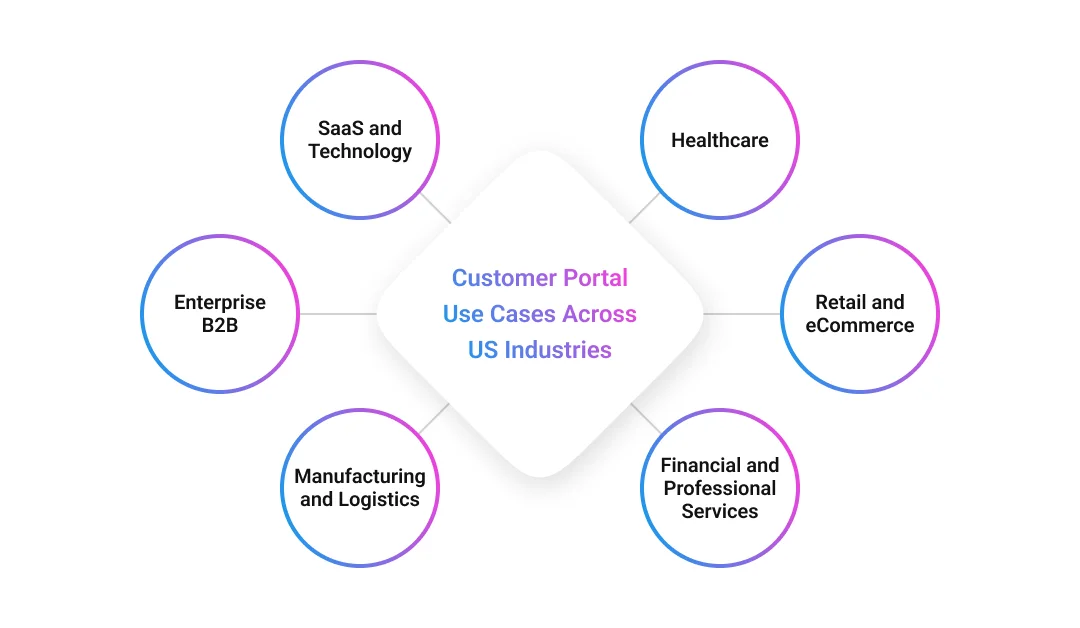
SaaS and Technology
SaaS portals often combine onboarding, subscriptions, usage, invoices, product access, and support. A SaaS development partner becomes useful when these functions span identity, billing, product, and service systems.
Healthcare
Healthcare portals may support appointment information, bills, forms, approved documents, and secure messages. When protected health information is involved, healthcare application development requires suitable privacy controls and auditability.
Typical tasks include pre-visit forms, statement access, and request tracking.
Retail and eCommerce
Retail portals focus on transactions. A customer may review an order, track delivery, start a return, and download a receipt from one account. Retail software systems can connect these actions with inventory, fulfillment, loyalty, and support data.
Financial and Professional Services
Client portals often prioritize statements, approvals, secure documents, and account servicing. Digital financial applications may also require stronger identity checks, detailed audit trails, and tighter approval permissions.
Manufacturing and Logistics
These portals are usually built around operational visibility:
- order and shipment tracking;
- delivery documents and invoices;
- service requests and exception handling.
When logistics software systems provide the underlying data, customers can check status without asking employees to retrieve it manually.
Enterprise B2B
B2B portals may serve buyers, finance teams, procurement staff, administrators, and managers under one company account. Account hierarchies and role-based permissions therefore become central to the design.
Gartner reported in 2026 that 70% of surveyed B2B buyers preferred a completely digital, self-service buying experience. This supports giving business customers digital control over routine tasks while keeping human help available for decisions that need context.
How to Implement a Customer Portal With Existing Business Systems
Customer portal implementation should start with customer tasks, not screens. Businesses first need to decide what users must accomplish, which systems support those actions, and where each record should live.
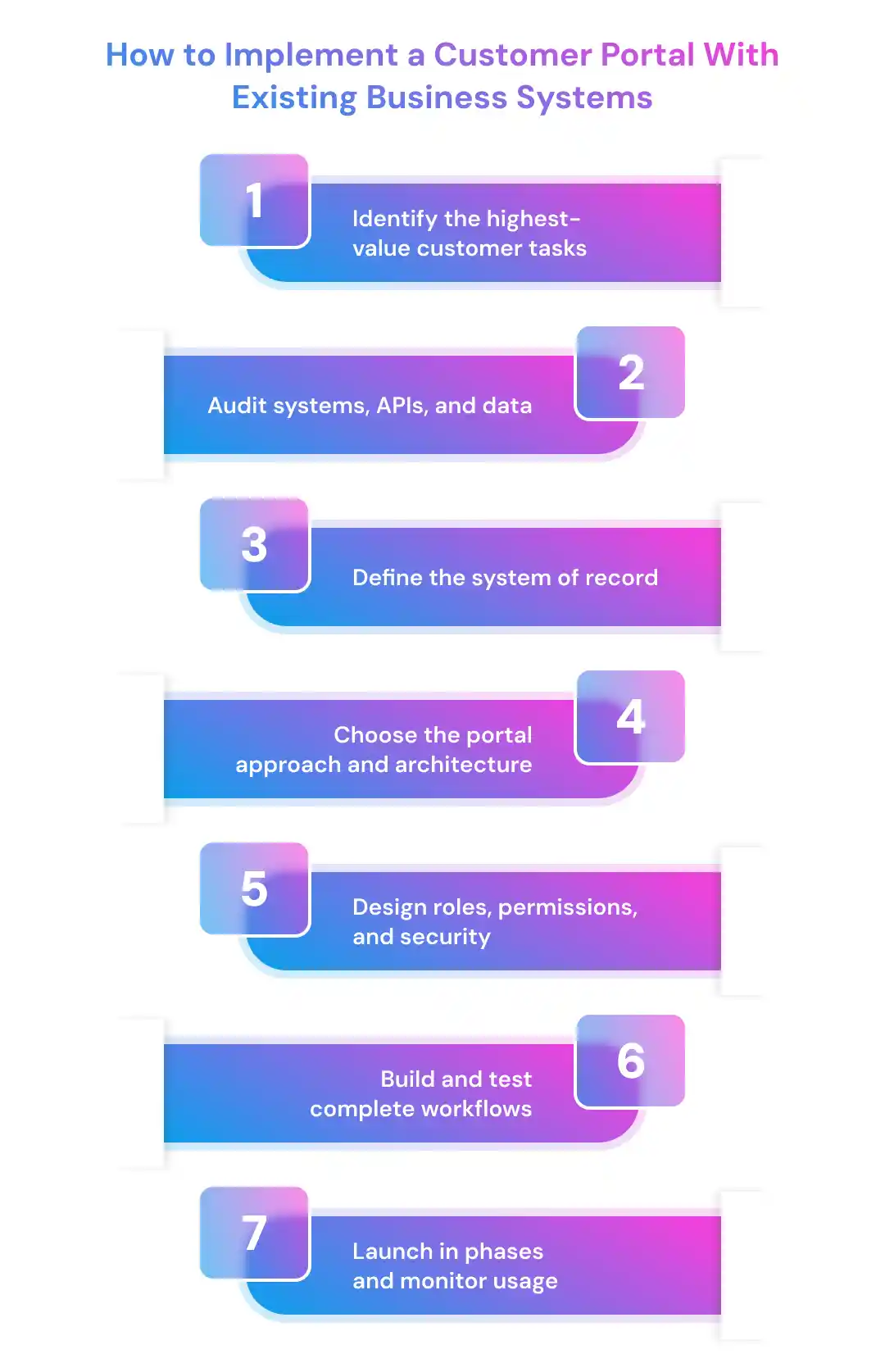
- Identify the highest-value customer tasks
Start with frequent requests such as invoice downloads, order tracking, account updates, and ticket status. A minimum viable product approach keeps the first release focused instead of trying to launch every feature at once.
- Audit systems, APIs, and data
Map the CRM, ERP, billing, help desk, identity, and document platforms behind each task. This audit should expose missing APIs, duplicate records, manual handoffs, and other web project success factors that can affect delivery.
- Define the system of record
Give every data type one authoritative source. Customer profiles may live in the CRM, invoices in the ERP, and ticket status in the help desk. This prevents the portal from becoming another database that teams must reconcile.
- Choose the portal approach and architecture
The right model depends on workflow complexity, integrations, permissions, and long-term control.
| Approach |
Best Suited To |
Main Limitation |
| SaaS |
Standard support and account workflows |
Limited custom logic |
| Low-code/no-code |
Faster configurable portals |
Platform constraints |
| Custom |
Complex B2B workflows and integrations |
Higher development effort |
Businesses can compare WeWeb alternatives for configurable builds. More complex projects may need a web development company in USA and a carefully chosen technology stack.
- Design roles, permissions, and security
Define who can view, edit, approve, download, or pay for information before development starts. B2B portals may require several roles under one company account, while regulated workflows may need stronger auditability.
- Build and test complete workflows
Development covers the interface, backend logic, integrations, and failure handling as one flow. React development support may suit interactive interfaces, but technology choices should follow project requirements.
Testing should include incorrect permissions, failed API calls, duplicate submissions, and mobile behavior. Reviewing common mobile app testing challenges can help when customers access portal functions across devices.
- Launch in phases and monitor usage
Pilot with a limited customer group. Teams can use suitable software development methodologies for iterations and DevOps consulting support for deployment and monitoring.
After launch, track task completion, integration failures, support demand, and adoption. These measures show whether the portal removes work or simply moves it to another channel.
What Are the Must-Have Customer Portal Features?
The most useful customer portal features help customers complete common tasks securely with minimal effort. Core self-service and access controls should come before advanced capabilities.
| Category |
Feature |
Why It Matters |
| Core |
Secure authentication and MFA |
Protects customer accounts |
| Core |
SSO |
Simplifies enterprise access |
| Core |
RBAC and account hierarchy |
Limits data by role and company |
| Core |
Personalized dashboard |
Shows relevant activity |
| Core |
Account and order management |
Supports self-service |
| Core |
Invoice and payment access |
Reduces billing requests |
| Core |
Ticketing and support hub |
Tracks service issues |
| Core |
Knowledge base |
Answers common questions |
| Core |
Document management |
Centralizes secure files |
| Core |
Notifications |
Communicates status changes |
| Core |
White-label branding |
Maintains brand consistency |
| Advanced |
AI-assisted search or support |
Helps users find approved information |
| Advanced |
Analytics and admin console |
Helps teams manage portal activity |
Progressive web app development can support responsive, app-like portal access without requiring a separate native application.
Advanced features need a clear use case. Enterprise chatbots can guide self-service, while teams considering conversational support should understand how to create a chatbot around reliable knowledge and escalation paths. Push notification technology can support time-sensitive updates, while white-label software development may help when branding extends across domains and workflows.
Accessibility should be part of product quality, not a final visual check. WebAIM’s 2026 analysis of one million home pages found detectable WCAG 2 failures on 95.9% of pages. The study is broader than customer portals, but it shows why forms, labels, contrast, keyboard access, and responsive behavior need deliberate testing.
Businesses do not need every advanced feature in version one. The roadmap should start with frequent customer tasks and add capabilities as usage data shows where more self-service or automation is useful.
Common Customer Portal Development Challenges and How to Solve Them
Customer portal projects often become difficult when integration, data, permissions, and adoption are treated as secondary tasks. The interface may look complete while the workflows behind it still depend on manual work.
| Challenge |
Practical Response |
| Legacy systems with limited APIs |
Use adapters, middleware, or phased modernization |
| Duplicate or inconsistent data |
Define data ownership and validation rules |
| Complex B2B permissions |
Create account, role, and access models before development |
| Integration failures |
Add retries, monitoring, queues, and clear error handling |
| Security and privacy risks |
Use MFA, least privilege, encryption, and audit logs |
| Low customer adoption |
Prioritize frequent tasks and simplify navigation |
Security deserves particular attention because a portal exposes business data through authenticated customer accounts. Verizon’s 2026 Data Breach Investigations Report found that vulnerability exploitation accounted for 31% of known initial access vectors, while credential abuse accounted for 13%. For portal teams, this strengthens the case for secure authentication, timely patching, API protection, and ongoing vulnerability management.
Some problems are operational rather than technical. Requirements can change after development starts, integrations may behave differently in production, and teams may underestimate exception cases. Following a defined software development life cycle helps businesses review requirements, testing, release, and maintenance as connected activities.
Integration failures also need visible monitoring. A structured DevOps implementation can help teams track failed jobs, API errors, and deployment issues instead of waiting for customers to report them.
When internal teams lack experience with complex integrations or portal architecture, outsourcing selected software development work can provide additional engineering capacity without changing the ownership of the business process itself.
The goal is not to remove every risk before launch. It is to identify likely failure points early and design the portal so teams can detect, contain, and fix problems without disrupting the full customer journey.
How Much Does Customer Portal Development Cost in the USA?
Customer portal development cost in the USA varies widely because a portal can range from a secure account dashboard to a multi-tenant B2B platform connected with ERP, CRM, payments, identity systems, and custom workflows.
Published 2026 estimates show that a simple read-only portal may start around 15,000–40,000, while transactional portals can reach 50,000–150,000. Complex B2B portals with SSO, detailed roles, audit logs, and deeper integrations can move into the 200,000–500,000+ range. These figures are market planning references, not fixed project quotes.
| Portal Scope |
Indicative 2026 Planning Range |
Typical Scope |
| Focused MVP |
$15K–$40K |
Login, dashboard, documents, basic account data, one integration |
| Integrated portal |
$50K–$150K |
CRM/ERP connections, payments, support workflows, multiple roles |
| Enterprise B2B portal |
$200K–$500K+ |
Multi-tenant accounts, SSO, auditability, complex workflows, several enterprise integrations |
The gap between these ranges comes from the work behind the screens. User roles, API quality, data migration, security controls, admin tools, reporting, and exception handling can all change the development effort. A broader software development cost estimation should therefore break the project into workflows and modules instead of pricing only by page count.
How to Control Costs Without Limiting Future Growth
- Start with high-volume tasks. Build the workflows that currently create the most customer or staff effort.
- Limit first-release integrations. Connect systems that are required for the MVP before adding lower-priority platforms.
- Reuse reliable business systems. The portal should expose trusted CRM, ERP, or billing data rather than recreate those capabilities.
- Design reusable integration components. Shared APIs and services can reduce repeated engineering work as new workflows are added.
- Budget for total cost of ownership. Hosting, monitoring, third-party licenses, security updates, and support continue after launch.
Teams should also account for hidden application development costs such as data cleanup, third-party services, testing, and post-launch changes. Reviewing broader web development cost factors can help separate interface work from backend and infrastructure expenses.
Long-term maintenance matters as much as the initial build. Architecture and coding choices that reduce web application maintenance costs can make future updates easier as integrations, browsers, security requirements, and customer workflows change.
Measuring the ROI of Customer Portal Development
Customer portal ROI should be measured by the work customers can complete independently and the operational effort the portal removes. Login counts alone do not show whether customer portal implementation is creating business value.
Salesforce reports that 80% of high-performing service organizations provide self-service, compared with 56% of underperforming organizations. The comparison does not prove that portals alone create higher performance, but it shows how strongly effective service teams use self-service as part of their operating model.
Businesses should establish a baseline before launch and compare the same measures after customers begin using the portal.
| ROI Measure |
What to Assess |
| Self-service completion |
Tasks finished without staff assistance |
| Support workload |
Changes in repetitive calls, emails, and tickets |
| Processing time |
Time required to complete requests |
| Manual data entry |
Staff effort spent moving information between systems |
| Data quality |
Duplicate, incomplete, or conflicting records |
| Customer adoption |
Active users and adoption across customer accounts |
A useful ROI framework for automation separates technology activity from business outcomes. For example, a high login rate has limited value if customers still contact support to finish a task.
Adoption metrics also need context. Principles used to track application KPIs can help teams examine active usage, retention, and task completion instead of treating downloads or registrations as success.
For portals that automate approvals, routing, or information retrieval, businesses can also examine whether automation improves operational efficiency by reducing handoffs and repetitive work.
A practical review cycle compares the baseline with results after roughly 90 days and again after six to twelve months. The goal is to measure whether customers complete tasks faster and whether employees spend less time handling avoidable requests.
Start With a Focused Portal MVP and Scale With Real Usage
Launch the highest-value self-service workflows first, measure adoption and support reduction, then expand integrations, roles, and features as customer needs grow.
Start Your Customer Portal MVP
Why Choose Prismetric for Customer Portal Development in the USA?
Complex customer portals require more than front-end development. They need clear business requirements, suitable architecture, secure integrations, testing, deployment, and a plan for maintaining connected systems after launch.
Prismetric can support this process across the software development journey, from discovery and UI/UX planning to backend engineering and API integration. For portals with data-heavy dashboards or complex workflows, teams can also apply proven approaches to enterprise React application development where the technology fits the project.
The need for an experienced development partner becomes greater when a portal connects several enterprise systems, supports multiple customer roles, or must evolve after launch. Prismetric also provides ongoing web maintenance and support for businesses that need help monitoring, updating, and maintaining the application as requirements change.
The objective is to build a customer portal around real customer workflows and business systems rather than adding features that do not solve a clear operational need.
Final Thoughts
Customer portal development in the USA works best when businesses focus on the tasks customers need to complete and connect those tasks with trusted business systems. Features alone do not create value; reliable integrations, clear permissions, secure access, and measurable self-service outcomes do.
A well-planned portal gives customers more control while helping internal teams reduce repetitive work and manage service processes more consistently.
FAQs About Customer Portal Development in the USA
Customer portal development is the process of building a secure digital platform where customers can manage accounts, view orders, download invoices, access documents, make payments, and track support requests. The portal usually connects with CRM, ERP, billing, identity, and service systems so users can work with current business data.
Costs depend on features, integrations, user roles, security requirements, and data migration. Current market estimates place focused portals around 15,000–40,000, integrated portals around 50,000–150,000, and complex enterprise B2B portals at 200,000–500,000+. These figures are planning ranges rather than fixed quotes.
Most portals connect with CRM, ERP, billing, payment, help desk, identity, and document systems. The exact mix depends on the customer journey. For example, an order-tracking portal may need ERP and logistics data, while a SaaS portal may rely more on subscription, billing, and identity platforms.
A focused MVP can often be delivered faster than a portal with several enterprise integrations, account hierarchies, complex permissions, and data migration. The timeline mainly depends on workflow scope, API readiness, testing needs, and whether legacy systems require custom integration work.
Businesses should combine MFA, SSO where appropriate, role-based access control, encryption, secure APIs, audit logs, session controls, and regular security testing. Security should be designed into the architecture from the beginning rather than added after development.