How AI Can Improve Restaurant Inventory Management
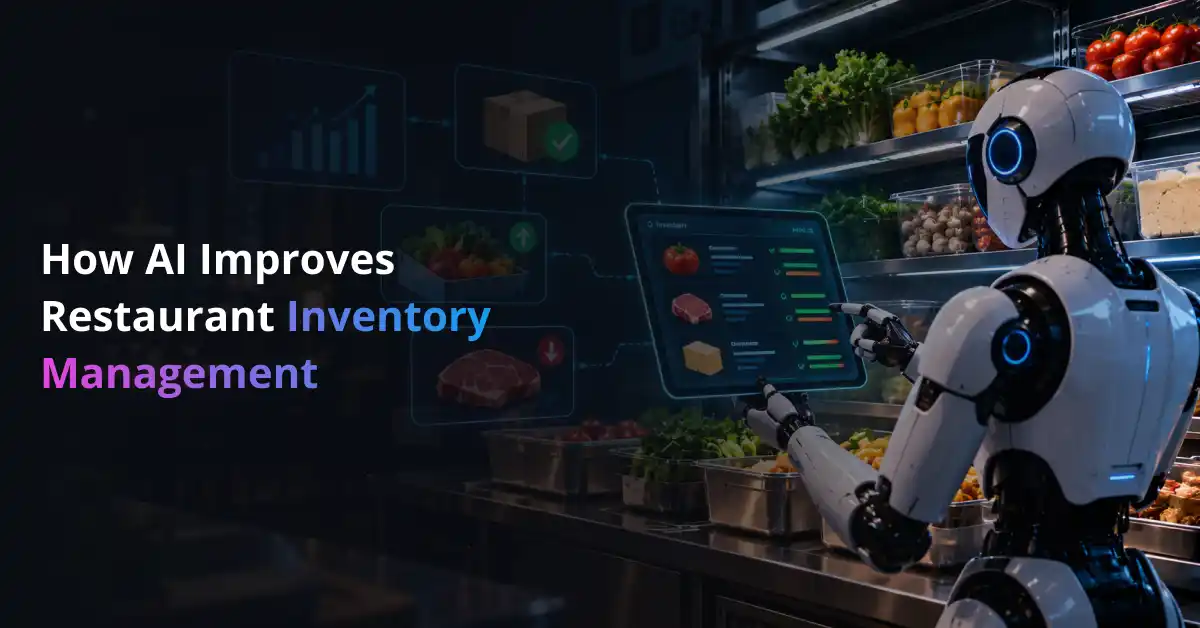
Restaurant inventory rarely behaves exactly as planned. A kitchen can start the day with enough stock on paper and still run short during dinner, while another ingredient sits in storage until it loses freshness. The real challenge is balancing availability with waste when demand keeps changing.
This is where AI can improve operational efficiency in a practical way. AI restaurant inventory management uses sales, recipe, purchasing, and stock data to estimate what a restaurant is likely to need next instead of depending only on fixed par levels or manager intuition.
The idea is not to replace the people running the kitchen. It is to give them a clearer picture of what is selling, what is being used, what may run out, and what should be ordered before a problem reaches the customer. Similar AI applications in hospitality already show how connected operational data can support faster day-to-day decisions.
Predict What Your Restaurant Will Need Before Stock Runs Low
Prismetric helps turn sales, recipe, inventory, and demand data into smarter ingredient forecasts and purchasing recommendations.
Explore AI Inventory Forecasting
What Is AI-Powered Restaurant Inventory Management?
AI-powered restaurant inventory management uses artificial intelligence to predict inventory needs, track stock movement, detect unusual usage, and improve purchasing decisions. Unlike a traditional inventory system that mainly records what happened, an AI-enabled system can also help estimate what is likely to happen next.
At the center of many of these systems is machine learning. Models study patterns in historical sales, dayparts, seasonality, menu demand, and other signals. When that information is connected with recipes and current stock, the restaurant gets something much more useful than a sales forecast.
Think of the process as a continuous loop:
Sales demand
menu items
ingredient usage →
stock on hand → future requirement → purchase recommendation → actual result
Each new day adds more information to that loop. If demand was higher than expected, the model sees it. If a certain ingredient repeatedly goes unused, that becomes visible too.
For restaurant groups with more complex operations, shaping an AI roadmap around existing processes can help identify where prediction or automation would actually create value. Not every inventory decision needs to be automated from day one.
That distinction matters. Good AI inventory management is less about putting AI everywhere and more about using it where uncertainty, repetition, and operational data already exist.
How AI Improves Restaurant Inventory Management
Inventory decisions are connected. Forecasting affects purchasing, purchasing affects waste, waste affects food cost, and poor stock visibility can weaken every decision that follows.
AI works best when those pieces talk to each other.
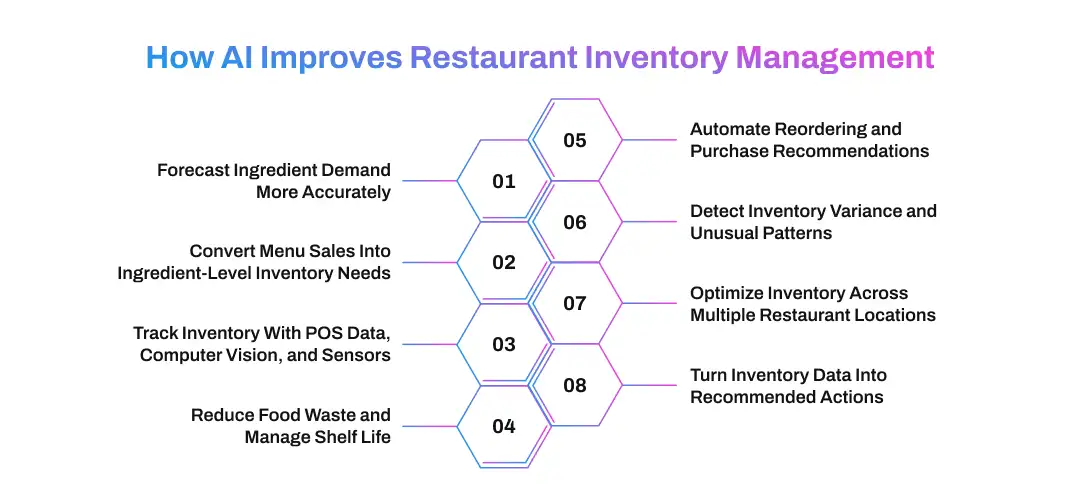
1. Forecast Ingredient Demand More Accurately
A restaurant does not sell the same amount of food every Monday, Friday, or holiday weekend. Weather can change footfall. A local event can create an unexpected rush. Promotions, reservations, delivery orders, and seasonal menu items can shift demand again.
AI in demand forecasting brings those signals together and looks for patterns that would be difficult to track manually. Instead of saying, “We sold 220 meals last Friday, so order for 220 again,” the system can estimate how tomorrow may differ from last week.
The useful part comes when that forecast reaches the ingredient level.
Example: If a restaurant expects a jump in grilled chicken sandwich sales, the system can estimate the additional chicken breasts, buns, lettuce, sauce, and packaging that demand will require. A forecast of menu sales becomes a purchasing plan.
Restaurant groups with unusual menu structures or large data volumes may need machine learning development services to create models around their own demand patterns. Behind those models, reliable data pipelines for operational forecasting help keep POS, inventory, purchasing, and recipe information consistent.
2. Convert Menu Sales Into Ingredient-Level Inventory Needs
Knowing that 500 meals may sell tomorrow is only the beginning. Inventory decisions happen at the ingredient level.
A burger, salad, pasta dish, and sandwich can all use the same tomatoes. The same chicken may appear in a wrap, entrée, and catering order. AI becomes more useful when it understands those relationships instead of treating every menu item as an isolated product.
The calculation may need to consider recipe quantities, portion sizes, batch yields, modifiers, substitutions, and ingredients shared across several dishes.
Suppose three menu items that use avocado are all forecast to sell more heavily over the weekend. The system can combine that demand and estimate the total avocado requirement before the purchasing team places an order.
That is a practical example of broader AI applications in business: separate pieces of operational data become more valuable when they are connected around one decision.
3. Track Inventory With POS Data, Computer Vision, and Sensors
A forecast is only as useful as the restaurant’s understanding of what it already has. If the system believes there are six cases of an ingredient in storage when only four remain, even a good demand forecast can produce the wrong recommendation.
Restaurants can build a clearer inventory picture using several sources:
- POS data: Sales can automatically reduce theoretical ingredient quantities according to recipes.
- Computer vision: Cameras or mobile devices can help identify and count visible inventory during physical checks.
- Connected sensors: Weight, storage, or temperature signals can add another layer of information where the use case justifies it.
The gap between theoretical inventory and physical inventory is especially important. POS data may suggest what should remain, while an actual count shows what really remains.
Computer vision can reduce some of the manual work involved in that process. Similar computer vision approaches for stock detection show how visual recognition can support inventory visibility. Restaurants considering image-based counting can also connect computer vision development with their existing inventory workflows rather than operating it as a separate system.
4. Reduce Food Waste and Manage Shelf Life
Food waste often begins with a small purchasing mistake.
A restaurant orders more produce than demand requires. Prep quantities stay the same even when bookings fall. A slow-moving ingredient remains in storage until the kitchen has too little time left to use it profitably.
AI gives teams an earlier warning.
Demand forecasts can reduce unnecessary purchasing, while inventory-age data can help managers identify ingredients that should be used first. A system can also flag items that repeatedly move slowly or show unusual levels of waste by shift, station, or menu item.
The same thinking seen in AI applications across the food industry becomes particularly useful in restaurants because so much inventory is perishable. Insights from AI-driven retail inventory practices also apply here: keeping too much stock can be just as costly as keeping too little.
The goal is not simply to buy less. It is to buy closer to what the restaurant can realistically sell and use.
5. Automate Reordering and Purchase Recommendations
Once expected demand and usable inventory are known, AI can help answer the question managers deal with constantly:
How much should we order?
A simplified decision might look like this:
Forecast requirement − usable stock − incoming inventory + safety stock = recommended order quantity
Real purchasing is more complicated, of course. Supplier lead times, delivery days, minimum order quantities, pack sizes, shelf life, price changes, and substitute ingredients may all affect the final recommendation.
This is where AI workflow automation becomes useful. A restaurant does not need to jump directly from manual ordering to fully autonomous purchasing. It can begin with low-stock alerts, move to suggested orders, and then let managers approve purchase orders before anything reaches a supplier.
AI in business process automation follows the same principle: automate repeatable parts of the decision without removing control where human judgment still matters. When deeper integration is required, AI workflow automation services can connect recommendations with approval, procurement, and vendor systems.
That makes ordering faster without turning it into a black box.
6. Detect Inventory Variance and Unusual Patterns
Imagine recipe and sales data shows that a kitchen should have used 25 kilograms of chicken. The physical inventory says 31 kilograms disappeared.
That six-kilogram difference deserves attention.
AI can compare expected and actual consumption and flag patterns that fall outside normal ranges. The cause may be over-portioning, unrecorded waste, receiving errors, an outdated recipe, or another operational issue.
The model does not have to declare the cause. Its job can simply be to show managers where something no longer looks normal.
This exception-based approach is similar to parallel AI in business operations, where several operational signals can be reviewed together instead of waiting for someone to notice a problem in an individual report.
7. Optimize Inventory Across Multiple Restaurant Locations
A single par level rarely works equally well across an entire restaurant chain.
One location may serve a busy office district at lunch. Another may depend on evening traffic. Supplier schedules, storage space, menu preferences, weather, and local events can also differ by store.
AI can create location-specific demand forecasts while giving central teams a wider view of stock across the network.
For example, if one location is holding excess avocados while another is likely to run short before its next delivery, transferring inventory may make more sense than placing another order. The food gets used where demand exists, and the business avoids unnecessary purchasing.
This connects restaurant inventory planning with the broader role of AI in logistics and the ways AI is changing logistics planning.
For multi-location restaurants, that changes the question from “What does this store have?” to “How can the group use what it already owns more effectively?”
8. Turn Inventory Data Into Recommended Actions
“18 kilograms of lettuce remaining” is information.
“Reduce tomorrow’s lettuce order by one case” is a decision.
That difference captures where predictive inventory management starts becoming more valuable. Instead of only displaying stock levels, the system connects current inventory with expected demand and suggests what the team should consider doing next.
It might recommend using an older batch first, increasing prep ahead of a local event, investigating unusual ingredient usage, lowering an order, or moving stock between locations.
This is where enterprise AI moves beyond reporting. The system is not only telling restaurant teams what happened yesterday. It is helping them decide what to do today.
How These Capabilities Work Together
None of these capabilities delivers its full value in isolation.
Forecasting estimates what customers may order. Recipe data turns that demand into ingredient quantities. Inventory tracking shows what is available. Waste and variance data reveal where reality differs from the plan. Purchasing automation then uses all of that information to recommend the next action.
The result is a continuous inventory cycle that learns from each service period instead of restarting from guesswork every morning.
Connect AI With Your POS, Inventory, ERP, and Supplier Systems
Build an inventory workflow where forecasts and recommendations use current restaurant data instead of becoming another disconnected dashboard.
Discuss Your Inventory Integration
Key Benefits of AI Restaurant Inventory Management
The value of AI inventory management is not simply that it gives restaurants more data. Most restaurants already have plenty of data sitting across POS systems, invoices, waste logs, recipes, and spreadsheets. The real benefit comes from turning that information into earlier and more consistent decisions.
Here is what changes when that happens:
| Benefit |
What It Changes in Daily Operations |
| Lower food waste |
Purchasing and prep quantities stay closer to expected demand, reducing unnecessary surplus. |
| Fewer stockouts |
Teams can identify ingredients likely to run short before they affect menu availability. |
| Better food-cost control |
Managers can spot excess purchasing, unusual ingredient usage, and recurring inventory variance earlier. |
| Less manual work |
Automated calculations, alerts, and suggested orders reduce time spent rebuilding inventory decisions by hand. |
| Healthier cash flow |
Less money remains tied up in ingredients that may sit unused or expire. |
| More consistent operations |
Multi-location businesses can use the same decision logic while still adjusting forecasts for each store. |
Some benefits show up quickly, such as fewer manual checks or faster ordering. Others need more time to measure. That is why restaurants should look at AI automation ROI through operational metrics such as waste percentage, stockout frequency, inventory variance, and employee time saved rather than treating automation itself as the result.
The value can also change by business model. A single-location restaurant may care most about reducing spoilage, while a large chain may focus on forecast consistency and centralized purchasing. This is why enterprise AI across different industries tends to work best when technology is tied to a specific operating problem instead of being adopted as a general upgrade.
How to Implement AI in Restaurant Inventory Management
Adding AI to inventory management does not start with choosing a model. It starts with identifying the inventory decision that is currently costing the restaurant time, money, or consistency.
A focused rollout is usually easier to measure and improve.
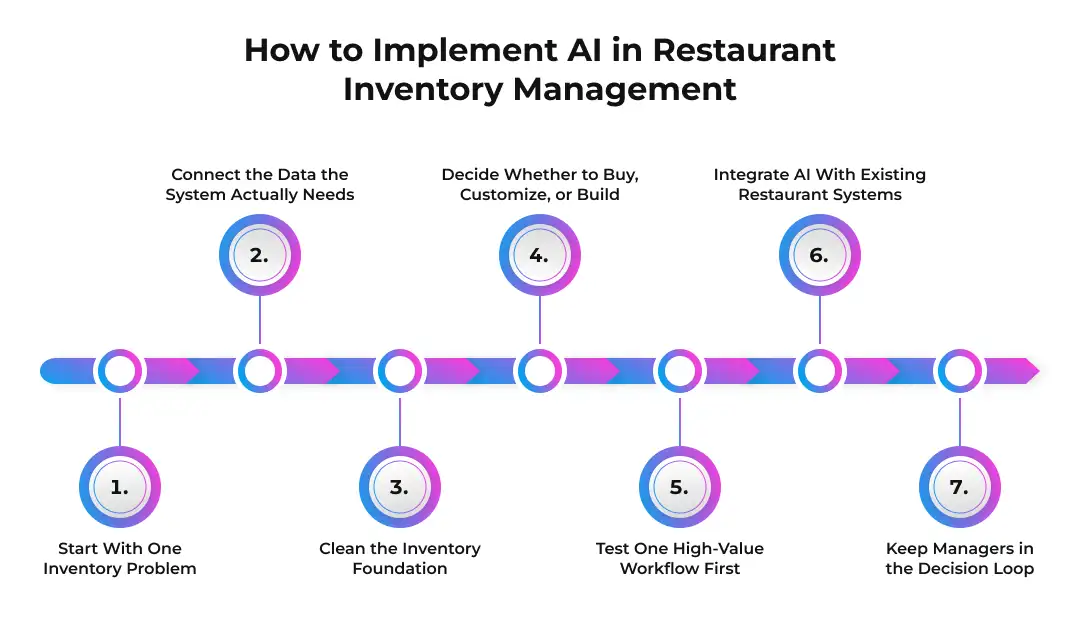
1. Start With One Inventory Problem
Before connecting systems or training models, establish a baseline.
The problem might be excessive produce waste, frequent stockouts, inaccurate counts, emergency purchases, or too much manager time spent creating orders. A practical AI strategy should connect the technology to one of those measurable outcomes.
For example, if a restaurant loses visibility between weekly physical counts, improving inventory accuracy may be a better first goal than trying to automate its entire procurement process.
2. Connect the Data the System Actually Needs
AI cannot forecast inventory from sales data alone.
Depending on the use case, the system may need information from:
- POS transactions: What sold, when it sold, and in what quantity.
- Recipe data: Which ingredients each item consumes.
- Inventory records: Current counts, receipts, transfers, and adjustments.
- Waste logs: What was discarded and why.
- Purchasing data: Supplier prices, pack sizes, lead times, and open orders.
- Demand signals: Reservations, promotions, holidays, weather, or local events when they meaningfully affect sales.
A good AI workflow discovery process helps identify which of these inputs are essential before the project grows unnecessarily large. Restaurants moving from planning into deployment may also use AI implementation services to bring data, workflows, models, and operational teams into the same rollout.
3. Clean the Inventory Foundation
This step is easy to underestimate.
Suppose the purchasing system records “Tomatoes 10 lb,” the recipe database uses kilograms, and one location calls the same product “Roma Tomato Case.” AI does not automatically make those inconsistencies disappear.
Ingredient names, units of measure, recipe yields, pack sizes, supplier SKUs, waste codes, and duplicate records need to be standardized first. Otherwise, the model may learn from data that does not describe the same thing consistently.
Better predictions begin with cleaner inputs.
4. Decide Whether to Buy, Customize, or Build
Not every restaurant needs custom AI.
A smaller operator may be able to add forecasting or suggested ordering through an existing restaurant management platform. A larger chain with proprietary recipes, several suppliers, unusual replenishment rules, or legacy systems may need more control.
The custom AI vs. off-the-shelf AI decision should therefore come down to workflow complexity, integration needs, available data, cost, and how differentiated the inventory process really is.
The question is not, “Which option sounds more advanced?” It is, “Which option solves the problem without creating unnecessary complexity?”
5. Test One High-Value Workflow First
A full inventory transformation is difficult to evaluate if forecasting, computer vision, purchasing automation, and supplier integration all go live together.
Start smaller.
A restaurant group might pilot AI demand forecasting for high-cost proteins. Another might test automated counts in one storeroom or suggested purchase orders for produce. These are the kinds of focused AI proof-of-concept use cases that help teams see whether the idea works with real operational data.
Businesses that need to validate technical feasibility can test the concept through an AI PoC before committing to a wider build. Once the workflow proves useful, an AI MVP can turn that validated idea into a usable product for a broader group of restaurant users.
6. Integrate AI With Existing Restaurant Systems
An inventory model should not become another dashboard managers have to update manually.
Its recommendations need to fit into systems the restaurant already uses: POS, inventory software, accounting tools, vendor portals, ERP platforms, or mobile applications. This is particularly important when older software remains part of day-to-day operations, where AI integration architecture for legacy systems can help define how data moves between old and new components.
The same applies to larger restaurant groups already operating ERP platforms. Guidance around integrating AI with ERP systems illustrates why forecasting and purchasing intelligence need access to existing business data rather than operating in isolation.
Where several platforms must exchange data, teams can connect AI with POS, ERP, accounting, and vendor systems so recommendations appear inside the actual operating workflow.
7. Keep Managers in the Decision Loop
AI should make inventory decisions easier to review, not harder to question.
Managers need to see why a recommendation changed, override it when local conditions demand it, and provide feedback when the system gets something wrong. A catering order that was never entered into the forecast or a supplier issue known only to the restaurant team can still change the right decision.
That human feedback becomes part of the system’s learning process.
The strongest implementation is therefore not the one that automates the most steps. It is the one that gives restaurant teams better information at the moment a decision has to be made.
Challenges of Using AI for Restaurant Inventory Management
AI can improve restaurant inventory decisions, but it does not fix weak processes automatically. Most problems appear when the data, systems, or people behind the model are not ready.
Poor Data Quality
AI depends on the information it receives. Missing waste records, outdated recipes, inconsistent units, or inaccurate counts can weaken even a well-designed forecasting model.
The practical fix is simple: clean the inventory foundation before expecting better predictions.
Integration With Existing Systems
Restaurant data often lives in separate places. POS systems, accounting tools, inventory software, supplier portals, and spreadsheets may not share information easily.
That can slow implementation and create gaps between what the model predicts and what teams actually see. Integration should therefore be planned around the existing workflow, not added as an afterthought.
Unpredictable Demand
AI can identify patterns, but restaurants still face surprises.
A sudden weather change, large walk-in group, viral menu item, supplier delay, or unexpected local event can shift demand quickly. Managers still need room to override recommendations when they have information the system does not.
Staff Adoption and Trust
A useful recommendation means little if managers ignore it.
Teams need to understand what the system is suggesting and why. Clear explanations, simple interfaces, and gradual automation usually work better than forcing staff to trust a black-box decision from day one.
Cost and ROI
AI should solve a measurable inventory problem.
If a restaurant cannot identify what it wants to improve—waste, stockouts, ordering time, inventory accuracy, or food cost—it will be difficult to judge whether the investment is working. The technology should follow the business case, not the other way around.
KPIs to Measure AI Inventory Management Performance
The best way to judge an AI inventory system is to compare operational results before and after implementation.
| KPI |
What It Shows |
| Forecast accuracy |
How closely predicted demand matches actual sales or ingredient usage |
| Food waste percentage |
Whether purchasing and prep are becoming more precise |
| Stockout rate |
How often ingredients become unavailable when needed |
| Inventory variance |
The gap between theoretical and physical stock |
| Food cost percentage |
Whether ingredient spending is becoming easier to control |
| Inventory turnover |
How efficiently stock moves through the restaurant |
| Emergency purchases |
Whether replenishment is becoming more predictable |
| Inventory count time |
How much manual work the new process removes |
| Recommendation override rate |
How often managers reject or change AI suggestions |
One metric rarely tells the full story. Waste may fall while stockouts rise, which could mean the restaurant simply started ordering too conservatively.
That is why restaurants should establish a baseline before deployment and review several KPIs together. The real goal is not perfect forecasting. It is a better balance between availability, waste, cost, and the time teams spend managing inventory.
The Future of AI in Restaurant Inventory Management
Restaurant inventory systems are moving from simply recording stock toward recommending what should happen next.
Computer vision can make physical counts faster. Forecasts can refresh as new sales arrive. Connected sensors can add signals from storage areas, while AI workflow automation tools can turn those signals into actions such as alerts, order suggestions, or approval requests.
The next step is likely to be more coordinated decision-making. Instead of separate systems for forecasting, purchasing, waste, and transfers, AI can connect them around the same inventory goal.
Agentic process automation also points toward systems that can handle a sequence of routine tasks rather than waiting for a person to trigger every step. In a restaurant setting, that could mean identifying a projected shortage, checking incoming stock, preparing a purchase recommendation, and routing it to a manager for approval.
Human oversight will still matter. The useful future is not a kitchen where algorithms make every decision. It is one where managers spend less time finding problems and more time deciding how to respond.
Start With One Inventory Problem and Prove the Value
Test AI on waste reduction, stockouts, purchasing, or physical counts, then measure forecast accuracy, food cost, variance, and time saved before scaling.
Start Your Restaurant AI PoC
How Prismetric Can Help Build AI-Powered Restaurant Inventory Solutions
Building an AI inventory system requires more than adding a forecasting model to an existing dashboard. Sales data, recipes, stock counts, supplier information, purchasing rules, and operational workflows all need to work together before the system can produce recommendations that restaurant teams can actually use.
Prismetric can support this through restaurant AI development services designed around the way restaurants already manage inventory, purchasing, and day-to-day operations. Depending on the problem being solved, the solution may bring together:
- demand forecasting for ingredients and menu items,
- POS, ERP, supplier, and inventory-system integrations,
- computer vision for selected stock-counting workflows,
- automated alerts and purchase recommendations,
- multi-location inventory visibility,
- and dashboards or mobile tools for restaurant managers.
The exact combination should depend on the operational problem rather than adding every available AI capability at once.
| Inventory Challenge |
Possible AI Support |
| Frequent stockouts or overordering |
Demand forecasting and replenishment recommendations |
| Time-consuming physical counts |
Computer vision and connected inventory data |
| Limited visibility across locations |
Centralized inventory monitoring and transfer recommendations |
| Manual purchasing decisions |
Automated alerts, suggested orders, and approval workflows |
A restaurant group might begin with one focused use case, such as improving produce forecasts or reducing the time spent on physical counts. Prismetric can also help businesses develop a custom AI inventory solution when existing restaurant software does not support the required forecasting logic, integrations, or operating rules.
If that initial workflow proves valuable, the same foundation can be extended into supplier coordination, purchase recommendations, waste analysis, multi-location inventory planning, or other operational use cases. This makes it possible to expand gradually without forcing restaurant teams to adopt an entirely new process at once.
For restaurant groups operating across different markets, implementation may also need to account for regional technology environments, business requirements, and existing systems. Prismetric supports AI initiatives in markets such as the USA, Australia, and Germany, while keeping the underlying solution aligned with the restaurant’s operational model.
The important part is building around how the restaurant already works. AI should make inventory decisions easier to understand and act on, not introduce another disconnected system that employees have to manage separately.
Final Thoughts
The biggest advantage of AI restaurant inventory management is not simply knowing how much stock is left. It is understanding what the restaurant is likely to need next and what action makes sense before waste, shortages, or unnecessary purchasing occur.
When forecasting, ingredient data, inventory tracking, and purchasing work together, managers can spend less time reacting to inventory problems and more time making informed decisions about them.
FAQs About AI in Restaurant Inventory Management
AI improves restaurant inventory management by predicting demand, tracking ingredient usage, identifying waste patterns, and recommending how much stock to order. This gives managers a more current basis for decisions than fixed par levels or manual estimates alone.
AI studies historical sales together with signals such as dayparts, seasonality, reservations, promotions, weather, and local events. Recipe data then converts predicted menu sales into the quantities of ingredients the kitchen may need.
Yes. Better forecasting can help restaurants avoid overordering and overpreparing food, while inventory-age data can highlight ingredients that should be used sooner. The goal is to match purchasing and preparation more closely with realistic demand.
It can support different levels of automation. A restaurant may begin with low-stock alerts, move to suggested purchase orders, and later automate selected routine orders while keeping manager approval for higher-risk purchasing decisions.
AI can combine POS transactions, receiving records, waste logs, transfers, and physical counts to maintain a more current inventory estimate. Some systems can also use computer vision or connected sensors to reduce the amount of manual counting required.
It can be, but the business case matters more than restaurant size. A smaller restaurant with frequent waste, expensive ingredients, or time-consuming inventory work may benefit from targeted automation without building a complex custom system.