How Retail Stores Use Computer Vision for Shelf Monitoring and Stock Detection
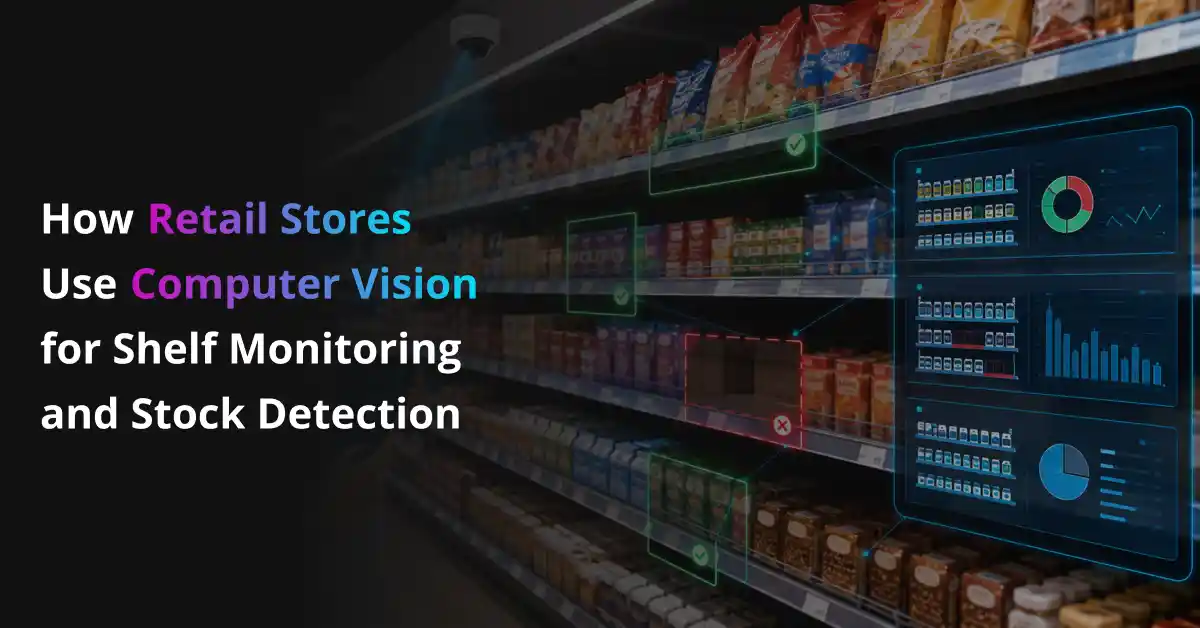
Computer vision for shelf monitoring is changing how retail stores track product availability, shelf gaps, misplaced items, and stock levels. Instead of depending only on manual aisle checks, retailers can use AI powered cameras and image recognition models to detect empty shelves, low stock, wrong product placement, and planogram issues faster. This helps store teams respond before customers leave without buying what they came for.
Core shelf monitoring areas:
- Out of Stock Detection: Faster detection of empty shelves, missing facings, and unavailable products
- Low Stock Alerts: Early alerts when products are running low but have not fully gone out of stock
- SKU Recognition: AI based product identification for exact items, variants, pack sizes, and categories
- Planogram Compliance: Automatic checking of whether products are placed according to the approved shelf layout
- Misplaced Product Detection: Identification of products kept in the wrong aisle, shelf, or category section
- Price and Label Verification: Computer vision and OCR support for checking shelf labels, price tags, and promotional displays
- Replenishment Tasks: Smart alerts that guide store staff on what to refill, where to refill it, and when to act
- Inventory Accuracy: Better visibility into phantom inventory, shelf availability, and real store stock conditions
Retail stores move fast. A product can sell out on the shelf while the inventory system still shows stock available in the backroom. Staff may notice the gap after an hour, or sometimes after a customer complains. That delay can cost sales and damage trust. This is where computer vision helps the most.
It does not replace store teams. It gives them better eyes on every shelf, every aisle, and every fast moving product.
This article explains how retail stores use computer vision for shelf monitoring and stock detection, where it fits into daily operations, which use cases matter most, and how retailers can use it without making store workflows complicated.
Make Retail Shelves Smarter with AI Vision
Prismetric develops custom computer vision solutions for SKU detection, planogram compliance, shelf analytics, and retail automation.
Get Started for Free
What Is Computer Vision Shelf Monitoring in Retail?
Computer vision shelf monitoring in retail means using AI powered cameras and image recognition systems to track what is happening on store shelves. For a retail store, this can include out of stock detection, low stock alerts, shelf gap detection, SKU recognition, misplaced product detection, planogram compliance, price label checking, promotional display monitoring, and replenishment task alerts.
For example, computer vision can detect that a popular cereal pack is missing from its assigned shelf space. The system can match that empty space with the expected SKU, check inventory data, and alert a store associate to refill the product if stock is available in the backroom. If the product is not available, the system can flag the issue for replenishment or inventory review.
That difference matters. A normal camera only records what happened. A computer vision shelf monitoring system detects the shelf issue, understands what product is affected, connects the alert with inventory data, and helps the store team act faster. It removes the need for staff to walk every aisle again and again just to find empty spaces or misplaced products.
In daily retail work, computer vision shelf monitoring can look like:
- An AI shelf monitoring system that detects empty spaces and alerts staff before customers notice the stockout
- A stock detection workflow that identifies low stock products before they fully disappear from the shelf
- A SKU recognition system that checks whether the right product, size, flavor, or pack type is placed in the correct location
- A planogram compliance workflow that compares real shelf images with the approved shelf layout
- A price and label checking system that reads shelf tags and flags wrong prices, missing labels, or old promotion signs
- A phantom inventory detection workflow that finds cases where the system shows stock available, but the shelf is empty
The goal is not to replace store teams. The goal is to give them better shelf visibility without adding more manual work. When computer vision for shelf monitoring is set up well, retailers detect stock issues faster, keep shelves cleaner, reduce missed sales, improve inventory accuracy, and give customers a smoother shopping experience.
Why Retail Stores Are Adopting Computer Vision for Shelf Monitoring Now
Retail stores are adopting computer vision for shelf monitoring because shelf operations have become harder to manage with manual checks alone. Products move faster, customers expect items to be available when they visit, and store teams already handle too many tasks during busy hours. Computer vision helps retailers spot shelf gaps, low stock, misplaced products, and planogram issues before they turn into lost sales.
Here are the main reasons retail stores are adopting computer vision for shelf monitoring now:
Customers Expect Products to Be Available
Customers usually walk into a store with a clear need. They may want a specific snack, shampoo, medicine, cereal, drink, or baby product. If the shelf is empty, they may choose another brand, visit another store, or order online instead. That lost sale may look small at first, but across hundreds of SKUs and multiple stores, it becomes a serious problem.
Computer vision shelf monitoring helps retailers detect out of stock products faster. The system can identify empty facings, low stock shelves, and missing products, then alert the store team while there is still time to fix the issue. This helps stores protect sales and keep customers from leaving disappointed.
Manual Shelf Checks Take Too Much Time
Store teams spend a lot of time on routine shelf work, such as:
- Checking empty shelves
- Finding low stock products
- Fixing misplaced items
- Verifying price tags
- Reviewing promotional displays
- Checking planogram compliance
- Reporting shelf gaps to managers
These tasks matter, but they take time and depend heavily on staff availability.
During peak hours, teams may focus on billing, customer help, deliveries, returns, and restocking. Shelf issues can easily go unnoticed. With AI shelf monitoring, cameras and image recognition models can scan shelves more often and send alerts when something needs attention. Staff still take action, but they do not need to walk every aisle again and again to find problems manually.
Retailers Need Better Inventory Accuracy
Many retail stores face a common issue. The inventory system shows that a product is available, but the shelf is empty. This is often called phantom inventory. It can happen because of wrong counts, misplaced products, delayed replenishment, theft, damaged goods, or stock sitting in the backroom.
Computer vision stock detection gives retailers a clearer view of what customers actually see on the shelf. It connects shelf images with inventory data, so teams can find the gap between system stock and shelf availability. For example, if the system shows ten units of a product but computer vision detects an empty shelf, the store can check the backroom, correct the inventory record, or trigger replenishment faster.
Also Read:
Best Computer Vision Development Companies
Stores Need Scale Without Adding More Pressure on Staff
As retail businesses grow, shelf monitoring becomes harder to manage across aisles, departments, and locations. A grocery store, pharmacy, supermarket, or convenience store may carry thousands of products. Expecting staff to check every item manually throughout the day is not practical.
Computer vision for shelf monitoring helps stores scale operations without putting more pressure on employees. It supports repeatable work like shelf gap detection, low stock alerts, SKU recognition, misplaced product tracking, and planogram checks. This gives store teams more time for customer service, faster replenishment, and better floor management. That is the real value of computer vision in retail. It helps stores stay more aware, act faster, and keep shelves ready for customers without making daily operations more complicated.
The Biggest Benefits of Computer Vision for Shelf Monitoring
Computer vision gives retail stores better control over the shelf issues that often get missed during busy hours. It helps teams detect empty shelves, low stock, misplaced products, wrong labels, and planogram gaps without depending only on manual aisle checks. The biggest benefit is simple: retailers can spend less time searching for problems and more time fixing them before they affect sales.
Benefits of computer vision for shelf monitoring:
Computer vision helps retail stores improve on shelf availability, reduce stockouts, keep product displays accurate, support faster replenishment, and make inventory data more reliable.
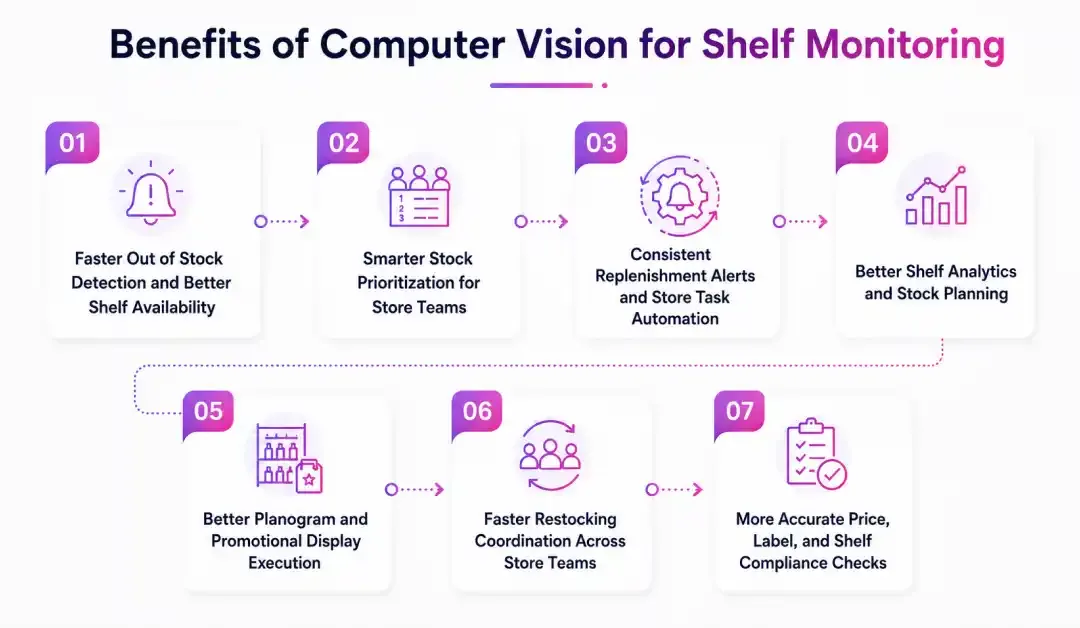
1. Faster Out of Stock Detection and Better Shelf Availability
Computer vision helps retail stores stop losing sales because of empty shelves. A customer may walk in to buy a specific cereal, skincare product, medicine, snack, or beverage. The inventory system may still show stock available, but the shelf may be empty because the product is in the backroom, misplaced, or not refilled on time. If the customer does not find it, they may choose another brand, visit another store, or order online.
AI powered shelf monitoring can watch shelves throughout the day and detect missing products faster than manual checks. It can identify empty facings, low stock areas, and shelf gaps, then alert the right store associate before the issue affects more customers.
For example, a computer vision workflow can:
- Detect an empty shelf space for a specific product
- Match the empty space with the expected SKU
- Check whether stock is available in the backroom
- Send a restocking alert to the store associate
- Create a replenishment task in the store dashboard
- Confirm through the camera when the product is refilled
- Update shelf availability data for managers
This gives retail stores a better chance to fix stock issues while customer demand is still active. It also helps teams improve on shelf availability without asking staff to check every aisle manually again and again.
2. Smarter Stock Prioritization for Store Teams
Not every shelf issue needs the same level of attention. Some products are slow moving. Some are fast selling. Some are part of a live promotion. Some have enough stock in the backroom but are missing from the shelf. Store teams can waste a lot of time checking the wrong areas first if they do not know which shelf gaps matter most.
Computer vision can help sort these issues before staff spend time walking every aisle. A smart shelf monitoring system can check simple signals like:
- Which product is missing from the shelf?
- Is the product a fast moving SKU?
- Is stock available in the backroom?
- Is the product part of a promotion?
- Is the shelf gap in a high traffic aisle?
- How long has the product been missing?
- Has the same product gone out of stock multiple times today?
This helps store teams understand what needs attention first. A high demand product with backroom stock can be sent straight to a store associate for fast restocking. A low priority shelf gap can wait until the next routine check.
3. Consistent Replenishment Alerts and Store Task Automation
Replenishment is where many retail shelf problems either get fixed quickly or turn into lost sales. The problem is that store teams are busy. A product may need restocking several times a day, but staff may not notice it during billing rush, customer support, delivery handling, or aisle cleaning. Computer vision keeps shelf alerts moving after key shelf events, such as:
| Trigger |
What Computer Vision Can Do |
| Empty shelf space |
Send an instant restocking alert to the assigned store associate |
| Low stock detected |
Create a refill task before the product fully runs out |
| Product missing from planogram |
Alert the merchandising team to correct the shelf layout |
| Product placed in the wrong section |
Flag the misplaced item and show where it should go |
| Backroom stock available |
Ask staff to refill the shelf instead of marking it unavailable |
| Promotion shelf running low |
Notify the team before the display looks empty |
| Price label mismatch |
Flag the shelf tag for review |
| Repeated stockout pattern |
Send the issue to the store manager for deeper review |
This does not mean every alert should create noise for the store team. Good AI shelf monitoring should feel useful, simple, and action focused. The goal is to help staff know what to fix first, where to go, and which product needs attention, so shelves stay ready for customers without endless manual checking.
4. Better Shelf Analytics and Stock Planning
Stock planning is one of the most important parts of retail shelf management. If a product is understocked, the store loses sales. If it is overstocked, the shelf space gets blocked and inventory may sit for too long. Computer vision can support better stock planning by reviewing shelf activity faster and more consistently than manual checks.
It can look at:
- Product availability throughout the day
- Low stock patterns
- Repeated shelf gaps
- Fast moving SKUs
- Slow moving products
- Peak shopping hours
- Promotion shelf performance
- Backroom stock versus shelf stock
- Planogram compliance issues
This does not replace a store manager’s judgment. A computer vision shelf monitoring system can give useful data, but the manager still needs to consider local demand, seasonal behavior, supplier delays, store layout, customer habits, and upcoming promotions.
Best for:
- Daily shelf availability tracking
- Fast moving product monitoring
- Promotion shelf analysis
- Restocking priority decisions
- Demand pattern review
- Backroom to shelf stock visibility
Not best for:
- Final buying decisions without human review
- New products with limited sales history
- Seasonal items with unusual demand spikes
- Stores with poor inventory records
- Products with frequent packaging changes without updated model training
5. Better Planogram and Promotional Display Execution
Retail shelf execution takes more work than most people think. Every product needs the right shelf space, correct facing, proper price label, clean placement, and sometimes a promotional display. Then the store team still needs to check whether the shelf matches the approved planogram, whether the offer is visible, and whether high demand products are stocked during peak hours.
Computer vision can speed up this work without making store teams depend only on manual audits. It can help monitor:
- Product placement
- Shelf facings
- End cap displays
- Promotional shelves
- Price labels
- Missing shelf tags
- Wrong product locations
- Brand shelf share
- Planogram compliance
- Display stock levels
A simple workflow could look like this:
The retail team uploads the approved planogram. Cameras capture shelf images throughout the day. The computer vision system compares real shelf conditions with the expected layout. It detects that a promoted product is placed in the wrong section or running low on the display. The system alerts the store associate, updates the dashboard, and gives the manager a clear view of execution quality.
That saves time, but it still keeps the store team in control of the final shelf correction.
6. Faster Restocking Coordination Across Store Teams
Restocking sounds simple until a store has hundreds of fast moving products, multiple aisles, busy billing counters, delivery orders, customer questions, and a sudden rush during peak hours. Store teams may know that shelves need attention, but they may not know which product to refill first or where the biggest gap is happening.
Computer vision for shelf monitoring can connect shelf alerts with staff task workflows. It can detect the issue, check the product location, confirm stock availability, and send the task to the right person without managers chasing updates all day.
It can also handle the small details that usually slow teams down:
- Empty shelf alerts
- Low stock reminders
- Product location details
- Backroom stock checks
- Restocking task assignment
- Priority based refill alerts
- Manager escalation for repeated gaps
- Confirmation after the shelf is refilled
This works especially well for busy supermarkets, pharmacies, grocery stores, convenience stores, and large retail chains.
A fast moving beverage shelf runs low during evening rush. The system detects the low stock, checks that inventory is available in the backroom, sends a refill task to the floor associate, and updates the dashboard once the shelf is restocked.
7. More Accurate Price, Label, and Shelf Compliance Checks
Retail shelf checks can be slow, detailed, and easy to miss during busy hours. A wrong price label, missing shelf tag, expired promotion sign, or misplaced product can confuse customers and create checkout issues. Computer vision can help review shelf conditions and pull out the problems that need staff attention, but it should work as support, not as the final decision maker.
For example, computer vision can scan:
- Price tags
- Shelf labels
- Promotion signs
- Product facings
- Barcode labels
- End cap displays
- Category shelves
- Planogram layouts
It can then highlight wrong prices, missing labels, outdated offers, misplaced products, and shelf sections that do not match the approved layout.
| Shelf Task |
How Computer Vision Can Help |
| Missing labels |
Flags products without visible shelf tags or barcode labels |
| Price mismatch |
Detects when the shelf price does not match the expected product price |
| Promotion check |
Finds old offer signs, missing campaign labels, or empty promotional displays |
| Product placement |
Highlights items kept in the wrong shelf, aisle, or category section |
| Planogram review |
Compares real shelf images with the approved shelf layout |
| Handoff |
Sends flagged shelf issues to the right store associate or manager |
This is useful because it helps retail teams move faster without pretending AI should manage every shelf decision alone. The final review still belongs to the store associate, merchandising team, category manager, or store manager. Computer vision simply makes the issue easier to find, confirm, and fix.
Improve Shelf Availability with Custom Computer Vision
Prismetric helps retail stores monitor shelves, detect low stock, and connect visual insights with POS, ERP, and inventory systems.
Get Started for Free
Key Use Cases of Computer Vision for Shelf Monitoring and Stock Detection
Computer vision works best when it connects directly with store operations, not when it sits as a camera system that only records footage.
For a retail store, the best use cases usually sit around out of stock detection, low stock alerts, SKU recognition, shelf gap tracking, planogram compliance, price label checks, promotional display monitoring, replenishment tasks, and inventory accuracy.
Here are 15 practical ways retail stores can use computer vision for shelf monitoring and stock detection in daily work:
| Use Case |
What It Detects or Automates |
Best For |
Tools or Data Needed |
Human Oversight Needed |
| Out of stock detection |
Detects empty shelf spaces, missing facings, and unavailable products |
Grocery stores, pharmacies, supermarkets, and convenience stores with fast moving products |
Shelf cameras, product image data, SKU catalog, inventory system |
Staff should confirm whether stock is available in the backroom and refill the shelf |
| Low stock alerts |
Identifies products that are running low before they fully go out of stock |
High demand products, peak hour shelves, and promotion displays |
Camera feed, shelf threshold rules, inventory data, store dashboard |
Store teams should review alert priority and decide refill timing |
| Shelf gap detection |
Finds empty spaces between products and maps them to expected shelf positions |
Large stores with many aisles and frequent shelf movement |
Shelf images, planogram data, SKU location mapping |
Staff should check whether the gap is due to sales, misplaced stock, or wrong shelf setup |
| SKU recognition |
Identifies exact products, variants, sizes, flavors, and pack types on the shelf |
Retailers with many similar looking products and product variants |
Product catalog, product images, AI recognition model, barcode or label data |
Teams should review accuracy for similar SKUs and updated packaging |
| Planogram compliance |
Compares real shelf images with the approved shelf layout |
Supermarkets, department stores, pharmacies, and brand led retail displays |
Planogram files, shelf images, SKU position data, category rules |
Merchandising teams should approve shelf corrections and layout changes |
| Misplaced product detection |
Flags products placed in the wrong aisle, shelf, or category section |
Stores where customers or staff often place items in the wrong location |
Shelf cameras, product recognition model, aisle mapping, SKU data |
Staff should move the product to the right shelf and check repeated placement issues |
| Price and label mismatch detection |
Reads shelf tags and checks whether product labels match expected prices or offers |
Retail stores with frequent price changes, discounts, and promotions |
OCR, price database, POS pricing data, shelf label images |
Store managers should verify flagged price issues before correction |
| Promotional display monitoring |
Tracks whether promotion shelves, end caps, and campaign displays are stocked and visible |
FMCG brands, supermarkets, seasonal campaigns, and retail chains |
Camera feed, campaign planogram, promotion SKU list, display location data |
Marketing or merchandising teams should review display quality and campaign execution |
| Phantom inventory detection |
Finds cases where the inventory system shows stock available, but the shelf is empty |
Retailers struggling with wrong stock counts and missed replenishment |
Inventory system, shelf images, POS data, backroom stock records |
Inventory teams should check backroom stock, shrink, damaged goods, or wrong counts |
| Replenishment task automation |
Creates restocking tasks when shelves are empty, low, or below threshold |
Busy stores where staff need clear task direction during peak hours |
Shelf monitoring system, store task app, inventory data, staff assignment rules |
Managers should monitor task completion and repeated delay patterns |
| Shelf share and facing analysis |
Measures how much shelf space each product, brand, or category receives |
Category managers and retail brands tracking shelf visibility |
Product recognition model, shelf images, planogram data, brand mapping |
Category teams should review shelf share reports before making merchandising decisions |
| Fresh product and spoilage detection |
Flags visible quality issues, damaged packaging, expired labels, or poor shelf condition |
Grocery, bakery, dairy, produce, meat, and ready to eat food sections |
High quality cameras, product quality rules, expiration label data, OCR |
Staff must make final quality, safety, and removal decisions |
| Store audit automation |
Replaces slow manual shelf audits with visual checks and exception reports |
Multi location retailers that need consistent store audits |
Shelf images, audit checklist, planogram data, pricing data, reporting dashboard |
Area managers should review exceptions and confirm store level action |
| Omnichannel inventory support |
Improves product availability data for pickup, delivery, and online store orders |
Retailers offering click and collect, same day delivery, or local ecommerce |
Shelf data, POS, ecommerce system, inventory system, order management system |
Teams should review availability rules before showing stock online |
| Demand and restocking pattern analysis |
Tracks shelf depletion patterns to support better stock planning |
Retail chains that want better replenishment planning and demand visibility |
Historical shelf images, POS sales data, stock movement data, AI analytics dashboard |
Retail planners should review insights with sales trends, supplier delays, and local demand |
Computer Vision Shelf Monitoring by Retail Department
Computer vision shelf monitoring is not useful for only one part of a retail store. It can support almost every team, as long as the workflow is clear and the store knows where human review is needed. A good way to think about it is simple: every retail department deals with shelf problems in a different way. Computer vision helps each team see those problems faster and act before they affect sales, customer experience, or inventory accuracy.
Store Operations Team
The store operations team usually feels the biggest impact first because they deal with shelf issues every day. They need to know which products are missing, which shelves need refilling, which items are placed in the wrong section, and which aisle needs attention during peak hours.
Computer vision can help store teams detect empty shelves, low stock products, misplaced items, and repeated shelf gaps without checking every aisle manually. For example, when a popular beverage shelf starts running low, the system can detect the issue, check stock availability, and send a refill task to the right associate. The team can act faster because they know exactly what product needs attention and where it is located.
This helps store operations teams reduce manual shelf walks, fix issues sooner, and keep shelves ready for customers throughout the day.
Inventory and Supply Chain Team
Inventory teams need accurate stock visibility. The problem is that system inventory and shelf reality do not always match. A product may show as available in the system, but the shelf may be empty. That gap can happen because stock is still in the backroom, the item is misplaced, the count is wrong, or the product sold faster than expected.
Computer vision stock detection gives inventory teams a clearer view of what customers actually see on the shelf. It can flag phantom inventory, repeated stockouts, low shelf availability, and backroom to shelf replenishment delays.
For example, if the inventory system shows 20 units of a product but computer vision detects an empty shelf, the team can investigate quickly. They can check the backroom, correct inventory records, review stock movement, or trigger a replenishment request. This helps the inventory team improve stock accuracy and reduce missed sales caused by poor shelf visibility.
Merchandising and Category Management Team
Merchandising teams care about how products appear on the shelf. They need to know whether items follow the approved planogram, whether brands get the right shelf space, whether product facings are correct, and whether high value SKUs are placed where customers can find them easily.
Computer vision shelf monitoring can compare real shelf images with the approved layout. It can detect wrong product placement, missing facings, blocked products, shelf share issues, and planogram gaps. This gives merchandising teams better control across stores without depending only on manual audits.
For example, if a skincare product is supposed to sit at eye level but staff placed it on a lower shelf, the system can flag the mismatch. The merchandising team can then ask the store to correct the layout. This helps retailers protect brand agreements, improve product visibility, and maintain a consistent shopping experience.
Marketing and Promotions Team
Marketing teams work hard to plan offers, seasonal campaigns, product launches, and in store promotions. But a promotion only works when the display is visible, stocked, and placed correctly. If the campaign shelf is empty or the offer label is missing, the store may lose the full value of that promotion.
Computer vision can help marketing teams monitor promotional displays, end caps, offer labels, seasonal shelves, and campaign product availability. It can show whether the display is active, whether promoted SKUs are stocked, and whether the shelf still looks ready for customers.
For example, a store may run a weekend discount on snacks. Computer vision can detect when the promotional display starts looking empty and send an alert before the busiest shopping hours. This helps the marketing team protect campaign performance and gives store teams a clear action point.
Store Managers and Regional Managers
Store managers need a clean view of what is happening across the floor. They cannot stand in every aisle, watch every shelf, and manually check every product during the day. Regional managers have an even bigger challenge because they need visibility across multiple locations.
Computer vision gives managers better shelf level reporting. They can track out of stock rates, low stock alerts, planogram issues, repeated shelf gaps, restocking response time, and task completion. This helps them understand which departments need support and which stores are struggling with shelf execution.
A manager can quickly see which aisle has the most shelf gaps, which products keep running out, and which tasks are still pending. This makes daily decisions easier. It also helps managers coach teams with real data instead of relying only on manual reports.
IT and Data Team
The IT and data team plays a key role in making computer vision useful. Cameras alone are not enough. The system needs clean product data, reliable integrations, secure storage, good model performance, and clear dashboards.
IT teams can connect computer vision shelf monitoring with POS systems, ERP software, inventory platforms, warehouse systems, staff task tools, and business intelligence dashboards. Data teams can use the shelf data to find demand patterns, repeated stockout issues, promotion gaps, and inventory accuracy problems.
This does not mean IT teams should own every shelf decision. Their role is to make sure the system works well, stays secure, and gives accurate information to the people who need it. When IT, store teams, and business teams work together, computer vision becomes more than a monitoring tool. It becomes a practical retail intelligence system that helps the whole store run better.
Computer Vision Shelf Monitoring Workflow Example: From Empty Shelf to Restocked Product
The easiest way to understand computer vision shelf monitoring is to see how it works in a real shelf replenishment journey.
A product does not move from empty shelf to restocked shelf in one step. There are shelf checks, stock verification, backroom availability, staff alerts, task assignment, replenishment, confirmation, and reporting. When every step is manual, shelf gaps can stay unnoticed for too long.
Here is what a computer vision powered workflow can look like:
- A shelf camera captures images at regular intervals.
- The AI model detects an empty shelf space or missing product facing.
- The system matches the empty space with the expected SKU.
- Inventory data is checked to see whether stock is available in the backroom.
- A restocking task is created for the right store associate.
- The associate receives the product name, shelf location, and priority level.
- The product is picked from the backroom and refilled on the shelf.
- The camera checks the shelf again after restocking.
- The system confirms whether the shelf gap is fixed.
- The store dashboard updates shelf availability, response time, and task status.
This kind of workflow helps the store team act quickly without waiting for a customer complaint or a manual aisle walk.
Here is a simple example.
A grocery store has a fast moving oat milk product that usually sells heavily during morning and evening hours. The inventory system shows 24 units available, but the shelf is empty because the product was not moved from the backroom.
The computer vision system detects the empty facing, matches it with the oat milk SKU, checks the available stock, and sends a restocking alert to the floor associate. The associate does not have to guess which product is missing or where to find it.
They can open the task and see the important details right away:
- Product: Oat milk 1 litre pack
- Shelf location: Dairy alternatives aisle
- Shelf status: Empty facing detected
- Backroom stock: Available
- Priority level: High
- Recommended next step: Refill shelf before the next customer rush
This is where computer vision shelf monitoring becomes useful in a very practical way.
It does not replace the store associate’s role. It simply makes sure the shelf issue is detected, matched with the right product, assigned to the right person, and fixed before more customers leave without buying.
Best Technologies Used in Computer Vision Shelf Monitoring
The best technologies for computer vision shelf monitoring are not limited to cameras alone. Retail stores need a mix of image capture systems, AI models, product data, inventory integrations, and dashboards to turn shelf images into useful actions. Here are the main technology categories to understand.
AI Cameras and Shelf Monitoring Cameras
AI cameras help retail stores capture shelf images at regular intervals. These cameras can be fixed on aisles, mounted near shelves, placed on ceilings, or added to scanning robots and mobile devices.
Common camera options include:
- Fixed IP cameras
- Shelf mounted cameras
- Overhead aisle cameras
- Edge AI cameras
- Mobile phone based shelf scanning
- Robot mounted cameras
- Smart shelf cameras
These cameras can help with:
- Shelf visibility
- Empty space detection
- Product facing checks
- Promotional display tracking
- Aisle level monitoring
- Store condition review
- Real time image capture
This is a good fit for retail stores that want regular shelf checks without depending only on manual audits. Camera placement matters a lot because poor angles can miss lower shelves, deep shelves, and blocked products.
Object Detection Models
Object detection models help systems identify products, empty shelf spaces, boxes, labels, and shelf sections from images. These models do not just capture images. They understand what is visible on the shelf.
Common model types include:
- YOLO based models
- Faster R CNN
- SSD models
- Transformer based vision models
- Custom object detection models
- Retail specific product detection models
These models can help with:
- Out of stock detection
- Low stock detection
- Shelf gap detection
- Product location tracking
- Product count estimation
- Facing detection
- Misplaced item detection
This is useful when retailers want to detect shelf issues quickly. For example, if a product section is empty, the system can flag it before customers complain or leave the store without buying.
SKU Recognition Models
SKU recognition models help retailers identify the exact product on the shelf. This is more advanced than basic object detection because many retail products look similar. A model must recognize different sizes, flavors, packaging designs, and brand variations.
These technologies can help with:
- Exact product identification
- Flavor and size detection
- Product catalog matching
- Similar SKU separation
- Shelf position mapping
- Brand level analysis
- Product availability tracking
This is important for grocery stores, supermarkets, pharmacies, convenience stores, and large retail chains. A weak model may detect a product as a bottle or box, but a strong SKU recognition model can identify the exact item that needs restocking.
OCR and Shelf Label Reading
OCR helps computer vision systems read text from shelf labels, price tags, product packaging, promotional stickers, and barcode labels. This makes shelf monitoring more useful for pricing and compliance checks.
OCR can help with:
- Price tag reading
- Promotion label verification
- Shelf tag mismatch detection
- Missing label detection
- Product name reading
- Barcode and printed code recognition
- Offer display checks
This is a good fit for retailers that frequently update prices, discounts, and promotional campaigns. It helps reduce customer complaints caused by wrong shelf prices or outdated offer labels.
Planogram Compliance Technology
Planogram compliance technology compares real shelf images with the approved shelf layout. It checks whether products are placed in the right position, with the right number of facings, and in the right category area.
These tools can help with:
- Planogram matching
- Shelf layout verification
- Product placement checks
- Facing count validation
- Brand visibility tracking
- Category display monitoring
- Promotional shelf compliance
This is useful for retail stores that need consistent shelf execution across multiple locations. It also helps merchandising teams see whether stores follow the planned layout or need correction.
Edge AI and Cloud AI Processing
Retailers can process shelf images on edge devices, in the cloud, or through a hybrid setup. Edge AI processes images closer to the camera. Cloud AI sends images or processed data to cloud servers for deeper analysis.
Edge AI can help with:
- Faster alerts
- Lower bandwidth use
- Reduced latency
- Better privacy control
- Real time shelf checks
- Store level processing
Cloud AI can help with:
- Centralized model training
- Large scale analytics
- Multi store reporting
- Advanced dashboard insights
- Long term data storage
- Better model improvement
A hybrid setup often works best for growing retail businesses. Edge AI can handle fast detection inside the store, while cloud AI can support reporting, training, and advanced analysis.
Product Image Dataset and Annotation Tools
Computer vision models need strong data to perform well. Retailers must collect and label product images, shelf images, packaging variations, price tags, and planogram references.
These tools can help with:
- Product image collection
- Shelf image labeling
- Bounding box annotation
- SKU data mapping
- Empty shelf labeling
- Facing count annotation
- Model training data preparation
This step is very important because poor data leads to poor detection. Retail shelves change often. Products get new packaging, promotions change, and seasonal items come in. The dataset should stay updated to keep the model accurate.
Inventory, POS, ERP, and WMS Integrations
Computer vision becomes more valuable when it connects with existing retail systems. A shelf alert alone is useful, but it becomes much stronger when the system knows whether stock is available in the backroom, warehouse, or nearby store.
Important integrations include:
- POS systems
- ERP systems
- Warehouse management systems
- Inventory management software
- Order management systems
- Staff task management tools
- Reporting dashboards
These integrations can help with:
- Stock availability checks
- Backroom stock validation
- Replenishment task creation
- Phantom inventory detection
- Order fulfillment accuracy
- Store pickup stock accuracy
- Multi location inventory visibility
This is where computer vision moves from simple shelf monitoring to practical retail automation. It helps teams act faster instead of only seeing a problem on a dashboard.
Store Dashboards and Mobile Task Apps
Dashboards and mobile apps help store teams use computer vision insights in daily work. Without a simple interface, AI alerts can become another system that staff ignore.
These tools can help with:
- Out of stock alerts
- Low stock alerts
- Task assignment
- Restocking confirmation
- Store performance tracking
- Shelf issue history
- Team response time tracking
For example, when the system detects an empty shelf, it can create a task for the store associate. Once the product is restocked, the camera can verify the correction and update the dashboard.
Analytics and Forecasting Tools
Shelf monitoring data can also support better planning. Retailers can use historical shelf data to understand which products run out often, which aisles need more attention, and which stores struggle with availability.
Analytics tools can help with:
- Stockout trend analysis
- Shelf availability reports
- Category performance insights
- Demand pattern detection
- Restocking frequency analysis
- Promotion performance review
- Lost sales estimation
This is useful for retail leadership, category managers, and supply chain teams. It helps them move beyond daily issue fixing and improve long term inventory planning.
Custom Computer Vision Workflows
Custom computer vision workflows connect cameras, AI models, inventory systems, alerts, dashboards, and staff actions into one practical system. This is often the best choice for retail businesses with unique store layouts, custom POS systems, multiple locations, or advanced shelf monitoring needs.
Custom workflows can help with:
- AI shelf monitoring
- Out of stock detection
- SKU recognition
- Planogram compliance
- Price mismatch detection
- Replenishment automation
- Inventory system integration
- Multi store shelf analytics
- Custom dashboard development
- Model performance monitoring
This is not always the first step for every small store.
But once a retailer wants accurate shelf intelligence across stores, a custom computer vision solution can fit the existing workflow instead of forcing teams to work around generic software.
How to Implement Computer Vision for Shelf Monitoring in Retail Stores
Computer vision shelf monitoring works best when retailers start with one clear store problem.
Do not begin by asking, “Which AI camera should we install?” Start by asking, “Where are we losing sales, time, or inventory accuracy?”
For most retail stores, the answer is usually found in empty shelves, delayed restocking, wrong product placement, missed price updates, or poor shelf visibility. Here is a simple step by step way to implement computer vision for shelf monitoring and stock detection.
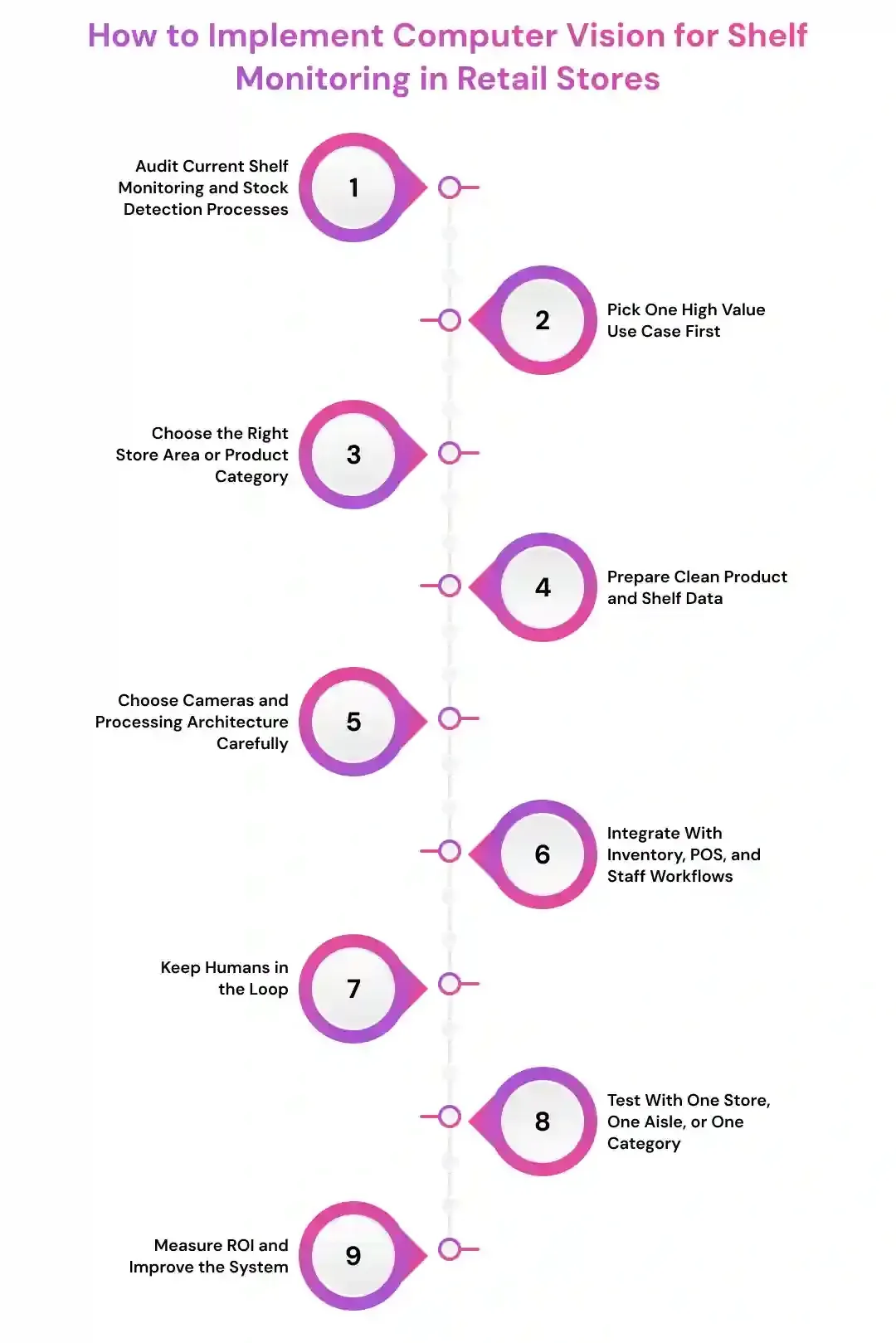
Step 1: Audit Current Shelf Monitoring and Stock Detection Processes
Start by understanding how your store team checks shelves today. Look at the tasks that happen every day or every shift. These are usually the best places to introduce computer vision because they are easy to track and measure.
Focus on shelf tasks that are:
- Manual
- Repeated often
- Time sensitive
- Easy to miss
- Error prone
- Hard to scale
- Affecting sales
Good examples include checking empty shelves, finding low stock products, verifying price labels, tracking promotional displays, checking planogram compliance, and reporting misplaced products.
If store associates keep walking the same aisles again and again to find missing products, that workflow may be a strong candidate for computer vision automation.
Step 2: Pick One High Value Use Case First
Do not try to monitor every shelf, aisle, and product category at once.
Pick one use case that can create a clear result. This keeps the project simple and helps the retail team see value faster.
Good starting points include:
- Out of stock detection
- Low stock alerts
- Shelf gap detection
- Planogram compliance
- Price label verification
- Promotional display monitoring
- Misplaced product detection
For most retailers, out of stock detection is the strongest first use case.
If the system can detect an empty shelf, match it with the right product, alert the staff, and confirm restocking, the store can see the value quickly. This also helps reduce missed sales and improves the customer experience.
Step 3: Choose the Right Store Area or Product Category
Computer vision performs better when the first rollout focuses on a specific area. Choose a section where shelf problems are common and business impact is easy to measure.
Good starting areas include:
- Fast moving grocery items
- Dairy and frozen products
- Beverage shelves
- Pharmacy shelves
- Personal care products
- High margin categories
- Seasonal displays
- Promotional shelves
- Checkout impulse products
The goal is not to cover the entire store on day one. The goal is to prove that computer vision can solve a real shelf monitoring problem.
For example, a supermarket may start with beverage shelves because products move fast, stockouts are visible, and restocking delays can directly affect sales.
Step 4: Prepare Clean Product and Shelf Data
Computer vision needs good visual data to work well.
If product images are missing, shelf layouts are outdated, or SKU data is messy, the system may struggle to detect products accurately. Start by organizing the data that the AI model needs.
Review and collect data from:
- Product catalog
- SKU details
- Product images
- Shelf images
- Planograms
- Price labels
- Barcode data
- Inventory records
- Store layout maps
- Promotional display rules
The goal is not perfection. The goal is to give the system enough accurate data to understand what each shelf should look like.
For example, if two products have similar packaging but different flavors, the model needs enough image examples to tell them apart. If the product catalog is outdated, the system may flag the wrong item or miss the right one.
Step 5: Choose Cameras and Processing Architecture Carefully
The camera setup has a direct impact on computer vision accuracy.
Before installing anything, check the store layout, shelf height, lighting, aisle width, product visibility, and customer movement. Poor camera placement can create blind spots and false alerts.
Consider options such as:
- Fixed aisle cameras
- Shelf mounted cameras
- Overhead cameras
- Mobile phone scanning
- Robot based shelf scanning
- Edge AI cameras
- Cloud based image processing
- Hybrid edge and cloud setup
This matters because every store is different. A large supermarket may need fixed cameras and cloud analytics. A smaller store may start with mobile shelf scanning. A high traffic store may need edge AI for faster alerts.
The right setup should capture clear shelf images without disturbing shoppers or store staff.
Step 6: Integrate With Inventory, POS, and Staff Workflows
A shelf alert is useful, but it becomes much more valuable when it connects with your existing retail systems.
Before choosing a computer vision solution, check whether it can connect with the tools your store already uses.
Look for integration with:
- POS system
- Inventory software
- ERP system
- Warehouse management system
- Order management system
- Staff task app
- Store dashboard
- Reporting tools
This matters because disconnected systems create more work.
If the camera detects an empty shelf but the inventory system does not update, someone still has to check stock manually. If the alert does not reach the right staff member, the shelf may stay empty.
Real shelf monitoring should create action. It should detect the issue, check stock availability, assign a task, and help the team fix the problem faster.
Step 7: Keep Humans in the Loop
Computer vision should support store teams, not replace their judgment.
Store associates, managers, merchandisers, and inventory teams should still review important actions, especially when the system affects pricing, compliance, customer experience, or replenishment decisions.
Human review is important for:
- Price mismatch alerts
- Promotion compliance
- Planogram changes
- Inventory corrections
- High value products
- Fresh product quality
- Customer facing errors
- Repeated false alerts
- Store level exceptions
AI can detect, flag, count, compare, and recommend. But the final action should stay with the right person, especially during the early rollout.
This keeps the system practical. It also helps staff trust the technology because they can see how alerts are created and corrected.
Step 8: Test With One Store, One Aisle, or One Category
Before rolling computer vision across all locations, test it in a smaller environment.
Start with one store, one aisle, or one product category. This gives the retail team space to understand accuracy, workflow fit, and staff response.
During the pilot, check:
- Are shelf gaps detected correctly?
- Are low stock alerts useful?
- Are products identified accurately?
- Are price labels read properly?
- Are false alerts too frequent?
- Are staff responding to tasks?
- Is the dashboard easy to understand?
- Is the system improving shelf availability?
A small test protects the retailer from a messy rollout.
It also helps teams improve camera placement, product data, alert rules, and dashboard design before scaling the system across more stores.
Step 9: Measure ROI and Improve the System
Computer vision should reduce stockouts, improve shelf availability, save staff time, or increase inventory accuracy.
Track simple numbers before and after the system goes live. This helps the business understand whether shelf monitoring is creating real value.
Useful metrics include:
- Out of stock rate
- Shelf gap detection accuracy
- Low stock response time
- Restocking time
- Planogram compliance rate
- Price label error rate
- Manual audit hours saved
- False alert rate
- Task completion rate
- Lost sales recovered
- Inventory accuracy improvement
- Shelf availability by category
You do not need a complex dashboard at the beginning.
Even a basic report can show whether computer vision is helping. For example, if the store reduces empty shelf time, improves restocking speed, and cuts manual shelf checks, the business can clearly see the impact.
The best computer vision system for retail shelf monitoring is not the one with the most features. It is the one that helps store teams find shelf problems faster, restock products sooner, and keep customers from walking away empty handed.
ROI of Computer Vision Shelf Monitoring for Retail Stores
Computer vision shelf monitoring should not be measured only by how advanced the camera or AI model looks. The real question is simple. Does it reduce stockouts, save staff time, improve shelf availability, or help the store recover sales that were being lost silently?
A good ROI check looks at both operational improvement and revenue impact. Sometimes the biggest win is not one large cost saving. It is hundreds of small shelf issues getting detected and fixed before they affect customers.
Here are the main areas to measure.
Fewer Lost Sales From Stockouts
This is usually the clearest ROI area for retail stores.
When a product is missing from the shelf, the store may still show stock in the system. But for the customer, the product is unavailable. That means the store can lose the sale even when inventory exists in the backroom.
Computer vision shelf monitoring helps detect:
- Empty shelf spaces
- Out of stock products
- Low stock items
- Unfilled facings
- Fast moving products running out
- Products available in inventory but missing on the shelf
For example, if a store regularly loses sales because popular snacks, beverages, medicines, or personal care products are not restocked on time, computer vision can alert staff earlier.
Even a small reduction in stockouts can create strong value because the store is recovering sales from products customers already wanted to buy.
Faster Replenishment Response
Manual shelf checks take time. Staff may not notice an empty product space until a customer asks for the item or the next aisle walk happens.
Computer vision changes this process from reactive to proactive.
It can help stores:
- Detect shelf gaps faster
- Notify staff in real time
- Create replenishment tasks
- Prioritize high demand products
- Confirm whether the shelf was restocked
- Track response time by aisle or category
For example, if a shelf gap normally stays unnoticed for two hours, but computer vision helps the team fix it within 20 minutes, the store reduces the time that product is unavailable to shoppers.
That faster response can directly support sales, especially during peak hours.
Lower Manual Audit Effort
Shelf audits are necessary, but they take a lot of staff time. Store teams must walk aisles, check products, compare layouts, review price labels, and report issues manually.
Computer vision can reduce this workload by automating the first layer of shelf checking.
It can help with:
- Shelf gap detection
- Planogram checks
- Product placement review
- Price label checks
- Promotional display monitoring
- Low stock alerts
- Shelf condition reporting
This does not mean removing staff from the process. It means helping them focus on the shelf issues that actually need action.
For example, instead of checking every aisle blindly, staff can start with the shelves already flagged by the system. That saves time and makes store operations cleaner.
Better Planogram Compliance
Planogram compliance matters because product placement affects visibility, sales, vendor agreements, and customer shopping behavior.
When products are placed in the wrong section, customers may not find them. When promotional displays are not set up correctly, campaigns may underperform. When shelf facings are wrong, high value products may lose visibility.
Computer vision can help retailers monitor:
- Product placement
- Facing count
- Shelf layout accuracy
- Brand visibility
- Category arrangement
- Promotional shelf execution
- Display compliance across stores
This is especially useful for retail chains with multiple locations. A manager or merchandising team can see which stores follow the approved shelf layout and which stores need correction.
Better compliance can improve product visibility and make store execution more consistent.
More Accurate Inventory Data
Many retailers face a common problem. The system says the product is available, but the shelf is empty.
This is where computer vision stock detection can support inventory accuracy.
It can help identify:
- Phantom inventory
- Shelf level stock gaps
- Wrong product placement
- Inventory mismatch
- Backroom stock not moved to shelf
- Repeated replenishment failures
For example, if the inventory system shows 30 units of a product, but the shelf is empty, the issue may be poor replenishment, misplaced stock, theft, wrong records, or receiving errors.
Computer vision does not solve every inventory issue alone. But it gives the store a visual signal that something is wrong. That helps teams investigate faster.
Improved Customer Experience
ROI is not always only about cost savings. Customers notice when shelves are well stocked. They notice when products are easy to find. They also notice when prices, labels, and promotions are clear.
Computer vision shelf monitoring can improve the shopping experience by helping stores maintain:
- Better product availability
- Cleaner shelf presentation
- Correct product placement
- Fewer missing items
- More reliable promotional displays
- Faster restocking during busy hours
- Better support for pickup and delivery orders
A better shelf experience can increase trust. Customers are more likely to return when they can find what they came for.
For grocery stores, pharmacies, convenience stores, and supermarkets, this matters a lot because many purchases are need based. If the product is missing, the customer may go somewhere else.
Better Omnichannel Fulfillment
Retail stores are no longer only physical shopping spaces. Many stores now support online orders, local delivery, click and collect, and store pickup.
For these channels, shelf level accuracy becomes even more important.
Computer vision can support omnichannel operations by improving:
- Store pickup accuracy
- Online stock visibility
- Substitution decisions
- Order fulfillment speed
- Inventory confidence
- Out of stock communication
- Same day delivery reliability
For example, if an online customer orders a product that appears available in the system but is not actually on the shelf, the store may have to cancel or substitute the item. That creates a poor customer experience.
Computer vision helps reduce this gap by giving retailers better shelf level visibility.
Useful ROI Metrics to Track
Retailers do not need a complicated dashboard at the start. Even a simple before and after report can show whether computer vision shelf monitoring is helping.
Useful metrics include:
- Out of stock rate
- Out of stock duration
- Shelf availability rate
- Low stock response time
- Restocking completion time
- Planogram compliance rate
- Price label error rate
- Manual audit hours saved
- False alert rate
- Task completion rate
- Phantom inventory cases
- Lost sales recovered
- Online order substitution rate
- Customer complaints about missing products
The goal is to connect shelf visibility with real store improvement.
For example, if the store reduces empty shelf time, improves restocking speed, cuts manual audit hours, and increases product availability, the ROI becomes clear.
The best computer vision shelf monitoring system is not the one with the most advanced features. It is the one that helps retail teams keep shelves full, reduce missed sales, improve inventory accuracy, and create a better shopping experience.
Challenges of Computer Vision for Shelf Monitoring
Computer vision can help retail stores detect stockouts, shelf gaps, misplaced products, and planogram issues faster. But it still needs the right setup, clean product data, strong integration, and human review. Retail shelves are busy, crowded, and constantly changing. So retailers should not expect computer vision to work perfectly without proper planning and continuous improvement.
- Bad visual data creates bad shelf alerts: Computer vision models need clear shelf images, updated product images, accurate SKU details, and correct planograms. If product data is outdated, packaging has changed, or shelf images are unclear, the system may detect the wrong item or miss an actual stock issue.
- Lighting and camera placement can affect accuracy: Retail stores have shadows, glare, reflective packaging, crowded aisles, and blocked shelf views. Poor camera angles can miss lower shelves, deep shelf spaces, or products hidden behind other items. Camera placement should be tested carefully before scaling the system.
- Similar looking products can confuse the model: Many products have small differences in flavor, size, packaging, or label design. A weak model may detect the product category but fail to identify the exact SKU. This can create wrong restocking alerts, incorrect planogram checks, or inaccurate shelf reports.
- Integration gaps reduce business value: Computer vision is most useful when it connects with POS, inventory, ERP, warehouse, and staff task systems. If the system only detects shelf gaps but does not check stock availability or alert the right team member, the store still needs manual work to fix the issue.
- False alerts can reduce staff trust: If the system sends too many wrong alerts, store associates may start ignoring them. This usually happens when the model is not trained well, camera coverage is weak, or alert rules are too sensitive. Retailers should review false alerts during the pilot and improve the system before full rollout.
- Privacy and compliance need attention: Shelf monitoring should focus on products, shelves, and store operations. Retailers should avoid unnecessary customer identification or personal data capture. Clear privacy rules, secure storage, access control, and data retention policies are important for responsible use.
- Human oversight is still necessary: Computer vision can detect, count, compare, flag, and recommend. But store managers, inventory teams, and merchandising teams should review important alerts, pricing issues, planogram exceptions, and repeated stock mismatches before making major decisions. The best results come when AI supports retail teams instead of replacing their judgment.
Develop Custom Computer Vision Solutions for Retail Shelf Monitoring with Prismetric
Managing shelf checks, stock detection, planogram reviews, product availability, and replenishment manually can slow down even well managed retail stores. Prismetric helps retail businesses build custom computer vision solutions for shelf monitoring that match their real store operations, product categories, inventory workflows, and business goals.
Whether you need AI powered shelf monitoring, out of stock detection, SKU recognition, planogram compliance, price label verification, replenishment alerts, or retail analytics dashboards, Prismetric can help you design a system that fits your store environment instead of forcing your team into a one size fits all tool.
We solve your biggest computer vision shelf monitoring challenges:
- Stock Visibility Gaps: Computer vision workflows help detect empty shelves, low stock items, missing facings, and products that are available in inventory but not visible on the shelf.
- Manual Shelf Audit Delays: AI powered shelf monitoring reduces the need for repeated manual aisle checks and helps store teams focus on shelves that need quick action.
- SKU Recognition Issues: Custom computer vision models help identify exact products, similar looking SKUs, packaging variations, flavors, sizes, and category level shelf placement.
- Planogram Compliance Problems: Smart shelf monitoring systems compare real shelf images with approved planograms to detect wrong product placement, missing facings, and display errors.
- Inventory and POS Integration Gaps: Custom integrations connect shelf monitoring data with POS, ERP, inventory software, warehouse systems, staff task apps, and reporting dashboards.
- Replenishment Workflow Delays: Automated alerts help store associates know which shelf needs restocking, which product is affected, and whether stock is available in the backroom.
- Privacy and Accuracy Concerns: Human in the loop workflows, secure data handling, and model monitoring help retailers use computer vision responsibly while improving detection accuracy over time.
Key Prismetric advantages include:
- Custom computer vision solutions built around your store layout, shelf types, product categories, and retail operations
- AI powered stock detection for out of stock alerts, low stock alerts, shelf gap detection, and SKU level visibility
- Planogram compliance and shelf analytics systems that help merchandising teams monitor product placement and display execution
- Secure and scalable retail AI systems designed for supermarkets, pharmacies, convenience stores, fashion retailers, grocery chains, and multi location businesses
Your competitive advantage does not come from installing more disconnected cameras or dashboards. It comes from building a computer vision shelf monitoring system that helps your team detect issues faster, restock products sooner, and keep shelves ready for customers.
Partner with Prismetric to build custom computer vision solutions for retail shelf monitoring and stock detection that improve shelf availability, reduce missed sales, support inventory accuracy, and create a better in store shopping experience.
FAQs About Computer Vision for Shelf Monitoring and Stock Detection
Computer vision shelf monitoring is the use of AI cameras and image recognition systems to monitor retail shelves automatically.
It helps stores detect empty shelves, low stock items, misplaced products, wrong labels, and planogram issues faster than manual shelf checks.
Computer vision detects out of stock products by analyzing shelf images and identifying empty spaces, missing facings, or products that are not visible in their expected location. The system can compare real shelf images with inventory data, product catalogs, and planograms to confirm whether a product needs restocking.
Yes, computer vision can identify exact SKUs when it is trained with the right product images and shelf data. This is useful when products look very similar but differ by flavor, size, packaging, or brand variant.
For example, the system can learn the difference between two soft drink flavors, two shampoo sizes, or two medicine packs placed in the same shelf section.
Shelf monitoring focuses on the overall condition of retail shelves, including product placement, planogram compliance, shelf gaps, labels, and display quality. Stock detection focuses more specifically on identifying whether products are available, low in quantity, or missing from the shelf.
The accuracy depends on camera quality, lighting, shelf visibility, product data, model training, and integration setup. A well trained computer vision system can deliver strong accuracy for out of stock detection, shelf gap detection, SKU recognition, and planogram checks, but it still needs regular testing and improvement.
Retailers can use different camera types based on store size and shelf layout.
Common options include:
- Fixed aisle cameras
- Shelf mounted cameras
- Overhead cameras
- Edge AI cameras
- Mobile phone scanning
- Robot mounted cameras
A small store may start with mobile shelf scanning. A large supermarket may need fixed cameras, edge AI processing, and store wide monitoring.
Yes, computer vision can detect misplaced products by comparing real shelf images with the expected shelf layout or planogram. If a product appears in the wrong aisle, wrong shelf, wrong bay, or wrong category section, the system can flag it for correction.
Yes, computer vision is very useful for planogram compliance. It can compare actual shelf images with approved planograms to check product placement, facing count, shelf order, brand visibility, and promotional display execution. This helps retailers maintain consistent merchandising across multiple stores.
Computer vision can connect with POS, ERP, WMS, and inventory systems through APIs or custom integrations. This allows the system to check whether stock is available in the backroom, create replenishment tasks, update dashboards, track shelf issues, and support better inventory accuracy.
Yes, but small stores do not always need a full store wide setup from day one.
They can start with:
- High moving products
- Promotional shelves
- Convenience items
- Pharmacy shelves
- Grocery sections
- Mobile shelf scanning
The main challenges include poor lighting, camera blind spots, reflective packaging, similar looking products, outdated product data, packaging changes, false alerts, and integration gaps. Retailers can reduce these issues through proper camera placement, clean SKU data, pilot testing, and continuous model improvement.
The cost depends on store size, number of cameras, product categories, AI model complexity, SKU recognition needs, integrations, dashboards, and rollout scale. A small pilot costs less than a multi location retail system with custom computer vision models, POS integration, ERP integration, and real time alerts.
A basic pilot can usually be planned around one store, one aisle, or one product category first. The full timeline depends on camera setup, data preparation, model training, system integration, testing, and rollout size. Retailers should start small, measure accuracy, and scale after the workflow proves useful.
Retailers can measure ROI by tracking out of stock rate, shelf availability, restocking time, manual audit hours saved, planogram compliance rate, false alert rate, task completion rate, inventory accuracy, and recovered sales. The goal is to see whether the system helps stores keep shelves full and reduce missed revenue.
Yes, computer vision can improve online order fulfillment by giving retailers better shelf level visibility. This helps reduce situations where products appear available online but are missing from the shelf. It can support store pickup, local delivery, same day delivery, and click and collect operations.
Retailers should consider a custom computer vision solution when generic tools do not match their store layout, product data, replenishment process, POS system, ERP system, or reporting needs. A custom solution can connect shelf monitoring directly with real store workflows and provide more useful alerts, dashboards, and automation.