AI Parenting and Baby Care App Development: Cost, Features, and How to Build
Key Takeaways:
- Development costs vary widely: An AI parenting app may cost $40,000 to $250,000+, depending on AI complexity, security, device integrations, and regulatory needs.
- Start with a focused MVP: The first version should include essential tracking, caregiver sharing, summaries, privacy controls, and one valuable AI feature.
- AI should assist, not replace caregivers: Predictions and recommendations must explain uncertainty and direct parents to qualified professionals for medical concerns.
- Privacy and safety are essential: Strong consent, encryption, role-based access, data deletion, and compliance controls should be built into the product from the beginning.
- Reliable data improves AI results: Accurate care logs, approved parenting content, parent feedback, and continuous model testing are necessary for trustworthy insights.
- Long-term success depends on user value: Businesses should launch with a controlled pilot, track retention and AI accuracy, and add features only when families demonstrate real demand.
Building an AI parenting or baby care app generally costs between $40,000 and $250,000 or more. A focused minimum viable product may take three to five months, while a platform with custom machine learning models, smart-device integrations, audio or video processing, and advanced security controls may require six to ten months or longer. Working with an experienced AI development company can help businesses define the right scope, select a suitable architecture, and manage technical and compliance risks.
The final investment depends on what the app needs to predict, which family data it processes, and whether it provides general wellness guidance or functionality that could be interpreted as medical advice.
The demand for these applications is connected to practical changes in how families manage care. The Centers for Disease Control and Prevention recorded 3,628,934 births in the United States in 2024. The U.S. Bureau of Labor Statistics reported that 32.9 million American families included children under 18 in 2025, and at least one parent was employed in 91.6% of those families. Among married-couple families with children, both parents were employed in 66.3% of households.
Mobile access also makes parenting support easier to deliver throughout the day. Pew Research Center found that 91% of U.S. adults owned a smartphone in 2025, including 96% of adults between 30 and 49. These figures do not prove that every parent wants an AI application, but they show that mobile platforms can reach a large share of the adults managing childcare routines.
For product teams, the opportunity is not simply to place a chatbot inside a baby tracker. A useful AI parenting app should reduce the effort required to record routines, coordinate caregivers, interpret historical patterns, and find reliable guidance during time-sensitive situations.
What Is an AI Parenting or Baby Care App?
An AI parenting app is a mobile or web-based platform that uses machine learning, predictive analytics, natural language processing, or other AI methods to support parents and caregivers.
A conventional baby tracker records information such as feeding times, diaper changes, sleep duration, growth measurements, appointments, and medications. An AI-enabled product can analyze these records to identify patterns, create summaries, predict likely routine events, and personalize information according to a child’s age and care history.
Depending on the product scope, the application may include:
- Feeding, sleep, diaper, growth, and medication logs
- Predictive nap or feeding suggestions
- Developmental milestone tracking
- Shared access for parents, grandparents, nannies, or childcare staff
- A conversational parenting assistant
- Audio-event or cry classification
- Smart baby-monitor and wearable integrations
- Personalized reminders and routine summaries
- Parent-controlled reports for pediatric appointments
The AI should support caregiver judgment rather than replace it. Recommendations should explain what data influenced them, communicate uncertainty, and direct users to a qualified professional when a question involves symptoms, diagnosis, treatment, or an emergency.
Types of AI Parenting and Baby Care Apps
The term “AI parenting app” can describe several different products. Defining the product category early helps determine the required features, development budget, data architecture, and compliance obligations.
| Product type |
Primary users |
Problem addressed |
Common AI capabilities |
| Baby tracker |
Parents of infants |
Recording daily routines |
Pattern analysis, routine summaries, and sleep predictions |
| AI parenting assistant |
Parents and guardians |
Finding personalized parenting guidance |
Generative AI, grounded question answering, and recommendations |
| Smart baby-monitor app |
Parents and caregivers |
Monitoring the child or nursery remotely |
Sound classification, computer vision, and sensor analysis |
| Childcare-management platform |
Daycare centres and nurseries |
Coordinating care and communication |
Automated reports, attendance forecasting, and workflow automation |
| Pediatric companion app |
Families and healthcare teams |
Sharing developmental or health-related records |
Trend analysis, structured reports, and controlled escalation |
A baby tracker, for example, may operate as a general wellness product. An application that claims to detect breathing problems or diagnose a medical condition may face a different level of clinical validation and regulatory review.
Build a Smarter AI Parenting App with Prismetric
Prismetric develops secure parenting and baby care apps with intelligent tracking, caregiver sharing, personalized insights, and responsible AI features.
Discuss Your App Idea
Why Businesses Are Investing in AI-Powered Baby Care
Parents often manage fragmented information across notes, messaging apps, calendars, spreadsheets, baby monitors, and verbal updates from other caregivers. This makes it difficult to understand the child’s complete routine or identify changes over time.
An AI-powered baby care app can bring these activities into one controlled system. It may help families:
- Maintain a shared record between multiple caregivers
- Reduce repeated manual data entry
- Identify changes in sleeping or feeding patterns
- Prepare concise summaries for pediatric appointments
- Receive guidance based on the child’s age and recorded routine
- Access information through voice commands while caring for the child
- Control who can view, add, export, or delete family data
For businesses, this creates several possible product models, including consumer subscriptions, childcare software, clinic-supported applications, employer family-benefit platforms, and connected baby-monitor ecosystems.
The product still needs a focused purpose. Adding AI to every screen can increase costs without improving the caregiving experience. A stronger approach is to identify one recurring parent problem, determine whether AI can address it reliably, and build the first version around that workflow.
Traditional Baby Care App vs AI-Powered Baby Care App
| Capability |
Traditional baby care app |
AI-powered baby care app |
| Sleep tracking |
Stores sleep start and end times |
Analyzes patterns and suggests likely sleep windows |
| Feeding records |
Displays previous feeds |
Estimates upcoming feeding periods based on recorded routines |
| Parenting content |
Provides the same articles to most users |
Retrieves age- and context-relevant guidance |
| Reminders |
Uses fixed schedules |
Adjusts reminders as routines change |
| Family reports |
Displays totals and charts |
Generates summaries and highlights notable changes |
| Search |
Relies on menus or keywords |
Supports conversational questions |
| Recommendations |
Uses predefined rules |
Combines rules with personalized data patterns |
| Caregiver coordination |
Shares basic records |
Produces handover summaries and role-specific updates |
The main difference is not the number of features. It is how the application uses historical and real-time data to make the information more relevant.
Before selecting an AI model or technology stack, the development team must answer a more basic question: Which parenting problem will the application solve better than an ordinary tracker? That decision shapes the features, architecture, cost, safety requirements, and development roadmap covered in the next parts of this guide.
Core Features Every Parenting and Baby Care App Needs
The core application creates the data foundation for every AI capability. If the records are incomplete, inconsistent, or difficult to update, the recommendations produced from them will also be less reliable.
A practical parenting or baby care app should include:
- Secure parent registration and authentication
- Parent, child, and family profiles
- Support for multiple children
- Feeding, pumping, sleep, diaper, medication, and activity logs
- Growth and developmental milestone records
- Vaccination and medical appointment reminders
- Shared access for parents, grandparents, nannies, and other caregivers
- Role-based permissions
- A synchronized family timeline
- Notes, photos, documents, and care instructions
- Push notifications and configurable quiet hours
- Daily, weekly, and monthly reports
- Data export and account deletion controls
- Emergency contacts
- Offline logging with later synchronization
- An administrative dashboard for content and user management
Multi-caregiver access requires more than a shared password. The system should allow the parent or guardian to decide what each person can view or change.
For example, a nanny may be able to record feeding and sleep events without accessing billing details, private conversations, or the child’s complete medical history.
Essential AI-Powered Features Parenting and Baby Care App Needs
The most valuable AI features are those that address frequent parenting tasks. They should reduce manual work, explain patterns, and help caregivers organize information without creating false certainty.
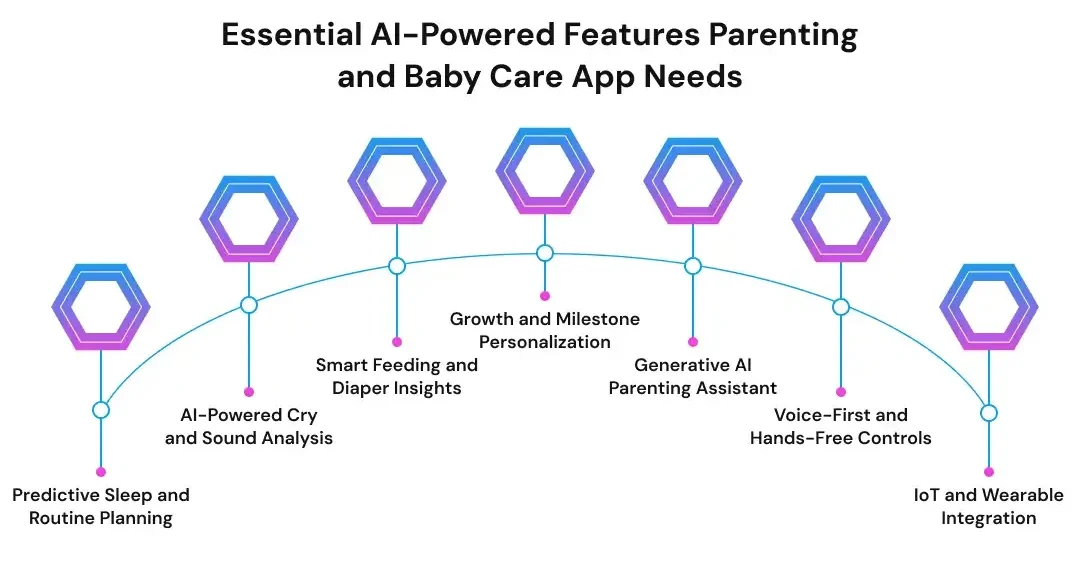
Predictive Sleep and Routine Planning
Sleep tracking is already common in baby care applications. AI can make this feature more useful by analyzing the child’s recent routine rather than displaying only past records.
A sleep prediction system may consider:
- The child’s age
- Recent nap duration
- Wake windows
- Bedtime patterns
- Overnight sleep interruptions
- Feeding times
- Changes in the daily schedule
- Corrections entered by the parent
The app can use these signals to suggest a likely nap window or warn that the current routine differs from the child’s recent pattern.
The recommendation should remain flexible. Infant routines can change because of growth, illness, travel, feeding changes, or environmental conditions. The interface should therefore explain why a suggestion appeared and allow the caregiver to dismiss or correct it.
AI-Powered Cry and Sound Analysis
Cry analysis uses audio-classification models to identify patterns in recorded sounds. Depending on the model and available training data, the app may categorize an audio event as crying, coughing, fussing, background noise, or another predefined sound type.
Some products attempt to estimate whether a baby may be tired, hungry, uncomfortable, or in pain. These outputs should be presented as probabilities, not facts.
A responsible cry-analysis feature should include:
- Background-noise filtering
- Clear consent before audio recording
- On-device processing where practical
- Confidence indicators
- A parent feedback option
- Automatic deletion or limited retention of raw recordings
- Clear wording that the result is not a medical diagnosis
The feature should never imply that an algorithm can determine the exact reason for every cry. Babies may produce similar sounds for different reasons, and environmental noise can affect classification quality.
Smart Feeding and Diaper Insights
Feeding and diaper records can help caregivers understand daily routines and prepare information for pediatric discussions.
AI may analyze these records to:
- Estimate the likely time of the next feeding
- Identify changes in feeding frequency
- Summarize breastfeeding, bottle-feeding, or pumping patterns
- Track the introduction of solid foods
- Highlight changes in diaper frequency
- Prepare a concise report for a pediatric appointment
The application must avoid turning routine variation into an alarming health claim. A change in feeding or diaper patterns may have many explanations, and the app should direct users to a qualified professional when the situation may require medical attention.
Growth and Milestone Personalization
A milestone feature can organize information about movement, communication, social interaction, cognitive development, and physical growth.
AI can personalize this experience by considering:
- The child’s age
- Corrected age for premature infants
- Previously recorded milestones
- Activities completed by the family
- Parent-entered observations
- Relevant developmental content
The app may then recommend age-appropriate activities or display areas the parent may want to discuss with a pediatrician.
This feature should not classify a child as having a developmental condition. Its role is to support observation, organization, and informed conversations with professionals.
Generative AI Parenting Assistant
A generative AI assistant can answer questions, summarize records, retrieve approved guidance, and help parents complete routine tasks through natural language.
A parent may ask:
- “How much did the baby sleep today?”
- “When was the last bottle?”
- “Summarize this week’s feeding routine.”
- “What questions should I prepare for the next pediatric appointment?”
- “Show age-appropriate activities for a six-month-old.”
A trustworthy parenting assistant should not rely only on the general knowledge of a large language model. It should use retrieval-augmented generation, which allows the system to retrieve relevant information from an approved knowledge base before producing an answer.
The implementation should include:
- Pediatrician-reviewed source material
- Citations or links to the supporting guidance
- Child-age and profile context
- Restricted responses for medical questions
- Emergency escalation rules
- Parent-controlled conversation history
- Output monitoring and evaluation
- Clear separation between general information and professional advice
The system should also say when it does not have enough information to answer safely.
Voice-First and Hands-Free Controls
Parents frequently use baby care applications while feeding, carrying, or settling a child. Voice input can make logging faster in these situations.
Example commands include:
- “Record a 120-millilitre feeding.”
- “The baby slept from 1:15 to 2:05.”
- “Add a diaper change.”
- “When was the last medicine dose?”
- “Create a handover summary for the nanny.”
The app should confirm sensitive or high-impact actions before saving them. This is especially important for medication records, appointments, and information shared with another caregiver.
Voice systems should also be tested with different accents, speaking speeds, household noise levels, and supported languages.
IoT and Wearable Integration
A parenting app may connect with external devices such as:
- Baby monitors
- Smart bassinets
- Room-temperature sensors
- Thermometers
- Smart scales
- White-noise machines
- Wearable devices
- Smart lights
- Nursery cameras
These integrations can automate data collection and provide a more complete view of the child’s environment or routine.
They also increase development complexity. The team must manage device permissions, unstable connections, delayed events, vendor API changes, battery limitations, and security risks. Hardware data should not be treated as accurate by default, especially when the app uses it to produce health-related alerts.
AI Feature-Priority Matrix for Product Team
The following table helps product teams compare features according to user value, technical method, data requirements, and risk.
| Feature |
Parent value |
AI method |
Required data |
MVP priority |
Main risk |
| Sleep-window prediction |
High |
Time-series forecasting |
Sleep and feeding logs |
High |
Overconfident suggestions |
| AI parenting assistant |
High |
LLM and RAG |
Approved content and family context |
High |
Unsupported or misleading answers |
| Daily routine summaries |
High |
Pattern analysis and text generation |
Daily care logs |
High |
Misleading correlations |
| Milestone recommendations |
High |
Rules and recommendation models |
Age and milestone records |
High |
Medical overreach |
| Cry classification |
Medium to high |
Audio classification |
Labeled audio samples |
Phase 2 |
Accuracy, consent, and privacy |
| Video safety detection |
High |
Computer vision |
Live or recorded video |
Phase 2 or 3 |
False alarms and surveillance concerns |
| Caregiver stress support |
Medium |
Sentiment analysis |
Parent-entered text or voice |
Phase 2 |
Incorrect emotional interpretation |
| Smart-device control |
Medium |
IoT rules and prediction |
Connected-device events |
Phase 2 |
Reliability and unauthorized access |
| Vital-sign alerts |
High |
Signal analysis |
Sensor and potentially clinical data |
Specialist product |
Medical-device regulation |
For most startups, a routine tracker with shared caregiver access, AI-generated summaries, and one prediction feature offers a more manageable MVP than continuous video analysis or custom cry detection.
Parenting and Baby Care App Features by User Role
Different users need different levels of access. Role-based design reduces privacy risk and keeps the interface relevant.
Parent or Guardian
The parent or guardian should have access to:
- The complete child profile
- AI-generated insights
- Caregiver permissions
- Data export and deletion
- Consent settings
- Subscription and billing
- Long-term reports
- Connected-device controls
Nanny, Grandparent, or Secondary Caregiver
A secondary caregiver may need:
- Limited access to the child profile
- Feeding, diaper, sleep, and activity logging
- Routine instructions
- Medication instructions where authorized
- Handover notes
- Notifications relevant to the care period
They should not automatically receive access to unrelated health information, private parent conversations, or account settings.
Pediatric or Childcare Professional
Professional access should be optional and parent-controlled. Relevant functions may include:
- Structured routine summaries
- Growth and milestone trends
- Exportable reports
- Notes or follow-up recommendations
- Time-limited access
- Audit records showing when information was viewed
Platform Administrator
The administration team may require:
- User and subscription management
- Content-review workflows
- AI prompt and model version control
- Consent records
- Safety-event review
- Support tools
- Audit logs
- Usage and performance analytics
Administrative access should follow the principle of least privilege. Team members should only access the data required for their role.
UX Principles for Time-Constrained Parents
A parenting app may have advanced technology behind it, but the experience should remain simple.
Useful design principles include:
- Support one-handed use
- Keep common logging actions within one or two taps
- Use clear and calm language
- Avoid alarmist notifications
- Explain why an AI recommendation appeared
- Show confidence or uncertainty where relevant
- Allow parents to correct the system
- Include undo options
- Support dark mode for nighttime use
- Provide offline logging
- Use readable typography and accessible contrast
- Respect quiet hours
- Use inclusive family terminology
- Support local languages and cultural differences
- Avoid manipulative streaks or guilt-based reminders
The interface should never make the parent feel that the app knows the child better than they do. AI works best as a supportive layer that organizes information, surfaces patterns, and helps caregivers decide what to do next.
How to Build an AI Parenting or Baby Care App
Building an AI parenting app starts with product decisions, not model selection. Before choosing an LLM, prediction algorithm, or cloud platform, the team must define the parent problem, the intended users, the data the product will process, and the limits of its recommendations.
This preparation matters because a shared baby tracker, a parenting assistant, and a device-connected health application require different architectures, validation methods, budgets, and compliance controls.
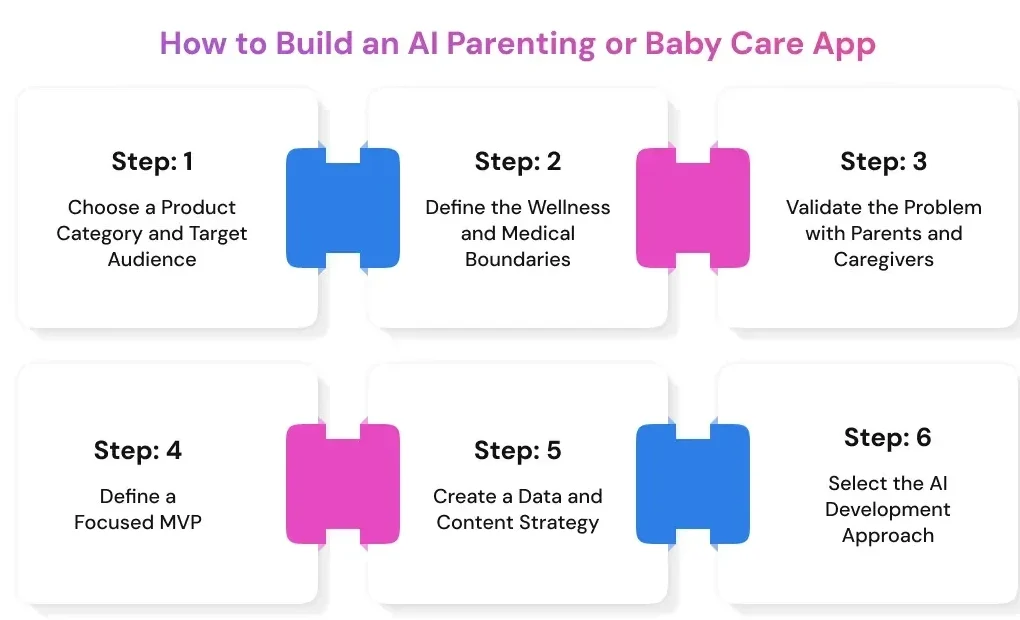
Step 1: Choose a Product Category and Target Audience
The first step is to define what type of parenting product you are building and who will use it.
Possible product directions include:
- A newborn sleep and feeding assistant
- A shared baby tracker for families and caregivers
- An AI-powered milestone coach
- A smart baby-monitor companion app
- A parenting question-and-answer assistant
- A daycare communication and management platform
- A pediatric follow-up companion
- A family-care coordination application
The product should begin with one high-frequency problem. A newborn sleep assistant, for example, may focus on tracking naps, identifying wake-window patterns, and preparing daily summaries. It does not need to include childcare billing, community forums, video monitoring, and developmental screening in its first version.
A focused scope makes it easier to validate demand, collect relevant data, test the AI, and control development costs.
The team should also define the primary user. Parents of newborns may need quick nighttime logging, while childcare providers may require attendance records, staff permissions, parent communication, and reports across multiple children.
Step 2: Define the Wellness and Medical Boundaries
A parenting app should clearly document what it does and what it does not do.
The product team should define:
- What information the app records
- What patterns it analyzes
- What predictions it produces
- What recommendations it provides
- Which situations require professional advice
- Which questions the AI should refuse to answer
- What the product does not diagnose
- What should trigger an emergency message
- Which data can be shared with caregivers
- How long sensitive information is retained
A useful question is:
Does the feature organize information, or does it claim to detect, diagnose, prevent, monitor, or treat a medical condition?
A feature that summarizes sleep records is different from one that claims to identify a breathing disorder. A growth chart is different from an automated developmental diagnosis. These distinctions affect product language, validation, legal review, user warnings, and potentially medical-device regulation.
The team should define these boundaries before development begins. Adding disclaimers after the product is built does not correct an unsafe feature design.
Step 3: Validate the Problem with Parents and Caregivers
User research helps the team understand which tasks are frequent, frustrating, or poorly supported by existing products.
Useful research methods include:
- Interviews with parents and guardians
- Diary studies of daily care routines
- Interviews with pediatric professionals
- Discussions with nannies and childcare staff
- Reviews of competing apps and user complaints
- Prototype usability testing
- Privacy and consent testing
- Small pilot programs with selected families
The research should answer practical questions:
- Which events do parents record every day?
- Which records are difficult to maintain consistently?
- What information is repeatedly shared between caregivers?
- Which alerts create unnecessary stress?
- What questions do parents ask most often?
- Which AI recommendations would they trust?
- Which data would they refuse to upload?
- What would make them stop using the product?
- Which features would they consider paying for?
These findings should shape the MVP. They should also influence notification design, consent flows, data-retention policies, and the tone used in AI-generated responses.
Step 4: Define a Focused MVP
The first version should solve a small number of problems well.
A practical AI parenting app MVP may include:
- Parent and child profiles
- Shared caregiver access
- Feeding, sleep, and diaper logs
- Smart reminders
- Daily and weekly summaries
- One predictive AI feature
- A grounded parenting assistant
- Privacy and consent controls
- Data export and deletion
- Basic administration tools
The team may postpone more complex features such as:
- Continuous video analysis
- A custom cry-classification model
- Medical risk predictions
- Multiple smart-home integrations
- A large parenting community
- Real-time vital-sign monitoring
- A custom foundational language model
- Automated clinical decision-making
An MVP should test whether families find the core workflow useful. It should not attempt to prove every possible AI use case at once.
Also read: How to Build an AI MVP: Step-by-Step Guide
For example, a startup may begin with shared routine tracking and sleep-window prediction. If parents use the predictions, correct the model, and return to the app regularly, the company can then evaluate whether audio analysis or connected-device support is worth the added complexity.
Turn Your Parenting App Idea Into a Focused MVP
Launch with essential baby tracking, caregiver access, AI summaries, privacy controls, and one valuable predictive feature.
Build Your MVP
Step 5: Create a Data and Content Strategy
AI performance depends on the quality, relevance, and governance of the data available to the system.
An AI parenting platform may process three broad categories of data.
User-Generated Data
This includes information created by parents and caregivers, such as:
- Feeding records
- Sleep logs
- Diaper changes
- Medication entries
- Notes
- Photos
- Audio recordings
- Video
- Chat history
- Device readings
- Parent corrections
The application should collect only the information required for the intended feature. A sleep prediction system may need timestamps and routine data, but it may not need to store continuous nursery video.
Reference Data
Reference data supports recommendations and AI-generated answers.
It may include:
- Pediatrician-reviewed parenting content
- Developmental milestone frameworks
- Sleep and feeding guidance
- Product instructions
- Emergency escalation content
- Age-specific activity suggestions
- Frequently asked questions
- Localized health and safety resources
This material should have a documented owner, review process, approval date, and update schedule. Generative AI should retrieve information from approved sources rather than produce unrestricted advice from a general-purpose model.
Model-Improvement Data
Model-improvement data may include:
- Parent corrections
- Accepted or dismissed recommendations
- Classification feedback
- Conversation ratings
- Anonymized performance metrics
- Prediction errors
- Failed searches
- Safety escalations
The organization should not assume that all user data can be reused for training. Consent for operating the application should be separated from consent for model improvement where required.
The data strategy should also address:
- Data minimization
- Purpose limitation
- Retention periods
- Data lineage
- Encryption
- Access controls
- De-identification
- Parent deletion requests
- Content versioning
- Training permissions
- Audit records
Step 6: Select the AI Development Approach
The right AI approach depends on the product stage, available data, privacy requirements, and expected differentiation.
| AI approach |
Best suited for |
Advantages |
Limitations |
| Third-party AI APIs |
MVPs and rapid validation |
Faster implementation and lower initial cost |
Recurring fees and vendor dependency |
| Fine-tuned existing model |
Domain-specific language or classification |
Better task performance than a general model |
Requires quality training data and evaluation |
| Custom machine learning model |
Proprietary prediction, audio, or vision features |
Greater control and product differentiation |
Higher data, training, and maintenance costs |
| On-device model |
Privacy-sensitive or low-latency tasks |
Keeps more processing on the device |
Limited by mobile hardware and battery use |
| Hybrid architecture |
Production products with mixed requirements |
Balances speed, privacy, and customization |
More complex to develop and operate |
A third-party LLM may be suitable for an early parenting assistant, provided the system uses approved content retrieval, access controls, output filters, and evaluation.
A custom model may be more appropriate for a proprietary cry-classification feature or sleep-prediction engine. However, the company will need sufficient labeled data, testing processes, and ongoing monitoring.
Most production applications use a hybrid approach. They may use a hosted language model for conversational features, a custom prediction service for routine analysis, and an on-device model for private audio processing.
Recommended AI Parenting App Architecture
A typical AI parenting application may follow this data flow:
Mobile app, baby monitor, or wearable → secure API gateway → event-processing service → operational database and media storage → AI orchestration layer → prediction or grounded response → safety controls → parent-facing explanation
Each layer has a different responsibility.
| Architecture layer |
Primary responsibility |
Possible technologies |
| Mobile application |
Logging, dashboards, voice input, and notifications |
Flutter, React Native, Swift, or Kotlin |
| Authentication |
Parent identity and caregiver permissions |
Managed identity platform or custom authentication service |
| API layer |
Business logic and secure communication |
Node.js, NestJS, FastAPI, or similar backend frameworks |
| Primary database |
Profiles, permissions, and structured care records |
PostgreSQL |
| Time-series storage |
Sleep, feeding, and device-event sequences |
Time-series extension or managed time-series database |
| Media storage |
Audio, photos, documents, and video |
Encrypted object storage |
| AI orchestration layer |
Prompt handling, retrieval, tools, and safety rules |
Python-based AI services or orchestration frameworks |
| Vector search |
Retrieval of approved parenting content |
Vector database or PostgreSQL vector extension |
| Machine learning services |
Prediction, audio, and computer-vision models |
Managed ML platform or containerized model services |
| On-device AI |
Local audio or image processing |
Core ML, TensorFlow Lite, or ONNX Runtime |
| Device connectivity |
Wearable and baby-monitor communication |
Bluetooth, MQTT, and vendor SDKs |
| Monitoring |
Application, infrastructure, and model performance |
Observability and ML-monitoring platforms |
The exact stack should match the product requirements. A simple tracker with an AI assistant may not need a separate time-series platform or custom model-serving system. A connected baby-monitor app may require low-latency processing, device management, media streaming, and edge inference.
Build the AI Orchestration and Safety Layer
The AI orchestration layer controls how models interact with user data, approved content, application tools, and safety rules.
For a parenting assistant, the layer may:
- Receive the parent’s question.
- Check whether the request involves an emergency or restricted medical topic.
- Retrieve relevant information from the approved knowledge base.
- Add permitted child-profile context.
- Generate a response.
- Check the output for unsupported claims or unsafe advice.
- Attach sources or explanatory context.
- Record performance data without exposing unnecessary personal information.
The application should not send the child’s complete profile to an external model when the task only requires one data point. Context should be limited to what is required for the response.
Tool access should also be restricted. An AI assistant may be allowed to retrieve a feeding summary, but it should not change medication records or share data with another caregiver without confirmation.
Create a Model-Evaluation Framework
AI testing should continue after the feature appears to work in a demonstration. The team must evaluate how the model performs with real users, incomplete records, noisy input, and changing routines.
Audio and Image Models
Useful metrics include:
- Precision
- Recall
- F1 score
- False-positive rate
- False-negative rate
- Performance across device types
- Background-noise tolerance
- Performance across age groups
- Performance across different environments
A cry-analysis model with high overall accuracy may still be unsafe if it frequently misses the events the product considers most important.
Predictive Models
A sleep or feeding prediction system may be evaluated using:
- Mean absolute error
- Calibration
- Prediction coverage
- Parent acceptance rate
- Parent correction rate
- Performance across different routine lengths
- Model drift
- Error patterns across user groups
Calibration measures whether the system’s confidence reflects its actual performance. A prediction shown with 80% confidence should be correct approximately 80% of the time under similar conditions.
Generative AI
A parenting assistant should be evaluated for:
- Grounded-answer rate
- Unsupported-claim rate
- Citation accuracy
- Medical escalation recall
- Refusal accuracy
- Bias
- Harmful or alarming language
- Response relevance
- Latency
- Cost per conversation
Human reviewers should test common parenting questions, ambiguous prompts, emergency scenarios, misleading questions, and attempts to make the model ignore its safety instructions.
Development Stages and Timeline
The development stages usually overlap. Security, data governance, and model evaluation should continue throughout the project rather than being added at the end.
| Development stage |
Approximate duration |
Main deliverable |
| Discovery and product strategy |
2–4 weeks |
Validated concept, audience, scope, and risk boundaries |
| UX research and interface design |
3–6 weeks |
Tested prototype and design system |
| Backend and core app development |
8–16 weeks |
Working mobile app, APIs, database, and admin tools |
| AI integration |
6–14 weeks |
Prediction, retrieval, or model services |
| Security and compliance |
Throughout |
Consent, access, retention, and auditing controls |
| QA and model validation |
4–8 weeks |
Tested release candidate |
| Controlled parent pilot |
4–6 weeks |
Real-world feedback and performance data |
| App store launch |
1–3 weeks |
Production release |
A focused MVP may be completed in approximately three to five months. A platform with custom audio models, device integrations, or clinical validation may require a longer timeline.
Team Required to Build the Application
An AI parenting app usually requires a cross-functional team.
The team may include:
- Product manager
- Business analyst or parenting-domain researcher
- UX/UI designer
- Mobile application developers
- Backend developers
- Machine learning engineer
- Data engineer
- QA and automation engineer
- DevOps or cloud engineer
- Security specialist
- Privacy or regulatory consultant
- Pediatric content reviewer
- Audio, computer-vision, or IoT specialist where required
The pediatric reviewer helps evaluate content, escalation rules, terminology, and health-related boundaries. The privacy specialist helps define consent, retention, data-sharing, and deletion controls.
Strong coordination between these roles is important. The machine learning team cannot evaluate a model properly if the product team has not defined the intended outcome, and the interface team cannot communicate uncertainty if the AI service does not provide confidence information.
The development process should end with a controlled pilot rather than an immediate large-scale launch. Real families will use the app in noisy, incomplete, and unpredictable conditions that internal testing cannot fully reproduce. Their feedback helps the team improve usability, prediction quality, notifications, safety rules, and caregiver permissions before expanding the product.
How Much Does It Cost to Develop an AI Parenting App?
A simple mobile tracker does not require the same investment as a product that analyzes nursery audio, processes video, or provides personalized developmental guidance.
The estimate should account for:
- Product discovery and user research
- UI and UX design
- Mobile and backend development
- Data infrastructure
- AI model integration or training
- Pediatric content development
- Security and privacy controls
- Quality assurance
- Model evaluation
- App-store deployment
- Post-launch monitoring and maintenance
The application’s claims also affect the budget. A wellness app that summarizes sleep records may need strong privacy and product-safety controls. A product that claims to detect a medical condition may require clinical evidence, specialist legal advice, and a more formal regulatory process.
Cost by Product Maturity
The following estimates provide a practical starting point for early budgeting.
| Product level |
Typical scope |
Estimated cost |
Expected timeline |
| Proof of concept |
Interface prototype or limited AI experiment |
$15,000–$35,000 |
1–2 months |
| Lean MVP |
Core logs, family profiles, caregiver sharing, summaries, and one AI feature |
$40,000–$80,000 |
3–5 months |
| Market-ready product |
Multiple AI capabilities, subscriptions, admin tools, analytics, and advanced security |
$80,000–$160,000 |
5–8 months |
| Advanced parenting ecosystem |
Custom models, voice, IoT, video, and high-scale infrastructure |
$160,000–$300,000+ |
8–12 months |
| Regulated or device-connected product |
Clinical claims, specialist hardware, formal validation, and regulatory work |
$250,000–$500,000+ |
12 months or longer |
For businesses that still need to validate technical feasibility, model performance, or a high-risk AI capability, AI PoC development can help test the concept before committing to a complete parenting app MVP.
These ranges overlap because two products with the same number of screens can have very different technical requirements.
For example, adding an AI-generated daily summary to an existing tracker is relatively contained. Developing a proprietary cry-analysis model requires audio collection, labeling, consent management, model training, bias testing, noise testing, and long-term performance monitoring.
Estimated Cost by Development Workstream
Breaking the budget into workstreams makes it easier to see where the investment goes.
| Development workstream |
Illustrative budget range |
| Discovery and product strategy |
$5,000–$15,000 |
| User research and UI/UX design |
$8,000–$25,000 |
| Mobile application development |
$20,000–$60,000 |
| Backend and administration platform |
$20,000–$70,000 |
| Generative AI and RAG integration |
$10,000–$35,000 |
| Predictive machine learning feature |
$15,000–$50,000 |
| Custom audio or computer-vision model |
$30,000–$100,000+ |
| IoT or wearable integration |
$15,000–$60,000 per device ecosystem |
| Security and privacy implementation |
$10,000–$40,000+ |
| QA and AI model validation |
$10,000–$35,000 |
| Deployment and launch preparation |
$3,000–$12,000 |
These workstreams should not automatically be added together. Some activities run in parallel, and one team member may contribute to several areas.
A product that uses a third-party language model, for instance, may not need a large model-training budget. It will still require retrieval, prompt design, output evaluation, safety controls, data-access rules, and usage monitoring.
Factors That Influence the Final Development Cost
AI Complexity
Rule-based reminders cost less to implement than personalized time-series predictions. Custom audio, image, or video models add data-collection and evaluation expenses that a standard generative AI integration does not require.
Number of Platforms
Developing separate native applications for iOS and Android usually requires more engineering and testing than building an initial cross-platform product. Native development may still be appropriate when the app depends heavily on Bluetooth, continuous audio, video processing, or device-specific functionality.
Data Requirements
AI models need representative, correctly labeled, and legally collected data. The budget may increase when the company must create a proprietary dataset, hire domain reviewers, remove personal identifiers, or build a data-labeling workflow.
Connected Devices
Baby monitors, wearables, smart bassinets, thermometers, and nursery sensors introduce vendor SDKs, unstable connections, device permissions, firmware differences, and additional security testing.
Personalization Depth
Basic personalization may use the child’s age and selected preferences. More advanced personalization may analyze months of routine data, caregiver feedback, device signals, and changing behavior. This requires more sophisticated data pipelines and model monitoring.
Security and Compliance
Parenting apps may process children’s profiles, audio, photos, health-related observations, and household information. Encryption, consent management, audit logs, retention controls, access permissions, and deletion workflows must be included in the architecture rather than added after launch.
Localization
Supporting another language involves more than translating buttons. Parenting content, measurements, emergency information, voice recognition, cultural guidance, and AI safety tests may need local review.
Scale and Performance
A small pilot may operate on managed cloud services with limited capacity. A product serving a large user base may need autoscaling, regional deployment, media-delivery infrastructure, database optimization, disaster recovery, and formal service-level objectives.
Plan Your AI Parenting App with Confidence
Get expert guidance on features, architecture, development cost, AI models, device integrations, security, and compliance requirements.
Get a Free Consultation
Hidden and Ongoing Costs
The initial development budget does not represent the complete cost of operating the product.
Ongoing expenses may include:
- Cloud computing and database usage
- Audio, image, and video storage
- LLM input and output processing
- Speech-to-text and text-to-speech services
- Push notifications and messaging
- Model monitoring and retraining
- Pediatric content review
- Privacy and legal audits
- Penetration testing
- Third-party device and software fees
- Customer support
- Analytics and observability tools
- Localization
- App-store charges
- Product updates and operating-system compatibility
Apple currently charges $99 per membership year for its Developer Program, although regional pricing and fee waivers may apply. Google Play charges a $25 one-time registration fee for a Play Console developer account. These amounts are small compared with engineering costs, but they belong in the deployment budget.
App-store commissions also affect subscription economics. Apple’s Small Business Program offers eligible developers a 15% commission rate on paid apps and in-app purchases, subject to its revenue and account requirements. Google states that its service fees vary by market, transaction type, billing method, and developer program.
A useful budgeting formula is:
Total cost of ownership = initial development + infrastructure + AI usage + security and compliance + support + ongoing product and model improvement
How to Reduce AI Parenting App Development Costs Safely
Cost optimization should remove unnecessary scope, not safety controls.
A product team can control spending by:
- Starting with one recurring parenting problem
- Testing the concept with a prototype before full development
- Limiting the MVP to one high-value AI feature
- Using an existing AI model rather than training a foundational model
- Applying RAG to approved content instead of relying on unrestricted generation
- Choosing cross-platform development where device requirements permit it
- Processing privacy-sensitive data on the device where practical
- Avoiding continuous audio or video collection in the first release
- Running a controlled beta before investing in large-scale infrastructure
- Using feature flags to test expensive AI capabilities
- Setting usage limits and monitoring the AI cost per active family
- Automating software regression and model-evaluation tests
- Defining data-retention periods before storage costs increase
- Adding device integrations only when users demonstrate demand
Teams should not reduce the budget by removing pediatric review, model testing, security engineering, or consent management. These measures protect both families and the business.
Revenue Models for an AI Parenting App
The right monetization model depends on the audience and the type of value the application provides.
| Revenue model |
How it works |
Suitable product |
Main consideration |
| Freemium |
Core tracking remains free while AI features require payment |
Consumer baby tracker |
The free tier must still solve a useful problem |
| Subscription |
Families pay monthly or annually |
Parenting assistant or routine coach |
The product must provide continuing value |
| Expert marketplace |
Users pay for sessions with verified professionals |
Parenting advice platform |
Professional credentials and boundaries need verification |
| B2B SaaS |
Childcare providers pay by location, employee, or child |
Daycare-management platform |
Sales and onboarding cycles may be longer |
| B2B2C |
An employer, clinic, insurer, or family-benefit provider pays |
Family-wellness platform |
Integration and contract requirements increase |
| Hardware bundle |
Software is packaged with a monitor or wearable |
Connected baby-care ecosystem |
Hardware support and returns affect margins |
| Paid content |
Users purchase structured programs or courses |
Sleep, feeding, or milestone application |
Content must remain evidence-based and regularly reviewed |
A parenting platform should not depend on selling identifiable child or family data. This model creates privacy risks and can damage the trust required for long-term retention.
Metrics to Track After Launch
Downloads alone do not show whether the product is helping families.
The product team should measure:
- Onboarding completion
- First care event recorded
- Time to the first useful AI insight
- Daily and weekly active families
- Caregiver invitations
- Day-7 and Day-30 retention
- Prediction acceptance rate
- Parent correction rate
- False-alert rate
- AI response satisfaction
- Unsupported-answer rate
- Medical escalation accuracy
- Free-to-paid conversion
- Subscription churn
- Customer-support requests
- AI and cloud cost per active family
- Data-export and deletion completion time
These metrics connect technical performance with product value. A sleep model may perform well in offline testing but still fail commercially if parents ignore its recommendations or find the notifications stressful.
The most sustainable investment approach is to launch a focused product, measure how families use it, and expand only when the data supports the next development decision.
Privacy and Regulatory Requirements for AI Parenting Apps
The laws that apply depend on where the app operates, who uses it, how the data is collected, and what claims the product makes.
| Requirement |
When it may apply |
Product implications |
| COPPA |
A US commercial app or connected service is directed to children under 13, or the operator has actual knowledge that it collects information from them |
Parental notice, verifiable consent, data minimization, access, deletion, retention controls, and vendor oversight |
| GDPR |
The organization processes personal data covered by EU or EEA data-protection law |
Lawful processing, transparent notices, user rights, data minimization, security, processor controls, and privacy impact assessment where required |
| EU AI Act |
An AI system is offered, deployed, or used within the Act’s scope |
Risk classification, transparency, technical documentation, monitoring, human oversight, and potentially additional high-risk obligations |
| HIPAA |
The company acts as a covered entity or a business associate handling protected health information |
Privacy, security, breach-notification, contractual, and access-control requirements |
| FDA medical-device rules |
Software performs a regulated device function or makes certain diagnostic, monitoring, prevention, or treatment claims |
Product classification, quality controls, evidence, documentation, and potentially premarket review |
| State and local privacy laws |
The business processes consumer, biometric, child, or health-related data in covered jurisdictions |
Consent, disclosure, deletion, opt-out, retention, and sensitive-data requirements may vary by location |
This table provides a planning overview, not legal advice. An organization should conduct a jurisdiction-specific review before collecting real family data or making health-related claims.
Does COPPA Apply to a Baby Care App Used by Parents?
COPPA does not automatically apply simply because an app stores information about a child. According to the Federal Trade Commission, the rule applies to covered services that collect personal information online from children under 13. The FTC’s guidance also states that COPPA does not apply to information about children collected online from parents or other adults.
The distinction matters. A baby tracker designed exclusively for adult caregivers may have a different COPPA position from an application that allows children to create profiles, communicate, upload audio, or interact directly with an AI assistant.
Where COPPA applies, the operator may need to:
- Publish a clear privacy policy
- Provide direct notice to parents
- Obtain verifiable parental consent
- Allow parents to review and delete information
- Limit collection to what the service requires
- Protect the confidentiality and integrity of the data
- Retain information only as long as necessary
The FTC amended the COPPA Rule in 2025. The changes include separate parental opt-in requirements for certain third-party disclosures and targeted advertising, stricter retention limits, and an expanded definition of personal information that includes biometric identifiers.
Even when COPPA does not apply, an app may still need to comply with consumer privacy, biometric privacy, health-data, advertising, and unfair-or-deceptive-practices requirements.
GDPR and European Data Protection
The GDPR applies to personal-data processing within its territorial scope and has applied across the European Economic Area since May 25, 2018. It establishes rights for individuals and obligations for organizations that control or process personal information.
For an AI parenting app, practical GDPR considerations may include:
- Identifying a lawful basis for each processing purpose
- Collecting only the information required for the feature
- Explaining how AI uses family data
- Supporting access, correction, portability, and deletion requests
- Controlling international data transfers
- Reviewing cloud, analytics, and AI vendors
- Conducting a data-protection impact assessment when processing creates high risks
- Separating service consent from optional model-training consent
- Applying suitable protections to children’s data
A generic privacy policy is not enough. The product should explain whether a voice recording is stored, converted into text, sent to an external model, used to improve a classifier, or deleted after processing.
EU AI Act
The EU AI Act uses a risk-based framework. The obligations depend on the AI system’s intended purpose, deployment context, and effect on health, safety, or fundamental rights.
The European Commission states that the Act entered into force on August 1, 2024, and is scheduled to become broadly applicable on August 2, 2026, with exceptions and extended timelines for some high-risk systems. Transparency rules for certain AI-generated content are also scheduled to apply from August 2026.
An AI parenting business serving the European market should evaluate:
- Whether users know they are interacting with AI
- How recommendations and limitations are explained
- Whether the system falls into a regulated risk category
- What technical records must be maintained
- How human oversight works
- How model changes are documented
- How incidents and performance problems are monitored
- Whether third-party model providers supply the required information
The compliance position should be reassessed when the app adds new functions. A content-retrieval assistant and an AI system used as a safety component of a regulated product may not face the same obligations.
Does HIPAA Apply to an AI Baby Care App?
HIPAA does not cover every health or wellness application.
The US Department of Health and Human Services states that the HIPAA Rules apply to covered entities and business associates. If an organization does not meet either definition, it does not have to comply with HIPAA solely because it processes health-related information.
HIPAA may become relevant when the app:
- Operates on behalf of a covered healthcare provider
- Receives protected health information from a clinic or health plan
- Provides services involving protected health information for a covered entity
- Integrates into a healthcare workflow under a business-associate arrangement
A direct-to-consumer baby tracker may fall outside HIPAA while still being subject to other federal or state privacy and breach-notification rules. Product teams should not use “HIPAA compliant” as a general marketing phrase without confirming that HIPAA applies and that the required controls and agreements are in place.
Medical-Device Boundaries and Infant-Monitor Safety
The regulatory risk increases when a parenting app moves from recording wellness information to diagnosing, treating, preventing, or monitoring a medical condition.
The FDA uses a risk-based approach to device software. Some low-risk software functions may not be the focus of active oversight, while software that meets the definition of a medical device and presents greater patient risk may require FDA review.
Features requiring specialist assessment may include:
- Monitoring pulse or heart rate
- Measuring oxygen saturation
- Detecting breathing interruptions
- Predicting a medical emergency
- Diagnosing developmental or neurological conditions
- Recommending a treatment or medication change
- Controlling a regulated medical device
- Claiming to prevent infant death or disease
In September 2025, the FDA warned consumers about unauthorized infant devices that claim to monitor vital signs. The agency identified risks including inaccurate measurements, missed changes in a child’s condition, delayed treatment, false alerts, and unnecessary medical intervention.
The FDA also stated that no infant monitor has been authorized to prevent Sudden Infant Death Syndrome or Sudden Unexpected Infant Death. A baby care application should never suggest that its alerts replace adult supervision or evidence-based safe-sleep practices.
A responsible product team should:
- Avoid unsupported medical claims
- Separate wellness insights from clinical alerts
- Show prediction uncertainty
- Avoid implying that silence from the app means the child is safe
- Provide clear emergency instructions
- Validate high-risk features with qualified specialists
- Review whether the software requires regulatory authorization
- Test false-negative and false-positive consequences
- Monitor real-world performance after launch
AI Security and Privacy Checklist
The security model should protect the family account, the child’s records, connected devices, and the AI services processing the data.
Recommended controls include:
- Encryption in transit and at rest
- Multi-factor authentication or passkeys
- Role-based caregiver access
- Least-privilege administrative permissions
- Short-lived links for photos, audio, and video
- Secure device pairing
- Audit logs for sensitive actions
- Parent-controlled data export and deletion
- Automatic retention and deletion rules
- Separate permission for model training
- Vendor security and privacy assessments
- Secure API authentication
- Rate limiting and abuse detection
- Prompt-injection testing
- LLM data-leakage testing
- Backup and disaster-recovery plans
- Penetration testing
- Incident-response procedures
- Model, prompt, and content version history
Deleting an account should remove more than the visible profile. The workflow should address operational databases, media storage, search indexes, vector databases, analytics platforms, backups, and model-improvement datasets according to the applicable retention policy.
Clinical and Ethical Guardrails
An AI parenting assistant may produce fluent language even when its answer is incomplete or unsupported. The system needs safeguards that address this behavior directly.
A 2025 preprint examined 1,508 baby care and pregnancy-related Google searches. It reported that AI Overviews and featured snippets appearing on the same results page provided inconsistent information in 33% of cases. Medical safeguards appeared in 11% of the AI Overviews and 7% of the featured snippets reviewed. The study concerned search features rather than a dedicated parenting app, but it illustrates why high-stakes AI content needs stronger grounding and escalation controls.
Useful guardrails include:
- A pediatrician-reviewed knowledge base
- Retrieval from approved sources before answer generation
- Source citations within health-related responses
- Emergency keyword and intent detection
- Refusal rules for diagnosis and treatment requests
- Human review of sensitive content
- Confidence thresholds
- Clear uncertainty statements
- Age-specific content controls
- Bias testing across demographic and family groups
- Local review for different languages and regions
- Monitoring for unsupported claims
- No fear-based notifications
- No automated medication changes
- No suggestion that AI replaces a pediatric professional
The system should also recognize when the question contains a potentially unsafe assumption. It should correct that assumption rather than answer it literally.
Launch and Growth Roadmap
A controlled launch gives the team time to evaluate how the app performs in real caregiving environments.
- Create a parent advisory group. Include families with different routines, household structures, accessibility needs, languages, and technology experience.
- Complete privacy and safety reviews. Map every data field, vendor, model, retention period, user permission, and product claim.
- Run an internal safety evaluation. Test medical questions, emergencies, ambiguous prompts, noisy audio, missing records, and malicious attempts to bypass AI controls.
- Launch a limited beta. Restrict the first release to a manageable number of families and one primary AI workflow.
- Measure corrections and false alerts. Parent disagreement can reveal usability problems, poor calibration, or gaps in the training data.
- Improve explanations. Users should understand why the app generated a prediction and what they should do when it may be wrong.
- Publish clear AI documentation. Explain data use, limitations, safety boundaries, and how users can report a problem.
- Expand through trusted channels. Suitable partners may include childcare providers, pediatric organizations, family-benefit platforms, and parenting communities.
- Add features based on evidence. Expansion should follow demonstrated retention, reliability, and user demand rather than competitor feature lists.
Future Trends in AI Parenting and Baby Care Apps
On-Device AI
More audio, image, and routine analysis may occur directly on the parent’s phone or connected device. This approach can reduce latency and limit how much raw family data leaves the household.
Smaller Domain-Specific Models
Companies may use smaller models designed for defined parenting workflows instead of sending every task to a large general-purpose model. Smaller models can offer better cost control and may be easier to evaluate for a restricted purpose.
Multimodal Care Assistance
Future applications may combine voice, text, audio events, images, routine logs, and sensor information. The main challenge will be determining which signal is reliable enough to influence a recommendation.
Privacy-Preserving Personalization
Federated learning, local processing, de-identification, and controlled data collaboration may allow products to improve without centralizing every raw recording or family record.
Explainable Routine Predictions
Parents will increasingly expect the app to explain why it recommends a nap, feeding window, or activity. A useful explanation might state that the prediction is based on three recent wake windows rather than presenting the result as a fact.
Greater Healthcare and Childcare Integration
Parent-authorized summaries may move more easily between families, pediatric professionals, nurseries, and other care providers. These integrations will require strict access controls and clear responsibility for data accuracy.
How Prismetric Can Help Build an AI Parenting App
Prismetric helps businesses transform AI parenting and baby care app ideas into secure, scalable, and user-friendly products. Our team manages the complete development lifecycle, from product planning and UI/UX design to development, testing, deployment, and ongoing support.
As the company behind Vitara.ai, Prismetric uses its in-house AI capabilities to accelerate development, automate complex workflows, and build intelligent app features more efficiently. This enables businesses to shorten development cycles, reduce implementation challenges, and launch AI-powered solutions faster.
Prismetric can help with:
- Product discovery, MVP planning, and technical consulting
- AI assistants, predictive insights, and personalized recommendations
- Sleep, feeding, growth, diaper, and milestone tracking
- Custom iOS, Android, and cross-platform development
- Faster AI development using the in-house Vitara.ai platform
- Voice, wearable, IoT, and baby-monitor integrations
- Secure caregiver access and role-based permissions
- Privacy, security, and compliance-focused development
- AI testing, cloud deployment, maintenance, and scaling
Frequently Asked Questions
An AI parenting app generally costs between $40,000 and $250,000 or more. A lean MVP with tracking, shared access, summaries, and one AI capability costs less than a platform with custom audio models, computer vision, connected devices, or regulated medical functions.
A focused MVP may take approximately three to five months. A market-ready product with several AI features may take five to eight months. Custom models, connected hardware, formal clinical validation, or regulatory submissions can extend development beyond 12 months.
A practical MVP may include family profiles, role-based caregiver access, sleep and feeding logs, reminders, daily summaries, privacy controls, data export, and one useful AI feature. Sleep-window prediction or a grounded parenting assistant is usually more manageable than continuous video or vital-sign analysis.
An existing API is often suitable for validating conversational and summarization features. A custom model may be justified when the business has proprietary data or needs a specialized prediction, audio, or vision capability. Many production applications combine third-party, custom, and on-device models.
AI can classify patterns in recorded audio, but it cannot reliably determine the exact cause of every cry. Results depend on training data, recording quality, background noise, device type, and the categories used. The application should present probabilities and allow parent correction.
COPPA generally focuses on personal information collected online from children under 13, not information about children entered by parents or other adults. The answer may change if children interact directly with the service or the operator has actual knowledge that it collects their information.
Regulation may become relevant when software performs a medical-device function or claims to diagnose, monitor, prevent, or treat a condition. Vital-sign monitoring, treatment recommendations, and disease detection require specialist review. The intended use and marketing claims can be as important as the underlying technology.
Common models include freemium access, subscriptions, expert consultations, B2B childcare software, employer or clinic partnerships, paid parenting programs, and hardware bundles. The model should provide continuing value without depending on the sale of identifiable child or family data.