How to Build an AI App for Business: An 8-Step Guide
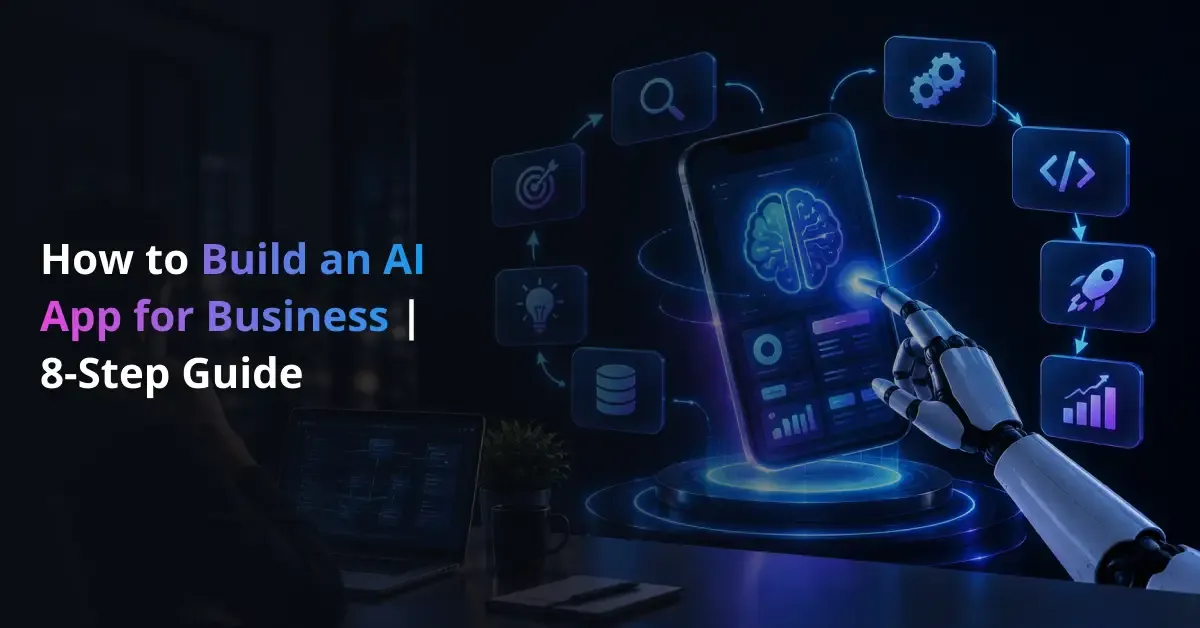
Businesses can now build AI applications faster by using pre-trained models, AI APIs, and no-code development tools. However, creating a working prototype is different from building a secure, scalable application that supports real business processes. Teams still need to define the right use case, prepare reliable data, connect existing systems, evaluate AI outputs, and plan for long-term monitoring.
Understanding how to build an AI app therefore starts with the business problem rather than the model. A practical AI strategy helps organizations connect AI capabilities with measurable goals, while businesses can also evaluate the technical and business feasibility of an AI initiative before choosing a development approach. From there, teams can move through data preparation, architecture design, model selection, integration, testing, deployment, and continuous improvement.
This structured process helps businesses build AI applications that improve efficiency, support faster decision-making, and fit existing operational requirements.
Quick Answer: How Do You Build an AI App?
To build an AI app for business, define the problem, users, workflow, data, and success metrics first. Then choose the right AI capability, design the architecture, build a proof of concept or MVP, integrate business systems, test both software and AI outputs, and deploy with monitoring and security controls.
The process can be summarized in eight steps:
- Define the business problem.
- Map users and workflows.
- Choose the AI capability.
- Design the architecture.
- Build a PoC or MVP.
- Integrate data and security.
- Test the application.
- Deploy and monitor.
What Is an AI App for Business?
An AI app for business is a software application that uses artificial intelligence to perform tasks such as generating content, predicting outcomes, analyzing images, understanding language, or supporting decisions. The application still includes familiar software components such as a user interface, backend services, databases, authentication, APIs, and business integrations. AI adds a layer of intelligence that helps the application automate or improve specific parts of a workflow.
Common AI capabilities include:
- Generative AI: Creates, summarizes, or transforms text and other content.
- Machine learning: Analyzes historical data to predict, classify, or identify patterns.
- Computer vision: Examines images or video to detect objects, defects, documents, or visual events.
- AI agents: Use connected tools and data sources to complete multi-step tasks with defined controls.
For example, an internal knowledge assistant can retrieve approved company information, while a forecasting application can analyze historical sales data to support inventory planning. Understanding how enterprise AI supports business workflows helps organizations connect AI capabilities with specific operational needs instead of treating AI as a standalone feature.
It is also important to separate AI used to build software from AI used inside the final application. An AI coding tool may help developers create an app faster, while the completed product may use models, agents, or machine learning to deliver the actual business functionality. Organizations with more complex requirements may need to develop AI applications around enterprise workflows, data, and integrations rather than rely only on a general-purpose app builder.
Turn Your AI App Idea Into a Validated PoC
Prismetric helps you define the use case, select the right AI approach, test technical feasibility, and validate business value before full development.
Start Your AI PoC
How Is an AI App Different From a Traditional Application?
Traditional applications usually follow predefined rules: when a user provides an input, the software executes programmed logic and returns a predictable result. AI applications combine that rule-based software with models that can interpret language, identify patterns, generate content, or make predictions. This allows businesses to handle workflows that fixed logic alone cannot manage efficiently.
| Area |
Traditional Application |
AI Application |
| Core logic |
Uses predefined rules and workflows |
Combines software rules with model-based reasoning or prediction |
| Data |
Stores and processes structured inputs |
Also uses data as context, training input, or retrieval sources |
| Output |
Usually deterministic |
May vary by model, prompt, and context |
| Testing |
Verifies expected inputs and outputs |
Also evaluates accuracy, relevance, safety, and consistency |
| Monitoring |
Tracks uptime, errors, and performance |
Also monitors output quality, drift, latency, and AI usage costs |
| Improvement |
Requires code or configuration changes |
May involve code, prompts, retrieval, data, or model updates |
These differences change how teams design and operate the product. A support workflow, for example, may use a scripted chatbot, an AI agent for multi-step actions, or an LLM application for knowledge retrieval. Understanding the difference between chatbots, AI agents, and LLM applications helps businesses choose the right level of autonomy.
Because the AI layer must work with the software, teams may need to develop the application and AI functionality as one connected system. This improves reliability, security, and maintainability as the application moves into production.
Choose the Right Way to Build Your AI App
Businesses can build an AI app in several ways, and each approach creates a different balance between development speed, control, cost, and long-term flexibility. The right choice depends on the workflow, data sensitivity, integration requirements, expected scale, and how much customization the product needs.
| Development Approach |
Best Suited For |
Main Advantages |
Key Considerations |
| AI or no-code app builder |
Prototypes, simple internal tools, basic workflows |
Fast setup, lower initial engineering effort |
Limited flexibility, platform dependency, integration constraints |
| Pre-trained AI API + custom app |
Most business generative AI products |
Faster development with greater control |
Requires backend, integration, testing, and security work |
| Custom ML or AI solution |
Proprietary, specialized, or data-intensive workflows |
Greater control over logic, models, and architecture |
Higher development effort, stronger data and engineering requirements |
Don’t Choose Based Only on Development Speed
A no-code AI app builder can be useful when a team needs to validate an idea quickly. However, speed should not be the only decision factor. Businesses should also consider:
- how many systems the app must integrate with;
- whether it handles sensitive or regulated data;
- how complex user roles and permissions are;
- whether the workflow requires custom logic or AI orchestration;
- how much control the organization needs over infrastructure and data;
- whether the product must support large-scale or multi-tenant usage.
Teams can compare custom AI with ready-made solutions to understand the trade-offs between faster deployment and deeper control. For generative AI use cases, organizations may also need to evaluate the architecture, model, retrieval, and implementation approach before selecting a development path.
In practice, the best option is the one that fits the business workflow without adding unnecessary complexity. A simple internal assistant may work well with an AI builder, while a customer-facing product with proprietary data, complex integrations, and strict governance may require a more customized architecture.
What Should You Define Before Starting AI App Development?
Before development begins, businesses should define the problem, users, data, workflow, and expected outcome. This step keeps the project focused on measurable business value and helps teams avoid building AI features that do not solve a clear operational need.
Pre-Development Checklist
- Business problem: What process, delay, cost, or decision needs improvement?
- Users: Who will use the application, and what permissions will they need?
- AI task: Should the system generate, classify, predict, retrieve, analyze, or automate?
- Data: Which documents, databases, APIs, or historical records will support the workflow?
- Success metric: How will the business measure accuracy, adoption, time savings, cost reduction, or another result?
- Integrations: Which CRM, ERP, support, payment, or internal systems must connect to the app?
- Human oversight: Where should employees review, approve, or override AI outputs?
- Security and compliance: What access, privacy, audit, or regulatory requirements apply?
Business-first rule: If an AI capability cannot be connected to a defined workflow, user need, or measurable outcome, it should not be the starting point for the MVP.
A structured AI workflow discovery process helps teams identify where automation can create practical value. Businesses can then estimate the potential return from AI automation and validate the concept with a focused proof of concept before investing in a larger application.
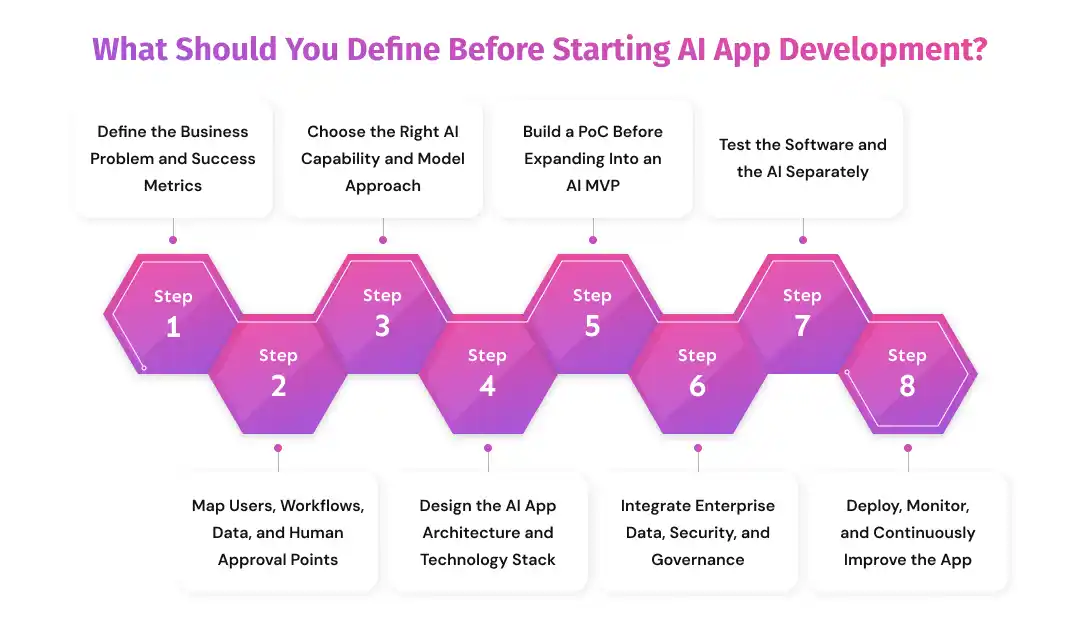
Step 1: Define the Business Problem and Success Metrics
The first step in how to build an AI app is to define the business problem the application should solve. Teams should avoid starting with a model or feature and instead identify the process that creates delays, costs, errors, or poor user experiences.
A useful way to frame the requirement is to connect the problem with the AI task, target user, desired outcome, and measurable KPI.
| Define |
Example |
| Business problem |
Support agents spend too much time searching policy documents |
| AI task |
Retrieve and summarize approved information |
| User |
Customer support employees |
| Desired outcome |
Faster access to relevant answers |
| KPI |
Response time, adoption rate, answer quality |
Businesses can implement AI around a defined business objective by choosing measurable outcomes such as reduced processing time, faster document review, improved forecast accuracy, or higher workflow completion rates.
Once the use case is validated, teams can move the AI initiative toward production with clearer requirements for data, integrations, security, and deployment.
The goal is simple: define what should improve before deciding how AI will improve it.
Step 2: Map Users, Workflows, Data, and Human Approval Points
After defining the business problem, map how the application will work from the user’s request to the final business action. This helps teams understand where AI adds value, which systems it needs to access, and where human review remains necessary.
A typical workflow may look like this:
User request → application → AI processing → business system → result → human approval or action
Before development starts, define:
- User roles: employees, managers, administrators, customers, or partners.
- Inputs: text, documents, images, forms, transactions, or system events.
- Data sources: databases, knowledge repositories, CRM platforms, ERP systems, or APIs.
- AI actions: retrieval, classification, generation, prediction, or workflow automation.
- Outputs: recommendations, summaries, alerts, forecasts, or completed tasks.
- Approval points: decisions that require employee verification before execution.
For LLM applications, teams may need to connect language models with enterprise databases so the system can use approved business information.
Organizations may also need to prepare reliable data pipelines for AI applications to keep information accurate, accessible, and consistent across the workflow.
Step 3: Choose the Right AI Capability and Model Approach
The next step is selecting an AI capability that matches the business problem. Different technologies solve different types of tasks, so businesses should choose the approach based on what the application needs to do rather than selecting a model first.
| Business Requirement |
Suitable AI Capability |
| Generate, summarize, or rewrite text |
Large language model or generative AI |
| Forecast demand or predict outcomes |
Machine learning |
| Analyze images or video |
Computer vision |
| Search private company knowledge |
Retrieval-augmented generation |
| Complete multi-step workflows |
AI agents |
| Classify documents or messages |
NLP or machine learning |
Prompting, RAG, Fine-Tuning, or Custom Models?
Prompt engineering guides a pre-trained model through clear instructions and is often the simplest starting point.
Retrieval-augmented generation (RAG) allows the application to retrieve approved business data before generating a response, helping improve relevance.
Fine-tuning adjusts a model using specialized examples when prompting alone cannot deliver the required behavior. Businesses should compare prompting, retrieval, and fine-tuning approaches before adding model complexity.
Many applications can integrate an LLM into an existing product without training a foundation model from scratch. Specialized requirements may justify developing domain-specific language model capabilities, while forecasting, scoring, and classification workflows may require teams to build predictive machine learning models.
Step 4: Design the AI App Architecture and Technology Stack
Once the use case and AI capability are clear, the next step is designing an architecture that connects the interface, application logic, models, data, and business systems. Businesses should plan the AI technology stack around workload, security, data access, integration requirements, and expected scale rather than selecting technologies individually.
A typical AI application may follow this structure:
User Interface → Application/API Layer → AI Orchestration Layer → Model or Agent → Business Data and APIs → Monitoring and Security
| Architecture Layer |
Main Responsibility |
| Frontend |
Handles user interaction and displays AI outputs |
| Backend |
Manages application logic, APIs, authentication, and workflows |
| AI layer |
Controls prompts, models, agents, and orchestration |
| Data layer |
Stores business data and supports retrieval |
| Integration layer |
Connects CRM, ERP, SaaS platforms, and internal systems |
| Infrastructure |
Supports deployment, scaling, logging, and monitoring |
For LLM-based products, teams also need to select technologies that support model interaction, retrieval, and orchestration. If the organization still depends on older enterprise platforms, the architecture should also account for connecting AI with legacy systems without disrupting existing workflows.
The model is only one part of the application. Businesses may need to integrate AI with existing software and business systems so data can move securely between applications. Knowledge-intensive use cases may require retrieval capabilities for private enterprise information, while content generation, summarization, and conversational workflows may benefit from application-specific generative AI functionality.
Step 5: Build a PoC Before Expanding Into an AI MVP
Businesses should avoid building a complete product before confirming that the underlying AI capability can solve the intended problem. A structured AI proof-of-concept process helps teams test technical feasibility with limited scope, data, and users before committing to a larger development effort.
| PoC |
AI MVP |
| Tests whether the AI capability works |
Tests whether users gain practical value |
| Uses a narrow experiment |
Includes a usable workflow |
| Involves limited users |
Reaches real target users |
| Focuses on technical feasibility |
Evaluates product and business fit |
A practical development path is:
Idea → PoC → MVP → Production
Teams should first decide whether the project needs a PoC or an MVP based on what remains uncertain. For example, instead of creating a company-wide AI assistant immediately, a business could test an assistant that answers questions from one approved policy repository.
Once the AI performs reliably in that narrow scenario, teams can build an AI MVP around the validated workflow. Defining the minimum feature set required to test real user value helps control complexity, while dedicated AI MVP development support can help move the product toward a production-ready version.
Step 6: Integrate Enterprise Data, Security, and Governance
An AI app becomes useful when it can work safely with the data and systems required by the business. Security and governance should therefore be designed into the application lifecycle, with teams applying AI controls throughout software development rather than adding them only before deployment.
Key controls typically include:
- Authentication: Verify who can access the application.
- Role-based access: Limit data and functions according to user responsibilities.
- Encryption: Protect sensitive information in transit and at rest.
- API security: Control how the app connects with internal and external systems.
- Tenant isolation: Separate customer or business-unit data in multi-tenant products.
- Input validation: Reduce exposure to unsafe or manipulated inputs.
- Audit logs: Record important user, system, and AI actions.
- Human oversight: Require approval when AI outputs affect sensitive or high-impact decisions.
For knowledge-based applications, retrieved information should follow the user’s existing permissions. Teams building these systems also need to understand the compliance, security, and governance requirements of enterprise RAG applications so AI does not expose information that a user would normally be restricted from accessing.
The same principle applies to automation. Businesses can automate operational workflows with appropriate controls while keeping approval steps, auditability, and access restrictions in place. This allows AI to improve efficiency without weakening privacy, security, or accountability.
Step 7: Test the Software and the AI Separately
Testing an AI app requires more than checking whether buttons, forms, APIs, and authentication work correctly. Teams also need to evaluate the quality of AI outputs because model responses can vary based on prompts, context, data, and user input. A structured AI model evaluation process helps businesses measure whether the system performs reliably enough for the intended workflow.
| What to Test |
Examples |
| Application functionality |
Forms, authentication, APIs, and business logic |
| AI quality |
Accuracy, relevance, completeness, and consistency |
| Failure behavior |
Unsupported, ambiguous, or adversarial inputs |
| Security |
Permissions, data exposure, and access controls |
| Performance |
Response time, latency, and throughput |
| Economics |
Token usage, API consumption, and cost per request |
| User acceptance |
Ease of use, usefulness, and workflow fit |
Teams should create evaluation datasets that reflect real business scenarios instead of relying only on a few manual prompts. For a document assistant, this may include questions with known answers, incomplete context, conflicting information, and restricted data.
The goal is to test both what the software does and how reliably the AI supports the business task before production use.
Step 8: Deploy, Monitor, and Continuously Improve the App
Deployment moves the AI app from a controlled development environment into real business use, but it does not end the development process. Teams need monitoring to identify performance issues, changing user behavior, model failures, and rising operating costs before they affect the workflow.
After launch, monitor:
- application uptime and errors;
- AI response quality and failed requests;
- response latency and throughput;
- token and API usage;
- inference and infrastructure costs;
- user feedback and adoption;
- model or provider changes;
- security events and access patterns.
As usage grows, businesses can reduce LLM inference costs by optimizing prompts, model selection, caching, retrieval, and request routing. These changes can improve cost efficiency without reducing the usefulness of the application.
Production systems also need reliable release, logging, scaling, and rollback processes. Establishing deployment and operational practices for AI applications helps teams manage updates with less disruption.
Continuous improvement may involve changing prompts, retrieval logic, data sources, workflows, or models based on measured performance and user feedback.
Build an AI App Around Your Real Business Workflow
Connect models, enterprise data, APIs, CRM, ERP, and business logic within a secure architecture designed for your users and operational needs.
Build Your AI Application
How Much Does It Cost and How Long Does It Take to Build an AI App?
AI app development cost and timeline depend on the complexity of the business workflow rather than on AI alone. A simple internal assistant that uses a pre-trained model may require far less effort than a customer-facing application with proprietary data, multiple integrations, role-based access, and strict compliance requirements.
For example, adding retrieval, enterprise integrations, or approval workflows increases development work because each capability introduces additional design and testing requirements.
The main cost drivers include:
| Cost Factor |
Why It Affects Development |
| AI capability |
API-based features are generally simpler than specialized model development |
| Data |
Cleaning, labeling, migration, and preparation add engineering effort |
| RAG |
Retrieval pipelines, vector storage, permissions, and evaluation require additional components |
| Integrations |
CRM, ERP, payment, and internal systems increase implementation complexity |
| Security |
Access controls, auditability, and compliance add design and testing requirements |
| UX |
Multiple roles and workflows require more interface and product design |
| Scale |
Higher usage increases infrastructure and model consumption |
| Maintenance |
Monitoring, evaluation, updates, and optimization continue after launch |
Businesses should review these variables when estimating AI development cost instead of relying on a single price range that may not match the project.
Timeline also changes by development stage:
| Stage |
Primary Objective |
| Prototype |
Demonstrate the idea and basic interaction |
| PoC |
Confirm technical feasibility |
| MVP |
Validate user and business value |
| Production |
Add reliability, security, integrations, and governance |
| Scale |
Optimize performance, cost, and operational processes |
A prototype can be created quickly with an AI builder, while a production application may require substantially more work because teams must validate data, integrations, security, and model behavior. Organizations can use an AI app development timeline to understand how scope and complexity affect delivery.
The most reliable estimate comes after the business workflow, data sources, integrations, user roles, and AI requirements are defined. This prevents teams from comparing projects that may both be called “AI apps” but have very different engineering requirements.
Common Mistakes to Avoid When Building an AI App
AI app development can move quickly, but problems arise when teams skip validation, security, or planning. Avoiding these mistakes helps businesses reduce rework and build applications that are easier to scale.
- Starting with the model instead of the problem. Choosing an AI platform before defining the workflow can lead to features that do not solve a measurable business need.
- Automating too much in the first version. A narrow use case is easier to test, improve, and measure than several unproven workflows.
- Fine-tuning or training too early. Prompting or RAG may solve the requirement with less cost and complexity.
- Ignoring data quality and permissions. Incomplete or poorly governed data can reduce output quality and expose information to the wrong users.
- Treating a prototype as production software. A demo may prove the concept, but production use still requires authentication, monitoring, testing, and operational controls.
- Testing the interface but not the AI. Teams should evaluate accuracy, relevance, failure cases, and business-specific output quality.
- Ignoring model and API costs. Token consumption, infrastructure, and third-party services can become significant as usage grows.
- Giving AI excessive access. Models and agents should receive only the tools and data required for their task.
- Launching without monitoring. Businesses need visibility into errors, latency, costs, and user feedback.
- Removing human review too early. High-impact decisions may still require approval or escalation.
A structured approach to building production AI software helps teams address these risks during design, development, testing, and deployment rather than correcting them after launch.
AI App Builder or Custom AI Development: Which Should You Choose?
An AI app builder can help businesses validate an idea quickly, while custom development provides more control over architecture, data, integrations, and scalability. The better option depends on the application’s complexity and business importance.
| Choose an AI App Builder When… |
Consider Custom AI Development When… |
| The workflow is simple and well defined |
The workflow includes proprietary or complex business logic |
| Rapid experimentation is the priority |
Long-term flexibility and control are important |
| Standard integrations meet the requirement |
Deep CRM, ERP, legacy, or custom API integrations are needed |
| The app handles lower-risk data |
Sensitive or regulated data is involved |
| Basic UI customization is sufficient |
The product needs a specialized user experience |
| Usage is small or predictable |
The application must support enterprise scale or multi-tenancy |
| Platform-managed infrastructure is acceptable |
The business needs control over hosting and deployment |
The choice does not have to be permanent. A business can use an AI builder to test user demand and workflow assumptions, then rebuild important components when requirements become clearer. This reduces early development effort without forcing the product into an unsuitable architecture.
When requirements include complex integrations, strict governance, advanced AI orchestration, or scale, teams may also need to evaluate an AI development partner based on technical expertise, security, and delivery experience.
The right path should support the business objective while leaving flexibility for the application to evolve.
Production-Ready AI App Checklist
Before launch, teams should confirm that the AI app can operate reliably within the intended business workflow. A production-readiness review helps identify gaps in data, security, testing, and operations before users depend on the system.
- The business objective and success metrics are clearly defined.
- The AI capability has a specific role in the workflow.
- User roles and permissions are implemented.
- Required databases, documents, and APIs are connected.
- AI outputs have been tested against realistic scenarios.
- Failure cases and unsupported requests are handled.
- Sensitive information is protected.
- Human review is included where oversight is required.
- Token, API, and infrastructure costs are monitored.
- Logging and observability are available for production issues.
- Users can report incorrect or unhelpful outputs.
- The team has a process for updating prompts, retrieval, data, or models.
This checklist helps teams verify that the application is ready to move from a controlled environment into day-to-day business use.
Move From AI Prototype to Production-Ready Application
Prismetric can help with testing, security, integrations, monitoring, scalability, and continuous optimization as your AI app moves into real business use.
Talk to Our AI App Experts
Why Choose Prismetric to Build and Scale Your AI Application
Building an AI app for business requires more than connecting a model to a user interface. The application also needs reliable data pipelines, secure integrations, appropriate model selection, testing, monitoring, and infrastructure that can support real business usage.
Prismetric helps businesses plan, develop, integrate, and scale AI applications around specific workflows and operational requirements. The company provides AI development services to businesses in the USA, Australia, Germany, and other markets around the globe, supporting organizations that need AI systems aligned with their existing data, applications, security requirements, and business processes.
What Prismetric Brings to AI App Development
Depending on the use case, Prismetric can support:
- AI strategy and use-case validation to define the business problem, users, data requirements, and measurable goals.
- PoC and MVP development to test technical feasibility before investing in a larger product.
- Generative AI and LLM application development for knowledge assistants, content workflows, document processing, and conversational applications.
- RAG implementation to connect AI applications with approved enterprise knowledge and business data.
- AI agent and workflow automation to automate multi-step processes across connected systems.
- Enterprise integration to connect AI functionality with CRM, ERP, databases, APIs, and existing software.
- AI testing and evaluation to measure response quality, accuracy, relevance, latency, and failure behavior.
- Deployment and monitoring to support security, scalability, observability, and ongoing optimization.
AI Applications Businesses Can Build Across Industries
| AI Solution |
What It Can Do |
Potential Business Value |
| Banking knowledge assistant |
Retrieves information from approved policies, procedures, and financial documents |
Faster information access and more consistent employee support |
| Healthcare document assistant |
Summarizes clinical or administrative documents and retrieves relevant information |
Reduced manual review and faster access to information |
| Retail forecasting application |
Analyzes historical sales and inventory data to predict demand |
Better inventory planning and fewer stock imbalances |
| Manufacturing AI system |
Analyzes equipment, production, or visual inspection data |
Faster anomaly detection and improved operational visibility |
| Logistics workflow assistant |
Monitors shipments, processes documents, and flags operational exceptions |
Faster exception handling and reduced manual coordination |
| Enterprise support copilot |
Searches internal knowledge and helps employees prepare responses |
Shorter search time and improved productivity |
AI delivers the most value when it becomes part of an existing workflow rather than operating as a standalone experiment. This requires models, enterprise data, business logic, security controls, and user actions to work together within one coordinated system.
For organizations in the USA, Australia, Germany, and other global markets, Prismetric can support the journey from an initial AI idea to a validated PoC, focused MVP, or production application while keeping architecture, integration, security, scalability, and long-term operational requirements in view from the beginning.
Frequently Asked Questions About Building an AI App for Business
Yes. AI app builders and no-code platforms can help businesses create prototypes, internal tools, and simple AI workflows without traditional programming.
However, custom development may still be required when the application needs:
- complex business logic;
- enterprise integrations;
- advanced user permissions;
- sensitive data controls; or
- greater control over scalability and infrastructure.
Usually, no. Many business applications can use existing pre-trained models for language generation, document processing, classification, search, and other tasks.
Businesses can extend these models with prompting, retrieval-augmented generation, or fine-tuning when the application requires company-specific knowledge or specialized behavior.
The required data depends on what the application needs to do. A knowledge assistant may use policies, documents, databases, or product information, while a predictive application may require historical sales, operational, or customer data.
The data should be relevant, accessible, properly governed, and reliable enough to support the intended AI task.
AI app development costs vary based on the scope, model requirements, integrations, data preparation, security, interface complexity, and expected usage.
The largest cost drivers usually include:
- custom application development;
- model or API usage;
- data engineering;
- RAG or fine-tuning;
- enterprise integrations;
- security and compliance; and
- ongoing monitoring and maintenance.
A simple prototype may be created relatively quickly, while a production AI application requires more time for architecture, integrations, testing, security, and deployment.
The development path often moves through prototype → PoC → MVP → production, with each stage adding more reliability and operational readiness.
There is no universal technology stack for every AI app. The right combination depends on the business workflow, model type, data sources, integrations, security requirements, and expected scale.
A typical stack may include a frontend framework, backend services, database, AI model or API, retrieval layer, authentication, cloud infrastructure, and monitoring tools.
Businesses can connect an AI application to databases, document repositories, CRM platforms, ERP systems, internal APIs, and other enterprise sources.
For knowledge-based applications, teams commonly use a retrieval layer that allows the AI to search approved information before generating an answer. Access controls should ensure users only retrieve information they are authorized to view.
Hallucinations cannot always be eliminated completely, but teams can reduce their frequency by giving the model better context and controlling how it responds.
Common methods include:
- using RAG with trusted business data;
- improving prompts and instructions;
- restricting unsupported responses;
- evaluating outputs against test datasets;
- adding citations or source references; and
- requiring human approval for high-impact decisions.
An internal team may work well when the organization already has AI, software engineering, data, DevOps, and security expertise. External support becomes more useful when the application involves unfamiliar models, complex integrations, or enterprise deployment requirements.
For businesses that need additional technical expertise, Prismetric can support AI application planning, architecture, development, integration, testing, and deployment while working around the organization’s existing workflows and technology environment.
Yes. AI applications can connect with existing systems through APIs, middleware, databases, and integration services. These connections allow AI to retrieve information, update records, trigger workflows, or support employees without replacing the underlying business platforms.
For organizations working across several systems, Prismetric can help integrate AI capabilities with existing enterprise applications while maintaining authentication, permissions, data flows, and operational controls.
A prototype proves that an idea can work, but production deployment requires additional engineering.
Teams typically need to add:
- secure authentication and authorization;
- production data integrations;
- monitoring and logging;
- AI evaluation;
- exception handling;
- infrastructure scaling; and
- governance controls.
Prismetric can help businesses move from an early AI concept or PoC to an MVP and production application, with the architecture, integrations, testing, and deployment processes required for day-to-day business use.
Start with a workflow where AI can improve a measurable outcome rather than adding AI because the technology is available.
A useful AI app should answer three questions:
- What business problem does it solve?
- What task does AI perform better or faster?
- How will the business measure whether it works?
This keeps development focused on practical value such as automation, faster decision-making, improved customer experience, or reduced manual processing.