“Working with Prismetric was a straightforward experience from day one. Their staff understood what we wanted to create and helped turn our idea into a practical AI product. They kept us informed, responded promptly, and handled every stage professionally. The solution matched our business needs well, and I would happily work with their team again.”
Marc De Chellis
Product Director- Launchpad Apps
“We had a positive experience with Prismetric while developing our AI product. Their team was professional, responsive, and willing to share ideas that improved the outcome. Communication was clear, deadlines were handled well, and the project stayed on track. They made things easy for our team, and we would gladly work with Prismetric on projects.”
Richard Tellier
President TellAText LLC
“Prismetric did a great job from planning through delivery. Their team understood the project, communicated well, and kept things moving without making the process complicated. They were reliable, easy to work with, and paid attention to the details. I would recommend them to anyone looking for a dependable team for AI development and product work.”
Curt Hayes
President Audio Design Inc
“Prismetric made the development process easy to understand from the beginning. Their team kept us updated, answered questions quickly, and handled changes without confusion. They were professional, helpful, and focused on making sure it worked properly. I was happy with how the AI project turned out and would gladly work with them again in future.”
Table of Contents
Difference Between AI Chatbot, AI Agent, and LLM App
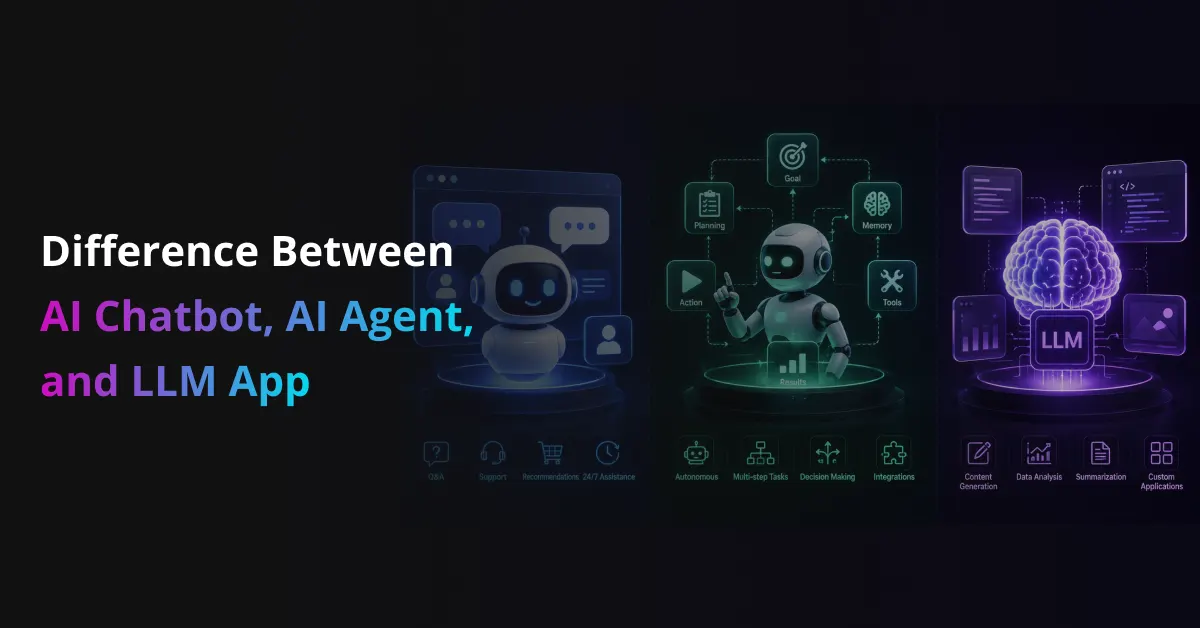
AI chatbots, AI agents, and LLM apps often get used like they mean the same thing. They don’t. Each one solves a different problem, works in a different way, and needs a different level of engineering.
For a business, this difference matters. A chatbot may answer customer questions, an LLM app may summarize documents, and an AI agent may complete a full workflow across tools like CRM, email, calendar, or ERP.
Choosing the right one helps businesses avoid wasted budget and overbuilt AI systems. It also helps product teams build AI solutions that match real needs, whether the goal is support automation, internal productivity, smarter workflows, or full AI powered task execution.
Table of Contents
Quick Answer: What Is the Difference Between an AI Chatbot, AI Agent, and LLM App?
An AI chatbot mainly talks with users and answers questions. An LLM app uses a large language model to complete a focused task, such as summarizing a document, drafting an email, or translating text. An AI agent goes further. It understands a goal, plans steps, uses tools, connects with systems, and takes action with limited human input.
AI Chatbot vs LLM App vs AI Agent: Simple Comparison Table
Comparison Point
AI Chatbot
LLM App
AI Agent
Main purpose
Answers user questions
Completes a focused AI task
Works toward a goal
User interaction
Mostly chat based
Can be chat or form based
Can be chat, task, or workflow based
Autonomy level
Low
Low to medium
Medium to high
Main ability
Responds to prompts
Generates, summarizes, extracts, or analyzes content
Plans steps, uses tools, and takes action
Tool usage
Limited or none
May use APIs or databases
Uses tools, APIs, apps, and business systems
Action taking
Usually does not take action
Usually gives output
Can update records, send emails, book meetings, or trigger workflows
Best for
FAQs, support, lead capture
Writing, summarizing, research, document analysis
Sales automation, support resolution, operations, workflow automation
Example
Website support bot
AI resume analyzer
AI sales agent that qualifies leads and updates CRM
Business risk
Low
Medium
Higher because it can take actions
Setup complexity
Simple to moderate
Moderate
More complex due to integrations and guardrails
Simple Meaning of AI Chatbot, AI Agent, and LLM App
These three AI terms often overlap because they may all use large language models in some way. The real difference comes from what each system is expected to do. Some answer questions. Some complete a focused task. Some take action across tools and business systems.
What Is an AI Chatbot?
An AI chatbot is a conversational system that talks with users through a chat interface. It answers questions, guides users, collects details, and helps people find the right information faster.
A chatbot can be rule based or LLM powered. A rule based chatbot follows fixed flows and predefined answers. An LLM powered chatbot understands natural language better and can respond in a more flexible way. Still, most chatbots wait for the user to ask something before they respond.
Businesses commonly use AI chatbots for FAQs, customer support, lead capture, product guidance, appointment queries, and basic troubleshooting. For example, a website support bot can answer questions about pricing, refund rules, delivery status, or order updates without involving a human support team every time.
What Is an LLM App?
An LLM app is a software application powered by a large language model. It usually completes one clear task, such as summarizing a document, drafting an email, translating text, extracting information, or generating product descriptions. Unlike an AI chatbot, an LLM app does not always need a chat interface. It can work through a form, dashboard, upload field, browser extension, or internal business tool.
Key points to understand:
It uses a large language model to process user input and generate useful output.
It usually focuses on one specific task or workflow.
It may work without a chat window or conversational interface.
It can use prompts, RAG, APIs, workflows, or fine tuning for better accuracy.
Common examples include resume analyzers, meeting summarizers, legal document summarizers, AI email writers, product description generators, and customer review analyzers.
What Is an AI Agent?
An AI agent is a goal driven AI system that can understand what needs to be done, plan the steps, use tools, and take action. It does more than answer a question or generate text. It works toward an outcome.
An AI agent may connect with CRMs, ERPs, databases, calendars, APIs, email platforms, ticketing tools, and other business systems. This allows it to complete multi step workflows, such as checking records, updating data, sending messages, creating tasks, or routing approvals.
Because AI agents can act inside real business systems, they need proper guardrails. Businesses must define permissions, approval rules, monitoring, fallback steps, and human escalation points. For example, a sales AI agent can qualify leads, check CRM records, draft follow up emails, schedule meetings, and update deal stages without needing a person to manage every small step.
AI Chatbot vs AI Agent vs LLM App: Detailed Comparison
The easiest way to compare an AI chatbot, LLM app, and AI agent is to look at what each one can actually do. The interface may look similar, especially when all three use a chat window, but their purpose, autonomy, and business impact are very different.
Comparison Point
AI Chatbot
LLM App
AI Agent
Main purpose
Answers questions and guides users
Completes a focused AI powered task
Works toward a goal and completes steps
User input
User asks a question or selects an option
User gives text, files, data, or instructions
User gives a goal or task request
Output type
Reply, suggestion, link, or guided answer
Summary, draft, analysis, classification, or extracted data
Completed action, updated record, sent message, or workflow result
Level of autonomy
Low
Low to medium
Medium to high
Ability to use tools
Limited, mostly knowledge base or simple integrations
May use APIs, RAG, databases, or workflow logic
Uses tools, APIs, software systems, databases, and business apps
Ability to take action
Usually limited to answering or routing
Usually creates output, but may not act on it
Can take actions like sending emails, updating CRM, creating tickets, or booking meetings
Memory and context
Basic conversation history or user session
Task specific context, uploaded files, or connected knowledge base
Ongoing task memory, user preferences, workflow state, and system context
Integration depth
Light to moderate
Moderate, depending on use case
Deep, especially when connected to CRM, ERP, calendar, email, or internal tools
Best use cases
FAQs, customer support, lead capture, basic guidance
Document summarization, email drafting, data extraction, content generation, review analysis
Sales automation, support resolution, invoice handling, HR workflows, operations automation
Business risk
Low, because it mostly responds
Medium, because output quality and data privacy matter
Higher, because it can act inside business systems
Cost and maintenance
Lower cost and easier to maintain
Moderate cost based on model usage, prompts, and data needs
Higher cost due to integrations, guardrails, monitoring, and workflow testing
Example
Website bot answering pricing or refund questions
AI meeting summarizer that creates action points
AI sales agent that qualifies leads, drafts follow ups, schedules calls, and updates CRM
Real World Examples of AI Chatbots, LLM Apps, and AI Agents
The difference becomes clearer when you see how each one works inside real business workflows.
Customer Support
Here’s how they support customer service teams in real life:
An AI chatbot answers refund policy questions.
An LLM app summarizes a long customer complaint.
An AI agent checks order history, creates a return request, updates the CRM, and sends a confirmation message.
Sales
This is how they help sales teams move leads forward:
An AI chatbot answers pricing and plan related questions.
An LLM app writes a personalized sales email.
An AI agent qualifies leads, checks CRM data, suggests the next step, and books a sales call.
An AI agent creates tasks, edits code, runs tests, and opens a pull request for review.
When Should a Business Use an AI Chatbot?
A business should use an AI chatbot when the goal is to answer questions, guide users, or handle simple conversations. It works best when queries are repetitive, workflows are easy to control, and human handoff is enough for complex cases.
AI chatbots are a good fit when:
Users ask the same questions again and again.
The business needs fast and low cost deployment.
The workflow does not need deep decision making.
Answers need to stay controlled for compliance or brand consistency.
The chatbot can transfer the user to a human when needed.
Best use cases include:
FAQs
Product support
Appointment guidance
Lead capture
Basic troubleshooting
Knowledge base search
When Should a Business Build an LLM App?
A business should build an LLM app when users need one intelligent task completed with better speed and accuracy. It works well when the process has a clear input and output, and the value comes from language understanding, content generation, summarization, extraction, or classification.
LLM apps are a good fit when:
The task needs high quality text or data output.
The user does not always need a chat interface.
The process depends on documents, text, or business data.
The app must generate, rewrite, summarize, classify, or extract information.
The workflow can stay focused around one main task.
Best use cases include:
AI content generator
Document summarizer
Proposal writer
Legal document analyzer
Review sentiment analyzer
Code assistant
Data to insight tool
When Should a Business Use an AI Agent?
A business should use an AI agent when the system must do more than answer or generate content. AI agents fit best when a task has many steps, needs reasoning, connects with multiple tools, and requires action inside business systems.
AI agents are a good fit when:
The workflow changes based on user context or business rules.
The system must use tools, APIs, CRMs, ERPs, calendars, or databases.
The task needs planning, decision making, and follow through.
Teams want automation, but still need monitoring and human approval.
The system must complete work across different apps or departments.
Best use cases include:
Customer issue resolution
Order modification
Invoice processing
Employee onboarding
IT ticket handling
Sales follow up
Workflow automation
Common Misconceptions About AI Chatbots, AI Agents, and LLM Apps
AI terms often sound similar, so it’s easy to mix them up. Here are the most common misconceptions businesses should clear before choosing the right AI solution.
Misconception 1: Every AI Chatbot Is an AI Agent
This is not true. An AI chatbot mainly answers questions or guides users through a conversation. It may use an LLM, but that does not make it an agent.
An AI agent needs more capability. It should understand a goal, plan steps, use tools, connect with systems, and take action.
Misconception 2: Every LLM App Is a Chatbot
Many LLM apps are not conversational at all. Some work through dashboards, forms, upload fields, internal tools, or browser extensions.
For example, a document summarizer, resume analyzer, or invoice data extractor may use an LLM without offering a chat interface.
Misconception 3: Adding ChatGPT to Software Makes It an AI Agent
Adding ChatGPT or any LLM to software only adds language intelligence. It does not automatically create an AI agent.
To become an agent, the system needs planning logic, tool access, permissions, memory, action loops, and clear rules for what it can and cannot do.
Misconception 4: AI Agents Can Run Everything Alone
AI agents still need control. They can automate many steps, but businesses should not let them handle every workflow without review.
Sensitive tasks need human approval, audit logs, fallback rules, and deterministic workflows. This matters most in finance, healthcare, legal, HR, and enterprise operations.
Misconception 5: AI Agents Are Always Better Than Chatbots
AI agents are more capable, but they are not always the better choice. A simple FAQ or lead capture workflow may only need an AI chatbot.
Using an agent for a basic task can increase cost, risk, and maintenance without adding real business value.
How to Choose the Right AI Solution for Your Business
Choosing between an AI chatbot, LLM app, and AI agent becomes easier when the business problem is clear. Use this checklist before you build or invest.
Define the exact business problem you want to solve.
List the inputs the system will need, such as text, files, customer data, or system records.
Decide what output you expect, such as an answer, summary, report, action, or completed workflow.
Check whether the system only needs to respond or take action inside business tools.
Review available data sources, APIs, CRMs, ERPs, calendars, or internal systems.
Decide how much autonomy the AI system should have.
Set safety rules, approval steps, permissions, and human handoff points.
Start with one narrow use case instead of automating everything at once.
Track results, accuracy, user feedback, cost, and time saved before scaling.
How Prismetric Helps Businesses Build AI Chatbots, LLM Apps, and AI Agents
Prismetric helps businesses choose, design, and build the right AI solution based on their actual workflow. Some businesses need a simple AI chatbot for customer support. Some need an LLM app to summarize documents, generate reports, or analyze business data. Others need an AI agent that can connect with tools, follow steps, and complete tasks across systems.
The team starts by understanding the business problem, user flow, data sources, and expected outcome. This helps avoid overbuilding. If a chatbot is enough, Prismetric builds a focused conversational solution. If the use case needs document intelligence or content generation, the team can build an LLM powered app with prompts, RAG, APIs, and workflow logic. If the process needs action, Prismetric can develop AI agents that work with CRMs, ERPs, calendars, databases, support tools, and internal platforms.
Prismetric also focuses on the parts that matter in real business use. That includes secure data handling, role based access, human approval steps, monitoring, error handling, and clear escalation paths. So the final AI system does not just look smart in a demo. It works inside the business with the right controls.
Businesses can work with Prismetric to build:
AI chatbots for customer support, lead capture, FAQs, product guidance, and internal knowledge search.
LLM apps for document summarization, proposal drafting, content generation, data extraction, and business reporting.
AI agents for sales follow up, customer issue resolution, invoice processing, HR workflows, IT ticket handling, and workflow automation.
RAG based AI systems that answer questions from company documents, policies, manuals, and knowledge bases.
Enterprise copilots that help teams search, analyze, draft, and complete tasks faster.
The goal is simple. Prismetric helps businesses move from AI confusion to a practical AI solution that fits the use case, budget, data environment, and long term product roadmap.
FAQs About AI Chatbots, AI Agents, and LLM Apps
What is the main difference between an AI chatbot, AI agent, and LLM app?
An AI chatbot answers questions through conversation. An LLM app completes a focused task using a large language model. An AI agent goes one step further and takes action across tools or systems.
Is an AI chatbot the same as an AI agent?
No, an AI chatbot is not the same as an AI agent. A chatbot mostly responds to user questions, while an AI agent can understand goals, plan steps, use tools, and complete tasks.
A chatbot talks.
An AI agent acts.
What is an LLM app?
An LLM app is a software application powered by a large language model. It helps users complete tasks like writing, summarizing, translating, extracting data, or analyzing text.
Common LLM app examples include:
AI meeting summarizer
Resume analyzer
Legal document summarizer
AI email writer
Product description generator
Can an LLM app have a chatbot interface?
Yes, an LLM app can have a chatbot interface, but it does not have to. Many LLM apps work through forms, dashboards, upload tools, browser extensions, or internal business platforms.
The interface does not define the product. The task it performs defines the product.
Is ChatGPT an AI chatbot, LLM app, or AI agent?
ChatGPT can work as an AI chatbot when users ask questions and get replies. It can also work like an LLM app when used for tasks such as writing, summarizing, coding, or research.
When connected with tools, memory, workflows, and action permissions, it can support agent like behavior.
Are AI agents better than AI chatbots?
AI agents are more capable, but they are not always better. A simple FAQ, support, or lead capture use case may only need an AI chatbot.
AI agents make more sense when the workflow needs planning, tool usage, system access, and task completion.
When should a business use an AI chatbot?
A business should use an AI chatbot when the goal is to answer common questions, guide users, collect leads, or reduce support workload.
Best use cases include:
FAQs
Product support
Appointment guidance
Lead capture
Basic troubleshooting
Knowledge base search
When should a business build an LLM app?
A business should build an LLM app when users need one focused AI task completed with better speed and accuracy. It works well for text, documents, reports, emails, and data heavy workflows.
For example, a company can build an LLM app to summarize contracts, generate proposals, classify support tickets, or extract key details from invoices.
When should a business use an AI agent?
A business should use an AI agent when the task has multiple steps and the system needs to act, not just reply. AI agents are useful when workflows involve CRMs, ERPs, calendars, databases, APIs, or internal tools.
They work well for sales follow ups, customer issue resolution, invoice processing, HR onboarding, and IT ticket handling.
Can an AI chatbot become an AI agent?
Yes, but only when it gets the right capabilities. A chatbot needs planning logic, tool access, memory, permissions, workflow rules, and action loops before it becomes an AI agent.
Simply adding an LLM to a chatbot does not make it an agent.
Do AI agents always need human supervision?
AI agents should have human supervision for sensitive, risky, or irreversible tasks. This is especially important in finance, healthcare, legal, HR, and enterprise operations.
Human review helps businesses control errors, approvals, compliance, and customer impact.
Which AI solution is best for customer support?
For basic customer support, an AI chatbot is usually enough. It can answer FAQs, explain policies, and route users to the right team.
For more advanced support, an AI agent can check customer history, create tickets, process return requests, update CRM records, and send follow up messages.
What is the safest way to start with AI agents?
The safest way is to start with one narrow workflow. Keep the task specific, set clear permissions, add human approval, and measure performance before expanding.
As the tech-savvy Project Manager at Prismetric, his admiration for app technology is boundless though!He writes widely researched articles about the AI development, app development methodologies, codes, technical project management skills, app trends, and technical events. Inventive mobile applications and Android app trends that inspire the maximum app users magnetize him deeply to offer his readers some remarkable articles.