“Working with Prismetric was a straightforward experience from day one. Their staff understood what we wanted to create and helped turn our idea into a practical AI product. They kept us informed, responded promptly, and handled every stage professionally. The solution matched our business needs well, and I would happily work with their team again.”
Marc De Chellis
Product Director- Launchpad Apps
“We had a positive experience with Prismetric while developing our AI product. Their team was professional, responsive, and willing to share ideas that improved the outcome. Communication was clear, deadlines were handled well, and the project stayed on track. They made things easy for our team, and we would gladly work with Prismetric on projects.”
Richard Tellier
President TellAText LLC
“Prismetric did a great job from planning through delivery. Their team understood the project, communicated well, and kept things moving without making the process complicated. They were reliable, easy to work with, and paid attention to the details. I would recommend them to anyone looking for a dependable team for AI development and product work.”
Curt Hayes
President Audio Design Inc
“Prismetric made the development process easy to understand from the beginning. Their team kept us updated, answered questions quickly, and handled changes without confusion. They were professional, helpful, and focused on making sure it worked properly. I was happy with how the AI project turned out and would gladly work with them again in future.”
Table of Contents
Pharmacy Software Development in the USA: Cost, Features, Architecture & Compliance Guide 2026
US pharmacy software is evolving from standalone dispensing tools into connected platforms for prescriptions, inventory, claims, clinical checks, payments, and patient services.
ePrescribing, EPCS, PBM connectivity, PDMP access, and healthcare interoperability are becoming core operational requirements.
Retail, hospital, specialty, compounding, and multi-store pharmacies need different workflows, integrations, and architectures.
HIPAA, DEA, DSCSA, NCPDP, and state-level requirements should influence system design from the beginning.
Successful pharmacy platforms balance medication safety, operational efficiency, interoperability, scalability, and user experience.
Pharmacies across the United States are becoming increasingly connected to the wider digital healthcare ecosystem. Prescription fulfillment now intersects with EHRs, insurers, PBMs, wholesalers, patient applications, delivery networks, and controlled-substance monitoring systems rather than functioning as an isolated back-office process.
The scale of this shift is substantial. NCPDP reports that more than 2.6 billion e-prescriptions were processed in 2024, showing how deeply electronic prescribing has become embedded in modern medication workflows across the country.
For pharmacy operators, digitization goes far beyond replacing paper prescriptions. Modern platforms must coordinate clinical verification, real-time claims adjudication, inventory, refills, payments, patient records, and secure data exchange without adding unnecessary friction to pharmacist and technician workflows.
At the same time, pharmacy software development in the USA operates within a demanding regulatory environment. HIPAA safeguards, DEA requirements, drug traceability, transaction standards, and state-specific pharmacy rules can influence authentication, data storage, integrations, audit trails, and infrastructure decisions.
This guide explains the cost, features, architecture, compliance requirements, and development process behind modern US pharmacy systems, helping independent pharmacies, growing chains, hospitals, and healthcare businesses understand what it takes to build a scalable custom platform.
Table of Contents
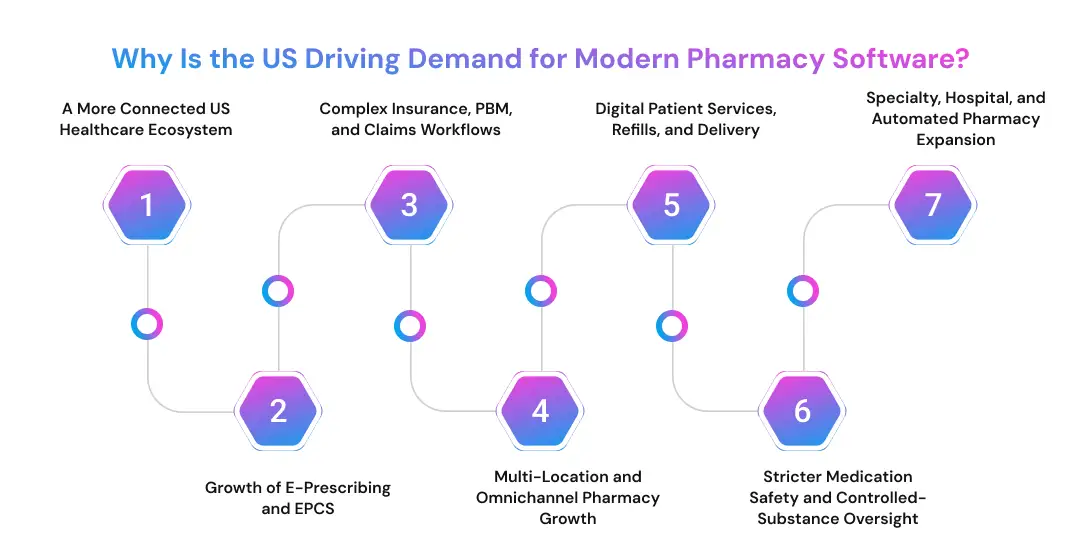
Why Is the US Driving Demand for Modern Pharmacy Software?
The demand is being shaped by more than pharmacy digitization alone. Changes in healthcare delivery, insurance processing, patient expectations, medication safety, and multi-location operations are pushing pharmacies toward connected systems that can manage clinical and commercial workflows in real time.
A More Connected US Healthcare Ecosystem
Pharmacies increasingly exchange information with prescribers, health systems, payers, and patients. As the future of healthcare with mobile technology becomes more connected, pharmacy platforms need secure interoperability for prescription data, benefits, medication histories, clinical updates, and patient communication.
Growth of E-Prescribing and EPCS
Electronic prescribing is now central to US medication workflows, while controlled substances introduce additional identity, authentication, and audit requirements. The expansion of telemedicine and telehealth further increases the need for reliable eRx intake, refill processing, prescription changes, and pharmacist verification.
Complex Insurance, PBM, and Claims Workflows
A clinically valid prescription may still require benefit verification, formulary checks, claim submission, copay calculation, prior authorization, or rejection handling before dispensing. Consequently, US pharmacy management software must connect prescription processing, payer responses, patient communication, and pharmacist intervention within one operational workflow.
Multi-Location and Omnichannel Pharmacy Growth
Growing pharmacy businesses need centralized visibility across inventory, staff permissions, prescription queues, purchasing, and reporting while preserving location-specific controls. Large retail models such as the CVS pharmacy business model also show how physical pharmacy operations increasingly connect with broader digital healthcare services.
Digital Patient Services, Refills, and Delivery
Patients increasingly expect refill requests, medication reminders, digital payments, order tracking, and delivery visibility. Well-designed mobile healthcare experiences can extend pharmacy access beyond the counter, while medicine delivery app development can connect prescription fulfillment with dispatch, status updates, proof of delivery, and notifications.
Stricter Medication Safety and Controlled-Substance Oversight
Modern pharmacy software must support drug-interaction checks, allergy alerts, duplicate therapy warnings, barcode verification, pharmacist review, controlled-substance records, and traceable audit events. These safeguards make pharmacy architecture fundamentally different from ordinary retail systems, where clinical safety rules are not part of daily transactions.
Specialty, Hospital, and Automated Pharmacy Expansion
Hospital, specialty, and compounding environments add high-cost therapies, complex fulfillment, clinical coordination, automated dispensing cabinets, robotics, and specialized inventory controls. These requirements can significantly increase integration depth, making pharmacy software development in the USA highly dependent on the pharmacy’s operating model.
Plan Your Pharmacy Software Before Development Begins
Prismetric helps map pharmacy workflows, compliance requirements, integrations, architecture, and feature priorities before engineering starts.
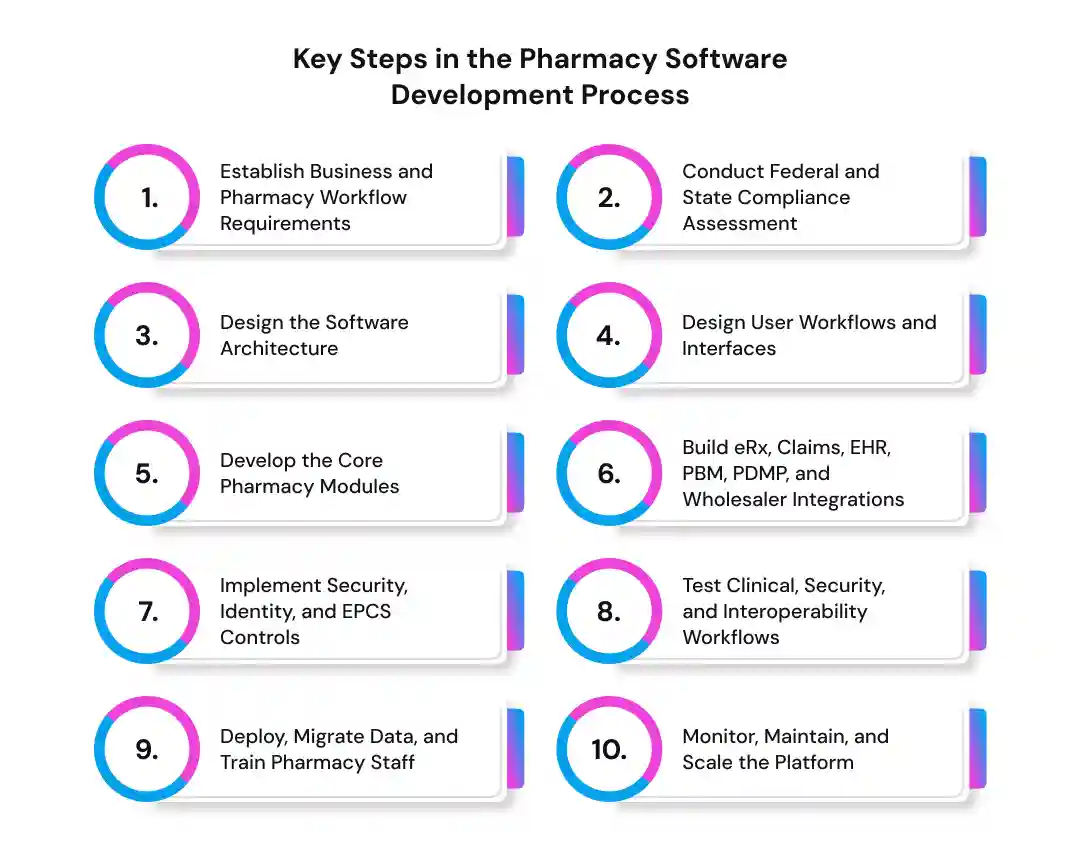
Key Steps in the Pharmacy Software Development Process
A structured software development life cycle is particularly important in pharmacy projects because workflows, integrations, medication safety, and compliance are tightly connected. Requirements should be validated before core engineering begins.
1. Establish Business and Pharmacy Workflow Requirements
Start by mapping how prescriptions, patients, inventory, payments, staff, and external systems move through the pharmacy. A broader software development planning guide can support discovery, while pharmacy-specific requirements should cover:
Pharmacy type and number of locations
Prescription volume and dispensing workflow
Pharmacist and technician responsibilities
Inventory, wholesaler, POS, and claims processes
Patient-facing services
Existing hardware and software integrations
Clear workflow mapping gives the development team a reliable foundation for deciding which modules should be built first and which external systems must remain connected.
2. Conduct Federal and State Compliance Assessment
Compliance should be mapped before architecture is finalized. The assessment should identify HIPAA and HITECH obligations, DEA and EPCS requirements, state board rules, PDMP connectivity, DSCSA traceability, applicable compounding requirements, record-retention policies, and transaction standards relevant to the pharmacy’s operating model.
3. Design the Software Architecture
Once workflows and compliance obligations are clear, define how the platform will handle prescriptions, clinical rules, inventory, claims, integrations, and data. The architecture should cover:
Web, mobile, and workstation interfaces
Backend services and databases
API and integration services
Cloud, on-premises, or hybrid deployment
Backup and disaster recovery
Choosing suitable software development methodologies also helps teams sequence regulated modules and validation work without pushing critical checks to the end.
4. Design User Workflows and Interfaces
Pharmacists, technicians, cashiers, administrators, patients, and delivery teams use the system differently. Interfaces should therefore be role-specific, quick to navigate, and designed to reduce avoidable dispensing errors.
Key flows include prescription intake, clinical review, filling, barcode verification, checkout, refills, inventory receiving, and patient communication. Thoughtful role-specific interface design becomes particularly important for patient-facing and mobile workflows.
5. Develop the Core Pharmacy Modules
Development can then move into the modules supporting daily pharmacy operations. When building the core pharmacy platform, the development scope typically includes:
Prescription and dispensing management
Patient profiles and medication history
Inventory and purchasing
POS and payments
Insurance claims
Controlled-substance records
Reporting and administration
These modules should share consistent business rules so prescriptions, inventory movements, claims, and audit events remain synchronized.
6. Build eRx, Claims, EHR, PBM, PDMP, and Wholesaler Integrations
Integration is one of the most demanding parts of pharmacy software development in the USA. The platform may exchange data with e-prescribing networks, PBMs, EHRs, state PDMPs, wholesalers, payment systems, and delivery providers.
A sound API development approach should address validation, mapping, retries, authentication, error handling, and monitoring. HL7 or FHIR may also be required when pharmacy software exchanges clinical information with healthcare systems.
7. Implement Security, Identity, and EPCS Controls
Security should be built into the application rather than added after development. Typical controls include:
Role-based access control
Multi-factor authentication
Encryption
Audit logging
Least-privilege permissions
Session and credential controls
Electronic prescribing of controlled substances can introduce additional identity, access, authentication, and audit requirements depending on the platform’s role within the prescription workflow.
8. Test Clinical, Security, and Interoperability Workflows
Testing should cover prescription workflows, clinical alerts, barcode matching, claims responses, permissions, integrations, performance, and failure handling not simply whether individual screens work.
Functional, integration, usability, performance, and clinical and regulatory software testing should be completed before production rollout to identify problems that could disrupt pharmacy operations.
9. Deploy, Migrate Data, and Train Pharmacy Staff
Deployment may require migrating patient profiles, prescription histories, inventory, supplier data, and user roles from legacy systems. A phased rollout can reduce disruption while teams verify migrated information and connected workflows.
Role-based training also helps pharmacists and technicians adopt the new pharmacy management system without adding unnecessary steps to routine prescription processing.
10. Monitor, Maintain, and Scale the Platform
After launch, pharmacy software needs monitoring, security patches, integration updates, backups, regulatory adjustments, and performance improvements. DevOps implementation can support more controlled and repeatable release processes.
As prescription volume or the number of locations grows, the platform should scale without compromising availability, response times, data integrity, or auditability.
Not Sure Where to Start Your Pharmacy Software Build? Begin with workflow discovery, compliance mapping, architecture, and integration planning. These decisions define project scope long before production deployment.
Must-Have Features for Pharmacy Software in the USA
The feature set varies by pharmacy type and operating model. However, most pharmacy management software development projects require a core combination of clinical, operational, financial, and patient-facing capabilities.
Prescription Processing and eRx Intake: Receive electronic prescriptions, validate information, manage queues, process refills, and route orders through the appropriate dispensing workflow.
Pharmacist Verification and Dispensing: Support medication review, clinical warnings, fulfillment status, and final pharmacist authorization before dispensing.
Clinical Drug, Interaction, Allergy, and DUR Alerts: Surface relevant interactions, allergies, duplicate therapy, contraindications, and other medication-safety concerns before fulfillment.
Patient Profiles and Medication History: Maintain demographics, medications, allergies, prescription history, and communication preferences in an accessible patient record.
Pharmacy Inventory Management: Track stock, lots, expirations, recalls, transfers, receiving, and reorder levels. A mobile inventory management system can further improve stock visibility across operational teams.
Supplier and Purchase Order Management: Connect wholesalers, purchasing, receiving, shortages, and replenishment with actual dispensing demand.
Pharmacy POS and Patient Payments: Combine prescription checkout with OTC sales, payment processing, refunds, and supported HSA/FSA transactions.
Insurance and Claims Adjudication: Submit claims, process payer responses, calculate patient responsibility, and help staff resolve rejected transactions.
Controlled-Substance and PDMP Workflows: Support controlled-medication records and state-specific prescription monitoring workflows where required.
Barcode Dispensing Verification: Match the drug, strength, package, and prescription before medication reaches the patient.
Multi-Location Management: Centralize inventory, users, purchasing, and reporting while preserving store-specific workflows and access controls.
Reporting, Audit Logs, and Dashboards: Monitor prescription volume, inventory movement, reimbursement, staff activity, and system events.
Build Pharmacy Software Around Real US Healthcare Workflows
Develop a custom platform for prescriptions, inventory, claims, eRx, EPCS, PDMP, payments, patient services, and multi-location operations.
Hospital, specialty, and compounding environments may additionally require medication therapy management, immunization workflows, automated dispensing cabinets, robotic dispensing, compounding support, and conversational AI for patient service.
Inside the Architecture of a Modern US Pharmacy Platform
A modern pharmacy platform needs more than a database connected to a dispensing interface. Its architecture must coordinate prescriptions, clinical rules, inventory, claims, patient data, external networks, and security controls while remaining reliable during high-volume pharmacy operations.
Presentation Layer
The presentation layer provides role-specific interfaces for pharmacists, technicians, administrators, cashiers, patients, and delivery teams. Depending on the operating model, these interfaces may include browser-based dashboards, POS workstations, patient portals, and mobile applications.
A well-planned mobile app development architecture should keep patient-facing functions separated from internal pharmacy permissions while still allowing secure access to refills, payments, notifications, and order status.
Application and Business Logic Layer
This layer controls the rules behind prescription processing, dispensing, clinical alerts, claims, inventory, payments, and notifications. Instead of embedding these processes directly into interfaces, a scalable web application architecture keeps business logic organized and easier to maintain.
A typical prescription workflow may look like this:
Keeping these stages coordinated helps prevent disconnected records and allows pharmacy software to maintain consistent information across clinical, financial, and operational workflows.
Data Layer
The data layer stores patient profiles, prescription histories, medication information, inventory and lot records, transactions, claims, and audit events. Sensitive information should be protected throughout storage, processing, backup, and recovery.
For larger pharmacy networks, appropriate data engineering services can help structure reliable pipelines between operational databases, analytical systems, reporting environments, and external healthcare data sources.
Integration and Interoperability Layer
Interoperability is a critical component of pharmacy software architecture because US pharmacies rarely operate independently. The integration layer may connect e-prescribing networks, PBMs, payers, EHRs, PDMPs, wholesalers, payment gateways, and delivery services.
NCPDP standards support major pharmacy transactions, while HL7 and FHIR can facilitate healthcare data exchange with hospitals and EHR systems. Middleware, APIs, message queues, data mapping, retry mechanisms, and monitoring help keep these connections reliable when individual external services become unavailable.
Hospital environments may also integrate automated dispensing cabinets, connected medication devices, or other Internet of Medical Things infrastructure requiring secure machine-to-system communication.
Security and Compliance Layer
Security controls should extend across every architectural layer rather than exist as a separate add-on. Common components include identity management, role-based access, authentication, encryption, audit logging, key management, monitoring, backup, and incident-response capabilities.
The current HIPAA Security Rule requires regulated entities to implement appropriate administrative, physical, and technical safeguards for ePHI, including controls addressing access, authentication, auditing, integrity, and transmission security.
Pharmacy Software Compliance and Regulatory Requirements in the USA
Compliance is one of the defining factors in pharmacy software development in the USA. Requirements vary according to the organization, transactions performed, states served, controlled-substance functionality, and pharmacy type, so compliance should be mapped to actual system workflows.
Understanding broader IT compliance regulations for US industries is useful, but pharmacy platforms also operate within healthcare, prescribing, drug-traceability, and transaction-specific frameworks.
Requirement or Standard
When It Matters
Key Software Implication
HIPAA & HITECH
When regulated entities create, receive, maintain, or transmit PHI/ePHI
Authentication, access controls, record integrity, auditing, and compliant pharmacy/e-prescribing applications
State Boards & PDMPs
State-regulated pharmacy and controlled-substance workflows
Configurable state requirements, reporting, and PDMP connectivity
DSCSA
Prescription-drug supply-chain tracing
Product tracing, verification, exception handling, and trading-partner workflows
NCPDP Standards
ePrescribing, prescription-benefit, claims, and pharmacy transactions
Standards-based messaging and adaptable integration architecture
HL7 / FHIR
EHR and healthcare-system interoperability
Structured clinical data exchange through interfaces and APIs
FDA / USP Requirements
Applicable specialty or compounding workflows
Traceability, documentation, validation, and workflow controls
For organizations building HIPAA-compliant mobile applications, compliance cannot be reduced to encrypting a database. Access policies, risk analysis, workforce permissions, auditability, transmission protection, and security procedures also influence implementation.
DEA requirements become particularly important when software processes electronic prescriptions for controlled substances. DEA states that qualifying electronic prescription and pharmacy applications must undergo an approved third-party audit or certification for compliance with 21 CFR Part 1311 before being used for EPCS.
DSCSA adds another layer by requiring eligible trading partners to support prescription-drug tracing and verification processes. Pharmacy software may therefore need to retain transaction information, support verification workflows, and connect operational inventory records with supply-chain data.
What US Pharmacies Should Plan for in 2026 and Beyond
Regulatory and transaction standards continue to evolve, so pharmacy software compliance should be designed for change rather than implemented as fixed logic.
FDA currently provides qualifying small dispensers with exemptions from certain DSCSA requirements through November 27, 2027. The exemption is limited to specified requirements and should not be interpreted as a general exemption from all DSCSA obligations.
NCPDP is also preparing the industry for major standards transitions. Its published implementation timelines identify Real-Time Prescription Benefit V13 for January 1, 2027, SCRIPT V2023011 for January 1, 2028, and Telecommunication Standard F6 for April 14, 2028.
For development teams, these timelines make modular integrations, versioned APIs, configurable transaction mappings, and regression testing important architectural decisions. A pharmacy platform built around replaceable standards components can adapt to regulatory changes more efficiently than one with transaction logic embedded throughout the application.
How Much Does Pharmacy Software Development Cost in the USA?
The pharmacy software development cost in the USA generally ranges from $150,000 to $950,000+ for serious custom platforms. The final investment depends on pharmacy type, clinical functionality, compliance requirements, third-party integrations, automation, infrastructure, and the complexity of existing systems.
A focused independent-pharmacy platform sits toward the lower end, while hospital, specialty, compounding, or automation-heavy solutions can exceed $1 million. Using a structured software development cost estimation approach helps separate essential requirements from features that can be introduced later.
Pharmacy Software Type
Estimated Development Cost
Independent Retail / Core MVP
$180,000–$350,000
Multi-Store / Advanced Retail
$350,000–$700,000
Hospital Pharmacy Core
$500,000–$1M+
Specialty / Compounding / Automation-Heavy
$800,000–$1.8M+
These ranges should be treated as planning estimates rather than fixed quotations. Two pharmacies with similar prescription volumes may have very different budgets if one needs standard dispensing while another requires EPCS, multiple PBMs, EHR connectivity, specialty workflows, and automated equipment.
Cost Breakdown by Development Stage
Development costs are usually distributed across discovery, design, engineering, integration, testing, security, migration, and deployment.
Development Stage
Indicative Share
Discovery and compliance assessment
8%
UI/UX and workflow design
8%
Core engineering
38%
Integrations
16%
QA and workflow validation
12%
Security and compliance hardening
10%
Migration, deployment, and training
8%
Total
100%
Post-launch maintenance, infrastructure, security updates, and regulatory changes can add approximately 15–25% of the original development investment annually, depending on support requirements and platform complexity.
Businesses comparing pharmacy development with broader healthcare app development costs should also account for pharmacy-specific transaction standards, medication-safety rules, claims processing, and controlled-substance workflows.
What Affects Pharmacy Software Development Costs?
Several decisions can move a project from a relatively focused pharmacy management system to an enterprise healthcare platform.
Feature Scope and Pharmacy Type
Independent retail, hospital, specialty, long-term care, and compounding pharmacies require different modules. Building only dispensing, inventory, and POS costs substantially less than supporting specialty medications, clinical programs, or enterprise operations.
eRx, EPCS, and PDMP Integrations
Standard electronic prescription intake is comparatively straightforward. Controlled-substance prescribing, identity controls, PDMP connectivity, audit requirements, and state-specific workflows increase development and validation effort.
Drug utilization review, interaction checking, allergy detection, duplicate therapy warnings, dosing rules, and pharmacist verification require carefully validated clinical logic.
EHR, HL7, and FHIR Interoperability
Hospital and health-system projects typically cost more because pharmacy software must exchange structured information with EHRs, clinical systems, and other healthcare applications.
Multi-Location, Patient App, and Delivery Scope
Centralized administration, branch-level permissions, patient applications, refill management, payments, and delivery tracking introduce additional interfaces and synchronization requirements.
HIPAA safeguards, EPCS requirements, penetration testing, detailed audit trails, access controls, monitoring, and compliance documentation contribute materially to the overall project budget.
Data Migration, Infrastructure, Team, and Maintenance
Legacy data quality, migration volume, cloud architecture, engineering rates, availability requirements, and ongoing support also affect costs. The chosen SaaS deployment model can further influence scalability and infrastructure planning.
Build a Secure, Compliant Pharmacy Platform That Can Scale
Prismetric can help design and integrate HIPAA-ready pharmacy software with EHRs, PBMs, wholesalers, claims systems, APIs, and patient applications.
Develop a Custom Pharmacy Platform for the USA with Prismetric
Modern pharmacy platforms have evolved beyond prescription records and inventory databases. They increasingly combine clinical workflows, payments, insurance transactions, patient applications, analytics, interoperability, and security within one connected operational environment.
As a AI development company in the USA, Prismetric can help businesses translate pharmacy workflows into scalable software architecture, integrations, user experiences, and data-driven functionality.
Its healthcare app development capabilities can support patient-facing applications, prescription workflows, inventory systems, analytics, integrations, and secure digital healthcare experiences tailored to project requirements.
For pharmacy businesses evaluating a custom platform, the right starting point is a clearly defined scope covering workflows, regulatory obligations, integrations, architecture, and long-term scaling requirements.
FAQs
How much does pharmacy software development cost in the USA?
Custom pharmacy software development in the USA generally requires approximately $150,000–$950,000+. Independent retail systems may start around $180,000, while hospital, specialty, compounding, and heavily automated platforms can exceed $1 million depending on integrations and compliance complexity.
How long does it take to build custom pharmacy management software?
A focused MVP may require approximately 6–9 months, while advanced multi-store or hospital platforms can take 9–18 months or longer. Timelines depend heavily on integrations, migration, regulatory validation, testing, and the number of pharmacy workflows being developed.
Does pharmacy software in the USA need to be HIPAA compliant?
HIPAA applies when a pharmacy organization or its software partners handle PHI or ePHI within HIPAA’s scope. Applicable systems need appropriate administrative, physical, and technical safeguards rather than simply adding encryption or a privacy statement.
What regulations and standards apply to US pharmacy software?
Depending on functionality and operating model, relevant requirements can include HIPAA, HITECH, DEA EPCS rules, state pharmacy regulations, PDMP requirements, DSCSA, and NCPDP standards, alongside applicable FDA or USP requirements for specialized pharmacy workflows.
What systems should pharmacy software integrate with?
Common integrations include e-prescribing networks, EHR or EMR platforms, PBMs and payers, PDMP databases, wholesalers, payment processors, delivery platforms, barcode systems, and hospital technologies such as automated dispensing cabinets.
Is custom pharmacy software better than off-the-shelf software?
Custom software becomes more valuable when a pharmacy has unique workflows, multiple locations, complex integrations, automation, or long-term scalability requirements. Off-the-shelf platforms may be more practical for smaller pharmacies whose processes closely match standard product capabilities.
As the tech-savvy Project Manager at Prismetric, his admiration for app technology is boundless though!He writes widely researched articles about the AI development, app development methodologies, codes, technical project management skills, app trends, and technical events. Inventive mobile applications and Android app trends that inspire the maximum app users magnetize him deeply to offer his readers some remarkable articles.