What is Bolt.new AI: A Vibe Coder’s Review of an AI-Powered App Builder
Key Takeaways
- Bolt.new converts plain English prompts into full-stack applications using React, Node.js, and PostgreSQL in a browser-based IDE.
- It enables rapid prototyping by generating UI, backend, database, and APIs without local setup or installations.
- Bolt.new works well for MVPs and creative exploration but struggles with complex logic, deep integrations, and long workflows.
- Token-based pricing can increase quickly, as debugging, refinements, and AI rewrites consume significant token volume.
- The platform suits beginners and fast prototyping, while advanced developers may need manual fixes or external tools.
I have spent nights staring at error messages, chasing bugs like they owed me money. Building an app used to mean endless setup, messy integrations, and too much coffee. But what if you could skip all that, just tell your computer what you want, and it builds it for you?
That is the promise of Bolt.new AI, an AI-powered app builder turning plain English into full stack apps in minutes. No installs, no steep learning curve, just pure creation. It is the new wave in development, and it is gaining serious buzz.
I am not your average coder. I am a Vibe Coder who cares about how a tool feels as much as what it does. In this no hype review, I will take you inside Bolt.new AI, what works, what frustrates, and whether it is worth your time. We will cover its features, tech stack, a hands-on app-building guide, pros and cons, pricing, a few alternatives and the final verdict.
What Exactly is Bolt.new AI?
Imagine sitting across from a developer who never gets tired, never needs coffee, and understands exactly what you mean. You tell them, “I want a photo sharing app with a clean design and a login page,” and minutes later, the app is ready for you to try. That is the simplest way to picture Bolt.new AI.
Bolt.new AI is a browser-based app builder powered by artificial intelligence. Instead of writing code line by line, you type a description in plain English, and the tool generates a working application. It handles both the front end and back end, using modern frameworks like React, Tailwind CSS, and Node.js.
For beginners, it removes the steep learning curve of traditional coding. For experienced developers, it speeds up the boring setup work so they can focus on creativity. In short, it is like having a tireless coding partner who can turn your ideas into a functional product in record time.
Bolt.new Tech Stack Explained
Bolt.new AI runs on a blend of clever browser tech and modern frameworks. It feels fast, intuitive, and grounded in solid engineering.
Here is what powers it:
- React + Tailwind CSS (Frontend)
Delivers a slick, responsive interface with modern UI components. React handles the logic, Tailwind styles it cleanly.
- Node.js + Express (Backend)
Manages server-side logic. Your app’s nuts and bolts, including routing, API endpoints, and data handling, run here.
- PostgreSQL with Prisma (Database / ORM)
Stores your data reliably. Prisma layers over Postgres to simplify queries and data modeling.
- WebContainers (Browser Environment)
Built by StackBlitz, this lets Bolt run Node and npm in your browser. No local setup needed.
- Anthropic’s Claude 3.5 (AI Engine)
Converts your words into working code. It handles prompting, structure, and logic.
- Integrations (Deploy & Services)
Includes Netlify or Vercel for one-click hosting, plus Supabase, Firebase, Figma, GitHub, Expo, and Stripe for data, design, version control, mobile, and payments.
Key Features of Bolt.new AI
Bolt.new AI is designed to remove friction from app development, making it fast, intuitive, and accessible. Whether you are building a quick prototype or exploring a new idea, these features set it apart.
Prompt-Based Development
Describe your app in plain language and Bolt turns it into a working project without writing a single line of code yourself.
Full Stack Generation
Creates both the front end and the back end, along with a database and API endpoints, in a single process.
Web-Based IDE
Build directly in your browser with a live preview, file tree, and terminal. No downloads or installations are needed.
Modern Tech Stack
Uses frameworks like React, Tailwind CSS, Node.js, and PostgreSQL for professional-grade results.
Integrations and Deployment
Connect to tools like Stripe, Supabase, and Firebase. Deploy instantly to platforms such as Vercel or Netlify.
Enhance Prompt Feature
Make targeted improvements by refining specific parts of your app without starting over.
Version Control and Export
Edit generated code, save versions, and export your project for local development or team collaboration.
Why Everyone is Talking About Bolt.new AI
Bolt.new AI did not invent AI-powered coding, but it found a way to make it irresistible. Its rise is not just about what it can do, but how it makes people feel while using it.
A Tool Anyone Can Pick Up
You do not need to know React, Node.js, or any coding jargon to start. Even non-coders can spin up a functional app just by describing it in plain language. For entrepreneurs and solo creators, this means skipping the hunt for a developer and building an MVP in days instead of weeks.
From Idea to App in Record Time
Type your vision, hit enter, and watch the app appear in seconds. It handles design, logic, and deployment without dragging you through endless setup screens. For developers, this means less time on repetitive tasks. For beginners, it is the difference between dreaming and doing.
Built for the Social Era
Bolt.new’s team knows how to spark attention. They share live demos, release notes, and “built in public” success stories that spread fast online. This constant visibility keeps it in front of developers, makers, and curious newcomers.
Full Stack Without the Hassle
Unlike tools that only create a front end, Bolt.new generates the backend, database, and API endpoints in one shot. This makes it useful for more than just prototypes—it can deliver functional, connected apps ready to test or deploy.
How Does Bolt.new AI Work?
Bolt.new AI feels simple on the surface, but under the hood it blends several advanced technologies into a smooth, browser-based experience. Here is how the magic happens.
A Web IDE That Lives in Your Browser
There is no need to install heavy software or configure your machine. Bolt.new runs entirely in the browser through WebContainers, giving you a live coding environment with a terminal, file explorer, and instant preview of your app.
Turning Words Into Code: You Prompt and it Will Make it
When you type a prompt, Bolt.new uses a large language model like Claude 3.5 Sonnet to interpret your request. It understands your description, chooses the right patterns, and starts generating the front end, backend, and database logic to match.
Smart Template Assembly
Behind the scenes, Bolt.new pulls from a library of proven templates such as CRUD operations, authentication flows, or payment integrations. These pieces are combined intelligently so the generated code is functional and connected.
Live Preview, Edit, and Deploy
Every change you make can be seen instantly in the live preview. You can edit the generated code directly, download it for local development, or push it live to hosting services like Vercel or Netlify.
Powered by Tokens
Bolt.new’s processing and code generation run on a token system. Every AI action uses a certain number of tokens, so managing prompts carefully can help keep costs in check.
How to Use Bolt.new AI: A Vibe Coder’s Step-by-Step Walkthrough
Using Bolt.new AI is less like setting up a project and more like having a creative jam session with a coder who never sleeps. Here is how to go from idea to working app in one sitting.
1. Getting Started
Go to the Bolt.new website and create a free account. Once inside, click New Project. You will see a clean interface with a prompt box, file tree, terminal, and preview panel. No local setup is required, so you can start building instantly.
2. The Art of the Prompt
Bolt.new works best when you are specific. Instead of typing “make me a website,” try something like:
“Create a responsive portfolio site with a dark theme, a hero section, a gallery grid for projects, and a contact form that sends email via a backend API.”
The more details you give, the closer the output will match your vision.
3. Live Building Session Example
Let us build a simple “Vibe of the Day” generator.
Step 1: The Initial Prompt
In the prompt box, type:
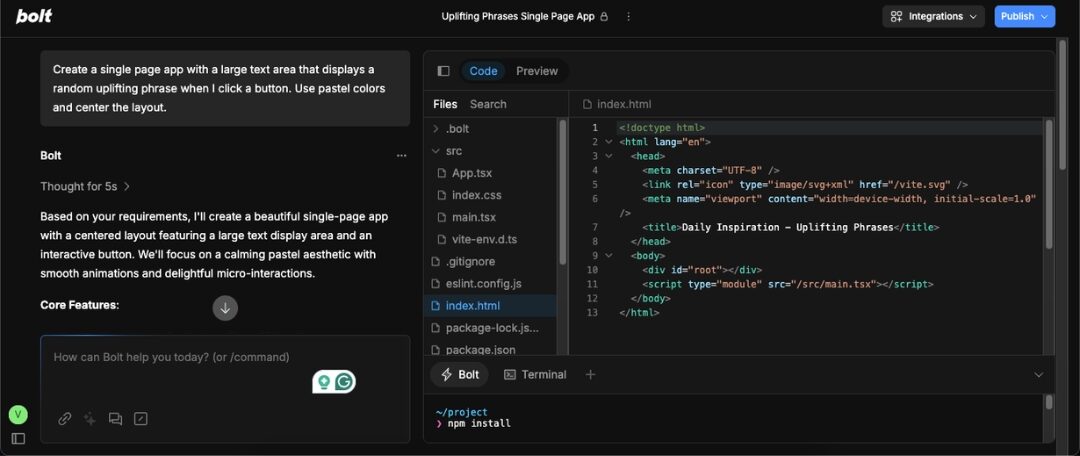
“Create a single page app with a large text area that displays a random uplifting phrase when I click a button. Use pastel colors and center the layout.”
Step 2: Reviewing the First Draft
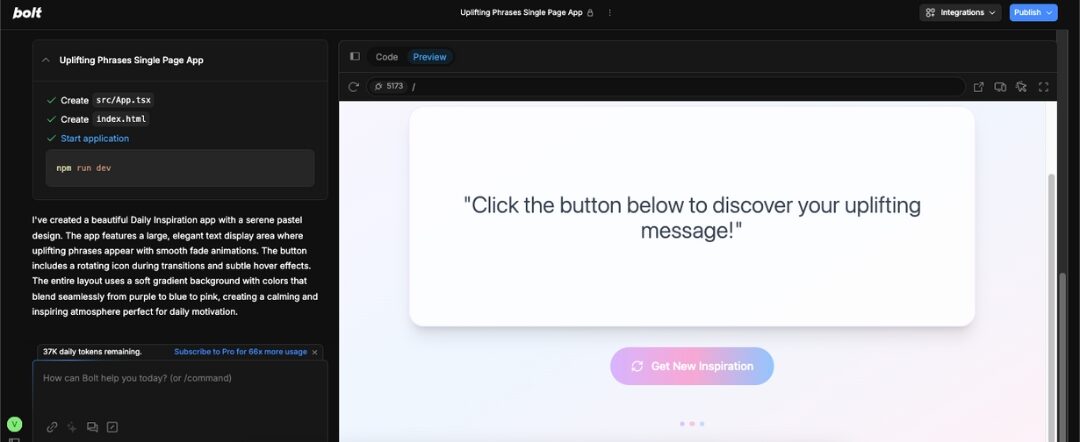
Within seconds, the preview shows a working app. Read through the generated code in the editor. If something feels off such as button placement or font size, make a note.
Step 3: Refining with Follow-up Prompts
Type refinements such as:
“Make the button larger with rounded corners and add a fade-in animation for the text.”
Bolt will adjust the code live.
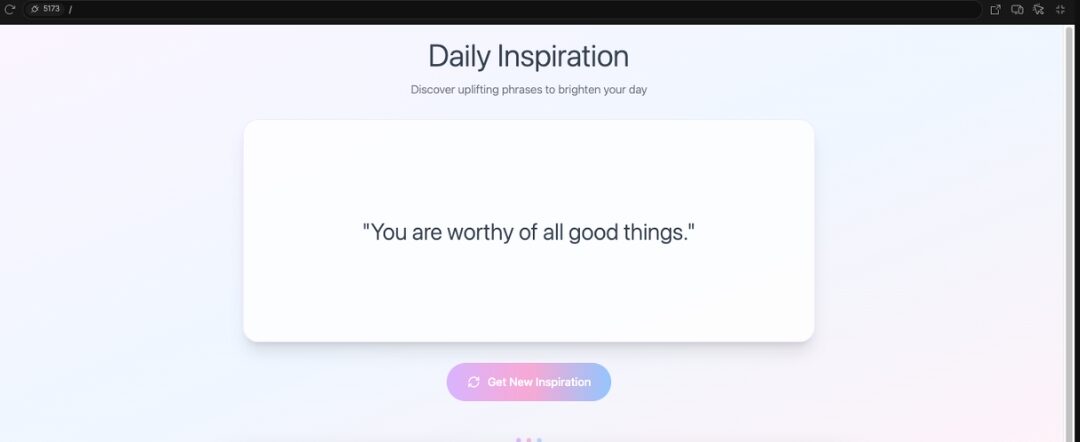
Step 4: The Final Product
Once satisfied, you can deploy directly to Vercel or Netlify, or export the code for local tweaks.
My Personal Vibe Check: A Hands-On Test Drive of Bolt.new AI
So here is what i build and experienced about bol.new:
The Challenge
To push Bolt.new AI beyond the basics, I set out to build a functional e-commerce site. My goal was a home page with product listings, a product detail page, a working shopping cart, and a simple checkout form. The aim was to see if Bolt could handle a real-world, multi-page project with interactive features.
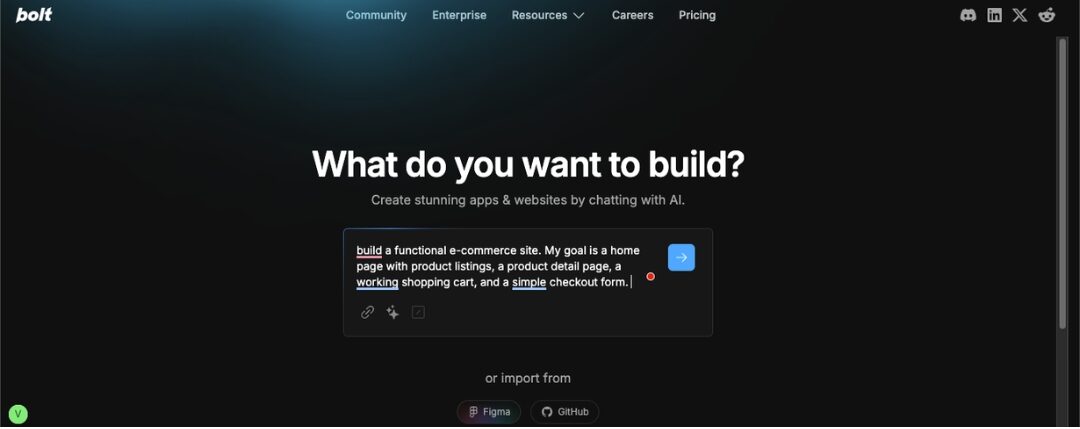
The Experience What Went Right
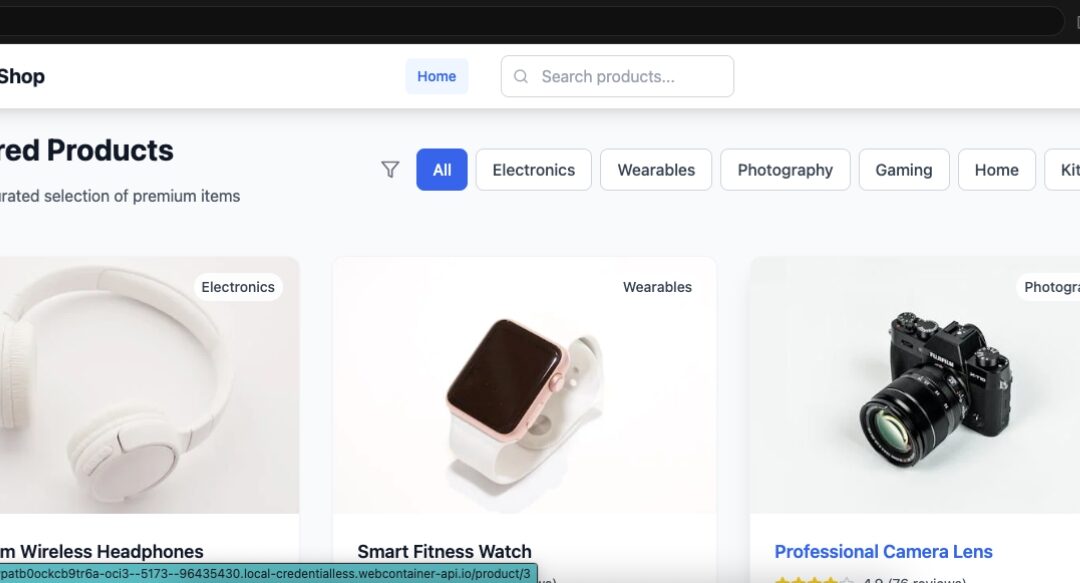
The initial generation was fast. Within minutes, Bolt produced a responsive home page, sample products with images, and linked product detail pages. It even wired up a cart system that tracked added items in memory. The code was clean enough to understand without heavy editing, and the styling with Tailwind CSS looked polished right out of the gate.
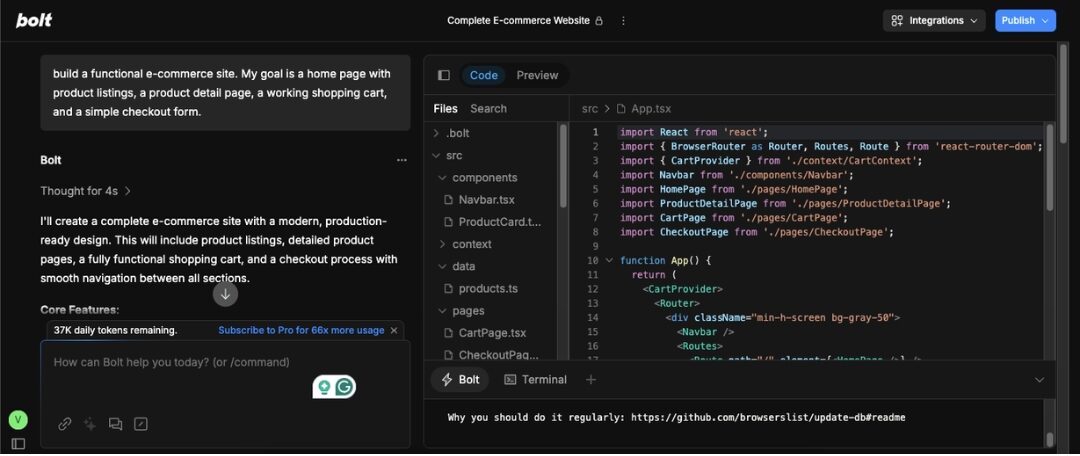
Where I Hit a Wall
Things got tricky when I asked for dynamic inventory from a database. Bolt set up a PostgreSQL schema but struggled with consistent integration between the backend and the front end. The cart worked locally in memory but needed extra tweaks to persist data. I also ran into a few moments where the AI misunderstood follow-up prompts, replacing working code instead of enhancing it. This meant I had to manually recover some functionality.
The “Enhance Prompt” Feature
This tool was a mixed bag. On simple requests like “add a search bar” or “make the buttons larger,” it worked beautifully. On more complex instructions like “connect the checkout form to Stripe payments,” it sometimes overwrote parts of the layout or created redundant code. Using it in small, focused steps gave the best results.
The Final Result
I ended up with a functional multi-page e-commerce app that looked great and worked for a demo, but it would need manual refinement before going live for real customers. Bolt proved it could deliver 80 percent of the work at lightning speed, leaving the remaining 20 percent for a human touch.
The Good and The Bad: An Honest Look at Bolt.new AI
The Good
- Insane Speed for Prototyping
From idea to functional app in minutes. Perfect for hackathons, MVPs, and quick client demos.
- Great for Beginners and Non-Coders
No installation or deep technical knowledge required. You can build something functional on your very first try.
- Full Stack Generation
Generates both the front end and the back end, plus database schemas and API endpoints, in a single flow.
- Good for UI Mockups
Designs are clean and modern out of the box, saving hours of styling work.
The Bad
- Can Be Buggy and Unpredictable
Complex requests sometimes break existing functionality. Changes may require manual fixes.
- Limited for Complex, Production-Ready Apps
While great for demos, larger projects or mission-critical apps need more stability and custom code.
- The Learning Curve of Prompting
Vague prompts lead to messy results. Clear, step-by-step instructions work best.
- Token-Based Pricing Model
Every AI action consumes tokens. During debugging or refinement, token usage can spike quickly, making costs add up.
- Deployment and Debugging Challenges
Deploying to platforms like Vercel or Netlify is simple, but troubleshooting live issues often requires developer experience.
Bolt.new AI Pricing
Bolt.new offers flexible pricing that can either fuel your creativity or drain your wallet if you are not careful. Knowing how it works is key.
Breakdown of the Tiers
Free Plan
You get up to 150,000 tokens per day, capped at 1 million tokens per month. It is ideal for small experiments or getting a feel for how Bolt works.
Pro Plans (Monthly Subscription)
- Pro ($20/month) – 10 million tokens
- Pro 50 ($50/month) – 26 million tokens
- Pro 100 ($100/month) – 55 million tokens
- Pro 200 ($200/month) – 120 million tokens
Team Plans
Designed for teams and priced per user, with scalable tiers and collaboration features.
The True Cost of Tokens
- How Tokens Add Up
Simple tasks like generating a small function consume dozens of tokens, while a full app scaffold can cost thousands of tokens.
- Real Usage Scenario
Some users have reported burning over 1 million tokens in a single day just fixing errors. Others saw 7–12 million tokens vanish during debugging sessions. The “diffs” feature can help save tokens by avoiding full file rewrites, but it is off by default.
- Reload Tokens and Rollover
Paid plans allow you to carry unused tokens into the next month, while free tokens reset each calendar month. You can also buy extra token packs when needed.
Bolt.new AI Alternatives You Should Know
Bolt.new is versatile, but it may not suit everyone. Maybe you need more UI control, open source flexibility, or richer design features. Here are five solid alternatives, each with its own strengths.
| Alternative |
What It Excels At |
Ideal For |
Pricing |
| Vitara |
AI powered vibe coding for internal tools and MVPs |
Makers who want natural language app creation with utility |
Starts at $12 per month |
| Lovable |
Emotion driven UI design and brand focused outputs |
Creators prioritizing visual appeal and user experience |
Free plan, paid from $15 per month |
| Softgen |
Low code IDE with GitHub support and autonomous generation |
Developers seeking editable flow and backend connectivity |
Custom pricing based on usage |
| Replit |
AI assisted coding in a familiar IDE with version control |
Developers who want full coding power wrapped in AI |
Free plan, paid from $7 per month |
| Hostinger Horizons |
Built in hosting, live preview, and prompt based app creation |
Beginners who want seamless deployment without hassle |
Starts at $2.99 per month |
Conclusion
Bolt.new AI delivers on its promise of turning plain ideas into functional apps with remarkable speed. It lowers the barrier to entry for beginners while giving experienced developers a powerful way to skip repetitive setup work. The experience is not flawless, but when used for rapid prototyping or creative exploration, it feels like a genuine leap forward in app development compared to many bolt.new alternatives.
If you approach it with clear prompts, realistic expectations, and an eye on token usage, Bolt.new can be an invaluable tool in your workflow. Whether you are a solo creator, a startup founder, or a business looking to hire a vibe coding agency to bring your vision to life, Bolt.new AI is worth a test drive to see how it fits your style of creating.
Bolt.new AI is a browser-based app builder that turns plain language prompts into fully functional applications. You describe what you want to build, and it generates the front end, back end, database, and API endpoints in minutes. It works through a web-based IDE powered by modern frameworks like React, Tailwind CSS, and Node.js. The AI interprets your instructions, assembles code from proven templates, and lets you preview, edit, and deploy your project without local setup.
Yes, Bolt.new offers a free plan with up to 150,000 tokens per day and a monthly cap of 1 million tokens. This is enough for small projects, experimentation, or learning the platform. If you need more tokens for larger or frequent builds, you can upgrade to a paid plan.
Bolt.new packs a wide range of tools to help you move from idea to functional app without the usual development headaches. Its standout features include:
- Prompt-based development to turn plain language into working apps
- Full stack code generation for both front end and back end
- Browser-based IDE with live preview, file tree, and terminal
- Popular integrations such as Stripe, Supabase, and Firebase
- One-click deployment to platforms like Vercel or Netlify
- Enhance Prompt for refining specific app elements without starting over
You can build fairly complex applications with Bolt.new, including multi-page sites, e-commerce demos, and apps with backend logic. However, for production-grade projects with advanced features, heavy traffic, or custom integrations, you will likely need to refine the generated code manually. Bolt.new excels at rapid prototyping and MVP development rather than replacing full-scale custom builds.
Yes. Bolt.new lets you export the entire codebase so you can work on it locally or share it with your team. This includes all generated front end, back end, and configuration files. Exporting is useful for developers who want to fine-tune or extend the app beyond what the AI produces.
Bolt.new’s pricing is designed to fit both casual users and teams that need heavy AI-powered development. Here is how it breaks down:
- Free plan with 150,000 tokens per day and 1 million tokens per month
- Pro plan at $20 per month for 10 million tokens
- Higher tiers for increased token limits, including Pro 50, Pro 100, and Pro 200
- Team plans with per-user pricing for collaboration
- Extra tokens available for purchase when you need more than your monthly allowance
One of the strongest alternatives to Bolt.new AI is Vitara.ai. Like Bolt.new, it offers prompt-based app creation, but it is tailored for building internal tools and MVPs quickly.
Vitara.ai focuses on a smooth user experience for non-technical creators while still giving developers the flexibility to adjust and extend projects. It is a good choice if you want rapid results without sacrificing utility for business-focused applications.