I Tested Codex vs Claude Code and Found the Clear Winner
Key Takeaways
- Claude Code delivers deeper reasoning and clearer debugging, making it stronger for complex engineering tasks.
- Codex shines in speed and rapid prototyping, offering clean output for quick scripts and utility functions.
- Claude Code handles long files and multi-step logic more reliably, keeping context stable across workflows.
- Codex adapts fastest in real-time edits, but Claude Code maintains better accuracy during evolving tasks.
- Developer tests show Claude Code wins most reasoning, refactoring, and analysis tasks across real scenarios.
- The best workflow uses both tools, with Codex for speed and Claude Code for clarity, depth, and stability.
You know you’re deep in developer territory when picking your AI coding partner starts to feel like choosing between R2-D2 and Baymax, except this time it’s Codex vs Claude Code. These coding assistants show up everywhere now. They write scripts, refactor messy functions, explain confusing errors, and somehow still have time to generate meme-level comments in your code.
And yes, I’m definitely the kind of person who keeps stress-testing them just to see where they crack.
I’ve spent months bouncing between Codex and Claude Code, putting them through real engineering work, the kind that happens outside polished demos.
Naturally, I had to line them up for a real developer showdown.
So I created a batch of hands-on tasks developers deal with every day. Debugging. Code generation. Refactoring. Architecture planning. Documentation cleanup. Even those strange little edge-case bugs we all try to forget about. Then I checked how well each tool handled the chaos. I also dug into user tests, public benchmarks, and tons of community threads to get a sense of what real developers are saying, not just what product pages highlight, especially from teams adopting gen ai development services in real workflows.
Here’s the headline. Codex feels fast and scrappy for quick coding tasks, while Claude Code steps up when the work gets deeper, more tangled, or demands stronger reasoning.
My take? The right choice depends on the kind of developer you are and the workflow you rely on, and I’ve got the receipts to back it up.
If you’ve been trying to figure out which AI coding partner actually holds up under real pressure, keep reading. No hype. No fluff. Just honest results.

Codex vs Claude Code: Key differences at a glance
Best for fast coding tasks: Codex handles quick scripts, boilerplate generation, and straightforward coding jobs with speed and surprisingly solid accuracy. It feels light and responsive, which makes it great for fast iterations.
Best for deep reasoning: Claude Code is stronger when the task gets complex. If you need careful debugging, multi-step logic, or thoughtful refactoring, it tends to deliver clearer explanations and more dependable results.
Ecosystem fit: Codex connects smoothly with many existing developer tools and IDE workflows. Claude Code leans into context-rich interactions, giving you detailed insights that fit well into engineering discussions and long coding sessions.
Context handling: Claude Code supports larger context windows and works well when you feed it long files or entire codebases. Codex shines in focused, single-task interactions where speed matters more than breadth.
Typical users: Codex often appeals to developers who want fast output during prototyping or day-to-day scripting. Claude Code attracts engineers who prefer a partner that reasons through problems, explains decisions, and handles bigger, more nuanced coding challenges.
Codex vs Claude Code: Core capabilities compared
This table compares Codex and Claude Code across core capabilities, coding strengths, context handling, and workflow fit, while the sections below explain which tool performs better for specific use cases.
| Feature |
Codex |
Claude Code |
| Overall sentiment |
Known for speed and clean code generation |
Known for strong reasoning and clear debugging feedback |
| AI models |
Codex model family focused on fast code output and pattern-driven generation |
Claude models focused on reasoning, long-context understanding, and detailed code explanations |
| Context window |
Optimized for short and mid-sized prompts |
Large context support suited for long files and multi-file tasks |
| Primary strengths |
Quick scripts, boilerplate, and straightforward coding tasks |
Complex problem solving, refactoring, and step-by-step reasoning |
| Code quality and explanations |
Fast, concise answers with minimal commentary |
More maintainable code with rich explanations and transparent logic |
| Error handling and debugging |
Solid for common issues and simple bug fixes |
Better breakdown of complex bugs, edge cases, and root causes |
| Real-time adaptability |
Strong for rapid iterations and short coding loops |
Strong for large tasks requiring consistent logic across long sessions |
| Platforms |
Works well in IDEs, terminals, and fast-execution coding assistants |
Fits long-context workflows, documentation-heavy tasks, and engineering reviews |
| Integrations |
Often used in prototyping tools and automation scripts |
Popular with teams needing deep reasoning, code reviews, or architectural support |
| Supported languages |
Broad language support with fast pattern-based generation |
Excels at modern frameworks and languages that benefit from explanation-heavy guidance |
| Pricing |
Depends on the hosting platform or service using Codex |
Depends on the tier in the Claude ecosystem |
| Ideal user profile |
Developers who want quick output for prototyping and everyday scripting |
Engineers who want clear reasoning, structured debugging, and long-context reliability |
How I compared Codex and Claude Code: My evaluation criteria
To keep things fair, I put both tools through the same set of tests. No special treatment, no adjusted prompts, and no “maybe it misunderstood me” excuses. I used the strongest versions available for each tool and ran them through tasks that developers deal with every day.
- Coding tasks
Generating functions, building small apps, writing automations, and handling tricky edge cases.
- Debugging tasks
Fixing broken snippets, analyzing error messages, and tracking down the kind of bugs that make you question everything.
- Refactoring and architecture
Cleaning up messy code, improving readability, and outlining how different components should work together.
- Documentation and explanation
Breaking down code behavior, writing comments, and explaining logic in a way that actually helps someone learn.
- Large-context tests
Feeding in longer files and multi-step instructions to see how well each tool keeps track of everything.
I kept the prompts identical for both tools. Same inputs, same constraints, same scenarios. No rephrasing or nudging. If one model stumbled on wording, that counted. If one handled ambiguity better, that counted too. The goal was simple: level playing field.
Here’s how I scored their outputs:
- Accuracy
Did the solution run? Did the explanation make sense? Did it actually solve the problem?
- Quality of reasoning
Was the logic clear? Could I follow the thought process without guessing?
- Efficiency
Was the output clean, readable, and formatted in a way I could drop into a real project?
- Practical usability
Could I use the answer with minimal editing, or did it need a full rewrite?
To broaden the picture, I also compared my results with experiences shared by developers across community forums and product reviews. It helped confirm what matched real-world feedback and what might have been a quirk of my own test cases.
How Codex and Claude Code actually performed in my tests: Complete Comparison
1. Code Summarization
For the first test, I wanted to see how well Codex and Claude Code handled a simple but important task: summarizing a messy code snippet in three short bullet points, under 50 words, in a way that a new developer could understand. The snippet was a small JavaScript function used for validating user input, full of conditional checks and error handling.
Codex: Code Summarization Task
Codex produced a clear and direct summary. It picked out the main logic, mentioned the validation flow, and explained what triggered the errors. The output was clean and structured, which I appreciated. What it missed was context. It didn’t mention why the snippet existed or what broader purpose it served, which made the summary feel a bit mechanical.
Claude Code: Code Summarization Task
Claude Code approached the same task with more depth. It highlighted the intent of the function, the validation logic, and the expected outcomes. It also referenced how the function would behave when fed invalid inputs, which made the summary more helpful. The only downside was that it used slightly more words than necessary, so I had to trim a bit.
Winner: Claude Code
Claude Code did a better job explaining the why behind the function, not just the what. For code summaries that need clarity and reasoning, Claude Code takes the point.
2. Code Generation
For the second test, I wanted to see how Codex and Claude Code handled a full code generation prompt. I asked both to build a small utility: a function that cleans user input by trimming whitespace, removing special characters, and converting everything to lowercase. Nothing fancy, just the kind of helper every developer writes more often than they’d like to admit.
Codex: Code Generation Task
Codex jumped on this instantly. It produced a neat, compact function that ran correctly on the first try. The logic was straightforward, the formatting was clean, and it stuck to the requirements without adding anything extra. It felt fast and efficient, like it knew exactly what I needed. The only catch was that it didn’t explain its choices. It worked, but the reasoning stayed behind the curtain.
Claude Code: Code Generation Task
Claude Code delivered a slightly longer version of the utility, and it showed more personality. It broke down each transformation step, added small comments, and explained why each part mattered. The final code was just as functional as Codex’s, but it aimed to be more readable and maintainable. If you’re handing this to a junior dev, Claude’s version is friendlier. If you want pure speed, it’s a touch slower to generate.
Winner: Split Decision
Codex wins for speed and clean, minimal output. Claude Code wins for clarity and developer-friendly structure. It really depends on whether you want quick code or teachable code.
3. Debugging
Codex: Debugging Task
For this test, I fed both models a broken Python snippet that crashed due to a type mismatch and an off by one error in a loop. Codex located the main issue quickly. It pointed to the line causing the crash and suggested a fix that worked right away. It also corrected the loop logic, but the explanation felt brief. It told me what to change without really walking through the thought process. If you already know your way around bugs, this is fine. If you need deeper insight, you might feel like something is missing.
Claude Code: Debugging Task
Claude Code took a different approach. Instead of jumping straight to the fix, it explained why the type mismatch happened and how the value flowed through the function. It traced the loop behavior step by step and showed how the original logic could lead to unexpected output. The corrected code was clean, and the explanation read like a thoughtful mini code review. It took a bit longer to generate, but the extra clarity made up for it.
Winner: Claude Code
Claude Code handled debugging with more depth and clearer reasoning. If you want to understand the bug as well as fix it, Claude Code comes out ahead.
4. Refactoring
Codex: Refactoring Task
For this test, I handed both models a cluttered chunk of JavaScript that mixed business logic, formatting, and API calls in one tangled function. Codex cleaned it up by splitting the code into smaller functions and tightening the syntax.
The result was shorter and more readable. It handled naming conventions well and removed a few redundant checks. What it didn’t do was explain its design choices. The refactor worked, but it felt more like a quick sweep than a thoughtful restructuring.
Claude Code: Refactoring Task
Claude Code took its time and treated the snippet like a real engineering task. It separated concerns, grouped related logic, and made the flow easier to follow. It also added a short explanation of why certain parts were extracted and how the new structure improved maintainability.
The final version looked like something you’d submit during a proper code review. It even suggested optional enhancements, like caching and clearer error handling, which felt like guidance rather than just output.
Winner: Claude Code
Claude Code delivered a more intentional and readable refactor. If you want more than a cosmetic cleanup and care about long-term maintainability, Claude Code is the stronger choice.
5. Documentation and Explanation
When I tested both models on documenting a small authentication module, I wanted to see how well they could turn raw code into something a real developer could understand. The goal was clear explanations, not just labels.
Codex: Documentation Task
Codex delivered simple docstrings and a short overview. The details were correct and practical, but the explanations stayed very surface level. It described what each function did without diving into why the logic mattered or how the pieces connected.
Claude Code: Documentation Task
Claude Code treated the documentation like teaching material. It explained the flow, the intent behind each step, and the conditions that might trigger errors. It felt like guidance from a teammate who enjoys walking you through the reasoning rather than just stating facts.
Winner: Claude Code
Claude Code offered clearer, more thoughtful explanations that made the code easier to understand.
6. Large-Context Handling
For this test, I gave both models longer inputs, including multi-file instructions and a full module with several functions. I wanted to see how well they could keep track of everything without losing the thread. This is where real-world development pressure shows up.
Codex: Large-Context Task
Codex handled the first few parts well, pulling out key functions and summarizing their roles. Once the input grew longer, its responses became more fragmented. It sometimes skipped smaller sections or mixed up variable names. It stayed fast and useful, but you could feel the strain when the context got heavy.
Claude Code: Large-Context Task
Claude Code handled the long input with surprising consistency. It kept track of function relationships, understood the flow between files, and referenced earlier details without drifting. Even when the module included nested logic, Claude still mapped it out clearly and explained how the pieces worked together.
Winner: Claude Code
Claude Code managed bigger inputs with better stability and clarity, making it the stronger option for long files or multi-step workflows.
7. Real-Time Adaptability
When I tested real-time adaptability, I focused on how each model handled rapid follow-up prompts, shifting requirements, and quick context updates. This is the kind of situation where you’re in the middle of a build and need your AI partner to keep up without losing track.
Codex: Real-Time Adaptability Task
Codex responded fast and handled quick back-and-forth changes with ease. If I asked it to modify a function, add a new condition, or switch languages, it adapted right away. The only limitation showed up when the context evolved too quickly. It sometimes forgot earlier constraints or overlooked edge cases from the previous step.
Claude Code: Real-Time Adaptability Task
Claude Code stayed more consistent across multiple turns. When I changed requirements midstream, it remembered the previous logic and adapted without dropping details. It also pointed out potential issues caused by the new instructions. The tradeoff was slightly slower responses, but the consistency made up for it.
Winner: Claude Code
Claude Code stayed more stable as the conversation grew, making it better suited for real-time coaching during complex builds.
8. File and Data Analysis
For this combined test, I asked both models to analyze a PDF containing documentation and a CSV file with application logs. The goal was to see how well they extracted insights, organized information, and turned raw content into something actionable.
Codex: File and Data Analysis Task
Codex handled the PDF summary well. It pulled out the main points, explained the module’s purpose, and kept things concise. With the CSV, it identified basic patterns and pointed out the most common error codes. It did not go deeper into correlations or trends, which left the analysis feeling more like a report than an insight.
Claude Code: File and Data Analysis Task
Claude Code delivered a more complete breakdown. It summarized the PDF with context, highlighting the intent behind each section and noting inconsistencies in the documentation. With the CSV, it organized the data into categories, spotted trends over time, and even suggested what might be causing spikes in certain errors. The insights felt more thoughtful and immediately usable.
Winner: Claude Code
Claude Code provided clearer, deeper, and more actionable analysis for both the PDF and the CSV. If your work involves structured data or document-heavy tasks, Claude Code is the stronger performer.
9. Deep Research and Code Reasoning
For this test, I pushed both models into heavier problem-solving territory. Instead of quick fixes or short snippets, I gave them a multi-part prompt that required researching best practices, evaluating tradeoffs, and outlining an architecture for a small service. This is the kind of work where raw code generation isn’t enough. You need structured thinking, clarity, and the ability to justify decisions.
Codex: Deep Reasoning Task
Codex delivered a workable outline. It suggested a simple architecture, listed common design patterns, and pointed out a few risks worth considering. The ideas were correct, but they came across like answers pulled from a template. It didn’t always connect the reasoning back to the project’s specific needs, and some sections felt more like high-level notes than a cohesive plan. Good foundation, but not quite ready for a design review.
Claude Code: Deep Reasoning Task
Claude Code approached the prompt with a level of structure that felt closer to how an experienced engineer thinks through a problem. It broke the project into components, explained why each pattern fit the requirements, and walked through tradeoffs in detail. It even anticipated questions I hadn’t asked yet, like deployment considerations and testing strategies. The final output read like a proper engineering document rather than a quick sketch.
Winner: Claude Code
Claude Code offered deeper insight, clearer reasoning, and a more complete plan. When the task calls for actual thinking rather than just output, Claude Code stands out.
Codex vs Claude Code — Task Winners
| Task |
Winner |
Why it Won |
| 1. Code Summarization |
Claude Code |
Gave clearer intent, deeper explanation, and more helpful context. |
| 2. Code Generation |
Split |
Codex for speed and concise output; Claude Code for clarity and maintainability. |
| 3. Debugging |
Claude Code |
Stronger reasoning, better breakdown of issues, clearer root-cause explanations. |
| 4. Refactoring |
Claude Code |
Delivered cleaner structure, thoughtful design choices, and guidance-level explanations. |
| 5. Documentation & Explanation |
Claude Code |
More thorough, readable, and teaching-oriented documentation. |
| 6. Large-Context Handling |
Claude Code |
Stayed consistent across long inputs and multi-file logic. |
| 7. Real-Time Adaptability |
Claude Code |
Handled rapid requirement changes with fewer slips and stronger memory. |
| 8. File & Data Analysis |
Claude Code |
Offered deeper insights, cleaner summaries, and stronger pattern recognition. |
| 9. Deep Research & Code Reasoning |
Claude Code |
Provided more structured thinking, better architecture decisions, and clearer explanations. |
Who Should Use Codex vs Claude Code?
To wrap up the performance tests, I pulled everything together into a simple comparison table. The goal here is to help you see, at a glance, which tool fits which type of developer and workflow.
| User role or need |
Recommended tool |
Why |
| Developers who want fast code generation |
Codex |
It produces quick, clean snippets and handles rapid iterations well. |
| Engineers working with complex logic |
Claude Code |
Stronger reasoning, clearer explanations, and better multi-step problem solving. |
| Teams doing heavy debugging or refactoring |
Claude Code |
Offers thoughtful breakdowns, clearer root-cause analysis, and maintainable output. |
| Prototypers and automation-focused users |
Codex |
Speed and conciseness make it ideal for fast experiments and utility scripts. |
| Developers handling long files or multi-file projects |
Claude Code |
Stable long-context handling keeps the entire structure in mind. |
| Anyone analyzing documents, logs, or structured data |
Claude Code |
Produces more actionable insights and better structured summaries. |
| Users who prefer short prompts and quick changes |
Codex |
Adjusts instantly and performs well in fast back-and-forth sessions. |
What Codex and Claude Code Users Say on Reddit?
One of the best ways to understand how developers feel about Codex and Claude Code is to see what they say in real conversations. I looked through multiple threads where users compared the two tools, and these direct comments capture the honest experiences people share in the community.
1. Codex feels more reliable for logic-heavy tasks
Some Reddit users say Codex catches deeper logic issues and produces fewer mistakes when the code starts getting complicated. They mention that while Claude Code is fast, it sometimes introduces bugs during long agentic tasks. For developers who care more about precision than speed, Codex often feels like the safer choice.
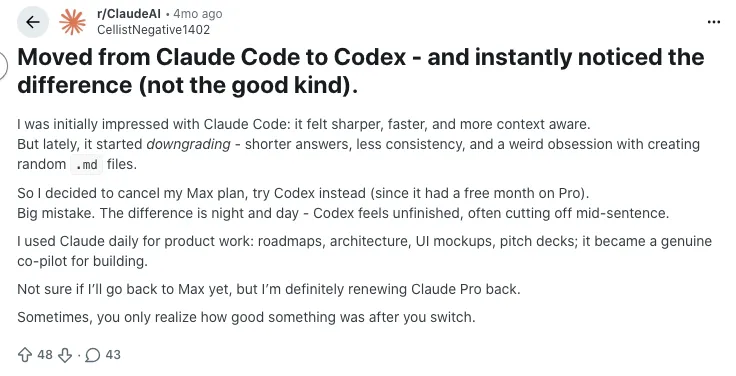
Source of Information: Reddit
2. Claude Code offers better explanations but requires more correction
A noticeable theme in several threads is that Claude Code explains its reasoning very well, but the output sometimes needs more fixes before it can run cleanly. Users appreciate the clarity in its thought process, yet they often find themselves polishing or debugging the final answer. It feels like working with a very thoughtful junior engineer.
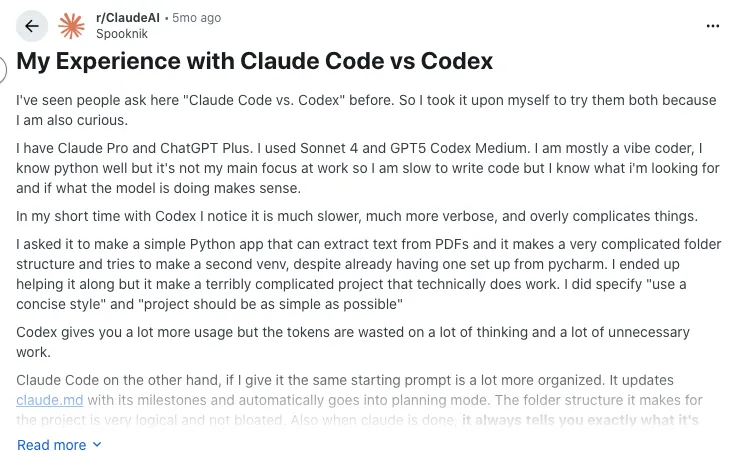
Source of Information: Reddit
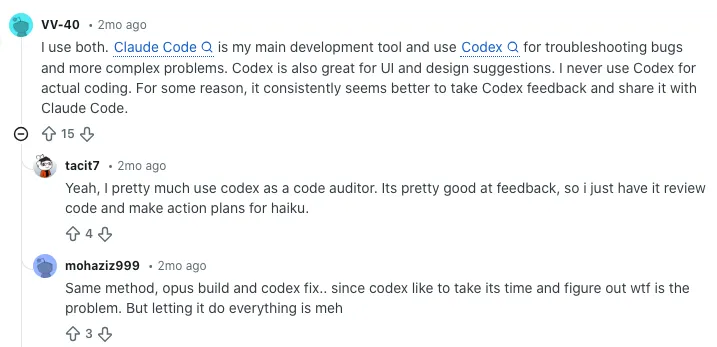
3. Speed vs depth: developers switch depending on what they need
Many Redditors mention they use both tools depending on the moment. Codex is often described as quick and efficient, great for prototyping or getting something working fast. Claude Code, on the other hand, takes its time but delivers more context-aware explanations and better long-form reasoning. The choice often depends on whether a task needs speed or depth.
Source of Information: Reddit
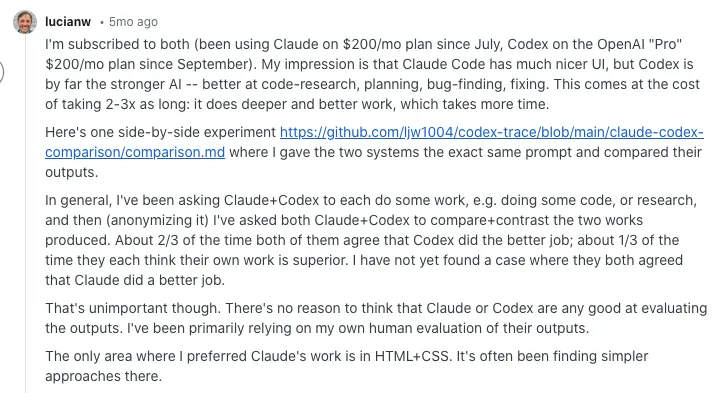
4. Claude Code shines in file and project navigation, but Codex feels stronger at “thinking”
In threads comparing the two side-by-side, users say Claude Code is better when browsing files, analyzing project structures, or working with long context. Codex, however, is often praised for “thinking smarter,” especially in code research, planning, or bug finding. Developers who want strategic reasoning lean toward Codex.
Source of Information: Reddit
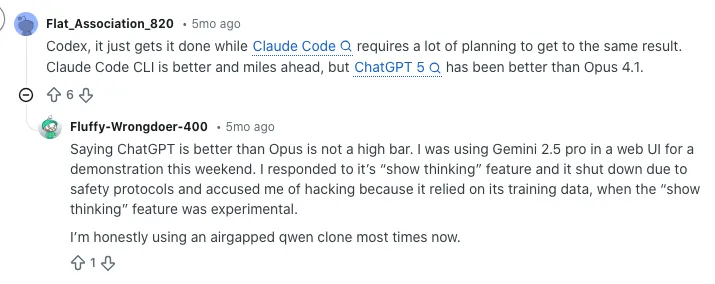
5. Codex delivers quicker results; Claude Code needs more setup
Some users say Codex gets to a working answer faster, while Claude Code benefits from more structured prompts. If you’re moving quickly between tasks or experimenting with ideas, Codex feels more responsive. Claude performs well too, but often requires more guidance to get the same outcome.
Source of Information: Reddit
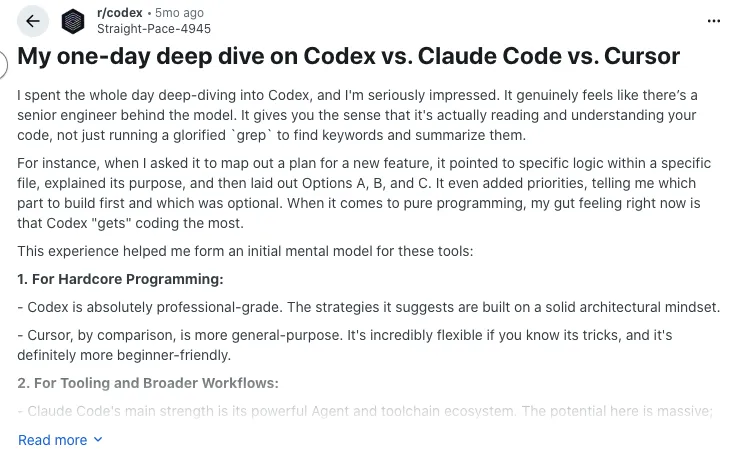
6. Claude Code’s UI gets praise, but Codex wins on raw output quality
Several developers comment that Claude Code feels more modern and pleasant to use, especially with its subagents and clean interface. Codex, on the other hand, is often described as producing higher-quality code more consistently, even if the interface feels a bit outdated.
Source of Information: Reddit
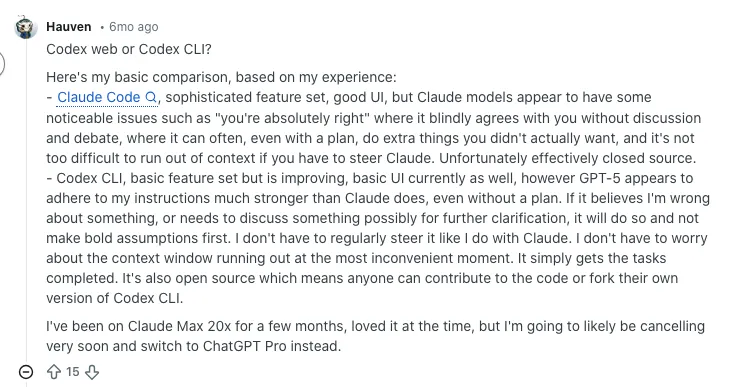
7. The consensus: use both, but for different strengths
Across all threads, the common conclusion is simple. Codex is the model developers trust for correctness and deep reasoning. Claude Code is the partner they choose when they want rich explanations, strong context understanding, or help navigating big projects. Most users don’t pick one forever. They switch between them based on the job.
Source of Information: Reddit

My Final Thoughts
After running both Codex and Claude Code through real development tasks, it’s clear they each shine in their own way. Codex is the partner you reach for when you want speed and clean, no-nonsense output. Claude Code steps in when a problem needs patience, structure, and a deeper understanding of how everything fits together. Most developers will get the best results by using them side by side, choosing the right one for the moment.
If you work on projects that demand clarity, long-context reasoning, or reliable debugging support, Claude Code offers a steady advantage. And if your day-to-day workflow involves rapid prototyping or quick utility scripts, Codex is hard to beat. No matter which one you lean toward, both can play an important role in modern ai development solutions services, helping teams ship smarter and move faster without cutting corners.
Frequently Asked Questions on Codex and Claude Code
It depends on what you need as a developer. Codex delivers faster output and clean, minimal code that works great for quick tasks and prototyping. Claude Code shines when your work requires deeper reasoning, structured logic, and long-context understanding. If your workflow leans on clarity, debugging depth, or multi-step planning, Claude Code often feels stronger.
Claude Code manages larger context inputs more reliably, making it ideal for reviewing long files, navigating multi-file projects, or analyzing extended logic flows. Codex handles short and mid-sized prompts well and stays quick, but it can lose detail as the conversation grows. Use Claude Code for large context tasks and Codex for fast, focused requests.
Codex is great for generating clean snippets fast and handling straightforward tasks with minimal friction. Claude Code is better when the code involves multiple layers of logic, tricky bugs, or requires explanations.
If you want pure speed, Codex feels lighter. If you need clarity and deeper thinking, Claude Code is your best pick.
Codex usually responds faster and identifies simple issues quickly. It works well when bugs are easy to spot or limited to smaller files. Claude Code is slower but more thorough. It handles complex debugging better, especially when the bug involves messy logic, interdependent functions, or unclear behavior.
Codex is ideal for rapid coding, utility scripts, and fast iterations where you want output right away. Claude Code offers stronger reasoning, clearer explanations, and better support for tasks that span multiple steps or require understanding how different parts of the codebase interact.
Codex is great for beginners who want quick examples, simple explanations, and fast answers to common coding questions. Claude Code is stronger when you need deeper walkthroughs, detailed reasoning, or help understanding how complex logic works. If you’re learning by doing, Codex feels easier. If you want thoughtful guidance, Claude Code is more supportive.
You can feed Claude Code long documentation, multi-file projects, API references, or technical notes and ask it to break things down step by step.
Codex is heavily trained on code from public sources and coding tasks, which helps it generate clean, accurate snippets. Claude Code is designed with a stronger focus on reasoning and long-form context, making it better at analysis, debugging, and problem-solving.
Codex is fast and practical, often suggesting direct solutions that work right away. Claude Code tends to be more creative in how it restructures logic, explains decisions, or proposes alternative approaches. If you want straightforward code, Codex is great.
If you want deeper insight or a fresh angle, Claude Code brings more creativity.
Codex feels simple and efficient, which many developers appreciate when working through quick tasks. Claude Code offers a more guided feel, with explanations and suggestions that make it easier to understand complex work.
The better choice depends on your workflow. If you prefer speed and minimalism, Codex feels right. If you like clarity and conversation, Claude Code feels more natural.
Claude Code handles larger files and longer inputs more reliably. It can walk through documentation, analyze multi-function modules, and review codebases with better stability. Codex works well with smaller files but can lose context when the input grows. If your workflow involves long documents or multi-file logic, Claude Code is the better fit.
Codex fits naturally into fast coding environments, especially IDEs and tools focused on rapid generation. Claude Code works best in workflows that rely on long-form reasoning, file navigation, and extended context. Both integrate well with development tools, but Claude tends to support deeper code inspection, while Codex is built for speed and quick embedding in coding pipelines.
Yes. Codex can quickly rewrite bullet points, summarize project experience, and clean up job descriptions. Claude Code goes deeper, helping you explain complex engineering work, highlight your problem-solving steps, and refine project write-ups with clarity. If you want fast edits, Codex is enough. If you want thoughtful storytelling, Claude Code wins.
Codex is sharp at implementing formulas, producing quick math utilities, and solving clear logic tasks. Claude Code offers stronger step-by-step reasoning and explains each stage of the solution, making it more helpful when the process matters as much as the answer. For deeper conceptual problems, Claude Code is the more dependable guide.
Claude Code tends to be more accurate in multi-step reasoning tasks, long-context debugging, and understanding the larger structure of a project. Codex is highly accurate for short tasks, direct code generation, and smaller bug fixes. If the task is simple, Codex often feels spot-on. If it’s complex, Claude Code generally stays more consistent.
Claude Code handles much larger inputs, making it easier to review long files, walk through multi-step logic, or analyze project structures without breaking the flow. It also provides clearer reasoning and more detailed explanations, which helps when you’re learning, debugging, or planning architecture. Codex is fast, but Claude Code goes deeper.
Claude Code feels smoother on long-context tasks, but Codex is generally faster for real-time coding, quick edits, and rapid prototyping. Codex responds almost instantly for smaller tasks, while Claude Code trades a bit of speed for more structured thinking. If you want pure speed, Codex takes the lead. If you want clarity, Claude Code is worth the extra moment.
Codex often produces cleaner code on the first attempt and handles rapid-fire prompts without losing pace. It’s also better at tight iteration loops, where you tweak the code step by step.
For developers who want fast, reliable snippets without much explanation, Codex provides a more lightweight experience than Claude Code.
Absolutely. Many developers switch between them depending on the task. Codex works well for quick solutions, utility functions, and simple debugging. Claude Code steps in when the work involves deeper logic, file analysis, or long reasoning chains. Using both gives you flexibility and stronger coverage across different types of challenges.
Several tools offer overlapping features. Models similar to Codex include solutions focused on fast code generation and prototyping. Tools similar to Claude Code include assistants that emphasize reasoning, explanation quality, and long-context analysis.
You’ll also find open-source models gaining traction among developers who want customization and local control.