AI in DevOps: Use Cases, Benefits, Tools, Risks, and Implementation Guide
Key Takeaways
- AI in DevOps helps teams troubleshoot pipelines, review infrastructure, analyze observability data, and support incident response without removing human control over production systems.
- Unlike rule-based automation, AI can interpret logs, traces, deployment history, documentation, and natural-language requests to provide context-aware recommendations.
- Reliable adoption depends on clean data, restricted permissions, automated validation, approval gates, auditability, and rollback mechanisms for high-impact changes.
- AI DevOps is moving toward controlled agents that use approved tools and complete multi-step tasks within defined security and governance boundaries.
DevOps teams already automate builds, tests, deployments, infrastructure provisioning, and monitoring. Yet engineers still spend time interpreting failed pipelines, searching logs, investigating alerts, reviewing configuration changes, and deciding whether a release is safe. As delivery environments become more distributed, the challenge is no longer automation alone. It is understanding operational context quickly enough to act confidently.
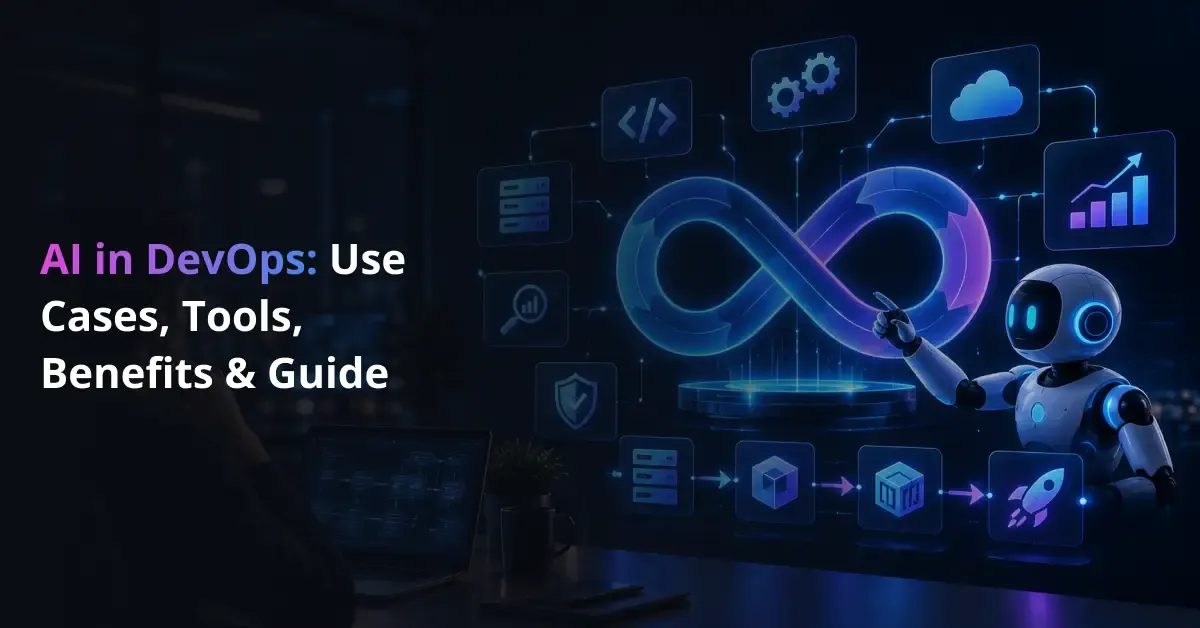
AI in DevOps applies artificial intelligence, machine learning, and increasingly AI agents to software development and IT operations. It helps teams analyze data, identify patterns, generate technical artifacts, and support decisions across the delivery lifecycle. Examples include explaining CI/CD failures, reviewing Terraform code, correlating logs and metrics, summarizing incidents, and recommending infrastructure changes.
The value becomes clearer when AI is embedded into existing engineering workflows. An AI system can inspect a failed deployment, compare it with recent code or configuration changes, pull relevant telemetry, and suggest where engineers should investigate first. Similar patterns can support testing, cloud optimization, documentation, and DevSecOps.
That does not make production operations autonomous. Engineering teams still define architecture, access controls, deployment policies, approvals, and rollback procedures. The practical role of AI across the software delivery lifecycle is to reduce repetitive analysis while keeping critical decisions accountable to people. This is why the role of DevOps in software delivery remains central as AI capabilities expand.
The Role of AI in DevOps
Traditional DevOps automation follows predefined instructions. A pipeline executes build, test, security, and deployment steps. Infrastructure as Code provisions resources from configuration files, while monitoring rules trigger alerts when thresholds are crossed. These mechanisms are predictable and repeatable, but they generally do not interpret ambiguous context beyond the rules they were given.
AI adds an analysis layer. It can work with less structured inputs such as logs, traces, incident notes, documentation, code changes, and natural-language requests. Machine learning can identify patterns or anomalies, while large language models can summarize technical context, generate configuration drafts, or interact with approved tools. AI in DevOps therefore complements existing automation rather than replacing it.
| Approach |
Primary Focus |
Typical DevOps Application |
Human Role |
| Traditional automation |
Rule-based execution |
Builds, deployments, scripts |
Define rules and exceptions |
| AI in DevOps |
Development and operations |
Analysis, generation, controlled automation |
Validate and govern actions |
| AIOps |
Operations data |
Anomaly detection, event correlation |
Verify and escalate |
| MLOps |
ML lifecycle |
Model deployment and monitoring |
Govern model operations |
| Agentic DevOps |
Tool-using AI agents |
Multi-step operational tasks |
Set permissions and approvals |
A typical workflow starts with code, Infrastructure as Code, logs, metrics, traces, deployment history, runbooks, and tickets. An AI or machine learning layer analyzes the request or event and returns a recommendation, draft, or proposed action. A policy layer then determines what the system may do and whether human approval is required.
This makes data quality and integration important. Teams may use machine learning models for predictive use cases, align AI with the software development lifecycle, and select an appropriate enterprise AI technology stack for orchestration and monitoring. Where models must use external tools, connecting AI systems through MCP can provide a structured access pattern.
For production adoption, AI must connect with repositories, CI/CD platforms, observability tools, cloud services, ticketing systems, and security controls without receiving excessive access. Teams may therefore need to connect AI with existing DevOps systems and build reliable telemetry and data foundations before expanding automation.
Turn Your DevOps Data Into Faster Engineering Decisions
Prismetric helps teams use AI to analyze pipelines, logs, infrastructure, incidents, and operational data without removing human control.
Explore AI for DevOps
7 Practical Use Cases of AI in DevOps
AI becomes useful in DevOps when it is applied to specific operational bottlenecks rather than treated as a general-purpose automation layer. The strongest use cases combine existing DevOps data, such as code changes, pipeline events, infrastructure state, logs, metrics, and security findings, with AI models that can interpret context and recommend a practical next step.
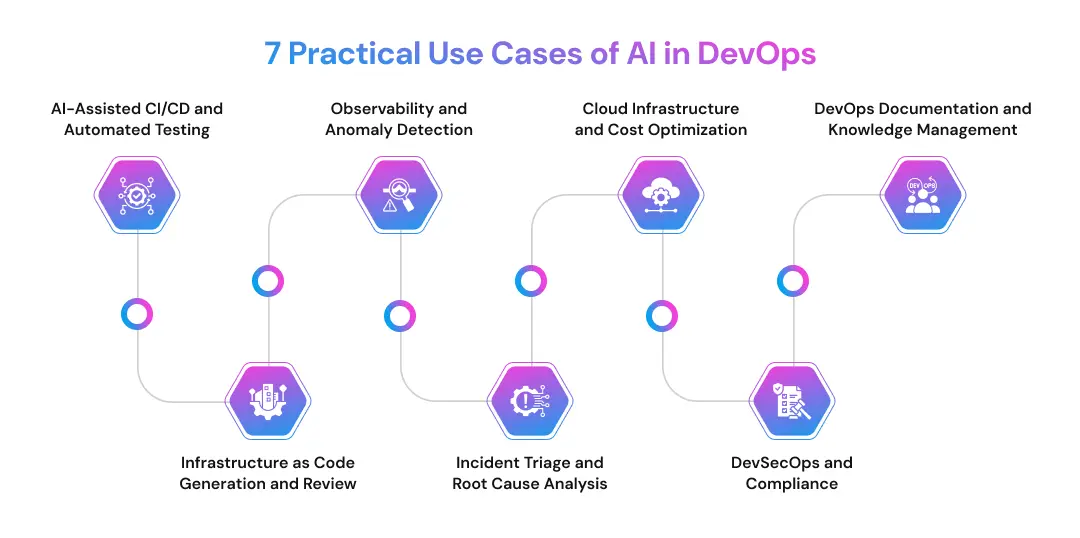
1. AI-Assisted CI/CD and Automated Testing
CI/CD pipelines generate large amounts of build, test, and deployment data. AI can help teams interpret that information by summarizing failed jobs, identifying recurring failure patterns, generating test cases, and highlighting changes that may require additional review before release.
For example, when a deployment fails, an AI assistant can compare the error with recent commits, test output, and previous failures. It can then suggest likely causes or recommend which checks to run next. Teams can also use AI-assisted software engineering workflows and AI tools used by development teams to reduce repetitive investigation. Organizations with specialized requirements may also create engineering copilots for delivery workflows.
Operational Impact
- Faster diagnosis of pipeline failures
- Less repetitive test creation and review
- More context before deployment decisions
DevOps Signal: AI can accelerate delivery analysis, but release policies, approval gates, and rollback decisions should remain governed by the engineering team.
2. Infrastructure as Code Generation and Review
Infrastructure as Code already gives teams a consistent way to provision cloud resources. AI can extend that workflow by drafting Terraform modules, Kubernetes manifests, Helm values, and configuration templates, then helping engineers review them for syntax, policy, and configuration issues.
A safer workflow is to treat generated infrastructure code as a first draft: generate the configuration, run linting and policy checks, create a plan in a non-production environment, review the proposed changes, and only then apply them. Understanding how DevOps architecture is structured helps teams place this capability in the right control layer, while they can automate repeatable infrastructure workflows where the process is stable and well defined.
Operational Impact
- Faster configuration drafting
- Earlier detection of infrastructure mistakes
- More consistent documentation of changes
DevOps Signal: AI-generated IaC should remain reviewable, testable, and reversible before it reaches production.
3. Observability and Anomaly Detection
Modern environments produce logs, metrics, traces, alerts, and deployment events across many services. AI can analyze these signals together, identify unusual patterns, group related events, and surface anomalies that might be difficult to spot through static thresholds alone.
This is where AIOps becomes especially relevant. Instead of treating every alert independently, an AI-supported system can correlate a latency spike with a recent deployment, a database slowdown, or an infrastructure change. Teams exploring generative AI applications for IT operations can use this pattern to reduce manual telemetry review. Similar approaches can support operational efficiency and predictive operational models when enough historical data is available.
Operational Impact
- Less manual review of telemetry
- Better correlation across monitoring signals
- Earlier identification of abnormal system behavior
DevOps Signal: Better AI recommendations depend on complete, trustworthy observability data rather than the model alone.
4. Incident Triage and Root Cause Analysis
Incident response often starts with fragmented information. Engineers may need to inspect dashboards, search logs, check deployment history, review recent configuration changes, and compare the incident with previous failures before they can form a useful hypothesis.
AI can compress that investigation. A practical workflow is: alert fires → relevant logs, metrics, and traces are collected → recent deployments are checked → related changes are correlated → likely causes are summarized → investigation steps are suggested → an engineer validates the evidence → incident notes or a runbook are updated.
This can be supported through AI-enabled workflow automation or by understanding what AI agents can do. Some teams may also build context-aware operational assistants or deploy governed agents with restricted tool access for controlled tasks.
Operational Impact
- Faster collection of incident context
- Less manual correlation across tools
- Better post-incident documentation
DevOps Signal: AI should narrow the investigation space; engineers should own the diagnosis and remediation decision.
5. Cloud Infrastructure and Cost Optimization
Cloud environments change continuously, which makes manual capacity and cost analysis difficult. AI can help identify idle resources, unusual spending patterns, underused instances, and demand trends that may justify rightsizing or scaling adjustments.
The same approach can support forecasting. Historical utilization, deployment schedules, and traffic patterns can be used to estimate future capacity requirements or flag unexpected consumption. Teams can explore AI applications in cloud computing and AI-driven process automation to connect recommendations with operational workflows. Larger programs may also need to scale AI-enabled operational automation across multiple cloud and engineering environments.
Operational Impact
- Better visibility into resource usage
- More informed capacity planning
- Faster identification of abnormal cloud consumption
DevOps Signal: Cost recommendations should account for performance, reliability, and workload requirements instead of optimizing spend in isolation.
6. DevSecOps and Compliance
Security teams already use automated scanners, policy checks, and dependency analysis. AI can help prioritize findings, explain configuration risks, summarize vulnerability context, and identify patterns across code, infrastructure, and operational data.
For example, an AI assistant can review a misconfigured cloud policy, explain why it creates risk, and recommend the relevant control to inspect. It can also help teams organize compliance evidence or surface exposed secrets and suspicious configuration changes. The system should not automatically approve exceptions, change access policies, or execute privileged remediation without explicit safeguards.
Operational Impact
- Faster interpretation of security findings
- Better prioritization of remediation work
- More consistent compliance documentation
DevOps Signal: AI can support security analysis, but privileged actions and policy exceptions need stronger controls than ordinary engineering assistance.
7. DevOps Documentation and Knowledge Management
A large amount of DevOps knowledge lives across tickets, wikis, repositories, dashboards, chat threads, and individual engineers. AI can help turn that scattered information into usable runbooks, deployment notes, configuration explanations, incident summaries, and onboarding material.
An operational assistant can retrieve documentation, explain an unfamiliar service, summarize how a previous incident was resolved, or draft a runbook from an approved workflow. Teams evaluating AI agents used in software development can apply similar patterns to operations, while software-development agent examples show how task-focused agents can support engineering work. Organizations may also build internal engineering platforms that bring these capabilities into a governed developer experience.
Operational Impact
- Faster access to operational knowledge
- More consistent runbooks and incident records
- Easier onboarding for new engineers
DevOps Signal: AI becomes more useful when it can retrieve approved internal knowledge instead of relying only on general model training.
| DevOps Task |
AI Capability to Evaluate |
| Coding and configuration |
Code generation, explanation, and configuration assistance |
| CI/CD |
Pipeline analysis, testing support, and deployment context |
| Observability |
Event correlation, anomaly detection, and telemetry summarization |
| Incident response |
Triage, evidence gathering, and runbook assistance |
| DevSecOps |
Finding prioritization, configuration review, and policy support |
| Cloud operations |
Capacity forecasting, rightsizing, and cost anomaly detection |
Tool selection should depend on the existing DevOps stack, integration options, data handling, role-based access controls, auditability, agent permissions, rollback support, and cost. A useful starting point is to compare AI workflow automation tools against the actual workflow being improved rather than choosing a platform based only on the number of AI features it offers.
Key Benefits of AI in DevOps
AI creates the most value in DevOps when it reduces the time between an operational signal and a useful engineering response. The benefit is not simply more automation, but faster access to context and less manual effort before engineers can act.
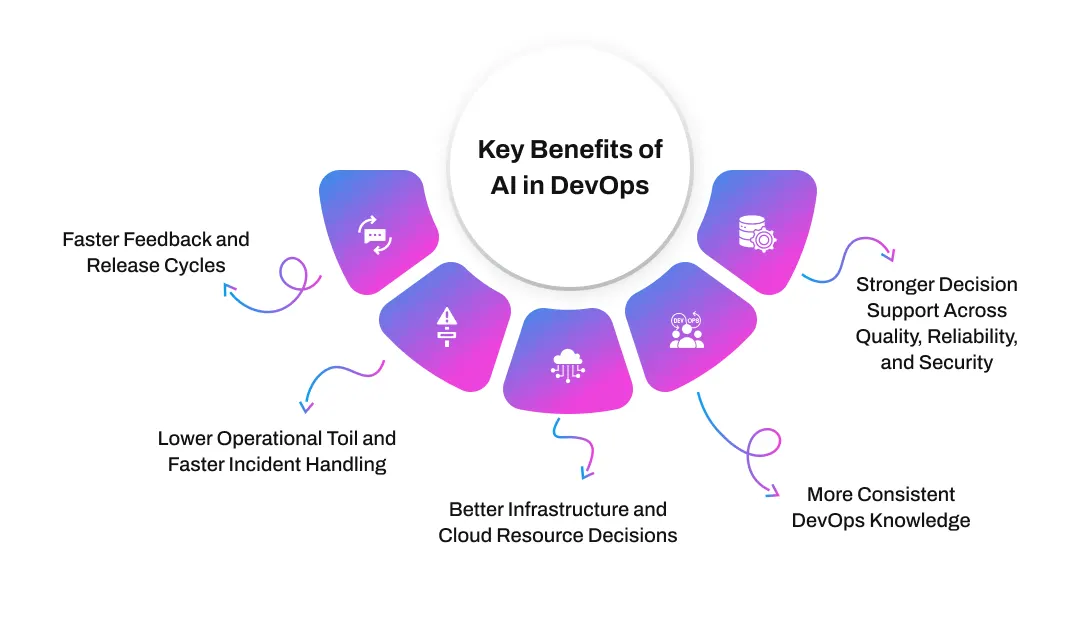
Faster Feedback and Release Cycles
AI can reduce the time engineers spend interpreting failed builds, test results, deployment logs, and configuration errors. When relevant information is summarized early, teams can investigate blockers sooner and make release decisions with more context.
It can also help prioritize tests or explain why a pipeline failed after a specific change. The value comes from shortening analysis loops rather than simply making every pipeline run faster.
Lower Operational Toil and Faster Incident Handling
Many operational tasks involve collecting information before the real engineering work begins. AI can summarize logs, correlate alerts, retrieve recent changes, draft incident notes, and organize evidence for troubleshooting.
That reduces repetitive investigation and gives engineers more time for remediation, reliability work, and architectural improvements, especially when an incident spans several services and tools.
Better Infrastructure and Cloud Resource Decisions
AI can analyze utilization, demand patterns, infrastructure changes, and cost signals to support rightsizing and capacity planning. It can also surface abnormal resource consumption or recurring overprovisioning.
These recommendations still need to be evaluated alongside reliability, performance, and service-level requirements rather than treated as automatic cost-cutting instructions.
More Consistent DevOps Knowledge
Runbooks and operational documentation can become outdated when teams are focused on restoring service or shipping changes. AI can help draft incident summaries, deployment notes, and workflow documentation from approved operational context.
That makes knowledge easier to reuse across teams while reducing dependence on undocumented tribal knowledge.
Stronger Decision Support Across Quality, Reliability, and Security
AI DevOps can surface patterns across large volumes of engineering data, helping teams investigate quality issues, reliability signals, infrastructure behavior, and security findings without manually reviewing every source.
Teams still need to validate recommendations before acting. Organizations should also measure whether automation creates measurable value, using approaches such as AI automation ROI frameworks, before they scale AI across enterprise delivery systems.
Bring AI Into Your DevOps Workflow Without Losing Control
Connect AI with CI/CD, cloud infrastructure, observability, repositories, and ticketing systems using restricted permissions, approval gates, and audit trails.
Discuss Your AI DevOps Workflow
How to Implement AI in DevOps
Adding AI to DevOps works best when teams begin with a specific operational problem and a measurable baseline. Starting with a low-risk workflow makes it easier to evaluate accuracy, integration quality, and governance requirements before the system is allowed to influence higher-impact production actions.
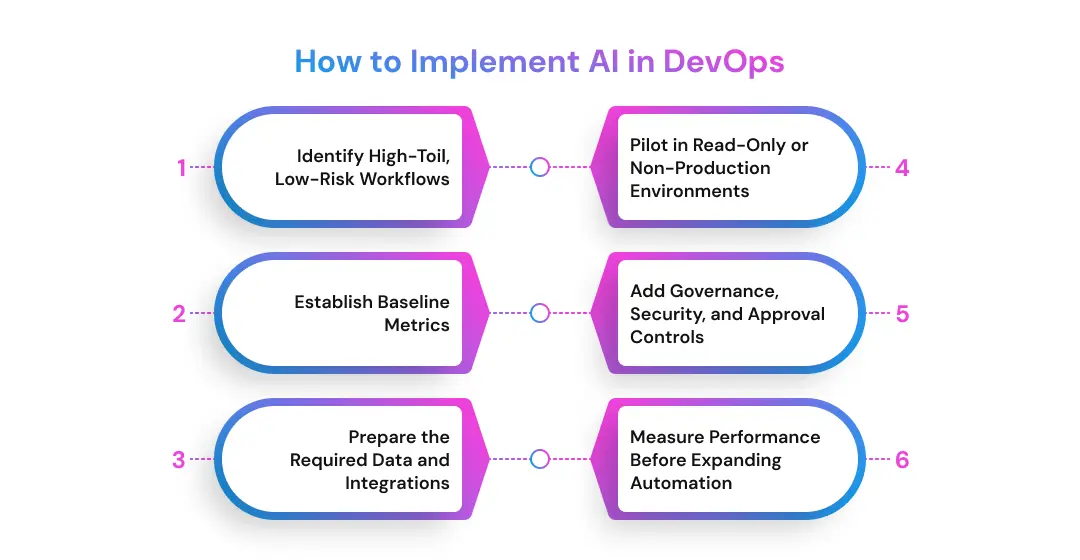
1. Identify High-Toil, Low-Risk Workflows
Start with tasks that consume time but do not require unrestricted production access. Good candidates include log summarization, incident note drafting, test generation, pipeline troubleshooting, configuration explanation, and read-only analysis.
A structured DevOps implementation roadmap can help teams determine where AI fits into existing processes instead of creating a separate automation layer that engineers must maintain independently.
2. Establish Baseline Metrics
Measure the workflow before introducing AI. Depending on the use case, useful baselines can include triage time, deployment failure frequency, alert volume, manual review effort, test duration, or cloud cost anomalies.
Without a baseline, it becomes difficult to determine whether the new system actually reduces operational effort or simply introduces another tool. Keep the measurement tied to the engineering problem the pilot is intended to solve.
3. Prepare the Required Data and Integrations
AI needs access to the right context. That may include telemetry, deployment history, source repositories, tickets, runbooks, infrastructure state, and approved internal documentation.
A broader enterprise AI implementation approach can help teams think through data readiness, integrations, permissions, and governance before expanding access. Missing or inconsistent context should be addressed before increasing automation.
4. Pilot in Read-Only or Non-Production Environments
Recommendation mode is a safer starting point than autonomous execution. Let the system summarize, diagnose, or propose a change while engineers decide whether the output is accurate.
Teams that need broader platform modernization may also use DevOps consulting support or expand platform engineering capacity while the pilot is being integrated into existing delivery workflows.
5. Add Governance, Security, and Approval Controls
Define exactly what the AI system can see, which tools it can call, what actions it may perform, and which actions require approval. Add audit logs, policy checks, restricted credentials, sandbox environments, and rollback procedures before granting higher-impact permissions.
Organizations moving beyond experiments may need help to move AI pilots into production without bypassing existing security and change-management controls. High-impact actions should have explicit ownership and escalation paths.
6. Measure Performance Before Expanding Automation
Compare the pilot against the original baseline. Review accuracy, false recommendations, time saved, operational incidents, user adoption, security findings, and maintenance overhead.
Expand automation only when the workflow remains reliable under real operating conditions. Where internal capacity is limited, teams can add specialized AI engineering support while keeping architecture, governance, and production accountability clearly defined.
This staged approach also makes operational ownership easier to preserve as AI receives access to more systems.
Challenges and Guardrails for AI in DevOps
AI can support analysis and controlled automation, but it also introduces operational risk. In DevOps, an incorrect recommendation can affect infrastructure, access controls, deployments, or incident response. Teams need safeguards that match the impact of each AI-assisted action.
Hallucinated or Incorrect Configurations
Generative AI can produce invalid YAML, incorrect Terraform arguments, outdated APIs, or remediation steps that look plausible but do not fit the actual environment. The risk increases when generated output moves directly into production workflows.
Practical safeguard: Treat generated configuration as untrusted input. Run linting, syntax validation, security checks, policy rules, and non-production tests before approval. Teams can also follow a structured approach to testing AI models before production when model outputs influence operational decisions.
Sensitive Operational Data and Credentials
Logs, incident records, and configuration files may contain API keys, internal hostnames, customer information, or sensitive data. Sending this information to an AI system without controls can create privacy, security, or compliance issues.
Practical safeguard: Sanitize inputs, mask secrets, use approved AI endpoints, and restrict which repositories, logs, and systems the model can access.
Excessive Agent Permissions and Blast Radius
An AI agent connected to cloud consoles, CI/CD systems, or infrastructure tools can do more than recommend a change. If its permissions are too broad, one action can affect multiple services or environments.
Practical safeguard: Use least-privilege access, scoped tools, temporary credentials, sandboxes, and explicit action boundaries. Teams should also evaluate AI agent behavior and reliability before expanding an agent’s authority.
Incomplete Telemetry and Missing Context
AI recommendations depend on the context available to the system. Missing traces, incomplete deployment history, outdated runbooks, or disconnected monitoring tools can produce incomplete conclusions.
Practical safeguard: Improve observability coverage and expose the evidence behind recommendations. Engineers should be able to see which logs, metrics, changes, or documents informed the output.
Over-Reliance on AI Recommendations
Fast answers can create false confidence. If teams approve suggestions without checking the evidence, AI may shift from decision support to an uncontrolled source of operational risk.
Practical safeguard: Define what AI may suggest, what it may execute, and what always requires human authorization. AI governance and regulatory considerations also matter for organizations operating under security or compliance requirements.
A practical production guardrail sequence is:
sanitize inputs → restrict permissions → sandbox changes → validate automatically → require approval → audit actions → maintain rollback capability
Planning an AI-enabled DevOps initiative? Start with one measurable workflow, define the risk boundary first, and expand automation only after the controls perform reliably.
The Future of AI in DevOps
From copilots to bounded agents. AI in DevOps is moving beyond assistants that only explain code or summarize logs. The next stage is tool-using agents that can gather context, call approved systems, and complete several steps in a workflow while operating inside predefined limits.
Agentic DevOps. These agents may investigate alerts, update tickets, prepare configuration changes, or trigger approved remediation steps. The important distinction is that useful autonomy does not require unrestricted access. Permissions, approval points, and rollback rules remain part of the operating model.
More predictive operations. As telemetry and historical data improve, AI can support earlier identification of capacity pressure, unusual system behavior, recurring incidents, and infrastructure inefficiencies. This shifts part of DevOps from reactive investigation toward evidence-based prediction and earlier operational intervention.
The engineer’s role changes rather than disappears. Architecture, platform engineering, SRE, security, governance, and validation become more important as automation gains broader access. Teams exploring agentic process automation patterns should therefore focus as much on orchestration, observability, permissions, and failure handling as on model capability. The goal is not autonomy at any cost, but dependable automation within boundaries engineering teams can understand and control.
Move From DevOps Copilots to Controlled AI Agents
Prismetric can help design, integrate, test, and govern AI agents that investigate incidents, prepare changes, and automate approved operational tasks.
Talk to Our AI Experts
Putting AI in DevOps Into Practice With Prismetric
Many organizations already have mature CI/CD pipelines, cloud automation, monitoring, and security controls. The next challenge is deciding where AI can remove operational friction without adding unnecessary complexity or risk. That usually starts with one workflow where the inputs, expected outputs, and success criteria are clear.
The implementation then depends on integration. Models and agents need controlled access to telemetry, repositories, ticketing systems, cloud services, and internal documentation. They also need the same security, observability, and governance discipline applied to other production systems.
A practical rollout starts with read-only assistance, moves through controlled pilots, and expands only after teams can measure accuracy, reliability, and operational value. Human approval should remain in place for actions with a meaningful production or security impact.
For organizations that need external guidance, Prismetric’s AI consulting services can provide a starting point for assessing suitable DevOps use cases, integration requirements, governance needs, and the path from pilot to controlled production deployment.
Prismetric provides AI development and consulting services to businesses in the USA, Australia, Germany, and other markets worldwide, helping organizations plan, build, integrate, and scale AI solutions within their existing technology environments.
AI in DevOps helps teams analyze engineering and operational data, troubleshoot CI/CD pipelines, review infrastructure configurations, correlate monitoring signals, assist incident response, and identify cloud or security issues.
It works best as a decision-support layer where engineers retain control over high-impact production actions.
AI in DevOps covers the broader use of artificial intelligence across development and operations.
AIOps focuses more specifically on IT operations, particularly:
- Logs, metrics, and events
- Anomaly detection
- Alert correlation
- Incident investigation
- Operational monitoring
AI can automate repetitive DevOps activities, but it does not replace the engineering judgment required for architecture, reliability, security, production changes, and incident management.
As AI handles more routine analysis, DevOps engineers are likely to spend more time on platform engineering, governance, system design, automation strategy, and reliability.
The most practical AI in DevOps use cases are those where teams already have reliable operational data and clearly defined workflows.
Common examples include:
- CI/CD failure analysis
- Automated test generation
- Infrastructure as Code review
- Log and telemetry analysis
- Incident triage
- Cloud resource optimization
- DevSecOps support
- Runbook and documentation generation
There is no single AI tool that covers the complete DevOps lifecycle. Teams normally combine different tools depending on the workflow.
Common categories include coding assistants, AI-enabled CI/CD platforms, AIOps and observability systems, security tools, cloud optimization platforms, and AI agents that interact with approved engineering tools.
A good starting point is one repetitive, measurable, and relatively low-risk workflow rather than attempting to automate production operations immediately.
A practical rollout can look like this:
- Select a high-toil workflow.
- Establish current performance metrics.
- Connect the required operational data.
- Test AI in read-only or staging mode.
- Add security and approval controls.
- Measure reliability before expanding access.
For organizations that need help designing this rollout, Prismetric can support the assessment, integration, and controlled implementation of AI-enabled DevOps workflows while keeping governance and existing engineering processes in focus.
Yes, particularly for tasks that involve interpreting or producing text-based engineering artifacts.
Generative AI can help with:
- Explaining pipeline errors
- Drafting Terraform or Kubernetes configurations
- Summarizing logs
- Creating test cases
- Generating runbooks
- Explaining unfamiliar code or configuration
- Drafting incident reports
Generated output should still pass the same testing and review processes as manually written engineering work.
Agentic AI in DevOps refers to AI systems that can perform several connected tasks instead of producing only a recommendation.
For example, an agent might inspect an alert, retrieve relevant logs, review recent deployments, query monitoring tools, and prepare a suggested remediation plan.
The agent should still operate within defined tool access, permissions, approval points, and audit requirements.
AI can support automated remediation for narrowly defined, low-risk scenarios, but unrestricted production access creates significant operational risk.
Teams should normally introduce autonomy gradually:
- Recommendation only
- Human-approved actions
- Automated low-risk actions
- Restricted remediation within predefined policies
High-impact changes should retain stronger approval, observability, and rollback controls.
The security of AI DevOps depends heavily on how the system is integrated and governed.
Teams need to consider which logs and repositories the model can access, whether sensitive data is sent to external systems, what credentials an agent receives, and which production actions it can perform.
Prismetric can help organizations design AI integrations around access controls, data protection, approval workflows, and auditability instead of adding AI as an unrestricted layer over existing DevOps systems.
Not every organization needs an internal team of ML researchers to start using AI in DevOps. Many use cases can be implemented through existing AI platforms and APIs.
However, deeper customization may require knowledge of:
- Machine learning
- LLM integration
- Data engineering
- Model evaluation
- Cloud infrastructure
- DevOps architecture
- Security and governance
The required expertise depends on whether a team is adopting an existing tool or building a custom AI capability.
There is no fixed implementation cost because the scope can range from adding an AI assistant to building an integrated operational agent.
The main cost drivers usually include:
- Number of workflows being automated
- Data and tool integrations
- Model/API usage
- Cloud infrastructure
- Security requirements
- Custom agent development
- Monitoring and evaluation
- Ongoing maintenance
A small read-only pilot will normally require much less engineering effort than an AI agent connected to several production systems.
The required data depends on the specific use case.
For incident analysis, AI may need logs, metrics, traces, deployment history, and runbooks. For CI/CD assistance, it may use build output, test results, code changes, and pipeline configuration.
The goal is not to expose every available data source. Teams should provide only the context required for the workflow.
AI can reduce workload primarily by removing repetitive information-gathering and analysis tasks.
For example, instead of manually searching five monitoring tools during an incident, an AI system can collect relevant signals and prepare a concise investigation summary.
That allows engineers to spend more time on remediation, reliability improvements, architecture, and platform development.
Yes, but smaller teams usually benefit most from focused use cases rather than building complex autonomous systems.
A startup might begin with AI-assisted testing, pipeline troubleshooting, cloud-cost analysis, or infrastructure documentation.
Prismetric can help businesses determine whether an off-the-shelf capability is sufficient or whether a custom AI-enabled DevOps workflow is justified, which can prevent unnecessary development effort.
DevOps engineers do not need to become full-time data scientists, but understanding how AI systems interact with operational environments will become increasingly useful.
Useful skills include:
- AI and LLM fundamentals
- Prompt and context design
- API integration
- AI agent orchestration
- Model evaluation
- Data engineering basics
- Observability
- Cloud security
- Policy-as-code
- AI governance
Existing strengths in infrastructure, automation, reliability, and systems thinking remain highly relevant.
Fully autonomous DevOps is unlikely to be appropriate for every workflow because production systems involve business risk, security requirements, dependencies, and unpredictable failure conditions.
The more practical direction is bounded autonomy: AI agents can perform defined tasks independently while humans retain control over high-impact changes, exceptions, and policy decisions.
Measure AI against the operational problem it was introduced to solve rather than simply tracking how often engineers use the tool.
Useful metrics can include:
- Mean time to identify an incident cause
- Manual investigation time
- Pipeline troubleshooting time
- Alert volume
- Test creation effort
- Deployment failure rate
- Cloud-cost anomalies detected
- Percentage of AI recommendations accepted
- Incorrect recommendation rate
The goal is measurable operational improvement, not AI adoption for its own sake.