V0 vs Lovable: Which Is the Better AI App Development Platform?
Lovable and v0 by Vercel are two of the most talked-about platforms in the AI app development space.
But which one is the right fit for your project?
Well, to help you decide, in this practical comparison, I’ll break down v0 by Vercel vs Lovable in terms of:
- App building capabilities
- AI development features
- Backend, database, and deployment support
- Ease of use for beginners and developers
And much more!
(Because… Why choose the wrong tool when both solve very different problems?)
Let me help you choose the right platform for building, launching, and scaling your app!
Build AI Apps That Are Ready to Scale
Prismetric develops custom AI app solutions with frontend, backend, database, and deployment support.
Get Started Today
Vercel vs Lovable at a Glance
Before we go deeper, here’s a quick side-by-side look at how Lovable, Vercel, and Vercel v0 compare.
| Comparison Point |
Lovable |
Vercel v0 |
| Main purpose |
Turns prompts into full-stack apps |
Helps generate and edit app interfaces with AI |
| Best for |
Building an app from scratch |
Creating UI, pages, and Vercel-ready app experiences |
| Starting point |
A plain-English idea or prompt |
A prompt, screenshot, design idea, or existing project |
| Coding required |
Low, especially for simple apps |
Some coding knowledge helps, especially for real projects |
| Frontend generation |
Yes, it can create app screens and layouts |
Yes, strong for React and Next.js-style interfaces |
| Backend/database |
Built around Supabase for database and backend features |
Can connect with app logic, but still works best with developer review |
| Authentication |
Can help set up login and user flows |
Can help generate auth-related UI, but setup still needs care |
| Hosting/deployment |
Offers simple publishing and can connect with GitHub |
Can deploy naturally into the Vercel ecosystem |
| GitHub workflow |
Supports code export or syncing for developer handoff |
Supports GitHub workflows for continuing development |
| Design editing |
Visual editing is beginner-friendly |
Strong AI-assisted design and interface editing |
| Best user type |
Founders, non-technical builders, MVP creators, small teams |
Developers, designers, and teams building fast UI prototypes |
| Biggest limitation |
Can feel limiting when the app becomes complex or needs deep custom control |
Still needs technical review for complex, secure, production apps |
| Pricing model |
Usually based on plans and usage/credits |
Plan or credit-based AI usage, depending on your Vercel setup |
| Production readiness |
Good for MVPs and early products, but serious apps need review |
Useful for production workflows, but generated output should be tested |
The simple way to think about it is this:
- Use Lovable when you want to build the app.
- Use Vercel v0 when you want AI help creating the app interface or Vercel-native project faster.
V0 By Vercel vs Lovable Feature Comparison
In the previous section, I gave you a quick overview of how Lovable, Vercel v0 stack up against each other.
Now, it’s time to break them down — feature by feature.
I’ve compared the core features that matter when you’re choosing an AI app builder, AI development platform, or deployment tool, including:
- App building capabilities
- Frontend and UI generation
- Backend, database, and authentication support
- Deployment and hosting
- GitHub workflow
- Design editing
- Pricing
- Production readiness
Keep reading!
Which Tool Is Best for Building an App From Scratch?
First, I wanted to see which platform is better when you’re starting with just an idea.
Let’s say you want to build a SaaS MVP, internal dashboard, client portal, marketplace, booking app, or simple web app.
Which tool gets you closest to a working product?
Let’s see who comes out as the winner.
| Feature |
Lovable |
Vercel v0 |
| Entry Price |
Free plan available; Pro starts at $25/mo when billed annually |
Free plan available; Team starts at $30/user/mo |
| Prompt-to-App Building |
✅ |
✅ |
| Full-Stack App Generation |
✅ |
⚠️ Yes, but better with developer review |
| Beginner Friendly |
✅ |
⚠️ Easier than coding, but still more developer-focused |
| App Logic Creation |
✅ |
✅ |
| Built-In Publishing |
✅ |
✅ |
| Best For |
Building an MVP from an idea |
Creating Vercel-ready apps and interfaces with AI |
Lovable
Lovable is the stronger choice when your starting point is just an idea.
You can type something like:
“Build a client portal where users can log in, upload files, view project status, and message the team.”
And Lovable can turn that into a working app structure with:
- Pages
- UI screens
- Forms
- App logic
- Database setup
- Authentication flows
- Basic deployment
That’s what makes Lovable useful for founders, non-technical builders, agencies, and small teams that want to test an idea quickly.
You don’t need to start with a GitHub repo. You don’t need to set up a frontend framework manually. You don’t need to figure out the whole backend from day one.
You describe what you want, and Lovable tries to create the first working version for you.
Now, is it perfect? No.
If your app has complex permissions, advanced payment logic, heavy backend workflows, or serious security needs, you’ll still want a developer to review the code and database setup.
But for getting from “I have an app idea” to “I can click around a working prototype,” Lovable does a really good job.
Vercel v0
This is where v0 comes in.
v0 is Vercel’s AI builder and design assistant. It’s much closer to Lovable than the main Vercel platform is.
With v0, you can generate app pages, dashboards, landing pages, forms, components, and full web experiences from prompts. It also fits naturally into the Vercel ecosystem, so deploying what you create is easier than moving between disconnected tools.
I especially like v0 for:
- Landing pages
- SaaS dashboards
- React components
- Form layouts
- Admin panels
- Product pages
- Design-heavy web interfaces
But compared with Lovable, v0 still feels more developer-aware.
That’s not a bad thing. It just means v0 is usually better if you understand how modern web apps work, or if you have a developer who can review and continue the project.
If Lovable feels like “describe the app and let it build,” v0 feels more like “generate the interface and keep improving it inside a developer-friendly workflow.”
Winner?
For building an app from scratch, Lovable wins.
It’s simply easier for beginners and non-technical users who want to move from idea to working MVP without setting up a full development workflow first.
But if you’re a developer, or you already know you want to build inside the Vercel ecosystem, v0 is a strong option too.
Vercel itself doesn’t win this round because it’s not meant to be a prompt-to-app builder. It’s better for deploying and scaling code once the app already exists.
Lovable User Review
“I like the user-friendly interface of Lovable and the quick results it provides. It makes saving time on deploying my project much easier.”
Read the full review on G2: source
This matches the biggest reason people like Lovable: it saves time in the early building stage.
Instead of spending days setting up the project, database, pages, and basic flows, you can get something usable much faster.
Vercel v0 User Review
“I genuinely enjoy the convenience and deployment workflow of V0 with Vercel. It’s hassle-free, and when it works, it’s great.”
Read the full review on Reddit: source
That’s a fair way to describe v0.
When it works well, it feels fast and clean. But you may still need to guide it carefully, especially if you’re building something more complex than a page or simple app flow.
Which Tool Offers the Best Frontend and UI Generation?
The next feature I wanted to compare is frontend and UI generation.
This matters a lot because most AI app builders can create something that works, but not all of them create something that looks polished.
And if you’re building a SaaS MVP, startup landing page, dashboard, client portal, or internal tool, the interface matters.
It affects how users understand your product, how professional your app feels, and how much editing you’ll need to do later.
So, let’s compare Lovable vs Vercel vs v0 for frontend generation.
| Feature |
Lovable |
Vercel v0 |
| AI UI Generation |
✅ |
✅ |
| Landing Page Creation |
✅ |
✅ |
| Dashboard Generation |
✅ |
✅ |
| React/Next.js Component Output |
✅ |
✅ |
| Visual Editing |
✅ |
✅ |
| Design Templates |
✅ |
✅ |
| Best For |
Complete app screens and user flows |
Polished UI, components, and Vercel-ready interfaces |
Lovable
Lovable does a solid job with frontend generation.
When you prompt it clearly, it can create clean pages, dashboards, forms, navigation menus, pricing pages, sign-up flows, and internal tool layouts.
For example, if you ask it to build a CRM dashboard, you may get:
- Sidebar navigation
- Dashboard cards
- Tables
- Search bars
- Filters
- Detail pages
- Add/edit forms
- Mobile-friendly layouts
This is helpful if you’re not a designer and don’t want to start with a blank screen.
I also like that Lovable thinks in terms of app flows, not just isolated UI blocks. So, if you’re building a customer portal, it won’t only create a pretty homepage. It can also create login screens, dashboard pages, settings pages, and connected workflows.
That said, the design quality depends heavily on your prompt.
If your prompt is vague, you may get a generic-looking app. If you give Lovable more direction around layout, style, colors, audience, and user flow, the output usually gets much better.
Vercel v0
v0 is probably the strongest option here if we’re talking specifically about frontend and UI design.
It’s especially good at creating modern-looking interfaces, including:
- Landing pages
- Dashboards
- Hero sections
- Pricing tables
- Login forms
- Product cards
- Admin panels
- SaaS-style layouts
- React components
You’ll notice v0 often produces UI that feels closer to what a designer or frontend developer would create manually.
It also works well if you want to start from a smaller piece of the product.
For example, instead of asking it to build your entire SaaS app at once, you can ask it to create:
- A pricing section
- A user onboarding flow
- A dashboard layout
- A settings page
- A billing page
- A responsive navigation bar
This makes v0 very useful for developers who want faster UI generation without giving up too much control.
But here’s where it may feel limiting:
If you’re a complete beginner and want the entire app logic, database, authentication, and user flows handled together, Lovable may feel easier.
v0 shines more when you care about frontend polish and you’re comfortable reviewing or continuing the code.
Winner?
For pure frontend and UI generation, Vercel v0 wins.
It’s better suited for polished React-style interfaces, landing pages, dashboards, and design-focused web experiences.
But Lovable is close behind because it doesn’t just create UI blocks. It creates full app screens and connects them into a bigger user flow.
So, here’s my simple take:
Use v0 if you want better UI polish.
Use Lovable if you want the UI plus the app structure around it.
Use Vercel when you already have the frontend and need to deploy it.
v0 User Review
“I feel like its context is better than lovable or cursor. But I do feel the content it gives is really generic and hard to customize sometimes.”
Read the full review on Reddit: source
This is exactly the tradeoff with v0.
It can create good-looking interfaces fast, but you may still need to break your project into smaller pieces and guide it carefully to avoid generic output.
Lovable User Review
“Overall, I liked the Lovable outputs better, but it can’t handle artsy styles… It excels with more professional-looking sites.”
Read the full review on Reddit: source
That feels accurate too.
Lovable is usually better for clean, practical, product-style interfaces than highly experimental or artistic web design.
Which Tool Offers the Best Backend, Database, and Authentication Support?
Now, let’s talk about the part many beginners overlook: backend support.
The backend is the part of your app users don’t directly see. It handles things like your database, user accounts, permissions, file storage, payments, API calls, and app logic.
So, if you’re building more than a simple landing page, this section matters a lot.
A pretty frontend is nice, but if your app needs users to log in, save data, upload files, or manage accounts, you need a backend that actually works.
| Feature |
Lovable |
Vercel v0 |
| Built-In Backend Support |
✅ |
⚠️ AI-assisted, but needs review |
| Database Support |
✅ Supabase/Lovable Cloud |
✅ Can help connect databases |
| Authentication Support |
✅ |
⚠️ Can generate flows, but setup needs care |
| Storage Support |
✅ |
⚠️ Depends on project setup |
| API Support |
✅ |
✅ |
| Beginner Friendly Backend Setup |
✅ |
⚠️ |
| Best For |
Non-technical users building full-stack MVPs |
Developers building AI-assisted app workflows |
Lovable
Lovable is the strongest option here for beginners.
It can help you set up backend features through a much simpler workflow than doing everything manually.
With Lovable, you can build things like:
- User login
- Sign-up pages
- Profile management
- Database tables
- Dashboards connected to real data
- File uploads
- Admin panels
- Basic permissions
- CRUD apps, where users can create, read, update, and delete data
A big reason Lovable works well for this is its Supabase connection.
Supabase is a backend platform that gives you a database, authentication, storage, and other app features. In simple words, it gives your app a place to store data and manage users.
So, when you’re using Lovable, you’re not just generating static pages. You can build apps that actually save and retrieve information.
That’s a huge advantage if you’re building a SaaS MVP, internal tool, client dashboard, directory, marketplace, or booking platform.
But there’s one thing you should not ignore:
Backend work is where mistakes become more serious.
If Lovable creates a button in the wrong color, that’s easy to fix. But if your database permissions, user roles, or authentication rules are wrong, that can become a real security issue.
So, for serious apps, I’d still recommend getting a developer to review the backend setup before you collect real user data.
Vercel v0
v0 is becoming more useful for full-stack work, not just frontend design.
It can help plan app flows, connect with databases, generate API-related code, and create pages that work with backend logic.
This makes it more capable than older comparisons suggest.
Still, I wouldn’t describe v0 as the easiest backend tool for complete beginners.
It can help you create the structure, but you still need to understand what’s happening behind the scenes, especially for:
- Database schema
- User permissions
- Authentication logic
- API keys
- Payment flows
- Data security
- Error handling
This is why v0 works best when a developer or technical founder is involved.
You can move fast, but you still need someone who can check the generated code and make sure the backend logic is safe.
Winner?
For backend, database, and authentication support, Lovable wins for beginners.
It gives non-technical users a much easier way to build full-stack apps without manually wiring everything together.
But for developers, Vercel can be stronger because it gives you more freedom to choose your own backend, database, authentication provider, and infrastructure setup.
v0 sits somewhere in the middle.
It can help generate backend-connected app experiences, but it works best when someone technical is reviewing the output.
Lovable User Review
“Lovable’s integration with Supabase is really good.”
Read the full review on Reddit: source
This is one of Lovable’s biggest strengths.
If you want a no code AI app builder or prompt to app builder that can handle more than static pages, its Supabase workflow makes a real difference.
Lovable Production Readiness Warning
“Do: Build for yourself internally. Build for friends who you trust. Don’t: Publish to internet.”
Read the full review on Reddit: source
This may sound harsh, but the point is useful.
Lovable can help you build fast, but if you’re launching a public app with real users, payments, sensitive data, or business-critical workflows, you should not skip security review.
That’s not just a Lovable issue. It’s true for any AI full stack app builder.
Turn Your AI App Idea into a Product
Prismetric helps startups build SaaS MVPs, dashboards, portals, and full-stack AI-powered apps.
Start Your Project
Which Tool Offers the Best Deployment and Hosting?
The next important feature I wanted to compare is deployment.
Because let’s be honest — building an app is only half the work.
At some point, you need to publish it, connect a domain, test it properly, and make sure users can actually open it without errors.
This is where the Lovable vs Vercel comparison gets interesting.
Lovable helps you build and publish quickly.
Vercel helps you deploy and scale code professionally.
v0 sits in the middle because it can generate apps and push them into the Vercel workflow.
Let’s see how they compare.
| Feature |
Lovable |
Vercel v0 |
| One-Click Publishing |
✅ |
✅ |
| Custom Domains |
✅ |
✅ |
| Preview Deployments |
✅ |
✅ |
| Git-Based Deployments |
✅ With GitHub sync |
✅ Through v0 + GitHub/Vercel |
| Production Hosting |
✅ |
✅ |
| Backend Hosting |
✅ Managed through Lovable Cloud/Supabase setup |
⚠️ Possible, but needs review |
| Best For |
Fast publishing for MVPs |
AI-generated apps inside Vercel’s ecosystem |
| Beginner Friendly |
✅ |
⚠️ |
Lovable
Lovable makes deployment simple for people who don’t want to deal with hosting setup.
Once your app is ready, you can publish it directly from Lovable. This is useful if you’re building a quick MVP, internal tool, client portal, landing page, dashboard, or simple SaaS prototype.
You don’t have to think too much about servers, build commands, deployment pipelines, SSL certificates, or CDN setup.
Lovable can handle things like:
- App publishing
- Preview environments
- Custom domains
- Managed hosting
- Backend infrastructure
- Database connection
- Authentication setup
- Basic production environment
This is why Lovable feels so beginner-friendly.
You can build the app, preview it, make changes, and publish it without jumping between five different tools.
But here’s where it may feel limiting:
If your app grows and you want deeper control over hosting, build settings, advanced routing, environment variables, server behavior, logs, scaling, or deployment rules, you may eventually want to move the code into GitHub and deploy it somewhere like Vercel.
So, Lovable is great when your goal is speed.
It may not be the best long-term deployment setup if your app becomes complex and needs a more developer-controlled infrastructure.
Vercel v0
v0 is more flexible than people often assume.
Earlier, many users saw v0 as just a UI or component generator. But now, it’s positioned more like a Vercel-native AI development platform.
You can use v0 to create pages, interfaces, app flows, and even full-stack web app experiences. Then, because it’s part of the Vercel ecosystem, the deployment path feels more natural.
This works well if you want to:
- Generate an app or page with AI
- Edit the UI
- Connect GitHub
- Deploy through Vercel
- Review changes before shipping
- Keep everything close to the Vercel workflow
For developers, this is a nice setup.
You can use v0 to speed up the building process and Vercel to handle deployment.
But if you’re a complete beginner, v0 may still feel more technical than Lovable. You may need to understand GitHub, branches, project structure, deployment settings, and code review.
That’s why v0 is best for technical founders, developers, designers, and teams that want AI help without leaving the modern web development workflow.
Winner?
For deployment and hosting, Vercel is the clear winner.
That’s its main strength.
If you already have a codebase and want preview links, production deployments, custom domains, fast hosting, and a serious Git-based workflow, Vercel is the better choice.
But if you want the easiest path from app idea to published MVP, Lovable is easier.
And if you want AI-generated web apps that fit naturally into Vercel’s deployment system, v0 is a strong middle option.
So, the simple answer is:
Use Lovable when you want quick publishing.
Use Vercel when you want professional deployment.
Use v0 when you want AI app generation plus Vercel-native shipping.
Vercel User Review
“On the deployment side, I use Vercel Hobby to deploy my production branch of the GitHub repo.”
Read the full review on Reddit: source
This is exactly how many builders use Vercel with Lovable.
They build fast in Lovable, push the code to GitHub, and then use Vercel as the production deployment layer.
v0 User Review
“I genuinely enjoy the convenience and deployment workflow of V0 with Vercel. It’s hassle-free, and when it works, it’s great.”
Read the full review on Reddit: source
That sums up v0 nicely.
The deployment workflow is one of its strongest parts. But like any AI development tool, the generated output still needs testing before you trust it for a real product.
Which Tool Offers the Best GitHub Workflow?
Now, let’s talk about GitHub.
This matters a lot if you care about code ownership, developer handoff, collaboration, version control, and long-term flexibility.
In simple words, GitHub helps you store your code, track changes, collaborate with developers, and deploy your app through platforms like Vercel.
If you’re just building a quick prototype, you may not care much about GitHub at first.
But if you’re building a real SaaS MVP, client project, startup product, or internal business app, GitHub becomes very important.
Let’s compare how Lovable, Vercel, and v0 handle it.
| Feature |
Lovable |
Vercel v0 |
| GitHub Connection |
✅ |
✅ |
| Code Export |
✅ |
✅ |
| Auto Sync |
✅ |
✅ |
| Pull Request Workflow |
✅ |
✅ |
| Branch-Based Workflow |
✅ |
✅ |
| Developer Handoff |
✅ |
✅ |
| Local IDE Editing |
✅ |
✅ |
| Best For |
Moving from AI builder to owned code |
AI-assisted building with GitHub/Vercel flow |
Lovable
Lovable has become much better for users who don’t want to stay locked inside an AI app builder forever.
You can connect your Lovable project to GitHub and use it for code backup, collaboration, developer handoff, and deployment outside Lovable.
This is a big deal.
Why?
Because many no code AI app builders make it easy to build inside the platform but hard to leave later.
Lovable is different because you can move your code into GitHub and let developers continue from there.
With Lovable’s GitHub workflow, you can:
- Back up your project code
- Sync Lovable changes to GitHub
- Let developers review the code
- Work with branches
- Use pull requests
- Clone the repo locally
- Edit the app in your IDE
- Deploy the project outside Lovable
This makes Lovable more flexible than a traditional no-code tool.
For example, a non-technical founder can build the first version in Lovable, then bring in a developer later to clean up the code, improve security, optimize the backend, and deploy through Vercel.
That’s a very practical workflow.
But it’s not always perfect.
When you move from Lovable to GitHub and Vercel, you may still need to check build settings, framework type, routing, environment variables, and backend connections.
So, while Lovable gives you code ownership, you still need some technical review when the project becomes serious.
Vercel v0
v0 also supports GitHub workflows, but it feels different from Vercel’s core deployment flow.
With v0, GitHub is useful because it gives your AI-generated code a proper place to live.
You can use it to:
- Track code changes
- Review generated output
- Collaborate with teammates
- Create pull requests
- Deploy through Vercel
- Continue editing outside v0
This is helpful because AI-generated code should not stay hidden inside a chat forever.
If you’re building something real, you want the code in GitHub so someone can review it, test it, and continue improving it.
That said, v0’s GitHub workflow may still feel newer and more AI-builder-focused compared with Vercel’s mature Git deployment system.
It works well when your team is already comfortable with Vercel and modern frontend development.
But for beginners, the GitHub side can still feel a little confusing.
Winner?
For GitHub workflow, Vercel wins.
It has the cleanest and most mature Git-based deployment experience.
You connect your repository, push code, get preview links, review pull requests, and deploy to production.
But Lovable deserves credit here too.
For an AI app builder, its GitHub sync makes it much easier to move from prompt-built MVP to developer-owned code.
v0 is also strong if you want an AI coding workflow that stays close to GitHub and Vercel from the beginning.
So, here’s the practical answer:
Use Lovable if you want to build first and hand off later.
Use Vercel if your app already lives in GitHub.
Use v0 if you want AI-generated code inside a GitHub and Vercel-friendly workflow.
Lovable
“So the center of everything is of course your GitHub repo.”
Read the full review on Reddit: source
I really agree with this approach.
v0 User Review
“The synchronization with GitHub is not working — it won’t let me switch branches, and the changes that are supposed to be automatically pushed to the repo aren’t leaving the platform.”
Read the full review on Vercel Community: source
This is worth keeping in mind.
v0’s GitHub workflow is useful, but some users have run into sync and branch issues. So, if your team depends heavily on GitHub, test the workflow with a small project before moving a serious app into it.
Which Tool Offers the Best Design Editing and Visual Control?
The next feature I wanted to compare is design editing.
This is important because AI-generated apps usually need a lot of small changes.
You may want to change button text, adjust spacing, move a section, update colors, fix mobile layout, add a card, remove a field, or make the dashboard look more polished.
If every small design change requires a long prompt, the process gets frustrating fast.
So, let’s see which tool gives you the best editing experience.
| Feature |
Lovable |
Vercel v0 |
| Visual Editing |
✅ |
✅ |
| Inline Text Editing |
✅ |
✅ |
| Select Elements to Edit |
✅ |
✅ |
| Design Mode |
✅ Preview toolbar style |
✅ |
| Code Editing |
✅ |
✅ |
| Figma/Screenshot Input |
✅ |
✅ |
| Best For |
Beginner-friendly app editing |
UI-focused design and frontend editing |
Lovable
Lovable is very beginner-friendly when it comes to editing.
You can make changes directly from the app preview instead of trying to describe everything from scratch in a prompt.
This is helpful when you want to say:
- Change this button text
- Move this section higher
- Make this card smaller
- Fix this typo
- Adjust this layout
- Update this color
- Remove this field
- Add a new column here
That may sound simple, but it saves a lot of time.
When you’re building with an AI app builder, the hardest part is often not the first prompt. The hard part is getting the app to look and behave exactly how you want after the first version is created.
Lovable’s visual editing helps with that.
You can point at elements, describe the change, edit text inline, add comments, and give Lovable more context about what needs to be fixed.
This works well for founders, marketers, product managers, and non-technical users who don’t want to open React files just to change a label or adjust a section.
Lovable also gives access to code editing, which is helpful if a developer wants to make more targeted changes later.
But there is still a limitation.
For very custom designs, advanced animations, unusual layouts, or highly polished brand experiences, Lovable may need more guidance. You may have to prompt carefully or bring in a designer/developer for final polish.
Vercel v0
v0 is the strongest option here if your main focus is frontend design and interface polish.
You can use prompts, screenshots, mockups, and design references to generate UI. You can then keep refining the output until it looks closer to what you want.
This is especially useful for:
- Landing pages
- SaaS dashboards
- Pricing pages
- Signup flows
- Product pages
- Admin panels
- Component libraries
- Marketing websites
- App interfaces
v0 feels more design-aware than many AI coding tools.
It understands modern frontend patterns, especially around React, Next.js, Tailwind, and shadcn-style components.
So, if you care about clean UI and want something closer to developer-ready frontend code, v0 is very strong.
But here’s the catch:
v0 may still require better prompts and more technical judgment than Lovable.
If the generated UI is generic, too complicated, or not aligned with your app logic, you may need to edit the code, split the task into smaller prompts, or manually refine the design.
That’s why v0 works best for people who can think like a product designer or frontend developer.
It can save a lot of time, but it doesn’t fully replace taste, product thinking, or quality control.
Winner?
For visual editing and beginner-friendly control, Lovable is the easier choice.
For polished frontend design and UI generation, v0 wins.
Vercel doesn’t win this round because it’s not built for visual design editing.
So, here’s the simple breakdown:
Use Lovable if you want to click, edit, and improve your app visually as a beginner.
Use v0 if you want stronger frontend design output and you’re comfortable reviewing generated code.
Use Vercel when the design is already in the code and you need to preview or deploy it.
Lovable User Review
“Overall, I liked the Lovable outputs better, but it can’t handle artsy styles… It excels with more professional-looking sites.”
Read the full review on Reddit: source
That feels accurate.
Lovable is usually better for clean, practical, professional app screens than highly experimental visual designs.
v0 User Review
“I feel like its context is better than lovable or cursor. But I do feel the content it gives is really generic and hard to customize sometimes.”
Read the full review on Reddit: source
This is the main tradeoff with v0.
It can create strong frontend layouts quickly, but you still need to guide it well if you don’t want generic output.
Which Tool Offers the Best Pricing?
Pricing is where the Vercel vs Lovable comparison can get a little tricky.
Why?
Because you’re not paying for the same thing.
With Lovable, you’re mainly paying for AI app building credits and the ability to create full-stack apps faster.
With Vercel, you’re paying for hosting, deployments, infrastructure, usage, team features, and scaling.
With v0, you’re paying for AI generation credits inside Vercel’s app-building and design workflow.
So, instead of only asking “which one is cheaper?” the better question is:
Which one gives you the best value for the job you’re trying to do?
Let’s compare them.
| Feature |
Lovable |
Vercel v0 |
| Free Plan |
✅ |
✅ |
| Entry Paid Plan |
Pro starts at $25/mo when billed annually |
Team starts at $30/user/mo |
| Pricing Type |
Credit-based AI app building |
Credit-based AI generation |
| Best Value For |
Founders building MVPs from scratch |
Developers/designers generating UI and Vercel-ready apps |
| Included Usage |
100 monthly credits on Pro |
$30 included monthly credits per user on Team |
| Extra Usage Cost |
More credits or higher plan may be needed |
Extra credits may be needed for heavy prompting |
| Team Pricing |
Shared across unlimited users on Pro/Business |
Per-user pricing |
| Best For Budget-Conscious Users |
Early MVP builders who want to avoid hiring developers immediately |
UI builders who manage credits carefully |
Lovable
Lovable’s pricing is easier to understand at first glance.
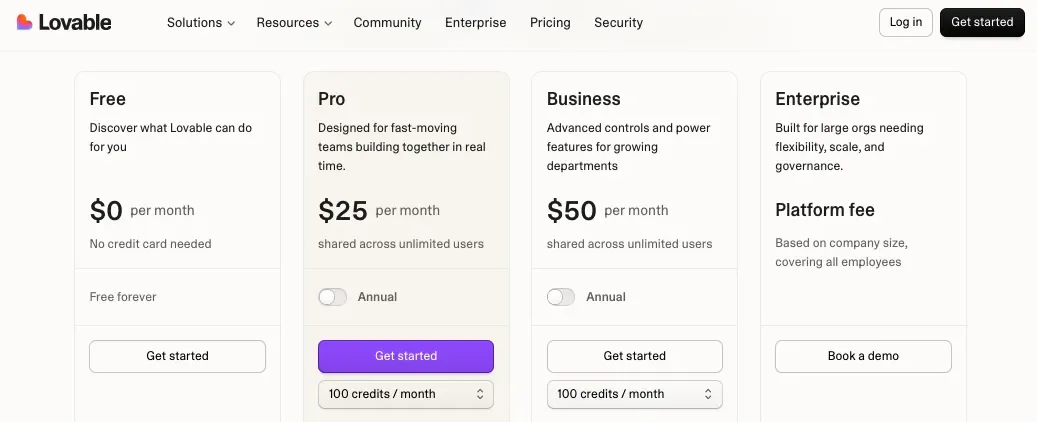
You can start for free, and the Pro plan starts at $25/month when billed annually. The Pro plan includes 100 monthly credits, daily credits, custom domains, credit rollovers, on-demand top-ups, user roles, and the ability to remove the Lovable badge.
The Business plan starts at $50/month when billed annually and adds features like SSO, team workspace, internal publish, role-based access, design templates, and security center.
So, for a founder or non-technical builder, Lovable can feel affordable because it replaces a lot of early development work.
Instead of hiring someone to set up:
- Frontend
- Backend
- Database
- Authentication
- Basic app logic
- Deployment
You can use Lovable to generate the first version much faster.
That’s why Lovable can be a good deal if your goal is to build an MVP, test a SaaS idea, create an internal dashboard, or launch a working prototype.
But there’s a catch.
Lovable uses credits, and credits can disappear faster than expected when you’re making lots of changes, fixing bugs, regenerating features, or testing different versions of your app.
This is where some users get frustrated.
The $25/month plan may look simple, but if your project needs a lot of prompting and fixing, you may need more credits or a higher plan.
So, Lovable is cost-effective when your prompts are clear and your app scope is controlled.
It can feel expensive when you keep asking the AI to fix the same issue again and again.
Vercel v0
v0 also uses a credit-based model.
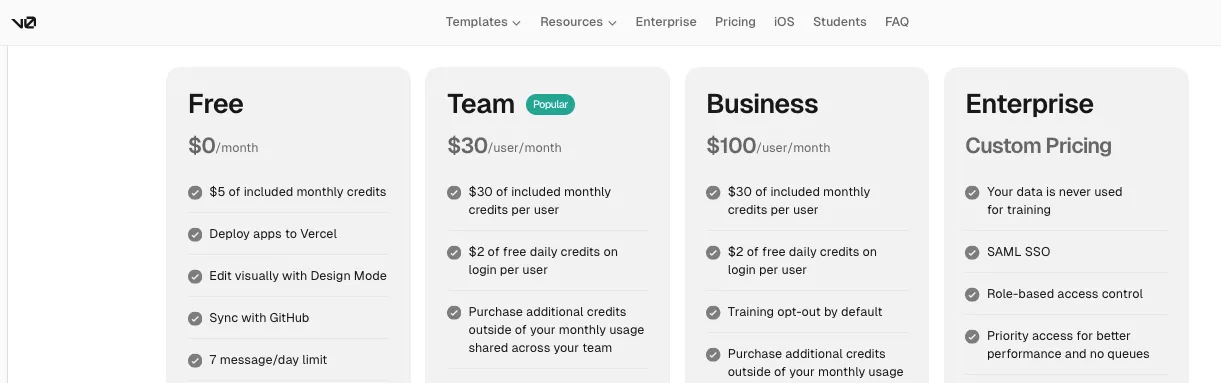
The Free plan includes monthly credits, Vercel deployment, Design Mode, GitHub sync, and a daily message limit.
The Team plan starts at $30/user/month and includes $30 of monthly credits per user, free daily credits on login, shared team credits, centralized billing, and collaboration features.
The Business plan starts at $100/user/month and adds more controls like training opt-out by default and team collaboration features.
v0 can be a good value if you use it for the right tasks.
For example, it works well when you want to generate:
- Landing pages
- SaaS dashboards
- Login pages
- Pricing sections
- Admin panels
- React components
- Full-page designs
- Vercel-ready app interfaces
But if you use v0 for broad, unclear, or messy prompts, credits can burn quickly.
You may also spend credits fixing AI mistakes, which can feel frustrating.
So, v0 is best when you break work into smaller tasks and guide it carefully.
Instead of saying:
“Build my entire SaaS app.”
You may get better value by saying:
“Create a responsive pricing page for a B2B SaaS product with three plans, monthly/yearly toggle, FAQ, and CTA section.”
That kind of focused prompt usually gives you better output and wastes fewer credits.
Winner?
For pricing, there is no single winner because each tool charges for a different job.
But here’s the practical answer:
Lovable gives better value if you’re a non-technical founder trying to build a working MVP from scratch.
Vercel gives better value if you already have a codebase and need serious deployment, hosting, previews, and scaling.
v0 gives better value if you’re a developer or designer who wants faster UI generation inside the Vercel ecosystem.
If I had to pick one for a beginner building their first app, I’d choose Lovable.
If I had to pick one for a developer shipping a production app, I’d choose Vercel.
If I had to pick one for fast frontend generation, I’d choose v0.
Lovable User Review
“I just tested their platform and quickly ran out of free quota. Then I looked into their paid offerings and $25/month seemed reasonable, but then I looked closer and turned out that is the price for 100 credits.”
Read the full review on Reddit: source
This is the main thing to watch with Lovable.
The starting price looks fair, but your real cost depends on how many credits your project needs.
v0 User Review
“Usage-based pricing drained $30 in two days, making v0 unaffordable for my regular workflow.”
Read the full review on Reddit: source
This is why I’d recommend using v0 carefully.
It can be very useful, but if your workflow needs constant regeneration, testing, and fixing, the credit model can feel expensive.
Which Tool Is Best for Production Readiness?
Now, let’s talk about production readiness.
This is one of the most important parts of this whole comparison.
Because building an app that works in a demo is not the same as building an app that is safe, stable, scalable, and ready for real users.
A production-ready app should be able to handle things like:
- Real user accounts
- Secure authentication
- Database permissions
- Error handling
- Performance
- Backups
- Environment variables
- API keys
- Payment logic
- Monitoring
- Team reviews
- Scaling
So, which tool is better when you want to move beyond a prototype?
Let’s compare.
| Feature |
Lovable |
Vercel v0 |
| Good for MVPs |
✅ |
✅ |
| Good for Production Hosting |
⚠️ Good, but review needed |
✅ Through Vercel |
| Security Controls |
⚠️ Improving, but app setup must be reviewed |
⚠️ Generated output needs review |
| Code Ownership |
✅ |
✅ |
| Human Code Review Needed |
✅ |
✅ |
| Best For Scaling |
⚠️ Depends on app architecture |
✅ If deployed and reviewed properly |
| Best Production Role |
Fast MVP creation |
AI-assisted frontend/app generation before deployment |
Lovable
Lovable can help you create apps that feel surprisingly real.
You can build login systems, dashboards, database-connected pages, user flows, forms, and internal tools without starting from a blank codebase.
That’s great for MVPs.
But when it comes to production, you need to slow down a little.
Lovable can generate the app, but you still need to check whether the app is safe and stable enough for real users.
This is especially true if your app stores:
- Customer data
- Payment data
- Private documents
- User messages
- Business records
- Admin permissions
- API keys
The biggest risk with any AI full stack app builder is that it may create something that looks correct on the surface but has problems underneath.
For example:
- A user might access data they shouldn’t see
- A database rule might be too open
- An API key might be exposed
- A form might not validate data properly
- Admin permissions might not be secure
- Error handling might be weak
So, I’d describe Lovable like this:
It’s excellent for getting to a working version fast.
But before using it for a serious public app, get the code, database rules, authentication, and security reviewed.
That’s not a reason to avoid Lovable.
It’s just how you should treat any AI generated app.
Vercel v0
v0 can help you move from idea to app faster, but you still need to review what it creates.
This is especially true now that v0 can do more than simple UI generation.
It can help with app flows, database connections, APIs, deployments, and full-stack web experiences.
That’s powerful.
But with more power comes more responsibility.
If v0 generates a simple pricing page, the risk is low.
If it generates a dashboard with authentication, database queries, API calls, and user permissions, you need to check everything carefully.
v0 is best for production when it’s used inside a developer workflow.
For example:
- Generate the UI in v0
- Sync the code to GitHub
- Review the pull request
- Test the app
- Fix security and performance issues
- Deploy through Vercel
That’s a much safer workflow than blindly publishing whatever the AI creates.
Winner?
For production readiness, Vercel wins.
It’s the strongest option for production hosting, deployment workflows, preview environments, scaling, and developer control.
Lovable is better for creating the first working version.
v0 is better for speeding up AI-assisted building inside Vercel’s ecosystem.
But for a serious production app, here’s the workflow I’d trust most:
Build fast with Lovable or v0.
Move the code to GitHub.
Review it with a developer.
Deploy it on Vercel.
Test everything before launch.
That gives you speed without ignoring quality.
Lovable User Review
“The codebase itself isn’t the issue. It’s clean, structured, and workable. But there’s still a noticeable gap between what Lovable ships and what a real production environment needs.”
Read the full review on Reddit: source
This is a very fair way to look at Lovable.
It can create a solid starting point, but the final production layer still needs attention.
Lovable Security Review
“What you probably meant to say: if you don’t know how to make it secure, don’t publish it.”
Read the full review on Reddit: source
This is the right mindset for AI app builders.
You can use them to build quickly, but you should not skip security review just because the app looks finished.
Which Tool Is Best for Beginners, Developers, and Teams?
At this point, we’ve compared the core features.
Now let’s make the decision easier based on the type of user.
Because Lovable, Vercel, and v0 are not built for the exact same person.
A non-technical founder has different needs from a frontend developer.
A startup team has different needs from a solo maker.
An agency building client prototypes has different needs from an engineering team deploying production apps.
So, let’s see who each tool is actually best for.
| User Type |
Lovable |
Vercel v0 |
| Non-Technical Founder |
✅ Best fit |
⚠️ Possible, but may feel technical |
| Startup MVP Builder |
✅ |
✅ |
| Frontend Developer |
⚠️ Useful for scaffolding |
✅ Best fit |
| Backend Developer |
⚠️ Useful, but may feel limiting |
⚠️ Helpful, but not enough alone |
| Product Manager |
✅ |
✅ |
| Designer |
✅ |
✅ |
| Agency |
✅ For prototypes |
✅ For UI work |
| Engineering Team |
⚠️ Useful for early ideas |
✅ Useful for faster UI/app generation |
Lovable
Lovable is best for people who want to build without starting from code.
That includes:
- Founders
- Solo builders
- Product managers
- Non-technical business owners
- Agencies
- Startup teams
- Freelancers
- Growth teams
- Internal tool builders
If you have an idea and want to turn it into something clickable, Lovable is one of the easiest tools to start with.
You can use it to build:
- SaaS MVPs
- Client portals
- Internal dashboards
- Admin panels
- Marketplaces
- Booking apps
- Directories
- CRM tools
- Simple web apps
- Landing pages with backend logic
The main advantage is speed.
You don’t need to plan every technical detail before starting. You can describe the app, see what Lovable creates, then keep improving it.
That’s why Lovable works well for people who want to test ideas quickly.
But if you’re a developer who wants full control from the beginning, Lovable may feel limiting at times.
You may not always like how the AI structures the app. You may want cleaner architecture, better naming, different backend choices, or more control over the development workflow.
So, Lovable is best when speed matters more than full technical control.
Vercel v0
v0 is best for developers, designers, and technical founders who want AI help without leaving the Vercel world.
It sits between Lovable and Vercel.
It’s more AI-driven than Vercel hosting, but more developer-focused than Lovable.
That makes it useful for:
- Frontend developers
- Product designers
- Design engineers
- Technical founders
- SaaS builders
- Agencies
- Teams building fast UI prototypes
- Developers working with React and Next.js
v0 is especially helpful when you need to generate polished UI quickly.
You can ask it to build a dashboard, landing page, pricing section, login screen, form flow, or admin panel, then keep refining it.
It’s not just useful for beginners who don’t code.
It’s useful for developers who do code but don’t want to spend hours creating every screen from scratch.
That said, v0 still needs careful review.
If the app gets complex, you’ll need someone who understands the code and can guide the output.
Winner?
For beginners, Lovable wins.
For developers and production teams, Vercel wins.
For AI-assisted UI generation, v0 wins.
So, the real answer depends on what you’re trying to do.
If you want to build your first app from an idea, start with Lovable.
If you want to deploy a real codebase, use Vercel.
If you want to generate polished Vercel-ready interfaces with AI, use v0.
And if you want the most practical workflow, you may not need to choose only one.
You can build the first version in Lovable, sync the code to GitHub, clean it up with a developer, and deploy it on Vercel.
Or you can use v0 to generate UI, connect it to your app, and deploy through Vercel.
That’s where this comparison gets interesting.
Vercel vs Lovable is not always a replacement question.
Many times, it’s a workflow question.
Final Feature Comparison Winner
So, after comparing Lovable, Vercel, and Vercel v0 across app building, frontend generation, backend support, deployment, GitHub workflow, design editing, pricing, production readiness, and user fit, here’s my final take:
| Category |
Winner |
| App Building From Scratch |
Lovable |
| Frontend and UI Generation |
Vercel v0 |
| Backend, Database, and Authentication |
Lovable for beginners; Vercel for developers |
| Deployment and Hosting |
Vercel |
| GitHub Workflow |
Vercel |
| Visual Editing |
Lovable for beginners; v0 for frontend polish |
| Pricing Value |
Depends on use case |
| Production Readiness |
Vercel |
| Best for Non-Technical Users |
Lovable |
| Best for Developers |
Vercel |
| Best for AI-Assisted UI Work |
Vercel v0 |
If you want the simplest answer:
Lovable is the better AI app builder.
Vercel is the better deployment platform.
v0 is the better Vercel-native AI design and app generation assistant.
So, don’t choose based only on the brand name.
Choose based on your starting point.
If you have an idea but no app, use Lovable.
If you have code but need hosting, use Vercel.
If you want AI to help generate polished interfaces inside the Vercel workflow, use v0.
Launch Full-Stack Apps with Confidence
Prismetric develops web apps with strong UI, backend logic, authentication, APIs, and cloud deployment.
Start Building
Vercel and Lovable Alternatives Worth Trying
Lovable and Vercel are strong tools, but they’re not the only options in the AI app development space.
If you’re still exploring, here are a few Vercel and Lovable alternatives worth checking out.
1. Vitara AI
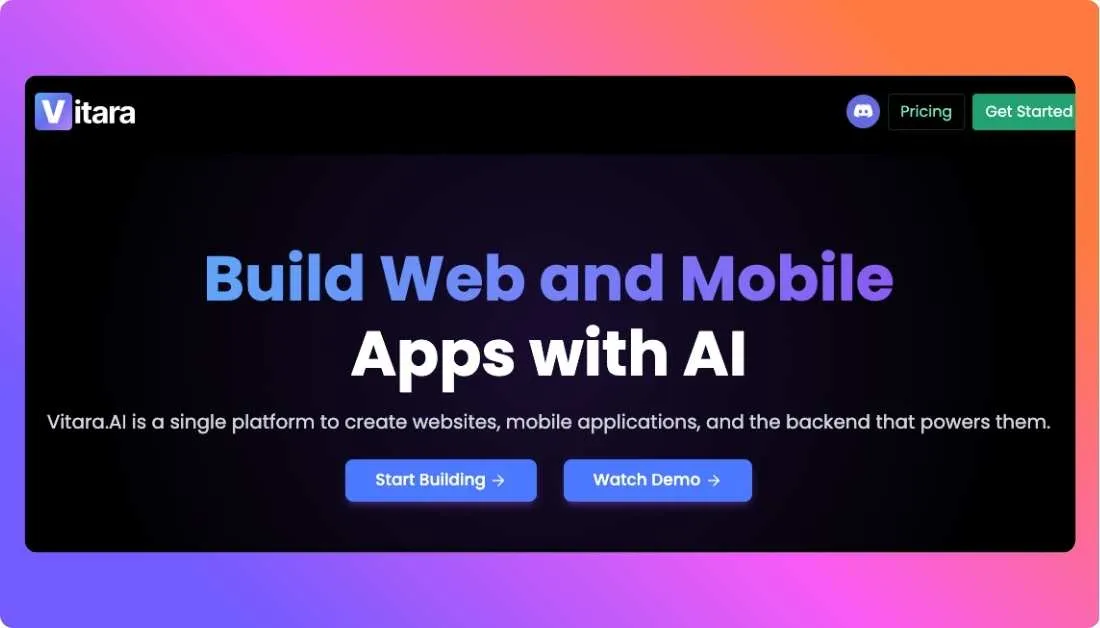
Vitara AI is a solid alternative if you want an AI full stack app builder that can help you create web and mobile apps from simple prompts.
It’s useful for founders, startups, and non-technical builders who want to turn an idea into a working product without starting from code.
With Vitara AI, you can build things like:
- SaaS MVPs
- Web apps
- Mobile apps
- Dashboards
- Internal tools
- Business apps
The main reason to consider Vitara AI is that it focuses on the full app-building workflow, not just frontend design or deployment.
So, if Lovable feels useful but you want to explore another prompt-to-app builder, Vitara AI is a good place to start.
2. Bolt
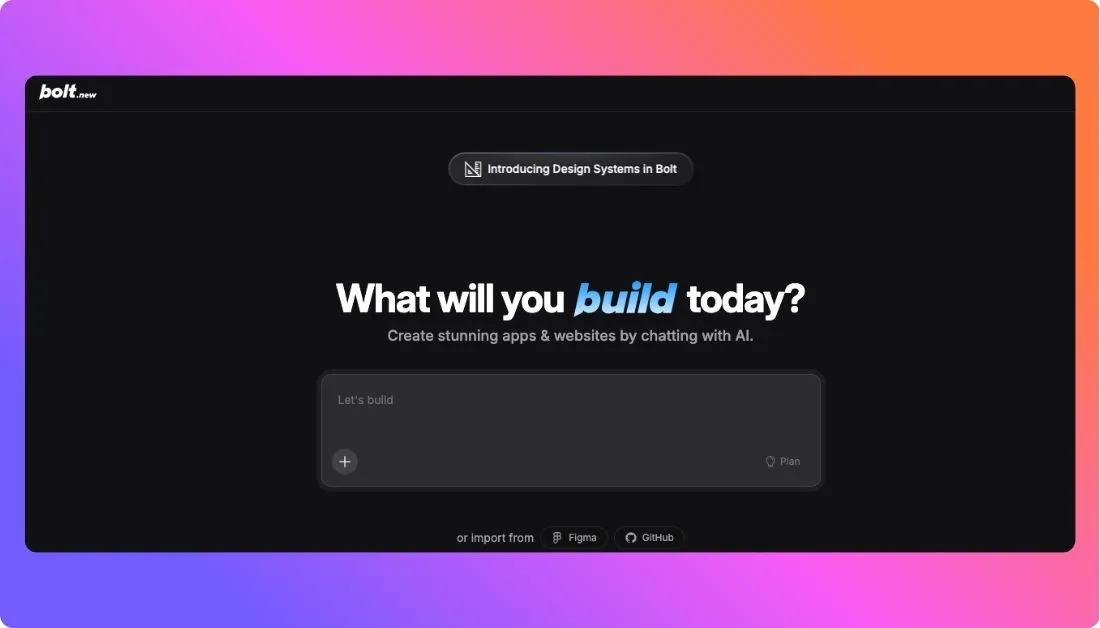
Bolt is another popular AI app builder for creating websites, web apps, and prototypes from prompts.
It works well if you want to build fast in the browser and see your idea take shape quickly.
You may like Bolt if you want to create:
- Landing pages
- Startup websites
- MVP prototypes
- Web apps
- Product demos
Compared with Vercel, Bolt is more focused on building. Compared with Lovable, it feels more developer-friendly in some workflows.
It’s a good option if you want speed, flexibility, and a simple way to test app ideas.
3. Replit
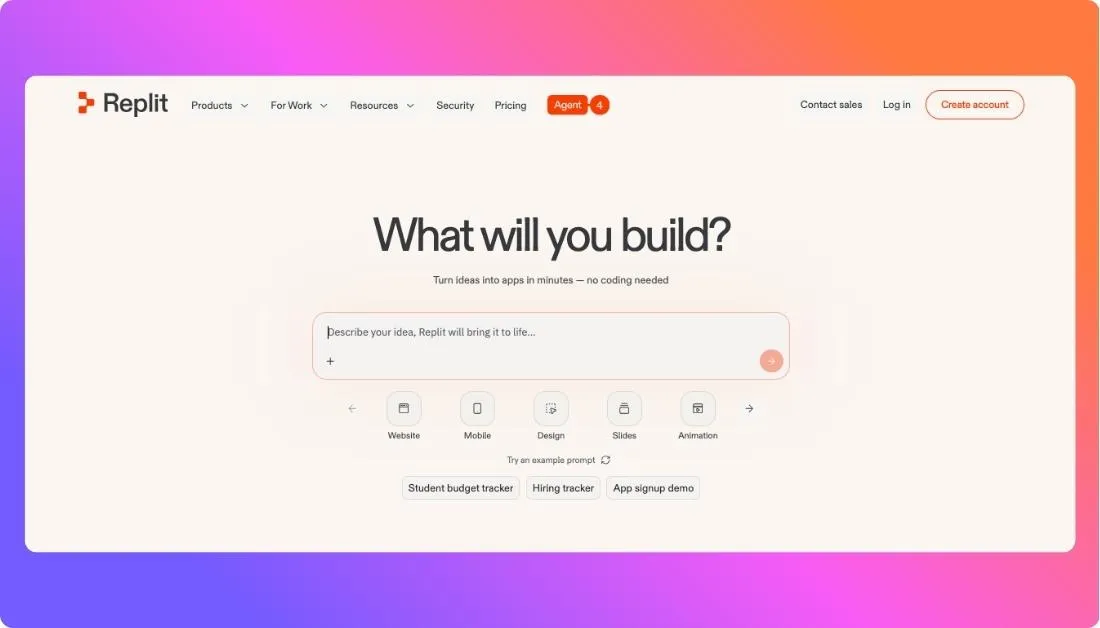
Replit is a good alternative if you want an AI coding and app-building platform in one place.
It’s useful for people who want to build, edit, test, and deploy apps without setting up a local development environment.
You can use Replit for:
- Web apps
- AI tools
- Internal tools
- MVPs
- Small SaaS products
- Learning projects
Replit is especially helpful if you want more control than a typical no-code AI app builder, but you still want AI to help with coding and setup.
It may feel more technical than Lovable, but it gives you more room to edit, debug, and continue building like a developer.
If you’re serious about learning how your app works behind the scenes, Replit is worth considering.
My Final Verdict: Should You Choose Vercel or Lovable?
If you’re still confused between Vercel and Lovable, here’s the simplest way to decide.
Choose Lovable if you want to build an app from scratch using prompts.
It’s the better option for founders, non-technical users, product managers, and small teams who want to create a SaaS MVP, dashboard, internal tool, client portal, or web app without starting from code.
Choose Vercel if you already have a codebase and need a reliable way to deploy, host, and scale it.
It’s better suited for developers, agencies, startups, and engineering teams that work with GitHub, Next.js, preview deployments, custom domains, and production workflows.
Choose Vercel v0 if you want AI help creating polished UI, pages, dashboards, and Vercel-ready app interfaces.
It’s especially useful for developers and design-focused teams that want to speed up frontend work without leaving the Vercel ecosystem.
So, my final take is this:
Lovable is the better AI app builder.
Vercel is the better deployment platform.
v0 is the better AI design and frontend generation tool inside Vercel’s workflow.
And honestly, you don’t always have to choose only one.
A smart workflow can look like this:
Build your first version in Lovable, sync the code to GitHub, review it with a developer, and deploy it on Vercel when you’re ready for a more production-friendly setup.
That gives you the best of both worlds speed in the beginning and more control when your app starts getting serious.
FAQs About Vercel vs Lovable
Lovable helps you build an app from an idea using AI prompts.
Vercel helps you deploy, host, and scale an app after the code already exists.
Lovable is better if you want to create a working app from scratch without writing much code.
Vercel is better if you already have a codebase and need a reliable platform to launch it online.
Not exactly.
Vercel is mainly a deployment platform. But Vercel also has v0, which is its AI tool for generating app interfaces, pages, and Vercel-ready projects.
Vercel v0 is an AI builder that helps create UI, pages, dashboards, and app interfaces.
Lovable is more focused on turning a complete app idea into a working full-stack app with frontend, backend, database, and authentication.
Yes, and this is actually a smart workflow for many projects.
You can:
- Build the first version in Lovable
- Sync or export the code to GitHub
- Review the code with a developer
- Deploy the app on Vercel
Lovable is usually better for beginners.
It’s easier if you don’t know much about GitHub, deployment settings, backend setup, or frontend frameworks.
Vercel is better for developers who already have code and want a clean deployment workflow.
v0 is also useful for developers who want to generate React or Next.js-style interfaces faster with AI.
Yes, Lovable can help you build full-stack apps.
That means it can create the frontend users see, plus backend features like database, authentication, user accounts, and app logic.
Vercel can run backend logic, but it doesn’t automatically design your full backend for you.
You still need to connect the right database, authentication provider, APIs, and server-side logic.
Lovable is usually the better starting point for a SaaS MVP if you’re building from zero.
It helps you move from idea to working prototype faster, especially if you need login, dashboard pages, forms, and database-connected features.
Vercel is stronger for production deployment.
But production readiness still depends on your code quality, security setup, database rules, authentication, and testing.
Yes, you can usually deploy a Lovable app to Vercel through GitHub.
Before doing that, check your build settings, environment variables, Supabase keys, authentication URLs, and backend connections.
Yes, Lovable is a good option for non-technical founders who want to test an app idea quickly.
It’s especially helpful for building MVPs, dashboards, client portals, internal tools, and simple SaaS products.
No, Vercel supports many modern web frameworks.
But it’s especially popular with Next.js because Vercel created and maintains Next.js.
Choose based on what you need right now.
- Need to build an app from an idea? Choose Lovable.
- Need to deploy and scale existing code? Choose Vercel.
- Need AI help creating polished UI or app pages? Choose v0.
Lovable feels like a no-code AI app builder for beginners, but it still generates real code behind the scenes.
That’s why it’s different from older no-code tools. You can start without coding, then involve developers later if the project grows.
v0 is usually stronger for polished frontend design, React components, landing pages, and SaaS-style interfaces.
Lovable is better when you want the UI plus backend, database, authentication, and app flow in one place.
Yes, you can build useful business apps with Lovable.
But if the app handles real users, payments, private data, or important workflows, get a developer to review it before launch.
Yes, especially when your app starts becoming more serious.
Lovable can help you build fast. Vercel can help you deploy with more control, preview links, custom domains, and a stronger production workflow.
Think of it like this:
Lovable builds the app.
Vercel ships the app.
v0 helps create the app interface inside the Vercel ecosystem.