AI Workflow Discovery Checklist: A Practical Guide to Assessing and Launching AI Workflows
Organizations often start AI initiatives by comparing models, platforms, or software licences. A better starting point is the workflow: the business outcome, people, data, decisions, systems, and risks involved.
AI adoption does not guarantee value. McKinsey reported that 78% of surveyed organizations used AI in at least one business function, while more than 80% saw no tangible enterprise-level EBIT impact from generative AI.
What Is an AI Workflow Discovery Checklist?
An AI workflow discovery checklist is a structured set of questions used to determine whether a business process is suitable for AI and what must be addressed before development or procurement begins. It helps teams define the problem, map the process, assess data readiness, set human oversight rules, and establish measurable success criteria.
The checklist replaces “Which AI tool should we buy?” with practical questions:
- What outcome needs to improve?
- Where does the workflow lose time, quality, or control?
- Which tasks follow repeatable patterns?
- What information would the AI need?
- What happens when it produces an incorrect result?
- How will the organization measure value?
Discovery does not automatically lead to an AI project. It may show that the process should first be simplified, standardized, handled through rules-based automation, or kept under human control.
Find the Right AI Opportunities Before You Invest
Prismetric maps your workflows, identifies suitable AI use cases, reviews data readiness, and defines measurable business outcomes.
Start AI Workflow Discovery
Why Should Organizations Assess Workflows Before Buying or Building AI?
Workflow assessment helps organizations avoid investing in technology that does not solve the underlying operational problem. It also uncovers fragmented data, undocumented exceptions, approval delays, and integration dependencies.
In McKinsey’s 2025 survey, only 21% of respondents whose organizations used generative AI said that at least some workflows had been fundamentally redesigned. Workflow redesign also had the strongest relationship with reported EBIT impact among the organizational attributes tested.
Consider a customer-support team that wants AI to handle incoming emails. Before selecting a model, the team must document how messages are classified, where account information is stored, which responses require approval, when requests are escalated, and whether AI may update the CRM or only prepare a draft.
How Is Workflow Discovery Different From Other AI Assessments?
AI workflow discovery evaluates one defined business process. Related assessments address organizational readiness, governance, implementation, or output quality.
| Assessment |
Primary purpose |
| AI workflow discovery |
Maps and evaluates a specific workflow |
| AI readiness assessment |
Reviews organization-wide data, skills, infrastructure, and governance |
| AI project intake |
Collects information for approval and prioritization |
| AI implementation checklist |
Guides an approved use case into production |
| AI output review |
Checks an AI-generated deliverable |
These activities support one another but are not interchangeable. NIST organizes AI risk management around four functions govern, map, measure, and manage and recommends multidisciplinary participation throughout the AI lifecycle.
Who Should Participate in AI Workflow Discovery?
The process should include people who understand the workflow, systems, data, and business outcome. Cross-functional participation can reveal overlooked requirements and risks.
The core participants usually include:
- A business owner who defines the outcome
- An employee who performs or supervises the work
- A technical owner who assesses systems and feasibility
- A data owner who confirms quality and permitted use
- A security, privacy, legal, or risk representative when needed
Microsoft’s 2026 Work Trend Index found that only 26% of surveyed AI users believed their leadership was clearly and consistently aligned on AI, showing why ownership and expectations should be established early.
A completed discovery should produce five outputs: a current-state workflow map, an AI-suitability assessment, a data and permissions map, a risk and human-review plan, and a baseline for measuring pilot performance.
How Do You Map the Current Business Workflow?
Map the workflow by documenting what starts it, the information it uses, the steps and decisions involved, the systems it touches, and the result it produces. The goal is to understand how work actually moves through the organization not how a policy document says it should work.
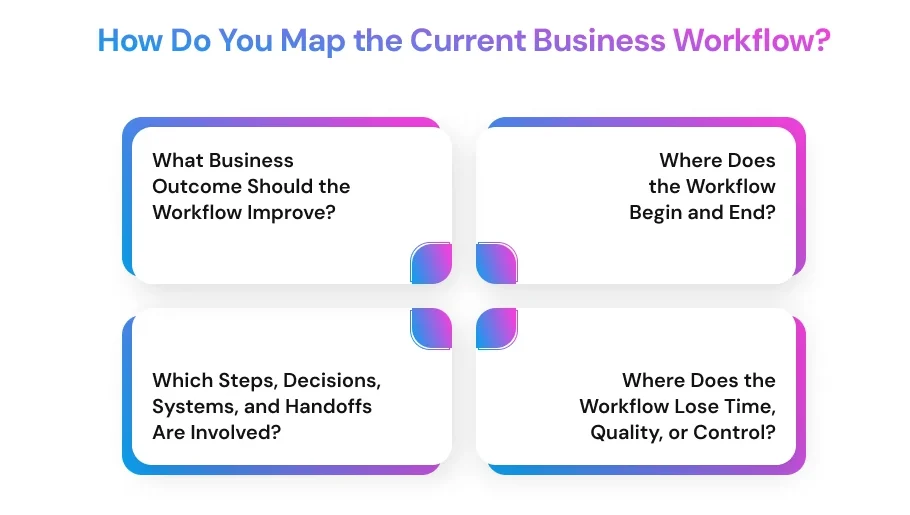
What Business Outcome Should the Workflow Improve?
Define one specific result before discussing AI. The target may be shorter processing time, fewer manual errors, more consistent decisions, lower cost, faster customer responses, or reduced compliance exposure.
Avoid objectives such as “adopt AI.” A useful objective connects the workflow to a measurable indicator, such as reducing ticket-handling time while maintaining response quality.
Where Does the Workflow Begin and End?
Identify the trigger that starts the process and the event that marks completion. Clear boundaries prevent teams from assessing one task while overlooking upstream data problems or downstream approvals.
For a customer-support workflow, the trigger may be a new email. Completion could include sending a response, recording the interaction in the CRM, assigning a resolution code, and escalating unresolved cases.
Which Steps, Decisions, Systems, and Handoffs Are Involved?
Interview the people who perform the work and observe real cases. Record six elements:
- Inputs, including forms, messages, documents, and system records
- Actions performed by employees or existing software
- Decisions based on rules, context, or professional judgment
- Systems, databases, spreadsheets, and communication channels
- Handoffs between employees, teams, customers, or vendors
- Outputs, exceptions, and escalation paths
McKinsey’s 2025 AI survey found that high-performing organizations were nearly three times more likely than others to have fundamentally redesigned individual workflows. Discovery should therefore examine the full process rather than place AI on top of inefficient steps.
Where Does the Workflow Lose Time, Quality, or Control?
Use operational evidence to locate queues, repeated data entry, document searches, unclear ownership, rework, inconsistent decisions, and approval delays. Record current volume, cycle time, error rate, escalation rate, and employee effort where available.
Then ask whether the problem requires AI. A clearer policy, standardized form, system integration, search function, or rules-based automation may solve it with less cost and risk. NIST recommends considering viable non-AI approaches when organizations determine how to manage AI risks and impacts.
How Do You Determine Whether a Workflow Is Suitable for AI?
A suitable AI workflow occurs frequently enough to justify investment, uses accessible inputs, produces outputs that can be evaluated, and has errors that people can detect and contain. Suitability also depends on the authority given to the system.
Which Six Questions Test AI Workflow Suitability?
Score each question from 1 to 5 and attach evidence:
- Frequency: Does the task occur often enough to create measurable value?
- Input consistency: Are inputs complete, accessible, and reasonably predictable?
- Output clarity: Can the organization define an acceptable result?
- Reviewability: Can a qualified person verify the result efficiently?
- Reversibility: Can an incorrect output or action be corrected at an acceptable cost?
- Business value: Will the benefit exceed implementation, review, and maintenance costs?
McKinsey reported that nearly two-thirds of surveyed organizations had not begun scaling AI across the enterprise, even though 88% used AI in at least one business function. This gap separates an interesting demonstration from a workflow ready for dependable operational use.
Should AI Assist, Recommend, or Act?
Choose the lowest level of authority that can produce the required value:
| AI role |
What the system does |
Example |
| Assist |
Retrieves, summarizes, classifies, or drafts |
Drafts a support reply |
| Recommend |
Proposes a decision for human approval |
Recommends an escalation category |
| Act |
Executes an approved action within limits |
Updates a low-risk CRM field |
NIST notes that generative AI applications may require different levels of human oversight depending on their use and risk. For the support example, version one could classify messages and prepare replies while employees approve every customer-facing response and system update.
How Do You Assess Data, Systems, Access, and Technical Readiness?
Assess technical readiness by identifying every data source and system the workflow requires, who owns them, whether the information is usable, and what permissions the AI should receive. This step determines whether the workflow can operate reliably without exposing data or creating uncontrolled access.
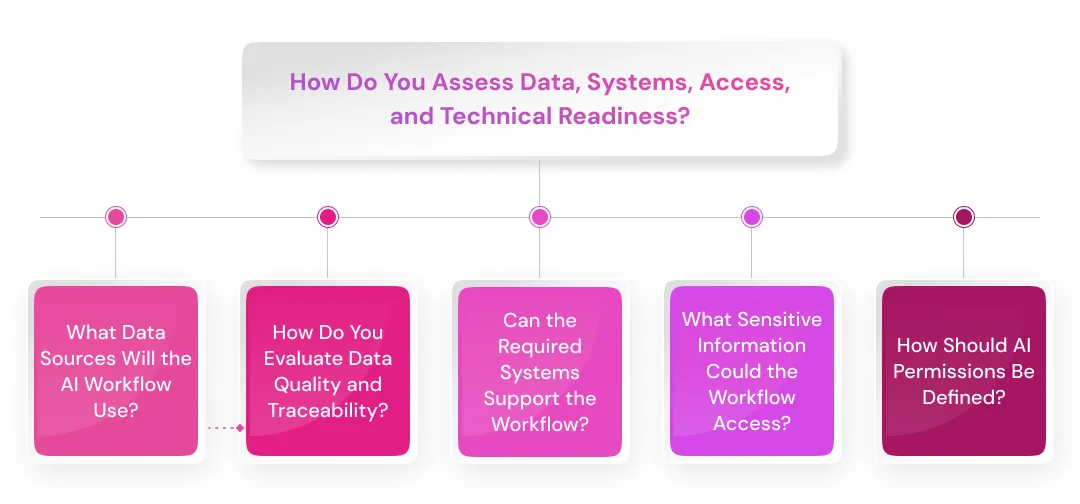
What Data Sources Will the AI Workflow Use?
List every source the workflow must read, retrieve, generate, or update. These may include email, documents, knowledge bases, CRM records, ticketing systems, databases, spreadsheets, APIs, call transcripts, and approved external sources.
For each source, record:
- The business and technical owner
- The information required
- How frequently it changes
- Whether the AI needs read or write access
- The approved purpose for using it
- Any retention or deletion requirement
Do not assume that access available to an employee should automatically be granted to an AI application. The workflow should receive only the information needed for its defined task.
How Do You Evaluate Data Quality and Traceability?
Evaluate whether the data is accurate, current, complete, consistent, and traceable to an approved source. Poor data can cause the workflow to retrieve outdated policies, misclassify requests, repeat duplicate records, or generate answers from conflicting information.
NIST’s AI Risk Management Framework identifies data quality, representativeness, relevance, and provenance as factors organizations should examine when mapping and measuring AI risk. Provenance means knowing where data came from, how it changed, and whether the organization may use it.
Check for:
- Missing or duplicated records
- Outdated documents and policy versions
- Inconsistent terminology or field formats
- Unstructured files without clear ownership
- Records that cannot be traced to a source
- Data that does not represent real workflow conditions
Can the Required Systems Support the Workflow?
Technical readiness depends on more than data availability. The team must confirm that systems can exchange information through APIs, approved connectors, event triggers, or controlled file transfers.
Document authentication methods, API limits, expected latency, failure handling, and whether the integration supports the required read or write operation. A workflow that depends on manual exports or unstable connections may not be ready for production, even when the AI model performs well.
For the support example, the system may read a shared inbox, retrieve knowledge articles, view selected CRM fields, and create a draft response. Updating refund status or identity records should remain outside the first version.
What Sensitive Information Could the Workflow Access?
Classify information before connecting it to an AI system. Sensitive data may include personal information, payment details, health records, employee files, contracts, credentials, confidential communications, or intellectual property.
IBM’s 2025 breach research reported that 97% of organizations experiencing an AI-related security incident lacked proper AI access controls. This supports treating permissions as a design requirement rather than a control added after deployment.
How Should AI Permissions Be Defined?
Apply least-privilege access: grant only the minimum data, tools, and actions required for the approved workflow. OWASP recommends restricting LLM applications to necessary data and backend functions because excessive access can increase the impact of prompt injection, sensitive-information disclosure, or incorrect tool use.
Use a data-readiness table during discovery:
| Source |
Owner |
Sensitivity |
Quality |
Access |
Allowed use |
Gap |
| Support inbox |
Service lead |
Medium |
Good |
Read |
Classify requests |
Retention rule |
| Knowledge base |
Content owner |
Internal |
Mixed |
Read |
Retrieve guidance |
Outdated articles |
| CRM |
Sales operations |
High |
Good |
Limited read |
View account context |
Field controls |
The assessment should show what the AI can access, what it cannot access, who approved each source, and which gaps must be resolved before testing.
How Do You Evaluate Governance, Risk, Human Review, and Business Value?
Evaluate an AI workflow by identifying who could be affected, what actions the system may perform, where people must intervene, and how the organization will measure value. Governance should be designed with the workflow rather than added after the pilot.
IBM reported in 2025 that 63% of surveyed organizations lacked AI governance initiatives. The same research linked high levels of unapproved “shadow AI” with $670,000 in additional breach costs, showing that unclear controls can create financial as well as technical exposure.
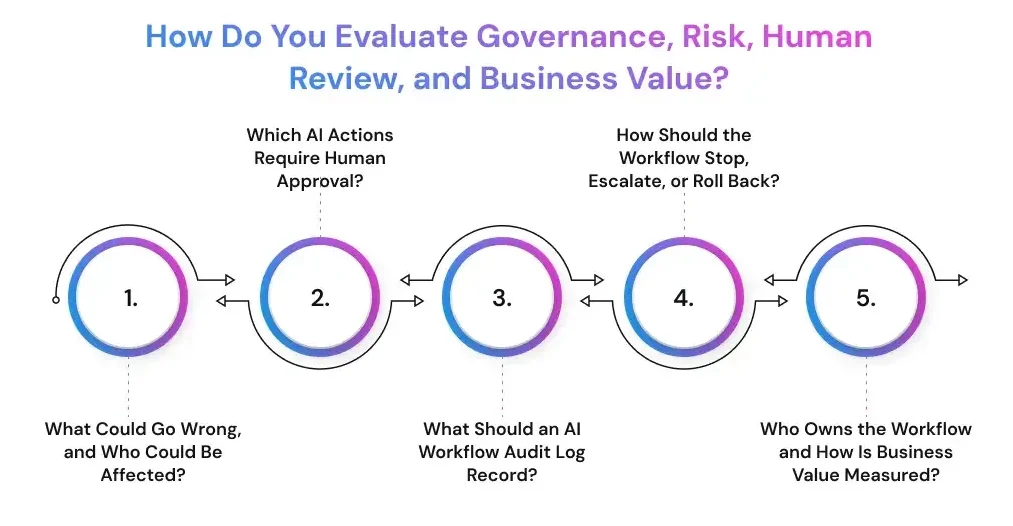
What Could Go Wrong, and Who Could Be Affected?
Begin with realistic failure scenarios. Consider inaccurate outputs, inappropriate disclosures, biased recommendations, unauthorized updates, missed exceptions, duplicated transactions, and actions based on incomplete inputs.
Record the people, processes, and systems that could be affected:
- Customers receiving incorrect information
- Employees evaluated through unreliable outputs
- Finance teams processing an invalid payment or refund
- Compliance teams losing required records
- Operational systems receiving incorrect updates
Classify the workflow as low, medium, or high risk based on data sensitivity, error consequences, the number of affected people, and ease of recovery. NIST structures AI risk management around four connected functions govern, map, measure, and manage so assessment should continue after deployment.
Which AI Actions Require Human Approval?
Human approval should be mandatory when a workflow can create a significant financial, legal, privacy, employment, security, or customer impact. The reviewer must see the relevant evidence and have authority to reject or change the proposed action.
Define three action groups:
- Allowed: Low-risk actions the system may complete within documented limits
- Approval required: Actions that pause until an authorized person confirms them
- Prohibited: Actions the AI cannot perform
For the support workflow, AI may classify an email and draft a reply. Refunds, account changes, contractual commitments, record deletion, and legal complaints should require approval or remain prohibited.
IBM research found that 68% of surveyed CEOs believed generative AI governance should be integrated during design rather than retrofitted after deployment. OWASP also recommends human-in-the-loop controls for privileged or high-risk operations.
What Should an AI Workflow Audit Log Record?
An audit log should make every important event traceable. It should show what triggered the workflow, what information the system used, what it proposed or executed, and whether a person approved the action.
Capture at least:
- Date, time, user, and workflow version
- Input source and retrieved records
- Model, prompt, policy, and tool versions
- Proposed and completed actions
- Human reviewer and approval outcome
- Error, escalation, and corrective action
OWASP recommends failing closed when approval validation, policy checks, risk classification, or audit logging fails. The workflow should pause rather than continue without a reliable control record.
How Should the Workflow Stop, Escalate, or Roll Back?
The workflow needs a defined response when confidence is low, data is missing, a protected topic appears, or an integration fails. Include a manual override, kill switch, escalation owner, pause conditions, recovery procedure, and tested rollback path.
Use reversible or staged actions where possible. A draft can be deleted, but a sent payment, removed account, or public statement may be difficult to recover.
Who Owns the Workflow and How Is Business Value Measured?
Assign a named business owner, technical owner, operational reviewer, data owner, and risk contact. Clear decision rights help teams manage thresholds, incidents, and continued funding.
Measure the existing workflow before the pilot:
- Monthly volume and completion time
- Labor and review effort
- Error, rework, and escalation rates
- Customer or employee outcomes
- Compliance events and operational costs
McKinsey’s 2025 survey found that 39% of respondents reported enterprise-level EBIT impact from AI, although 80% said efficiency was an objective. This gap reinforces the need to measure net value rather than assume automation produces financial returns.
Use a complete calculation:
Estimated annual benefit = time saved after review + fewer errors + additional revenue + avoided risk
Estimated annual cost = licences + development + integration + testing + human review + monitoring + training + maintenance
Proceed only when the expected value, evidence quality, ownership, and controls justify the operational risk.
Is Your Workflow Ready for AI? Let’s Find Out
Assess business value, data quality, system access, human review needs, technical feasibility, and implementation risks before development begins.
Get an AI Readiness Assessment
How Do You Test, Score, and Launch an AI Workflow?
Test an AI workflow with representative cases, defined thresholds, controlled access, and a phased rollout. The pilot should show whether the workflow creates value without pushing error, review effort, cost, or operational risk beyond agreed limits.
How Do You Build a Golden Test Set?
A golden test set is a collection of real or carefully designed cases with expected outcomes. It lets teams compare workflow versions before they affect customers, employees, or production systems.
Include:
- Common cases from normal operations
- Incomplete or ambiguous inputs
- Rare exceptions and escalation scenarios
- Sensitive or high-impact cases
- Examples of previous errors
For each case, define the expected result, acceptable variation, required evidence, and prohibited action. NIST treats testing, evaluation, validation, and verification as structured activities supported by meaningful datasets, defined tasks, metrics, and documented methods.
What Is Shadow-Mode Testing?
Shadow mode lets the AI process live or replayed inputs without sending messages, changing records, moving money, or completing other live actions. Teams compare its proposed results with human decisions and record disagreements, review time, failures, and integration issues.
Run shadow mode for at least one representative operating cycle that covers normal volume, peak demand, handoffs, and exceptions.
In the support example, AI can classify emails, retrieve account context, and draft replies in the background. Employees keep using the existing process while evaluators compare classifications, sources, escalations, and proposed CRM updates.
Which Acceptance and Stop Thresholds Should You Define?
Set thresholds before reviewing pilot results so teams do not change the criteria after seeing promising demonstrations.
Measure:
- Output quality and serious-error rate
- Human review time and override rate
- Escalation and unresolved-case rates
- Processing cost and latency
- Customer, employee, or compliance impact
Stop the pilot for sensitive-data exposure, prohibited actions, missing audit logs, uncontrolled updates, or repeated high-impact errors. OWASP recommends security testing before production and after material changes to prompts, tools, memory, retrieval, policies, or model providers.
What Should the First AI Workflow Pilot Include?
The first version should use the lowest level of autonomy needed to test the business hypothesis. Limit its users, data sources, tools, and actions while keeping human approval for consequential outputs.
Use a phased rollout:
- AI creates classifications, summaries, or drafts.
- Humans review every output and proposed action.
- Approved low-risk actions become automated.
- Broader authority is considered after further testing.
NIST notes that pre-deployment evaluation cannot reveal every real-world behavior. Production monitoring, incident handling, and periodic reassessment remain necessary after launch.
How Do You Score AI Workflow Readiness?
Score eight dimensions from 1 to 5: business value, frequency, input consistency, output verifiability, data readiness, review and reversibility, technical feasibility, and ownership.
Use this practical guide:
- 32–40: Prepare a controlled pilot
- 24–31: Redesign the workflow or close readiness gaps
- Below 24: Do not proceed yet
This is a prioritization method, not an industry standard. Stop regardless of the score when data use is unauthorized, no accountable owner exists, a high-impact action lacks approval, or success cannot be measured.
What Should Happen After Workflow Discovery?
Turn the assessment into a pilot brief covering scope, owners, permissions, test cases, metrics, approval rules, monitoring, and rollback. The decision should be go, redesign, use simpler automation, or stop not simply “buy AI.”
A strong AI workflow begins with a defined business outcome and ends with evidence.
Turn a Validated Workflow Into a Controlled AI Pilot
Prismetric can build a focused proof of concept with approved data access, human oversight, evaluation metrics, monitoring, and rollback controls.
Build Your AI PoC
How Can Prismetric Help With AI Workflow Discovery?
Prismetric can help organizations turn workflow discovery findings into a practical AI implementation plan. Its AI consulting, AI workflow automation, data engineering, AI integration, and custom development services can support teams from use-case assessment through pilot deployment.
The engagement can begin by mapping the business process, identifying suitable AI tasks, reviewing data and system dependencies, and defining human approval points. Prismetric can then develop a proof of concept or MVP, connect it with approved enterprise systems, test performance against agreed metrics, and prepare the workflow for controlled rollout. This approach helps businesses evaluate technical feasibility and operational value before committing to a larger implementation.
Frequently Asked Questions About AI Workflow Discovery
An AI workflow discovery checklist is a structured set of questions used to evaluate whether a business process is suitable for AI. It covers the business objective, workflow steps, data, integrations, risks, human review, costs, and success metrics.
Start with workflows that occur frequently, use accessible information, and produce outputs that employees can evaluate. The potential benefit should also justify development, integration, monitoring, and review costs.
Strong candidates often have:
- Repeatable inputs and process steps
- Clear quality criteria
- Measurable delays or manual effort
- Errors that can be detected and corrected
- A named business owner
AI may not be appropriate when a process is rare, highly unpredictable, poorly documented, or dependent on unavailable data. It may also be unsuitable when errors could create irreversible financial, legal, safety, or customer consequences.
In such cases, organizations can simplify the process, improve data quality, use rules-based automation, or keep the decision under human control.
AI workflow discovery evaluates one specific business process, such as claims review, invoice processing, or customer-support routing. It determines whether that workflow is valuable, feasible, and safe enough for an AI pilot.
An AI readiness assessment examines broader organizational capabilities, including data infrastructure, employee skills, governance, security, leadership alignment, and technology architecture.
Teams should document how the process currently operates and what the proposed AI system would need to access or change.
The assessment should include:
- Workflow triggers, inputs, steps, and outputs
- Decisions, exceptions, and approval points
- Data sources and owners
- Systems, APIs, and integrations
- Security and privacy requirements
- Current performance and operating costs
- Pilot metrics and stop conditions
The session should include the business owner, employees who perform the work, and technical specialists who understand the relevant systems. Data, security, privacy, legal, or compliance representatives should participate when the workflow handles sensitive information or consequential decisions.
The group should be small enough to make decisions but broad enough to identify operational and technical dependencies.
A simple and well-documented workflow may be assessed through a few focused workshops. A cross-departmental process involving sensitive data, legacy systems, multiple approvals, or regulatory requirements may require a longer discovery phase.
The required effort depends on workflow complexity, data accessibility, stakeholder availability, and the level of evidence needed before approving a pilot.
Calculate ROI by comparing the expected annual benefit with the complete cost of implementation and operation.
Potential benefits include:
- Employee time saved after human review
- Lower error and rework costs
- Faster processing or customer response
- Increased capacity or revenue
- Reduced operational or compliance exposure
Costs should include licences, development, integrations, testing, infrastructure, human review, training, security, monitoring, and maintenance.
Human-in-the-loop design requires an authorized person to review, approve, correct, or escalate selected AI outputs. The level of oversight should reflect the possible impact of an incorrect recommendation or action.
For example, AI may draft a customer response or recommend a refund category. An employee can verify the evidence and approve the final action before it affects the customer or financial system.
Shadow-mode testing allows an AI workflow to process real or replayed cases without taking live actions. Teams compare its proposed outputs with actual human decisions while customers and operational systems remain unaffected.
This approach helps evaluate output quality, review effort, escalation rates, integration reliability, and unexpected behavior before production deployment.
An existing platform may be suitable when the workflow is standardized and does not require extensive customization, restricted deployment, or complex integrations.
A custom AI solution may be appropriate when the organization needs:
- Specialized business rules or approval paths
- Integration with several internal systems
- Control over data access and deployment
- Industry-specific evaluation criteria
- Custom monitoring, audit, or security controls
The decision should follow workflow discovery rather than precede it.
The process should end with a documented decision rather than a general recommendation to adopt AI.
The final outputs normally include:
- A current-state workflow map
- An AI-suitability score
- A data and permissions assessment
- A risk and human-review plan
- Baseline performance metrics
- A pilot scope and test plan
- A go, redesign, simplify, or stop decision