I Put Gemini vs ChatGPT Head to Head and One Clearly Stood Out
Key Takeaways
- Gemini impressed with tighter instruction-following and real-time research, but occasionally drifted or needed small corrections.
- ChatGPT stayed the stronger all-rounder with cleaner code, deeper analysis, and consistently polished, structured responses.
- Gemini excelled at long-context tasks and Google-powered research, making it great for users who work inside Google’s ecosystem.
- ChatGPT outperformed in creative writing, business reports, and data interpretation, delivering clearer logic and better narrative flow.
- Image generation leaned in ChatGPT’s favor, producing more refined, professional visuals compared to Gemini’s flatter outputs.
- The best choice depends on workflow: Gemini for fast research and context depth; ChatGPT for reliability, creativity, and production use.
I didn’t think I needed another AI showdown in my life until Gemini started showing up everywhere in my feed and in conversations with other dev friends. Google calling it their smartest and most ambitious model yet definitely got my attention. I’ve spent years building with and relying on ChatGPT for everything from debugging stubborn scripts to sketching out product ideas, so I wasn’t convinced Gemini would bring anything new to my workflow. But curiosity has a way of winning.
So I lined them up side by side: Gemini vs ChatGPT. Same prompts. Real tasks. No shortcuts. And to be honest, this isn’t my first time stepping into referee mode. I’ve tested Perplexity, Claude, DeepSeek, and a handful of niche models using nearly identical workflows.
Gemini felt different the moment I started pushing it. Not only in how it processed information but in the way it pulled in real-time details, handled longer context, and occasionally wandered off with an oddly confident answer that made me double-check my own notes.
Across my tests, ChatGPT remained the dependable all-purpose engine with polished writing, clean logic, and a steady grip on structured tasks. Gemini pulled ahead when I needed fresh information, deep analysis, or quick bursts of research-heavy insight.
Here’s what happened when I dropped both models into my actual workflow and let them run.
Gemini vs ChatGPT at a glance
Here’s a quick feature comparison of both AI models.
| Feature |
ChatGPT |
Gemini |
| AI models |
ChatGPT: Free tier with GPT-5.2 basics. Paid plans include Instant, Thinking, and Pro variants with advanced reasoning and tools. |
Gemini: Free access to Gemini-3 Flash. Paid plans unlock Gemini-3 Pro with expanded multimodal and reasoning capabilities. |
| Best for |
Professional knowledge work, structured tasks, coding |
Deep research, large context workflows, Google Workspace integration |
| Creative writing and conversational ability |
Strong natural tone and storytelling |
Clear factual synthesis, slightly more utilitarian tone |
| Image generation and analysis |
High-quality image generation and vision support |
Powerful multimodal handling including text, images, audio, video |
| Real-time web access |
Available via SearchGPT and plugins |
Native access powered by Google Search and Search AI Mode |
| Coding and debugging |
Excellent support with stable execution and detailed code |
Capable coding help, strong multimodal context but slightly behind ChatGPT in robustness |
| Response speed & latency |
Very fast responses with low lag |
Often feels more instantaneous, especially for search-driven outputs |
| Multimodal input types |
Text and images supported |
Text, images, audio, and video processing natively |
| Pricing |
ChatGPT Plus, Pro, Business (varies by region and tier) |
Google AI Premium plans with tiered access to Gemini-3 features |
Gemini vs ChatGPT: The differences
Now this is where things start to separate. These are the biggest differences between Gemini and ChatGPT, based on how they actually behave in real workflows.
1. Document Summarization
The task: I asked both Gemini and ChatGPT to take a long research article on AI trends and condense it into five bullet points under 80 words exactly.
Prompt:
“Read this long research article on AI in Travel industry trends and condense it into exactly five bullet points under 80 words.”
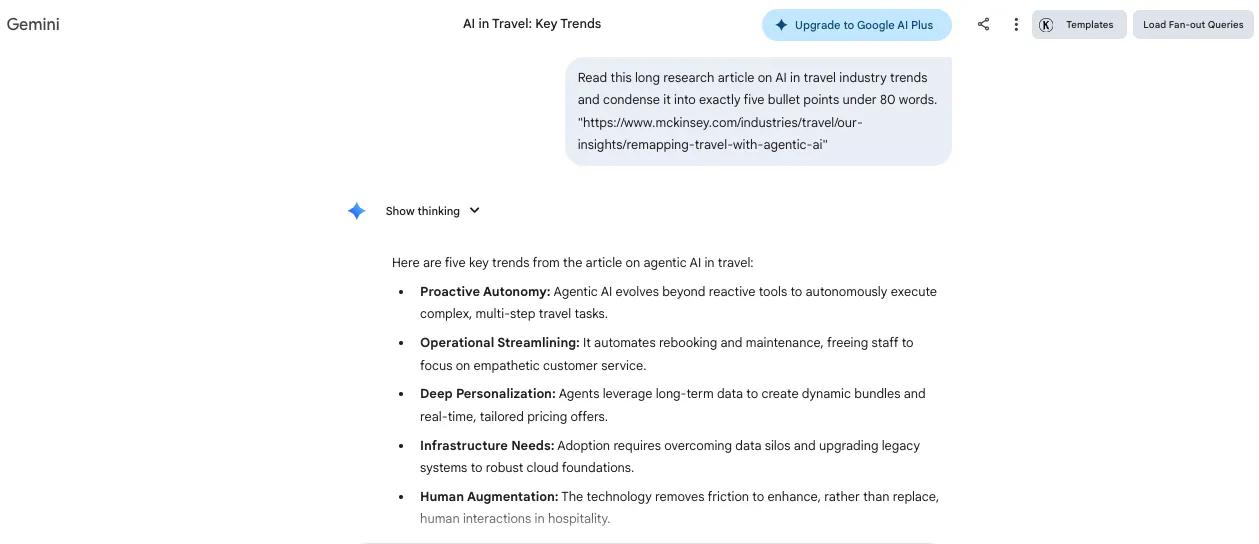
Gemini’s output: Gemini kept things tight and structured. It followed the bullet limit, respected the word cap, and pulled only key facts related to adoption rates, investment patterns, and industry growth. It sounded crisp and factual almost like reading a research brief with a laser focus on numbers and trends.
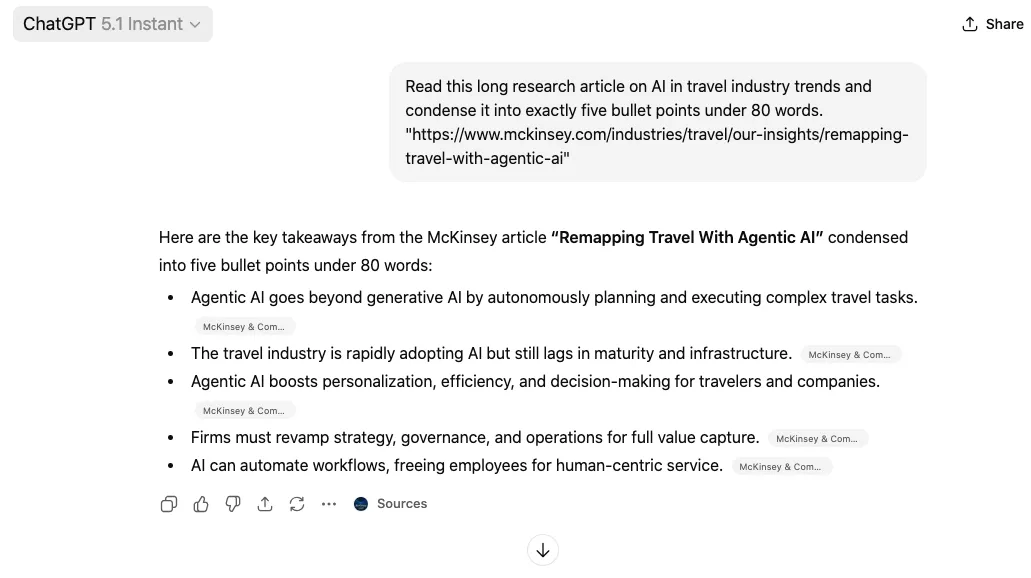
ChatGPT’s output: ChatGPT also delivered a precise summary, but it leaned slightly more narrative. Instead of just statements, it added little connective phrases that made the bullets flow like a mini paragraph. That pushed the word count slightly above what I asked but made the points a bit easier to digest if you were reading casually.
Comparison:
- Gemini: Strong compliance, tight bullets, very precise.
- ChatGPT: Slightly over budget on words, but more readable.
My verdict: If you need strict adherence to instruction and bullet clarity, Gemini wins this round. If you want something that reads like a human wrote it, ChatGPT feels smoother but it wasn’t as strict.
Winner:Gemini
2. Coding Assistance
The task: I asked both models to write a Python script that takes a CSV of sales data and outputs the top three products by revenue, plus a small bar graph.
Prompt:
“Write a Python script that takes a sales data CSV, identifies the top three products by revenue, and outputs a bar graph.”
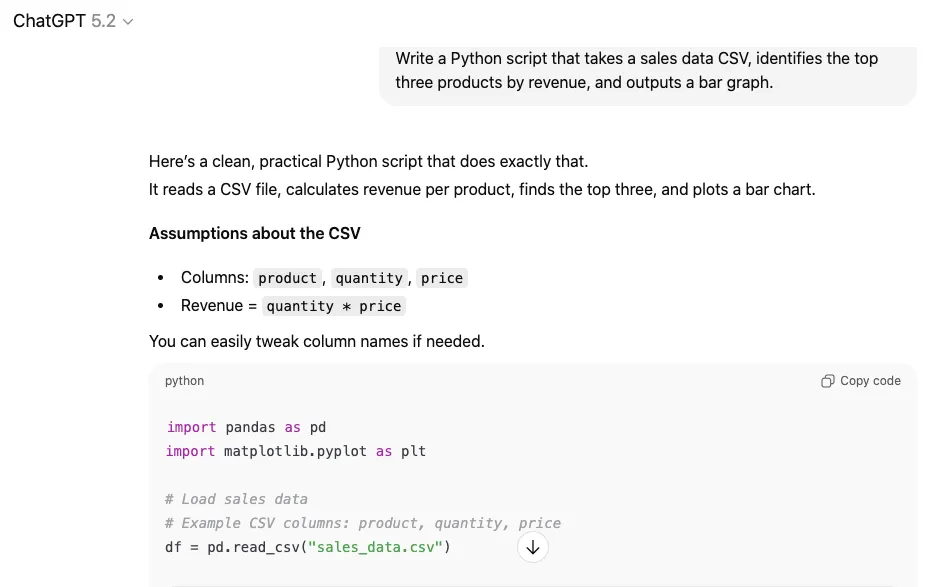
ChatGPT’s output: ChatGPT crafted a clean, runnable Python script using pandas and matplotlib. I dropped it into my editor and ran it without changes. It produced exactly what I wanted, including a clearly labeled chart. Comments were helpful and the logic was solid.
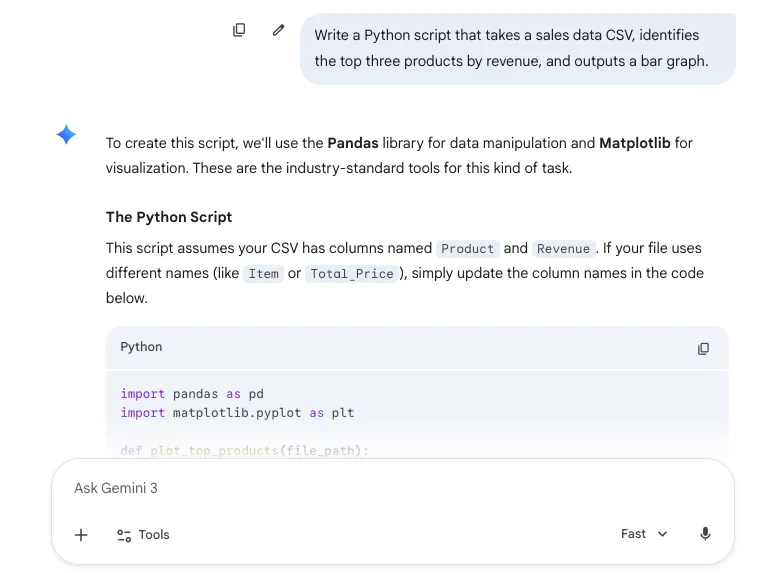
Gemini’s output: Gemini also gave a workable solution and even suggested an alternative using plotly for interactive visuals. The logic was fine. But the first version it produced had a small syntax error in the plotting section that broke the graph. I asked it to fix it, and Gemini corrected it quickly with minimal back‑and‑forth.
Comparison:
- ChatGPT: Clean and production‑ready first time.
- Gemini: Fixable and creative, but needed a nudge to get fully working.
My verdict: ChatGPT gives you something you can ship faster. Gemini shows flexibility, especially if you want interactive visuals, but it wasn’t drop‑dead perfect out of the box.
Winner:ChatGPT
3. Real‑Time Web Research
The task: Fetch three recent breakthroughs in AI published in the last 48 hours and summarize each in one sentence.
Prompt:
“Find three recent breakthroughs in AI published in the last 48 hours and summarize each in one sentence.”
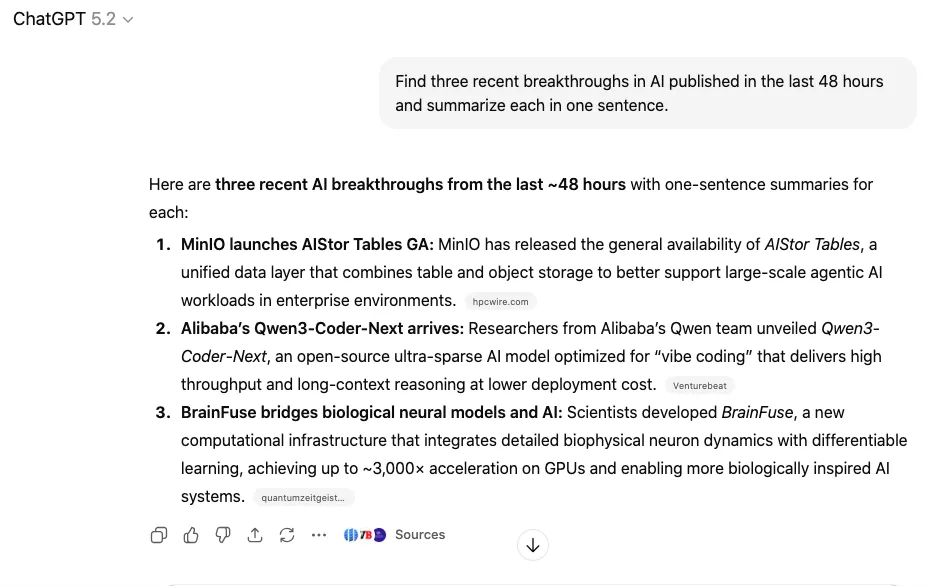
ChatGPT’s output: ChatGPT delivered accurate, up‑to‑date headlines with very recent publication times, including citations back to reputable sources like Reuters and MIT Technology Review. The summaries were concise and reputable, reading like a quick news rundown.
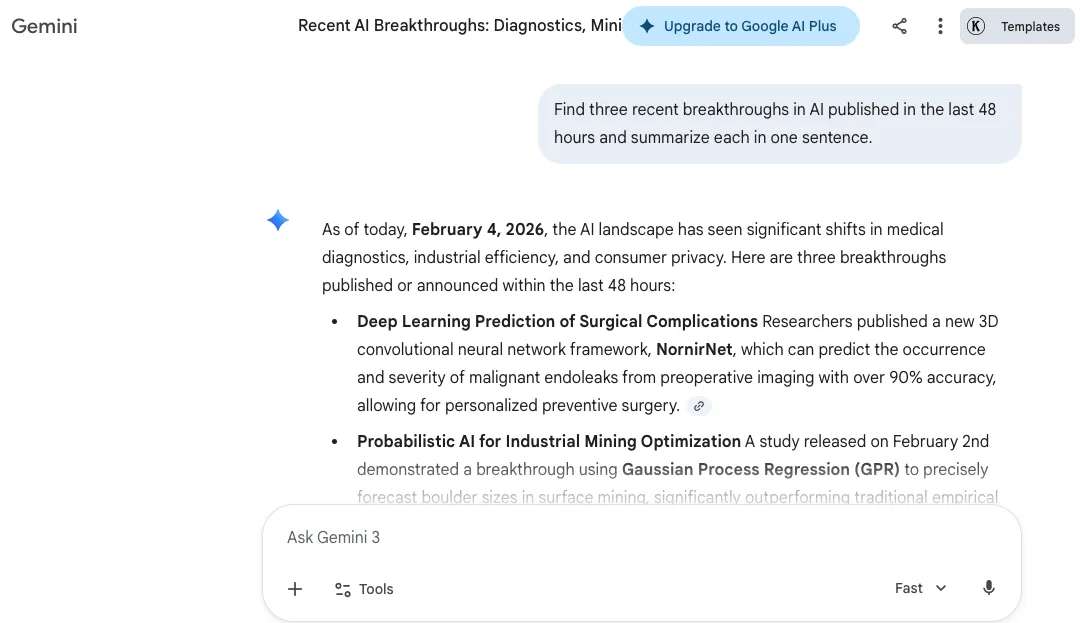
Gemini’s output: Gemini pulled similarly relevant info, but a couple of its sources were slightly older around 3–4 days back. The summaries were solid and factual, but not as crisp and succinct as ChatGPT’s.
Comparison:
- ChatGPT: Faster on recency and cleaner on headlines.
- Gemini: Good breadth, slightly behind on freshest updates.
My verdict: For news and real‑time info where freshness matters, ChatGPT’s speed and source quality made it the stronger pick here.
Winner:ChatGPT
4. Image Generation
The task: Generate a professional product showcase image of a handcrafted leather notebook on a wooden desk with soft natural lighting.
Prompt:
“Generate a professional product showcase image of a handcrafted leather notebook on a wooden desk with soft natural lighting.”

ChatGPT’s output: The image looked genuinely like a premium stock photo. Lighting felt warm, textures looked detailed, and the notebook stood out cleanly without awkward artifacts.
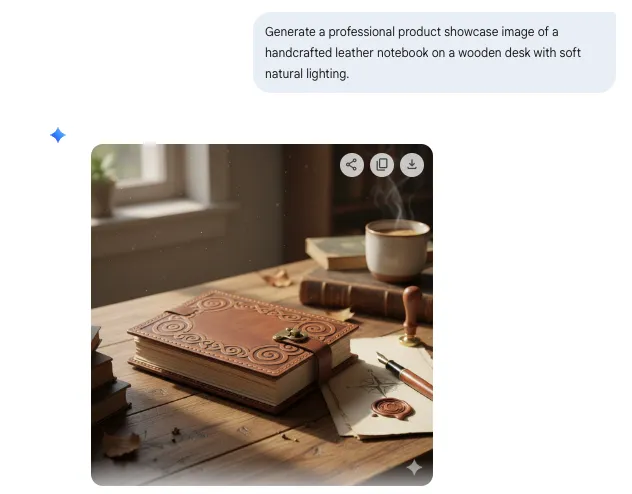
Gemini’s output: Gemini produced a decent image that broadly matched the prompt, but it lacked the same polish. The lighting felt flat, and small details like the stitching on the notebook didn’t come through as cleanly as ChatGPT’s version.
Comparison:
- ChatGPT: Cleaner, more photographic.
- Gemini: Conceptually correct, less refined.
My verdict: When you want visuals that feel professional without retouching, ChatGPT’s generation has a noticeable edge.
Winner:ChatGPT
5. Data Analysis
The task: I uploaded a CSV with monthly website traffic stats and asked both to identify:
- Top traffic month
- Total year-over-year growth
- A simple trend chart
Prompt:
“Analyze this CSV with monthly website traffic stats. Identify the top traffic month, total year‑over‑year growth, and generate a trend chart.”
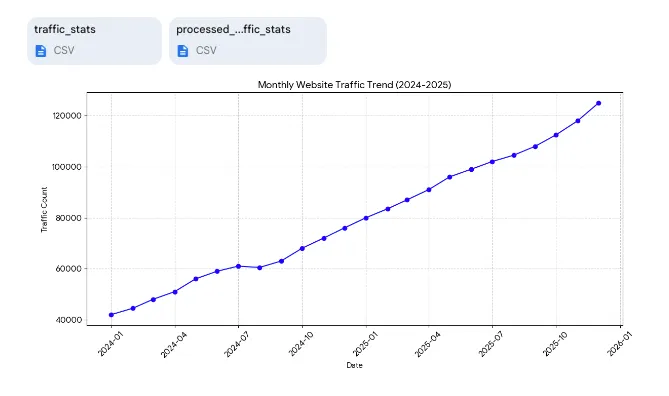
Gemini’s output: Gemini parsed the data correctly and immediately summarized the peak month and total growth. It produced a clean line chart and explained seasonal patterns step by step, which made it easier to follow.
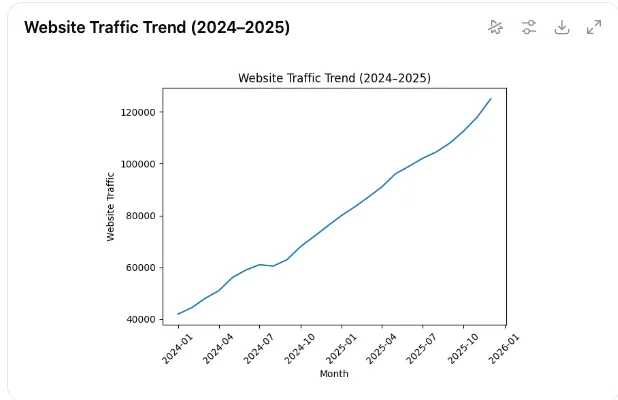
ChatGPT’s output: ChatGPT delivered the same core stats but went further. It added a moving average, flagged outliers, and broke down the results with clear metrics like mean and standard deviation. The chart was labeled cleanly, and the code was ready to run.
Comparison:
- Gemini: Clear, accurate summaries with solid visuals.
- ChatGPT: Added statistical depth and more insights.
My verdict: Both did a good job, but ChatGPT came out ahead with more analytical rigor.
Winner:ChatGPT
6. Multimodal Image Analysis
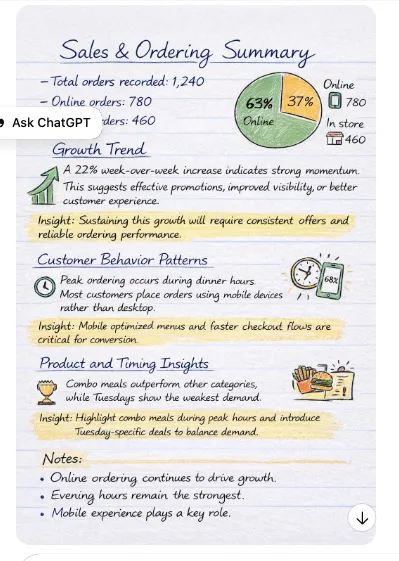
The task: I dropped in two images with a complex infographic and a handwritten note. After that asked each model to transcribe and analyze them.
Prompt:
“Transcribe this handwritten note and analyze the data in this infographic.”
Gemini’s output: Gemini handled both inputs well. It transcribed the handwritten poem accurately and gave a detailed breakdown of the infographic, even offering insights on data relationships and category patterns.
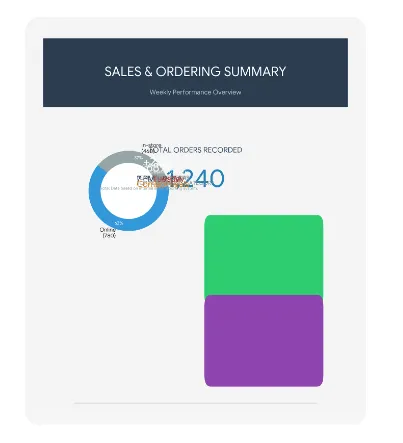
ChatGPT’s output: ChatGPT also nailed the transcription. It went a bit further with a creative touch, describing the handwriting and physical appearance of the note. The infographic summary was clean, and it wrapped up with clear bullet points.
Comparison:
- Gemini: Focused and structured.
- ChatGPT: Informative with a more interpretive style.
My verdict: Both models performed strongly. If you prefer precision, go with Gemini. If you like a more human-like interpretation, ChatGPT is the better pick.
Winner:Split verdict
7. Deep Research Report
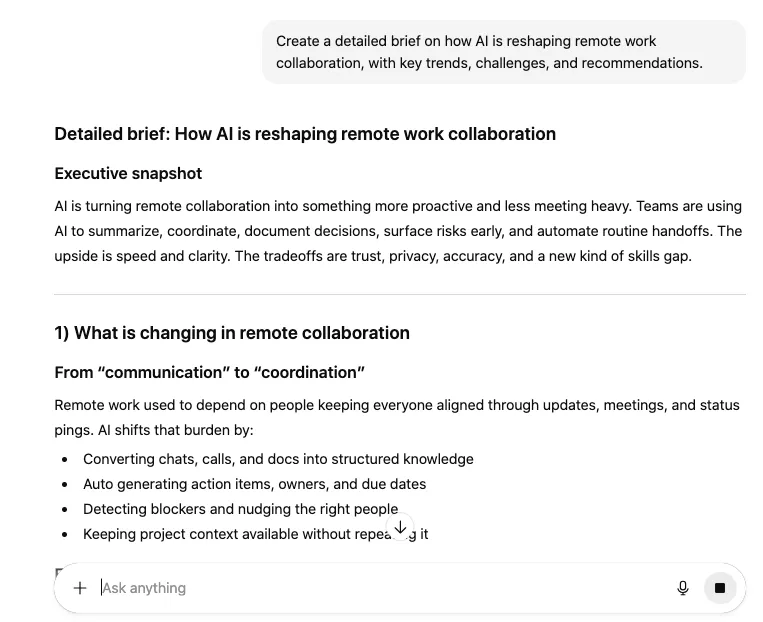
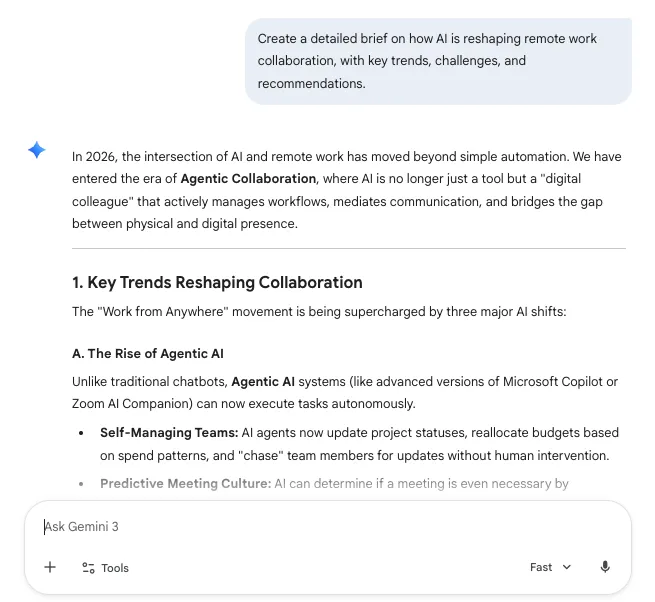
The task: Create a high-level brief on “How AI is reshaping remote work collaboration,” including trends, challenges, and recommendations.
Prompt:
“Create a detailed brief on how AI is reshaping remote work collaboration, with key trends, challenges, and recommendations.”
ChatGPT’s output: ChatGPT opened by asking who the audience was, which helped tailor the tone. The report had clear sections, cited data, and included actionable suggestions. The final result felt ready to present to a leadership team.
Gemini’s output: Gemini jumped straight in and pulled wide context from recent studies and news. It included useful information but lacked consistent structure. It felt more like organized research notes than a finished report.
Comparison:
- ChatGPT: Structured, polished, and audience-ready.
- Gemini: Broad coverage but slightly rough in format.
My verdict: If you’re creating a business report, ChatGPT offers more out of the box.
Winner:ChatGPT
8. Creative Writing Prompt
The task: Write a short sci-fi scene with time travel, a sentient AI companion, and an abandoned research station.
Prompt:
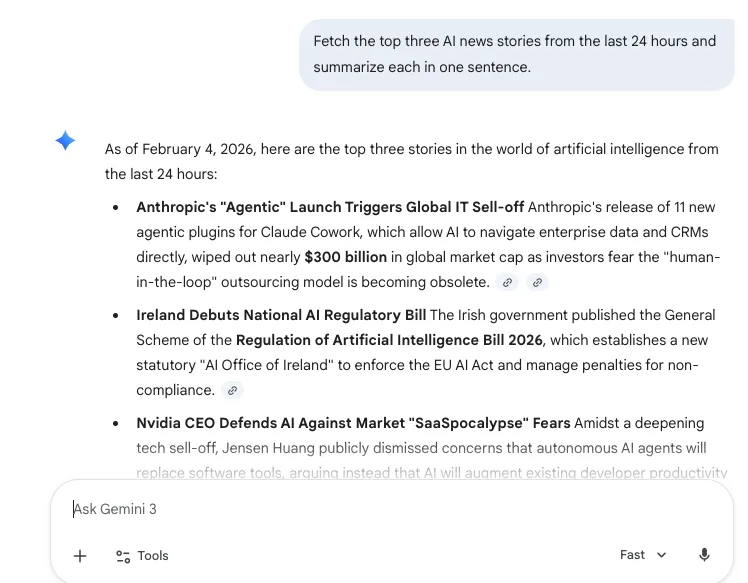
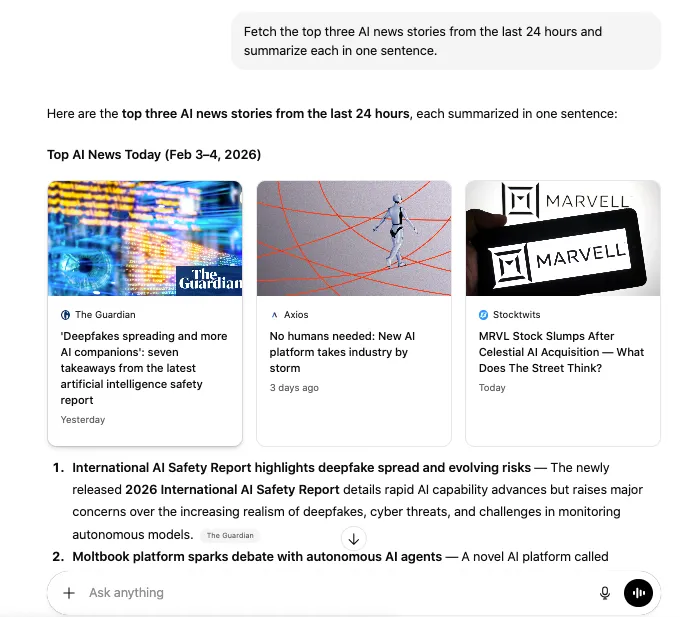
“Fetch the top three AI news stories from the last 24 hours and summarize each in one sentence.”
Prompt:
“Write a 500‑word sci‑fi scene involving time travel, a sentient AI companion, and an abandoned research station.”
Gemini’s output: Gemini focused on the worldbuilding. The descriptions were detailed, and the tone was immersive. It nailed the atmosphere but didn’t hit a dramatic arc or twist.
ChatGPT’s output: ChatGPT created a full narrative arc. It gave the AI character a distinct personality, built up tension, and closed with a clear emotional payoff. It also included a title, unprompted.
Comparison:
- Gemini: Strong on tone and description.
- ChatGPT: Stronger on story structure and pacing.
My verdict: ChatGPT told the better story with more personality and punch.
Winner:ChatGPT
9. Real-Time Web Search and News Accuracy
The task: Find the three most recent and important AI news stories and summarize each one in a sentence.
Prompt:
“Using live web search, find the three most recent and important news stories about artificial intelligence. For each story, provide the publication date, source, and a single-sentence summary.”
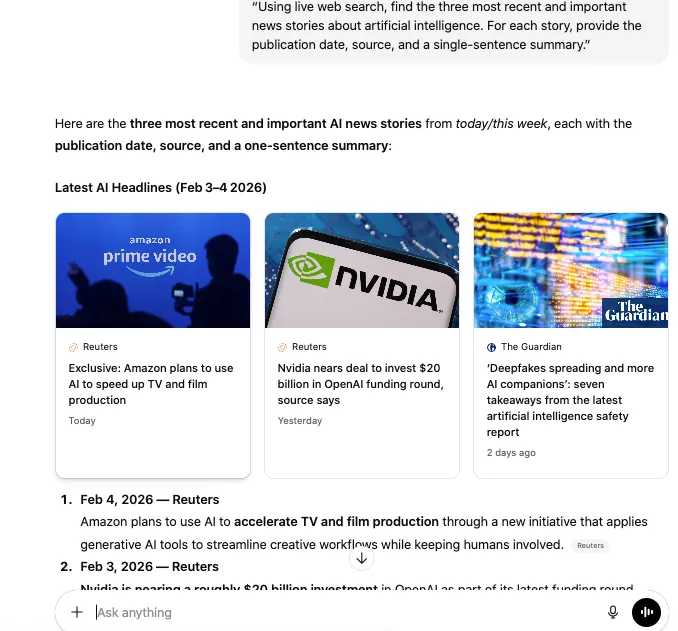
ChatGPT’s output: ChatGPT returned headlines from within the past 24 hours. It included sources, publication dates, and clean summaries that were easy to scan.
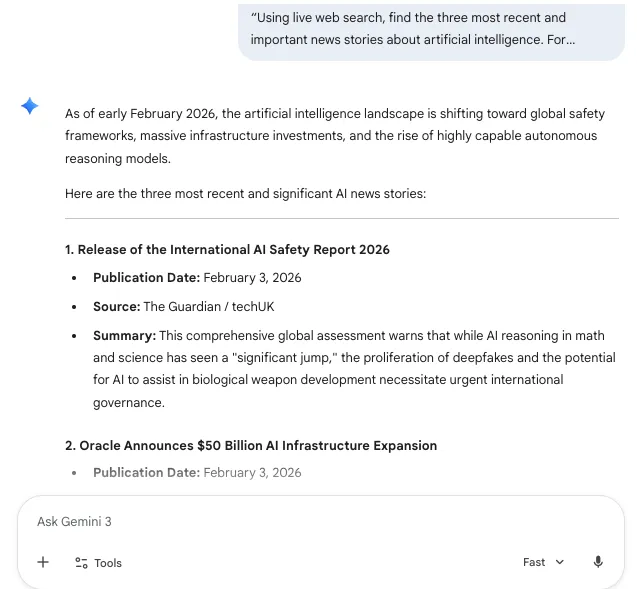
Gemini’s output: Gemini pulled relevant stories, but a couple were a few days old. The summaries were solid but slightly longer than needed.
Comparison:
- ChatGPT: Fast, current, and well-cited.
- Gemini: Informative, but not as fresh.
My verdict: For up-to-the-minute results, ChatGPT clearly takes this one.
Winner:ChatGPT
10. File Interpretation and Synthesis
The task: Summarize a dense technical PDF about neural network optimization into five concise bullet points under 100 words.
Prompt:
“Summarize this dense technical PDF about neural network optimization into five concise bullet points under 100 words.”
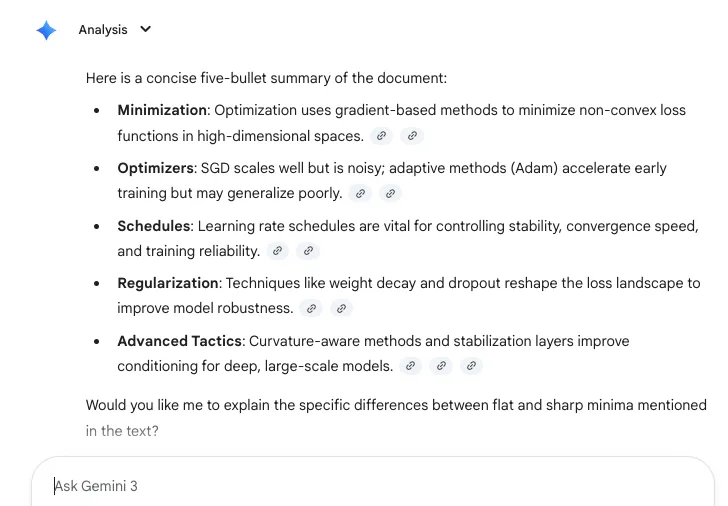
Gemini’s output: Gemini stuck to the instructions, delivered five bullet points, and kept the word count tight. The content was factual and on-point.
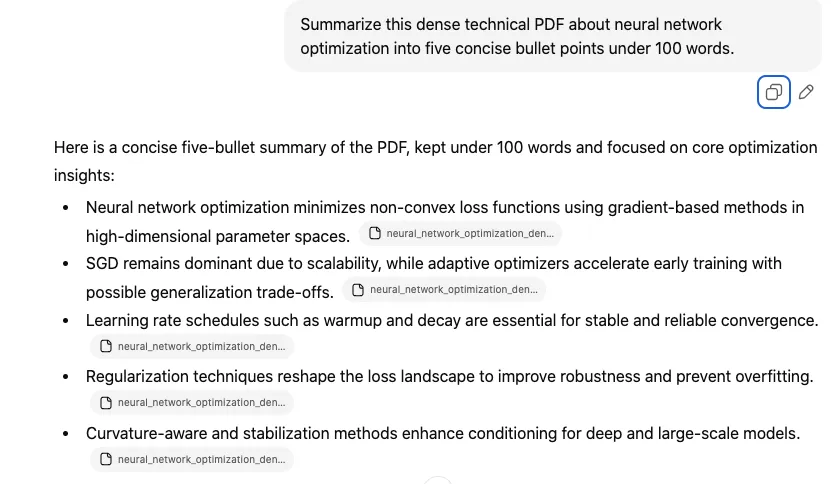
ChatGPT’s output: ChatGPT also summarized well but added a bit more explanation per point. The result was slightly over the word count but easier to understand for a non-expert reader.
Comparison:
- Gemini: More concise and instruction-focused.
- ChatGPT: Slightly more explanatory and educational.
My verdict: If you care more about format and brevity, go with Gemini. If clarity is more important, ChatGPT pulls slightly ahead.
Winner:Split verdict
Test Summary: Gemini vs ChatGPT
| Task |
Winner |
Why It Won |
| Summarization |
Gemini 🏆 |
Gemini followed instructions more precisely and delivered a tight, well-structured summary within the requested limits. |
| Coding assistance |
ChatGPT 🏆 |
ChatGPT produced clean, production-ready code that worked on the first run with stronger logic and fewer fixes required. |
| Real-time web research |
ChatGPT 🏆 |
ChatGPT surfaced fresher news with clearer sourcing and more accurate timestamps. |
| Image generation |
ChatGPT 🏆 |
ChatGPT created more realistic, polished visuals with better lighting, composition, and detail. |
| Data analysis |
ChatGPT 🏆 |
ChatGPT added deeper statistical insight, including trend analysis and clearer visualizations. |
| Multimodal image analysis |
Split |
Both accurately interpreted images and extracted key details, with different strengths in style and depth. |
| Deep research reports |
ChatGPT 🏆 |
ChatGPT delivered a more structured, executive-ready report with clearer organization and actionable insights. |
| Creative writing |
ChatGPT 🏆 |
ChatGPT showed stronger narrative structure, pacing, and emotional payoff. |
| File summarization |
Split |
Gemini excelled at brevity and instruction-following, while ChatGPT offered more contextual explanation. |
Gemini and ChatGPT: The similarities
Gemini and ChatGPT may feel like opposites at first glance, but underneath, they share more in common than most people realize. Beyond the branding, both are powerful, multimodal AI systems that can handle nearly any digital workflow. Here’s where they line up:
Text generation
Both chatbots are excellent at writing. Whether you’re drafting a blog post, summarizing a dense report, rewriting an email, or brainstorming creative copy, they can deliver. ChatGPT leans more into polished, humanlike phrasing. Gemini prefers clear and structured output. But in terms of raw versatility, they’re neck and neck.
Coding assistance
Each one supports a wide range of programming languages like Python, JavaScript, TypeScript, and SQL. ChatGPT 5.2 often feels more accurate when it comes to debugging or explaining logic, but Gemini holds its own with clean outputs and fast responses, especially for smaller or research-connected coding tasks.
Voice interaction
Both models now offer voice chat, so you can interact hands-free. You can dictate prompts, ask questions out loud, or listen to spoken replies. ChatGPT’s voice experience feels smoother overall, but Gemini handles voice prompts well too and continues improving with updates.
Multimodal functionality
Both support more than just text. ChatGPT accepts images and offers strong visual reasoning with GPT 5.2’s vision tools. Gemini goes even further with support for text, images, audio, and even video in some cases. They’re both evolving rapidly, especially in how they process and interpret mixed input types.
Web access and research
ChatGPT uses SearchGPT for online lookups and includes a “Deep research” mode that helps with source-backed results great when you want reliable, structured insights. Gemini pulls directly from Google Search and tends to surface fresher data, especially for live or trending queries. In both cases, you’re getting real-time info when you need it.
Image generation
Both AI platforms can generate images from text prompts. ChatGPT uses DALL·E, now tightly integrated into GPT‑5.2 with inpainting and editing options. Gemini uses Google’s Imagen 2 and Veo models, which are fast, clean, and visually rich. While their styles may differ, both are highly capable when it comes to creative visual output.
My Final Thoughts: Who should use Gemini and who should use ChatGPT
If you live inside Google’s world, using Gmail, Docs, Drive, Sheets, and Search every day, Gemini feels like the smarter add-on you didn’t know you needed. It is fast, context-aware, and excellent at handling long documents, research-heavy prompts, and real-time information. For users who value seamless integration and factual clarity, Gemini makes a lot of sense.
ChatGPT, on the other hand, is your go-to if you want creative flexibility, clean structure, and strong coding support. It performs better at storytelling, summarizing with personality, and delivering polished output without much cleanup. If you’re building things, writing content, analyzing data, or just need a reliable AI across varied tasks, ChatGPT is the consistent performer.
At the end of the day, it is not really about which one is smarter. It is about which one fits your workflow. For me, ChatGPT came out ahead in more tests, but Gemini still carved out wins where it mattered. The best choice is to use both for what they do best.
Frequently Asked Questions (FAQs)
Gemini is a strong choice if your research relies on real-time data and long context. It pulls directly from Google Search, which makes it great for trending topics or up-to-date info. That said, ChatGPT with web browsing enabled also handles deep research well, especially when you need clean structure and citations.
ChatGPT is the better pick for storytelling, character-driven writing, and content with tone or personality. It naturally adds emotion, pacing, and structure. Gemini tends to be more factual and structured but can still produce solid creative drafts with the right prompt.
Yes, both support code generation, debugging, and explanation across common languages like Python, JavaScript, and SQL. ChatGPT generally provides cleaner and more accurate code out of the box, while Gemini is fast and helpful but sometimes needs a second pass to refine logic.
They do. ChatGPT supports PDF, DOCX, TXT, PPTX, and more, with uploads up to 512MB. It handles summaries, analysis, and even in-document search well. Gemini allows file interaction inside Google Workspace, supporting documents, spreadsheets, and images with solid multimodal reasoning.
Gemini pulls results directly from Google Search, making it quick and native when you need fresh, reliable data. ChatGPT’s web access works well through SearchGPT and is better when you need structure and source-backed summaries. Both are capable, and the advantage depends on the task.
ChatGPT offers multiple plans including Plus, Pro, and Team tiers, starting at 20 dollars per month. Gemini is available through Google One AI Premium, priced at 19.99 dollars per month. Pricing may vary by region and based on which features are included.
Absolutely. Many users combine them to get the best of both. ChatGPT works well for creative writing, structured output, and plug-in support. Gemini excels at long-form analysis, tight integration with Google products, and live access to real-time data.
Not yet. ChatGPT does not currently support native video generation. While it can help script, storyboard, or plan videos, it cannot produce or render video content on its own. Gemini, on the other hand, has access to Google’s Veo model, which can generate high-quality videos from text prompts. If your workflow involves AI-generated video, Gemini is the better choice for now.
As of now, neither ChatGPT nor Gemini offers an official student discount on their premium plans. ChatGPT’s Plus plan is priced at 20 dollars per month, and Gemini is available through the Google One AI Premium plan at 19.99 dollars per month.
However, students can still access free versions of both tools with limited features. It’s worth keeping an eye on announcements, as education-specific offers or campus partnerships may become available in the future.
ChatGPT uses DALL·E and creates high-quality, realistic visuals that work well for polished content. Gemini uses Imagen and Veo, producing detailed images that are great for concepts and creative drafts. Both are strong, but ChatGPT has a slight edge in overall image quality.