Base44 vs v0: Which AI App Builder Should You Use in 2026?
Picking between Base44 and v0?
Base44 promises a faster way to build full apps with backend, database, authentication, and hosting handled for you.
But is it flexible enough for real product building?
v0 claims better code control, cleaner React components, and a smoother workflow for developers.
But does it work well when you need more than just a polished frontend?
And which one is actually better for you, your team, or your next MVP?
So, I compared Base44 and v0 across ten practical tests.
I looked at ease of use, app generation, backend support, code access, UI quality, pricing, and more.
Keep reading to find out which AI app builder stands out for you in 2026!
Base44 vs v0 at a Glance
Before we go deeper, here’s a quick side-by-side look at how Base44 and v0 compare.
| Category |
Base44 |
v0 |
| Main purpose |
AI no-code app builder |
AI development assistant and app/UI generator |
| Best for |
Non-technical founders, MVPs, and internal tools |
React/Next.js developers, frontend teams, and design-heavy apps |
| Output |
Working app with UI, backend, database, and hosting |
Editable code, UI, pages, apps, and deployment workflow |
| Backend |
Built-in and managed by the platform |
Can connect databases and integrations, but developer workflow still matters |
| Code access |
Improving through code edits and GitHub sync, but still platform-first |
Strong code access with more developer control |
| Ease of use |
Easier for non-coders |
Easier for developers |
| Customization |
Fast, prompt-based, and visual, but more abstracted |
Deeper customization through code |
| Hosting |
Included in the platform |
Built around Vercel-oriented deployment |
| Pricing style |
Plan plus message and integration credits |
Plan plus usage credits and tokens |
| Biggest risk |
Platform lock-in, credit limits, and abstraction limits |
Requires technical skill and more backend/integration responsibility |
| Best use case |
MVPs, internal dashboards, customer portals, and simple SaaS prototypes |
Landing pages, dashboards, design systems, React apps, and frontend-heavy products |
The simple way to think about it is this:
- Base44 is better when you want to describe an app idea and get something functional without managing the technical setup yourself.
- v0 is better when you want AI to help you build faster, but you still want control over the code, design, and development workflow.
Build Your AI App with Expert Developers
Prismetric helps startups and businesses turn AI app ideas into scalable MVPs, SaaS products, dashboards, and custom web apps.
Get Started for Free
Base44 vs v0: Feature-by-Feature Comparison
I compared Base44 and v0 across the areas that matter when you’re actually trying to build something useful, not just play with an AI demo.
That includes app generation, ease of use, UI quality, backend support, code access, deployment, pricing, and the kind of projects each tool can realistically handle.
Let’s start with the biggest question first.
Base44 vs v0: Who Has the Better App Builder?
Your app builder is where the whole promise becomes real.
It’s one thing to generate a nice-looking screen. It’s very different to build an app with pages, data, user login, workflows, backend logic, and a live link you can share.
I compared both tools as AI app builders, not just as prompt-based design tools. Here’s the breakdown.
| Feature |
Base44 |
v0 |
| App creation style |
Prompt-to-app builder |
Prompt-to-code and app builder |
| Best starting point |
Describe the full app idea |
Describe a page, component, or app flow |
| Full-stack app support |
Yes, with managed backend |
Yes, with developer-oriented setup |
| Built-in database |
Yes |
Via integrations like Supabase, Neon, Upstash, and Vercel Blob |
| Authentication |
Built into the platform |
Possible through app setup and integrations |
| Hosting |
Included with Base44 |
Vercel-oriented deployment |
| Best for |
MVPs, internal tools, portals, simple SaaS apps |
React apps, dashboards, landing pages, frontend-heavy products |
| Main limitation |
Less control as apps get complex |
More technical knowledge needed |
What I Found Inside Base44
Base44 feels more like a true no-code AI app builder.
You describe what you want to build, and it tries to create the app around that idea. That means it’s not only thinking about the frontend. It also handles things like database structure, user authentication, backend functions, hosting, and app logic.
This is helpful if you’re a founder, operator, product manager, or small business owner who doesn’t want to set up a separate database, connect APIs manually, or think about where the app will be hosted.
Base44’s own documentation says its backend service handles data management, authentication, backend functions, and hosting. That makes it feel more complete for people who want an AI full stack app builder instead of a code generator. source
For example, if you want to build a customer portal, internal dashboard, task tracker, booking system, or simple SaaS MVP, Base44 gives you a faster starting point. You can focus on what the app should do instead of choosing frameworks, libraries, deployment tools, or database providers.
But Base44 is not magic.
The more complex your app gets, the more you may feel the limits of building through prompts. If the AI misunderstands your request or creates a bug, you may have to spend more credits explaining the same issue again.
One Reddit user summed it up well: “Base44 is best for fast prototyping.” They also added that once app logic becomes complex, you may need to know how to code. source: Reddit
That matches the biggest Base44 tradeoff: it’s great when you want speed, but it can feel limiting when you need deeper technical control.
What I Found Inside v0
v0 is different.
It started with a strong reputation for generating clean React components and polished UI, but it’s no longer just a simple frontend generator. v0 now positions itself as an AI agent for creating real code, full-stack apps, live prototypes, and production-ready web experiences. source
The big difference is the workflow.
With v0, you’re usually working closer to the code. It can generate pages, layouts, dashboards, components, and full app flows. It can also connect to databases like Supabase, Neon, Upstash, and Vercel Blob. source
That makes v0 powerful if you already understand how modern web apps work.
If terms like React, Next.js, GitHub, environment variables, API routes, and Vercel deployment don’t scare you, v0 can save a lot of time. You can use it like an AI coding assistant that helps you move faster while still giving you access to the underlying code.
But if you’re a complete beginner, this can also be where v0 feels harder.
You may get a beautiful interface quickly, but when it’s time to connect real data, fix logic, manage authentication, or clean up the app structure, you still need some technical judgment.
One Reddit user said v0 “works great for simple things,” but struggled with more complicated requests. source: Reddit
That’s the real story with v0. It’s not weak. It’s just better suited for people who want AI help inside a developer-style workflow.
Who Wins This Round?
Base44 wins if you want the fastest path from idea to working app without touching code.
v0 wins if you want cleaner code, more frontend control, and a tool that fits into a real developer workflow.
The gap neither fully solves: both tools still need human review when the app becomes serious. Base44 can hide too much complexity. v0 can expose too much complexity. The better choice depends on whether you want the platform to handle more for you or you want more control yourself.
Base44 vs v0: Which Tool Is Easier for Beginners?
Ease of use matters a lot in this category.
Most people searching for Base44 vs v0 are not only asking which tool has more features. They’re asking, “Which one will actually help me build something without getting stuck?”
So I looked at how approachable both tools are for someone who wants to build an MVP, website, dashboard, or internal tool without spending weeks learning a development stack.
| Feature |
Base44 |
v0 |
| Beginner friendliness |
Very strong |
Moderate |
| Coding knowledge needed |
Low |
Medium |
| Setup complexity |
Low |
Medium |
| Prompting style |
App idea focused |
Code/app/UI focused |
| Technical terms |
Fewer upfront |
More common |
| Best beginner user |
Non-technical founder |
Beginner with some web dev knowledge |
| Biggest learning curve |
Fixing complex app behavior |
Understanding code and deployment |
What I Found Inside Base44
Base44 is easier for non-coders.
The reason is simple: it starts from the app idea, not the codebase.
You don’t need to know what database provider to choose. You don’t need to set up a backend. You don’t need to think about routing, hosting, package installs, or where your app files live.
You can say something like:
“Build me a client portal where users can log in, submit project requests, upload files, and track status.”
That kind of prompt fits Base44 well because the platform is designed around complete app creation. It can turn plain-language instructions into pages, data, forms, and workflows.
This is exactly why Base44 feels attractive to non-technical founders and MVP builders. It lowers the starting barrier. You don’t have to become a developer before testing your idea.
The downside appears when you move beyond the first version.
If something breaks, you still need to explain the issue clearly. And that can be hard if you don’t understand what’s going wrong behind the scenes. A Reddit user complained about using monthly credits while trying to fix bugs in an app that had issues from the beginning. source: Reddit
That doesn’t mean Base44 is bad. It means beginners should use it carefully. Start small, test each feature, and don’t ask it to build a giant app in one prompt.
What I Found Inside v0
v0 is easy in a different way.
The prompt box is simple. The output is fast. And the UI generation quality is often impressive. If you ask for a landing page, SaaS dashboard, pricing page, admin panel, or React component, v0 can usually give you a strong first version quickly.
But the beginner experience changes once you need to go beyond the preview.
v0’s official pricing page mentions features like deploying apps to Vercel, editing visually with Design Mode, and syncing with GitHub, even on the free plan. source: V0 Pricing
Those are useful features, but they also tell you something important: v0 expects you to be comfortable with a more developer-shaped workflow.
That’s great if you’re a frontend developer, technical founder, or designer who works with engineers. It’s less ideal if you don’t know what GitHub is or why a database connection failed.
For beginners, v0 can feel exciting at first and confusing later.
You may get a polished app screen, then suddenly need to understand how to connect data, deploy properly, fix errors, or edit generated code.
One Reddit user described v0 as more of a “prototyping tool / quick UX mockup tool” than a full-stack coding solution. source: Reddit
That’s a fair way to think about it for non-technical users. v0 is approachable, but it’s not as beginner-proof as Base44.
Who Wins This Round?
Base44 wins for beginners.
If you don’t code and want an AI app builder for beginners, Base44 gives you a smoother path. It hides more of the technical setup and lets you focus on what the app should do.
v0 wins for beginner developers or technical founders.
If you already know the basics of React, Next.js, GitHub, or Vercel, v0 will feel faster and more flexible. But if you’re starting from zero, Base44 is easier to understand.
Base44 vs v0: Who Creates Better UI and Design?
UI quality matters more than people admit.
A tool can create a working app, but if the design looks messy, generic, or hard to use, you’ll still spend time fixing it.
So I compared Base44 and v0 on how well they handle layouts, dashboards, landing pages, responsive design, visual editing, and frontend polish.
| Feature |
Base44 |
v0 |
| UI generation |
Good for functional apps |
Strong for polished interfaces |
| Best design output |
Internal tools, portals, dashboards |
Landing pages, SaaS dashboards, components |
| Visual editing |
Yes |
Yes, with Design Mode |
| Frontend code quality |
Improving |
Stronger for React/Next.js workflows |
| Design system support |
More limited |
Better fit for shadcn/ui and Tailwind-style apps |
| Best for designers |
Basic visual edits |
More detailed visual and code control |
| Main limitation |
Can feel app-builder generic |
Still needs human review for complex UX |
What I Found Inside Base44
Base44 creates practical UI.
That’s not a bad thing. In fact, for many users, practical is exactly what they need.
If you’re building an internal dashboard, admin panel, client portal, inventory tracker, CRM-style app, or simple SaaS MVP, Base44 can usually create a clean enough interface to test the idea.
The UI feels more focused on function than design perfection.
That works well for business apps where the main goal is to collect data, show records, manage users, and complete workflows. You’re not necessarily trying to win a design award. You’re trying to get something usable in front of people quickly.
Base44 also includes a responsive visual editor according to its pricing page, which helps when you want to adjust the app without diving into code. source: base44 Pricing
But this is where v0 starts to pull ahead.
Base44’s UI can feel more like a generated app builder interface. It’s useful, but not always as polished or design-system-friendly as what v0 can create.
So if your product depends heavily on first impression, landing page quality, or pixel-level frontend design, Base44 may need extra refinement.
What I Found Inside v0
v0 is stronger for UI.
This is the area where it feels most comfortable.
It’s built around modern web interface generation, especially for React and Next.js projects. It can create dashboards, pricing pages, onboarding flows, landing pages, settings screens, forms, navigation layouts, and full-page designs with cleaner frontend structure.
v0 also has Design Mode, which lets users visually adjust parts of the interface without re-prompting every small change. Its website also highlights screenshot-to-website, Figma-to-website, visual polish, and one-click Vercel deployment for websites. source
That makes it more useful for design-heavy apps.
For example, if you want a SaaS analytics dashboard with KPI cards, filters, charts, responsive sidebar navigation, and polished empty states, v0 is usually the better starting point.
It also fits naturally with developers who already use Tailwind, shadcn/ui, and component-based frontend development.
The catch is that good UI does not automatically mean complete product logic.
v0 can make the frontend look excellent, but you still need to make sure the app behaves correctly, connects to real data, handles edge cases, and works reliably after deployment.
Who Wins This Round?
v0 wins for UI and frontend design.
If your project needs polished layouts, clean React components, landing pages, dashboards, or design-system-friendly output, v0 is the stronger choice.
Base44 wins when design is secondary to getting a functional app built fast.
The gap both leave open: neither tool replaces product design judgment. You still need to check whether the flow makes sense, whether the app is easy to use, and whether the design supports the actual user journey.
Create Smarter Apps with AI Development Experts
Prismetric develops AI-powered web apps, SaaS products, dashboards, and business tools tailored to your product goals.
Get a Free Consultation
Base44 vs v0: Who Has Better Backend and Database Support?
This is one of the most important parts of the Base44 vs v0 comparison.
A lot of AI app builders can create screens. The harder part is building the backend, which is the part of the app that handles data, users, permissions, server logic, and actions behind the scenes.
If you’re building a real MVP or SaaS product, backend support can make or break the tool.
| Feature |
Base44 |
v0 |
| Managed backend |
Yes |
No, more developer-managed |
| Database support |
Built into Base44 |
Through integrations |
| Authentication |
Built in |
Possible through integrations and app setup |
| Backend functions |
Yes |
Yes, through Next.js app structure |
| External APIs |
Supported through backend functions |
Supported through code and integrations |
| Best for |
Users who want backend handled |
Developers who want backend flexibility |
| Main risk |
Less infrastructure control |
More setup responsibility |
What I Found Inside Base44
Base44 has the simpler backend story.
Its backend service is managed by the platform, so you don’t have to manually stitch together a database, hosting provider, authentication tool, and backend logic layer before your app becomes useful.
This matters a lot for non-technical users.
Let’s say you want to build a booking app. You need users, bookings, availability, status updates, emails, and maybe admin controls. In a traditional development workflow, that means planning your data structure, writing server-side logic, setting up authentication, and connecting everything to the frontend.
Base44 tries to handle much of that inside one platform.
Its developer docs also mention backend functions, data access, authentication, and integrations through the Base44 SDK. source
This makes Base44 better for users who want an AI full stack app builder that manages the backend for them.
But the tradeoff is control.
Because Base44 abstracts the backend, you may not always have the same freedom you’d get from building directly with your own stack. For simple apps, that abstraction is helpful. For complex products, it can become limiting.
This is why Base44 works best when your app logic is clear, focused, and not overly custom.
What I Found Inside v0
v0’s backend support is more powerful than many people realize.
A lot of older comparisons describe v0 as “frontend only,” but that’s no longer fully accurate. v0’s docs say it can build full-stack applications, create backend endpoints using Next.js App Router conventions, and connect to databases like Supabase, Neon, and Upstash. source
That’s a big deal.
It means v0 can help with more than static UI. It can work with real app flows, server-side logic, database connections, and production-style previews.
v0’s docs also say previews now run the full application with server-side code, API routes, database connections, and environment variables. source
So the fair comparison is not:
“Base44 builds apps, v0 only builds UI.”
A better comparison is:
“Base44 manages more of the app stack for you, while v0 gives developers more control over how the app stack is built.”
That difference matters.
If you’re a developer, v0’s approach may feel better because you can connect the tools you already trust. If you’re a non-technical founder, it may feel like extra work because you still need to understand what those tools do.
Who Wins This Round?
Base44 wins for managed backend simplicity.
If you want the platform to handle database, authentication, backend functions, hosting, and app logic in one place, Base44 is easier.
v0 wins for backend flexibility.
If you’re comfortable working with Next.js, Supabase, Neon, Upstash, API routes, and Vercel deployment, v0 gives you a more developer-friendly path.
The gap between them is clear: Base44 is better when you want less setup. v0 is better when you want more control.
Base44 vs v0: Who Gives Better Code Access and Ownership?
Code access is where this comparison gets interesting.
A no-code AI app builder is great when you want speed. But once your app starts becoming serious, you’ll naturally ask: Can I edit the code? Can I export it? Can a developer take over later? Can I connect it to GitHub?
I checked both tools with that question in mind.
| Feature |
Base44 |
v0 |
| In-app code editing |
Yes, on paid plans |
Yes |
| GitHub support |
Yes, on Builder plan and above |
Yes, included even on Free plan |
| Local development |
Supported through GitHub sync and CLI-style workflows |
Supported through exported code and GitHub workflow |
| Code-first workflow |
Partial |
Strong |
| Best for handoff to developers |
Good, but still platform-first |
Stronger |
| Version control |
Through GitHub integration |
Through GitHub branches, commits, and pull requests |
| Main limitation |
Still tied to Base44’s platform/backend model |
Requires developer comfort with code |
What I Found Inside Base44
Base44 has improved a lot here.
It is not just a black-box no-code app builder anymore. Its pricing page now lists in-app code edits even on the Starter plan. Builder and Pro plans add GitHub integration, backend functions, AI model selection, and domain connection.
That matters because older AI app builders often trapped users inside a visual editor. Base44 is trying to make the platform more useful for people who start no-code but later want developer help.
The GitHub workflow is helpful, but it still has some rules.
Base44’s documentation says local changes sync back to Base44 when they are merged into the main branch. Other default branch names like master are not currently supported. After that, you still need to publish from Base44 to make the changes live. source
This tells you a lot about how Base44 works.
You can bring developers into the project, but Base44 still remains the main app environment. The code access is useful, but the product is still designed around the Base44 builder, backend, and publishing flow.
That is not necessarily bad.
For a non-technical founder, this is actually a good middle ground. You can build the first version yourself, then ask a developer to clean up or extend the app later.
But if your goal is full code ownership from day one, Base44 may still feel more controlled than a developer-first tool.
One Reddit user asked a simple but important question while considering Base44: “can i edit the code that the AI builder wrote?” source: Reddit
That question shows the real concern around Base44. People like the speed, but they also want to know whether they’ll be stuck later.
What I Found Inside v0
v0 is much stronger for code ownership.
That is expected, because v0 was built inside the Vercel ecosystem and speaks the language of modern frontend development. You can edit generated code directly, export it, sync with GitHub, open pull requests, and work with a real codebase.
v0’s documentation says GitHub integration supports version control, collaboration, CI/CD, and pull requests. When you connect a chat to GitHub, v0 creates a branch from main, so you can work without touching the protected main branch right away. source
That feels more natural for developers.
You can use v0 as an AI coding assistant, not just an AI website builder. It can generate the first version, then your team can review, edit, merge, and deploy the code through a familiar workflow.
v0’s FAQ also says you can export the generated code, edit directly in v0, and use bi-directional GitHub syncing between local development and v0. source
This is where v0 has a real edge.
If your project will eventually live inside a professional codebase, v0 is easier to trust. Developers can inspect the files, change the structure, fix bugs, connect APIs, and keep working in their usual tools.
But this strength comes with a learning curve.
For non-technical users, “more code access” can also mean “more things I don’t understand.” If you don’t know how GitHub branches, pull requests, deployments, or environment variables work, v0 may feel less friendly than Base44.
Who Wins This Round?
v0 wins for code access and ownership.
It gives you a more developer-friendly workflow, better GitHub support, easier code handoff, and more control over the final product.
Base44 still deserves credit. It now supports in-app code edits and GitHub integration, which makes it more flexible than many no-code AI app builders.
The gap is this: Base44 helps non-technical users start faster and later involve developers. v0 is better when developers are part of the plan from the beginning.
Base44 vs v0: Who Handles Deployment and Hosting Better?
Deployment is where many AI-built projects fall apart.
It’s exciting to generate an app from a prompt. But then you need to publish it, share it, connect a domain, test it on real devices, and keep it running.
So I compared both tools based on how easy they make it to go from generated app to live product.
| Feature |
Base44 |
v0 |
| Built-in hosting |
Yes |
Yes, through Vercel |
| One-click publishing |
Yes |
Yes |
| Custom domain |
Available on higher paid plans |
Available through Vercel domain setup |
| Best for quick sharing |
Strong |
Strong |
| Best for production web apps |
Good for simple apps |
Stronger for developer-led apps |
| Hosting control |
More platform-managed |
More Vercel/developer-managed |
| Main limitation |
Less infrastructure control |
More setup knowledge may be needed |
What I Found Inside Base44
Base44 keeps deployment simple.
This is one of its biggest strengths for beginners. You don’t need to create a separate hosting account, configure build settings, or decide where the app should live. The platform handles hosting as part of the app-building experience.
That is helpful if you just want to create a working MVP, share it with a client, or test an internal tool with your team.
Base44’s quick-start documentation says it takes care of design, databases, signups, user permissions, and hosting behind the scenes. source
That is exactly what non-technical users want to hear.
If you’re building a customer portal or internal dashboard, you probably don’t want to spend your day learning about hosting infrastructure. You want to click publish and see if the app works.
Base44 also supports custom domains on Builder and Pro plans, according to its pricing page. That means you can move from a test app to something that looks more professional.
But the tradeoff is control.
Base44’s hosting is convenient because it’s managed. But if you want deeper infrastructure control, custom deployment pipelines, edge functions, advanced logs, or a more traditional engineering setup, you may outgrow the default experience.
That’s where v0 and Vercel start to feel stronger.
What I Found Inside v0
v0 is built for deployment through Vercel.
That gives it a serious advantage for developers and startups already using the Vercel ecosystem. You can generate an app, preview it, publish it, and deploy it to Vercel with a few clicks.
v0’s deployment documentation says you can publish a chat to production, create a Vercel project, and get a live production URL. Vercel handles things like HTTPS, global CDN distribution, edge caching, analytics, and performance monitoring. source
That makes v0 feel more production-oriented for web apps.
You also get a clearer path from prototype to real deployment. If your project grows, you can keep working with GitHub, Vercel projects, environment variables, custom domains, and production deployments.
v0’s custom domain docs explain that you can use a free .vercel.app domain for testing or connect your own domain through Vercel. source
This is excellent if you’re a developer.
But for a complete beginner, the words “Vercel project,” “environment variables,” and “DNS configuration” may feel like a lot.
So v0’s deployment is powerful, but not always simpler.
It’s best when you want a professional web deployment workflow and you’re comfortable with Vercel or have someone technical on the team.
Who Wins This Round?
Base44 wins for beginner-friendly publishing.
If you want your AI-generated app live without thinking too much about infrastructure, Base44 is easier.
v0 wins for production-style web deployment.
If you care about performance, GitHub workflow, custom domains, Vercel projects, and scaling a real frontend app, v0 gives you the stronger foundation.
The simple difference: Base44 hides deployment complexity. v0 gives you a stronger deployment system if you know how to use it.
Base44 vs v0: Which Tool Has Better Pricing?
Pricing is tricky with AI app builders because the monthly plan is only one part of the real cost.
Both Base44 and v0 use credits. That means the price you see on the pricing page may not fully reflect how much you’ll spend while building, fixing, regenerating, and testing your app.
So I checked the official pricing pages and compared what you actually get.
| Pricing Factor |
Base44 |
v0 |
| Free plan |
$0 with 25 message credits/month and 100 integration credits/month |
$0 with $5 monthly credits |
| Entry paid plan |
Starter at $16/month, billed annually |
Team at $30/user/month for new team users |
| Premium-style individual plan |
Starter/Builder/Pro plans available |
Premium listed at $20/month in docs, but being sunset for new users |
| Higher plan |
Builder at $40/month, billed annually |
Business at $100/user/month |
| Pro/business tier |
Pro listed with 500 message credits and 20,000 integration credits |
Enterprise custom pricing available |
| Credit type |
Message credits + integration credits |
Monthly usage credits + model token pricing |
| Credit rollover |
Unused credits expire monthly |
Monthly credit system based on plan |
| Biggest pricing risk |
Burning credits while fixing or expanding apps |
Burning credits through large prompts, better models, and repeated generations |
What I Found Inside Base44
Base44’s pricing is easier to understand at first glance.
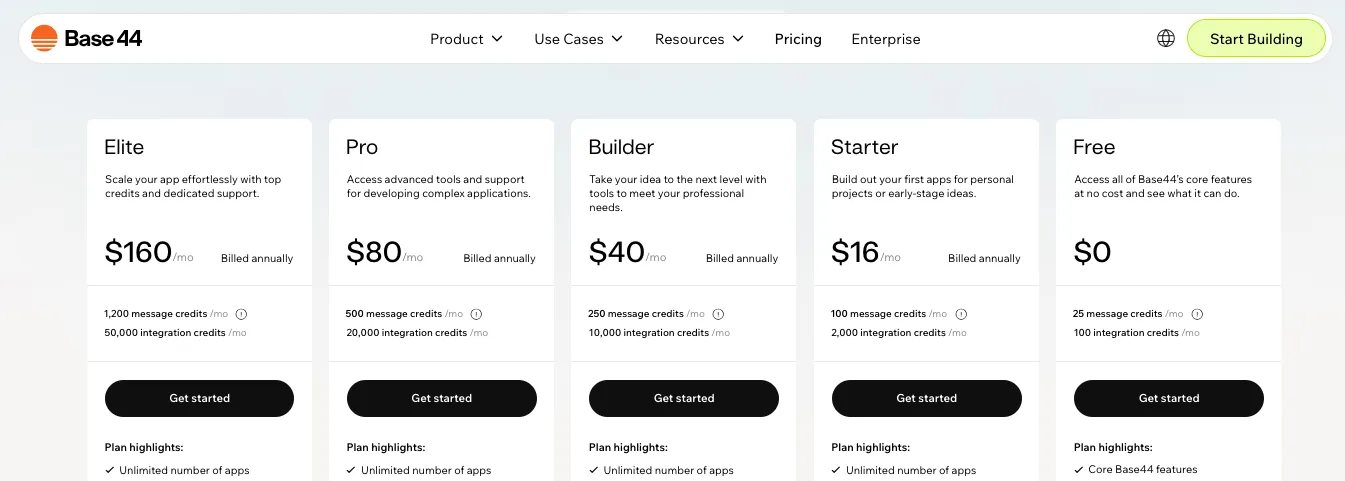
At the time of writing, Base44’s official pricing page shows:
- Free: $0/month with 25 message credits and 100 integration credits
- Starter: $16/month, billed annually, with 100 message credits and 2,000 integration credits
- Builder: $40/month, billed annually, with 250 message credits and 10,000 integration credits
- Pro: listed with 500 message credits and 20,000 integration credits
The pricing page also shows features like unlimited apps, in-app code edits, backend functions, custom domain support, AI model selection, and GitHub integration depending on the plan. source
The important thing is understanding the two-credit system.
Message credits are used when you interact with Base44’s AI while building, fixing, or changing your app. Integration credits are used when your app uses built-in services like sending emails, generating images, uploading files, running LLM calls, or triggering automations. source
This is where Base44 can get expensive in real usage.
A simple text change may use a small amount of credits. A bigger request that touches multiple pages, logic, or app structure can use more. If the AI creates a bug and you need to prompt again to fix it, that also affects your credit usage.
Base44’s docs say unused credits expire at the end of the monthly cycle and do not carry over. source
That is a real limitation.
If you build slowly, you may lose unused credits. If you build aggressively, you may run out before your app feels finished.
A Reddit user shared the same frustration: “The amount of credits I burnt through getting my app to just function – is wild.” source
That’s the pricing risk with Base44. The starting price can look reasonable, but debugging and iteration may cost more than expected.
What I Found Inside v0
v0’s pricing is more developer-style, but also more complex.
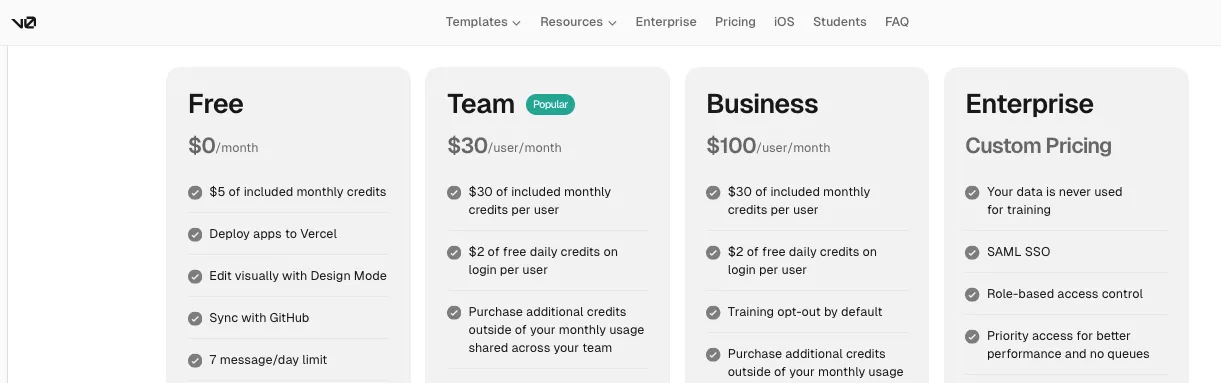
At the time of writing, v0’s official pricing page shows:
- Free: $0/month with $5 included monthly credits
- Team: $30/user/month with $30 included monthly credits per user
- Business: $100/user/month with $30 included monthly credits per user
- Enterprise: custom pricing
v0’s docs also mention a Premium plan at $20/month, but they clearly say Premium is being sunset and is no longer available to new users. source
The big difference is that v0 is usage-based.
Instead of counting “messages” in a simple way, v0 pricing is tied to credits and model usage. Its pricing page shows separate token rates for models like v0 Mini, v0 Pro, and v0 Max. source
That means your real cost depends on what you ask v0 to do.
Small UI edits may be cheap. Larger full-stack generations, repeated fixes, long chats, big context windows, or stronger models may use credits faster.
This is why some users love v0’s flexibility while others feel uncomfortable with the pricing model.
One Reddit user wrote: “Usage-based pricing drained $30 in two days.” source: Reddit
Another user had a more balanced view, saying the billing was clear and they could manually refill tokens to avoid surprise bills. source: Reddit
That seems fair.
v0 gives you more visibility and control if you understand how usage-based tools work. But if you’re used to a flat monthly plan, the credit system can feel unpredictable.
Who Wins This Round?
Base44 wins for simpler pricing.
Its plans are easier to compare, and the credit categories are easier for non-technical users to understand.
v0 wins for technical users who want usage control.
If you understand tokens, model costs, and usage-based billing, v0 may feel more flexible. But it can also become expensive if you keep regenerating large apps or using stronger models.
The gap both leave open: neither tool gives you unlimited AI building. Credits matter. Before paying for either one, start with a small test project and watch how fast your credits disappear.
Base44 vs v0: Who Has Better Integrations and Workflow?
Integrations decide how useful your app becomes after the first version.
A simple app is nice. But most real projects need to connect with tools like email, Slack, Notion, Google Workspace, APIs, databases, payment tools, CRMs, or custom internal systems.
So I compared Base44 and v0 based on how they connect to the rest of your stack.
| Feature |
Base44 |
v0 |
| Built-in integrations |
Yes |
Yes, through app/tool integrations |
| External APIs |
Supported through backend functions and OpenAPI-style integrations |
Supported through code and APIs |
| Database integrations |
Built-in database, plus external options through APIs |
Supabase, Neon, Upstash, Vercel Blob, and more |
| Workflow automation |
Stronger for no-code-style app workflows |
Stronger for developer-led workflows |
| Best for |
Users who want integrations handled inside the builder |
Developers who want stack flexibility |
| Main limitation |
Built-in services use integration credits |
Setup may require technical understanding |
What I Found Inside Base44
Base44 is better if you want integrations without wiring everything by hand.
Its integration documentation explains three levels of integrations:
- App-level integrations
- Workspace-level shared APIs
- Built-in services and connectors
Base44 supports built-in services like SendEmail, UploadFile, ExtractDataFromUploadedFile, GenerateImage, GenerateVideo, GenerateSpeech, Invoke LLM, and automations. It also supports connectors for tools like Notion, Slack, and Google Workspace. source
This is useful for business apps.
For example, you can build an internal request portal that sends email notifications, stores uploaded files, extracts data from documents, and triggers automations when a status changes.
That is exactly the kind of workflow where Base44 feels practical.
The downside is that many of these actions use integration credits.
Base44’s credit docs say sending an email costs 1 integration credit, a custom-domain email costs 2 credits, file upload costs 1 credit, image generation costs 1 credit, video generation costs 5 credits per second, and LLM calls can cost different amounts depending on the model. source
So the workflow is easy, but not free.
If your app sends a lot of emails, runs AI calls, processes files, or uses automations often, integration credits can become part of your real operating cost.
That’s the thing many beginners miss. Base44 is not only charging you while building. Some app actions can also cost credits after the app is live.
What I Found Inside v0
v0 handles integrations in a more developer-friendly way.
Its docs say v0 can connect to databases and build data-driven apps. It supports database integrations like Supabase, Neon, Upstash, and Vercel Blob. source
It also works naturally with external APIs because the output is real code. If your team wants to connect Stripe, Clerk, Resend, Sanity, Firebase, custom APIs, or your own backend, v0 gives you a cleaner path because developers can edit the code directly.
v0’s homepage also highlights GitHub sync, app integrations, APIs, and one-click deployment to Vercel. source
This makes v0 better for technical teams.
Instead of staying inside one all-in-one app builder, you can use v0 as part of your existing development stack. That is helpful if your team already has a preferred database, authentication provider, analytics setup, CMS, or deployment workflow.
But again, this flexibility comes with more responsibility.
With Base44, the platform tries to guide the integration process. With v0, the generated code may get you far, but someone still needs to understand API keys, environment variables, database rules, auth flows, and production errors.
So v0 is more flexible, but Base44 is more guided.
Who Wins This Round?
Base44 wins for no-code integrations and business workflows.
It is better when you want built-in services, app-level automations, email actions, file handling, and AI calls without manually wiring every API yourself.
v0 wins for developer flexibility.
It is better when you already have a technical stack and want AI to help you build inside it.
The gap is simple: Base44 gives you a more packaged workflow. v0 gives you more freedom to build the workflow your way.
Base44 vs v0: Who Has Better AI Features?
AI is the whole reason people use these tools.
But “AI features” can mean very different things. In Base44, AI is mostly used to turn plain English into a working app. In v0, AI is used more like a coding partner that can generate, edit, debug, and improve real web app code.
So I compared both based on how useful the AI actually feels when you’re building.
| Feature |
Base44 |
v0 |
| Prompt-to-app generation |
Yes |
Yes |
| AI planning |
Yes |
Yes |
| AI code generation |
Yes, but more platform-guided |
Yes, stronger and more code-first |
| AI debugging |
Prompt-based fixes |
Stronger code-level debugging help |
| AI model selection |
Available on paid plans |
Uses v0 model tiers like Mini, Pro, and Max |
| AI inside generated apps |
Yes, through Invoke LLM and AI integrations |
Yes, through code and integrations |
| Best for |
Turning ideas into working apps fast |
Building, editing, and refining app code |
| Biggest limitation |
AI fixes can burn credits quickly |
Large prompts and stronger models can burn credits quickly |
What I Found Inside Base44
Base44’s AI feels more beginner-friendly.
You don’t need to explain your app in technical terms. You can describe what you want in plain English, and Base44 tries to plan the app, create the screens, build the database structure, add authentication, and make the app usable.
That is the biggest strength.
For example, you can ask:
“Build a client portal where customers can log in, submit requests, upload files, and track project status.”
Base44 understands this as an app idea, not just a UI request. It tries to create the full workflow around it.
Base44 also supports AI inside the apps you build. Its integration docs mention Invoke LLM, which can generate AI responses using prompts, JSON outputs, file attachments, image analysis, and web search. That means you can build apps that use AI features, not just apps built by AI. source
There is also support for connecting AI services like OpenAI, Claude, Groq, Mistral, or other API-based AI platforms, but Base44 says these AI integrations are available on the Builder tier and above. source
That makes Base44 useful if you want to create things like:
- AI document analyzers
- AI customer support tools
- AI content generators
- AI dashboard assistants
- AI workflow apps
- Internal tools with AI-powered summaries
But there is a catch.
AI actions use credits. And when the AI misunderstands your app or introduces a bug, you may spend more message credits trying to fix the same issue.
That is where Base44 can feel frustrating. It makes the first version easy, but complex fixes may require clearer prompts or technical help.
One Reddit user described Base44 as “best for fast prototyping,” but also said that once app logic gets more complex, you eventually need to know how to code. source
That feels like the right way to look at Base44’s AI.
It is excellent for getting started. It is less perfect when you expect it to behave like a senior engineer on a complicated product.
What I Found Inside v0
v0’s AI feels more developer-aware.
It can still start from a plain English prompt, but the output is closer to real code. v0 describes itself as an AI agent that helps users create real code, full-stack apps, and agents. It can help ship features, refine designs, update copy, create live prototypes, deploy to production, or open pull requests for review. source
This makes v0 stronger when the app needs frontend polish, code changes, or a more technical build process.
You can ask it to:
- Create a SaaS dashboard
- Build a React component
- Generate a pricing page
- Fix layout issues
- Add a form
- Connect to a database
- Improve responsive design
- Refactor code
- Prepare a deployable app
v0 also became more agentic after moving from v0.dev to v0.app. Vercel says v0 can help research, reason, debug, and plan, not just generate UI. source
This is useful if you already understand web development. You can use v0 like an AI coding assistant that works inside a modern app-building workflow.
But v0’s AI has its own downside: cost control.
Its pricing is based on credits and model usage. Stronger models and larger generations can use credits faster. That means asking v0 to repeatedly fix, regenerate, or rebuild large sections of an app can become expensive.
One Vercel community user complained: “I’ve just paid ~$30 for a fairly simple change/prompt.” source
Another user said: “It’s also using up my credits fast today.” source
So v0’s AI is powerful, but you need to use it carefully.
If you know how to ask precise questions, review code, and control model usage, it can save serious time. If you keep prompting blindly, the credit system can hurt.
Who Wins This Round?
Base44 wins for AI app generation.
It is better when you want to describe a full app idea and let the platform create the structure, database, backend, and pages for you.
v0 wins for AI-assisted development.
It is better when you want AI to generate code, improve UI, debug issues, and fit into a developer workflow.
The gap is clear: Base44’s AI is more helpful for beginners. v0’s AI is more useful for developers.
Base44 vs v0: Who Is Better for Team Collaboration?
Building alone is one thing. Building with a team is different.
Once more people are involved, you need things like shared access, roles, permissions, GitHub sync, version control, reviews, and a clean handoff process.
So I compared how Base44 and v0 work when more than one person needs to touch the project.
| Feature |
Base44 |
v0 |
| Team collaboration |
Yes |
Yes |
| App access controls |
Yes |
Yes, stronger on team/business/enterprise plans |
| User roles |
Yes |
Stronger for developer and enterprise teams |
| GitHub workflow |
Available on paid plans |
Stronger and more native |
| Pull request workflow |
Limited |
Yes |
| Best for |
Founder + small team + app users |
Developers, product teams, and startups |
| Enterprise controls |
More limited publicly |
Stronger with SAML SSO, RBAC, and enterprise support |
| Main limitation |
Still platform-first |
More technical setup required |
What I Found Inside Base44
Base44 supports collaboration, but it feels more app-builder focused than engineering-team focused.
Its access management docs say you can control app visibility, invite users, set roles, and manage collaborator access. source
This is helpful when you’re building an internal tool or MVP and want to invite people into the app.
For example, you may want:
- Admins who manage app data
- Team members who use the dashboard
- Clients who access a portal
- Collaborators who help edit the app
- Test users who can preview the product
Base44 also has security rules for entity data, including row-level security and field-level security. In plain words, that means you can control which records and fields different users are allowed to see or change. source
That is useful for apps with different user types.
But Base44’s collaboration still feels more suited to small teams, founders, agencies, and internal builders than full software teams.
If you have a developer joining later, GitHub integration helps. But the main workflow still runs through Base44. Developers can contribute, but Base44 remains the center of the project.
There are also signs that user roles can become confusing for some builders. One Reddit user asked why users could only see each other when made system administrators, while custom roles did not behave as expected. source
That is the kind of issue beginners may run into when an app becomes multi-user.
Base44 gives you collaboration features, but you still need to think carefully about permissions, user roles, and who should access what.
What I Found Inside v0
v0 is stronger for team collaboration, especially if your team is technical.
Its Team plan includes shared chats, collaboration, centralized billing, and shared credits. The Business plan adds training opt-out by default, while Enterprise adds stronger controls like SAML SSO, role-based access control, priority access, and support SLAs. source
That makes v0 a better fit for startups, product teams, frontend teams, and agencies where multiple people need to work on the same codebase.
The GitHub workflow is also a big advantage.
v0 can open pull requests, sync with GitHub, and let developers review changes before they go live. That is much closer to how real software teams already work.
This matters because AI-generated code should not always go straight into production.
A developer can review what v0 created, clean it up, test it, and merge it safely. That workflow is harder to replicate in a pure no-code environment.
v0’s enterprise page also highlights secure infrastructure, access controls, compliance support, and priority support for larger teams. source
That gives v0 a more serious team-ready feel.
But again, there is a tradeoff.
v0 is better for collaboration when the team understands code. If your team is mostly non-technical, Base44 may still feel easier because people can work around the app instead of the codebase.
Who Wins This Round?
v0 wins for technical team collaboration.
Its GitHub workflow, pull request support, shared team plans, and enterprise controls make it better for teams that treat AI-generated output like real software.
Base44 wins for small non-technical teams.
If your team wants to build and use an app without managing a codebase, Base44 is easier to adopt.
The simple difference: Base44 is better for collaborative app building. v0 is better for collaborative software development.
Base44 vs v0: Which One Is Better for Production Apps?
This is where you need to be careful.
A demo is not the same as a production app. A production app needs to be secure, reliable, maintainable, easy to update, and safe for real users.
So I compared Base44 and v0 based on what happens after the first version looks good.
| Feature |
Base44 |
v0 |
| Production readiness |
Good for simple apps and internal tools |
Stronger for developer-led production apps |
| Security controls |
App access, roles, RLS, FLS |
Stronger enterprise security and developer control |
| Code review |
Possible through GitHub, but platform-first |
Stronger through GitHub and pull requests |
| Debugging |
Prompt-based and code edits |
Stronger code-level debugging |
| Scaling control |
More platform-managed |
More Vercel/developer-managed |
| Best production use |
MVPs, portals, dashboards, internal tools |
SaaS apps, frontend-heavy products, production web apps |
| Main risk |
Hidden complexity and platform limits |
Requires technical ownership |
What I Found Inside Base44
Base44 can absolutely help you build useful apps.
For many internal tools, dashboards, customer portals, MVPs, and simple SaaS prototypes, it may be enough to get something live and usable faster than traditional development.
That is the appeal.
A Business Insider test found Base44 beginner-friendly, and one tester said Base44 gave them a “complete, fully functional project” they could use and share with their team. source
That is exactly where Base44 shines.
It is great when you want a working app quickly, especially if the app has clear workflows and does not require deep custom engineering.
But production apps are where you need to slow down.
If your app handles payments, sensitive customer data, complex permissions, business-critical workflows, or high traffic, you should not rely only on prompts. You need to review the structure, permissions, security rules, data model, and failure cases.
Base44 does provide app access controls and entity-level security, which is useful. But because the platform abstracts much of the backend, non-technical users may not always notice when something is architected poorly.
That is the real risk.
Base44 makes software feel easy, but production software still needs careful thinking.
Use it for production only when the app is simple enough, tested enough, and reviewed enough for the risk level.
What I Found Inside v0
v0 is stronger for production apps when developers are involved.
The reason is not just that v0 generates code. It is that the code can be reviewed, edited, synced with GitHub, deployed through Vercel, and managed like a normal web application.
That makes a big difference.
If you are building a serious SaaS product, frontend-heavy dashboard, customer-facing web app, or design-sensitive product, v0 gives your team more control over the final result.
v0’s docs say you can deploy to production immediately or open a pull request for review. source
That review step matters. It lets developers check the generated code before users depend on it.
Vercel also says v0 can go from one prompt to a deployed app with UI, content, backend, and logic included. source
But that does not mean you should blindly ship everything v0 creates.
AI-generated code can still have bugs, weak assumptions, poor state management, messy structure, or security gaps. v0 gives you more control, but someone still needs to use that control properly.
The other issue is pricing and reliability during heavy iteration. If you keep asking v0 to fix problems without understanding the code, you may burn credits quickly and still end up stuck.
So v0 is better for production, but mainly for teams that can review and maintain the code.
Who Wins This Round?
v0 wins for production apps when developers are involved.
It gives you better code access, GitHub workflow, review process, deployment control, and long-term maintainability.
Base44 wins for simpler production-style business apps.
If you are launching an internal dashboard, client portal, admin tool, or MVP where speed matters more than deep infrastructure control, Base44 can be the better path.
The gap both leave open: neither tool removes the need for testing. Before using either for a serious production app, check security, permissions, database structure, mobile responsiveness, edge cases, and maintenance.
Base44 vs v0: Who Has Better Support and Learning Resources?
Support matters more than you think.
When an AI app builder works, it feels amazing. When it breaks, you need docs, tutorials, support tickets, community help, or a developer who can step in.
So I looked at how Base44 and v0 support users when they get stuck.
| Feature |
Base44 |
v0 |
| Official docs |
Yes |
Yes |
| Support tickets |
Yes |
Yes, with stronger enterprise support |
| Community help |
Reddit, community discussions, tutorials |
Vercel Community, docs, Discord/GitHub-style developer channels |
| Beginner learning curve |
Easier |
Harder for non-coders |
| Developer documentation |
Improving |
Stronger |
| Enterprise support |
Higher tiers / custom support |
Stronger enterprise support and SLAs |
| Best for |
Beginners who want guided app building |
Developers who can use docs and technical communities |
What I Found Inside Base44
Base44’s docs are useful and beginner-friendly.
They cover getting started, app setup, backend functions, integrations, credits, data, access control, GitHub, and publishing. For a no-code AI app builder, that is a good sign.
Base44’s documentation also lets users submit a support ticket for personalized help. source
That is useful when you are stuck on something specific.
But user feedback on support is mixed.
Some users like the product and have built real apps with it. Others complain about slow or unresponsive support, especially when the app becomes important to their business.
One Reddit user wrote that they were on the highest-tier plan, but support was “completely unresponsive.” source
That does not mean every user will have the same experience. But it does show one important point: if your app is business-critical, support quality matters.
Base44 is easiest when things are going well. When something breaks, you may still need patience, clear prompts, documentation, or outside developer help.
What I Found Inside v0
v0 has stronger technical documentation.
That makes sense because it sits inside the Vercel ecosystem. Its docs cover app generation, full-stack apps, GitHub sync, deployments, custom domains, databases, security, pricing, and platform API usage.
For developers, this is helpful. They can read the docs, understand the system, and troubleshoot with more control.
v0’s platform docs also mention community support through GitHub Discussions, Discord, and Twitter, while enterprise users can get dedicated support, priority assistance, on-premise deployment options, SLA guarantees, and priority support. source
That makes v0 stronger for serious technical teams.
But beginner support is a different story.
If you are not technical, v0’s docs may explain the answer but still leave you confused. Knowing that something involves GitHub, environment variables, or database setup does not mean you know how to fix it.
So v0’s support ecosystem is stronger for developers than for complete beginners.
Who Wins This Round?
v0 wins for developer documentation and enterprise support.
It has a stronger technical knowledge base, better alignment with Vercel, and more serious enterprise options.
Base44 wins for beginner accessibility.
Its learning path is easier for non-coders because the product itself hides more technical complexity.
The gap is this: Base44 is easier until something technical breaks. v0 is harder upfront, but gives technical users more ways to solve problems.
Base44 vs v0: Which One Should You Choose?
By this point, the answer is pretty clear.
Base44 and v0 are not trying to be the same tool. They both help you build apps with AI, but they are built around different users and different workflows.
Here is the practical decision table.
| Use Case |
Better Choice |
Why |
| Non-technical founder building an MVP |
Base44 |
Faster path from idea to working app |
| React/Next.js developer building UI |
v0 |
Better code access and frontend control |
| Internal business tool |
Base44 |
Backend, auth, database, and hosting are easier |
| SaaS dashboard |
v0 |
Stronger UI and developer workflow |
| Customer portal |
Base44 |
Easier full-app setup |
| Landing page |
v0 |
Better design and frontend output |
| Design system or component library |
v0 |
More code-level control |
| Prototype for investor demo |
Base44 |
Faster to generate a complete working version |
| Production app with engineering team |
v0 |
Better review, GitHub, and deployment workflow |
| Simple no-code app for business use |
Base44 |
Less setup and fewer technical decisions |
Choose Base44 If…
Choose Base44 if you want to build a working app without becoming a developer first.
It is the better choice if you are a founder, product manager, agency owner, operator, freelancer, or small business owner who wants to turn an idea into something usable quickly.
Base44 works well when you need:
- A SaaS MVP
- A customer portal
- An admin dashboard
- An internal tool
- A booking system
- A lightweight CRM
- A project tracker
- A database-backed business app
- A prototype you can show to users
The main reason to choose Base44 is speed.
You do not have to think deeply about the frontend, backend, database, authentication, or hosting in the beginning. That makes it much easier to test ideas.
But choose it with realistic expectations.
Base44 is not the best fit if you need total code ownership, complex architecture, advanced backend logic, or a highly custom production system from day one.
Choose v0 If…
Choose v0 if you want AI to help you build faster while still keeping control over the code.
It is the better choice if you are a developer, frontend engineer, technical founder, designer working with developers, or startup team already using React, Next.js, GitHub, and Vercel.
v0 works well when you need:
- Landing pages
- SaaS dashboards
- React components
- Next.js apps
- Frontend-heavy web apps
- Design systems
- Admin panels
- Polished product screens
- Apps that developers will maintain later
The main reason to choose v0 is control.
You can generate faster, edit code, review changes, sync with GitHub, deploy through Vercel, and keep building like a real software team.
But v0 is not the easiest option for complete beginners.
If you do not understand code, databases, deployment, or GitHub, you may get stuck after the first impressive preview.
Who Wins Overall?
Base44 wins for non-technical users who want a complete AI app builder.
v0 wins for developers who want AI-generated code, polished UI, and more control over the final product.
If I had to simplify it:
Use Base44 when you want the app handled for you.
Use v0 when you want the code handed to you.
That is the real difference.
Build AI Apps Without Platform Limits
Prismetric helps you create custom AI applications with flexible features, secure integrations, scalable backend, and production-ready code.
Start Your Project
My Final Verdict: Base44 vs v0
Base44 and v0 are both useful AI app-building tools, but they are not built for the same person.
Base44 is the better choice if you want to build a working app quickly without dealing with code, backend setup, database connections, authentication, or hosting. It’s best for non-technical founders, MVP builders, internal tools, portals, and simple SaaS prototypes.
v0 is the better choice if you already understand modern web development and want cleaner code, better frontend control, GitHub workflow, and polished React or Next.js output. It’s better for developers, technical founders, and teams building design-heavy web apps.
So the simple answer is this:
Choose Base44 if you want the app handled for you.
Choose v0 if you want the code handed to you.
Base44 is better if you want a complete AI app builder that handles the app, backend, database, authentication, and hosting for you.
v0 is better if you want more control over the code, frontend design, GitHub workflow, and React or Next.js development.
No, v0 is not only a frontend generator anymore.
It can help build full-stack web apps, connect databases, and create deployable projects. But it still works best when a developer or technical founder can review the code and manage the setup.
Yes, Base44 can build backend logic, database structures, user authentication, and app workflows inside its platform.
That’s one of the main reasons non-technical founders choose it over developer-first AI coding tools.
Base44 is easier for beginners because you can describe the app you want in plain English and let the platform handle most of the setup.
v0 is simple to start with, but it becomes more technical when you need to edit code, connect databases, fix errors, or deploy a real app.
v0 is better for developers.
It gives you more control over:
- React and Next.js code
- UI components
- GitHub workflow
- Pull requests
- Vercel deployment
- Custom integrations
Base44 can still be useful for developers, especially for quick prototypes, but v0 fits better into a normal software development workflow.
Yes, you can use Base44 to build a simple SaaS MVP, customer portal, internal tool, dashboard, or database-backed app.
But if your SaaS needs complex architecture, advanced permissions, custom infrastructure, or high scalability, you should involve a developer before treating it as a serious production product.
Yes, v0 can help you build SaaS pages, dashboards, onboarding flows, settings screens, pricing pages, and full-stack app flows.
It is especially useful if your SaaS is built with React, Next.js, Vercel, and modern frontend tools.
Base44 is usually better for non-technical MVP builders because it helps you move from idea to working app faster.
v0 is better for technical founders who want the MVP to start as real code from day one.
v0 gives better code access and ownership.
Base44 has improved with code editing and GitHub support, but it still feels more platform-first. v0 is more code-first and easier to hand over to a developer team.
v0 usually creates better UI, especially for landing pages, SaaS dashboards, React components, and design-heavy web apps.
Base44’s UI is more practical. It works well for internal tools, portals, forms, dashboards, and MVPs where function matters more than pixel-perfect design.
Yes, Base44 is mostly a no-code AI app builder.
You can build apps through prompts and visual editing without writing code. That said, code access and developer features are becoming more important as the platform grows.
Not really.
v0 is easier than coding everything manually, but it’s not a pure no-code app builder. It is better described as an AI coding assistant or AI app generator for people who are comfortable working with code.
It depends on how you build.
Base44 may feel cheaper if it helps you avoid hiring a developer for a simple MVP or internal app. v0 may feel cheaper if you already know how to code and only need AI help for UI, frontend, and faster development.
Always check credit usage, not just the monthly plan price.
Base44 can create some platform dependency because it handles much of the backend, hosting, app structure, and workflow inside its own environment.
That’s convenient for beginners, but it can feel limiting if you later want full infrastructure control.
v0 has less lock-in on the code side because you can work with generated code, GitHub, and Vercel-style deployment.
But if your whole workflow depends on Vercel services, databases, and integrations, you should still think about long-term portability
Yes, and this can actually be a smart workflow.
You can use Base44 to quickly validate the idea and understand the app flow. Then you can use v0 to rebuild or refine the frontend with cleaner code and stronger design control.
Base44 is usually better for internal tools because it handles backend, database, user access, forms, dashboards, and hosting in one place.
v0 is better if the internal tool needs to live inside your existing codebase or connect deeply with your company’s development stack.
v0 is the better choice for landing pages.
It creates stronger frontend layouts, better visual polish, and cleaner React or Next.js code. Base44 can create basic pages, but landing pages are not its biggest strength.
Base44 is the better choice for most non-technical founders.
You can explain what you want to build without knowing how frontend, backend, database, authentication, and deployment work behind the scenes.
Use Base44 if your startup needs to test an idea quickly with a working MVP.
Use v0 if your startup already has a developer or technical founder who wants to build with code, move fast, and keep more control over the final product.
Choose Base44 if you want the fastest path to a working app without managing code.
Choose v0 if you want cleaner frontend code, better design control, and a more developer-friendly AI software development workflow.