Integrating AI with SAP or ERP Systems: Architecture, Use Cases, and Implementation
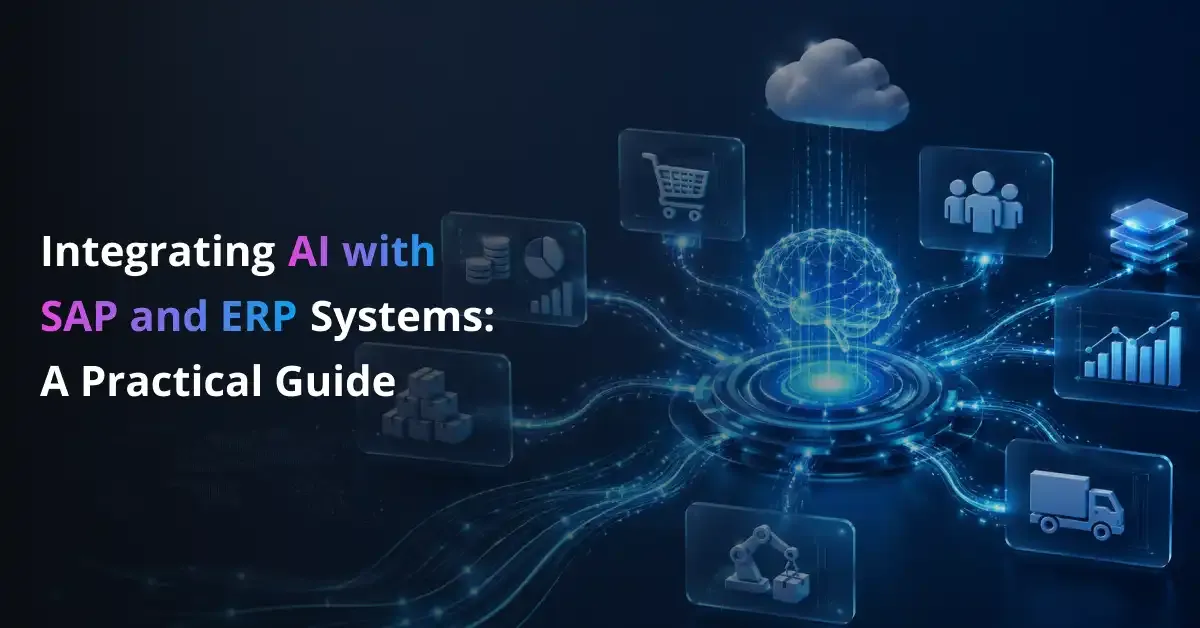
ERP systems store critical information about finance, procurement, inventory, manufacturing, employees, customers, and supply chains.
Yet employees often spend hours searching reports, moving data between applications, reviewing documents, and checking records manually.
These delays make it harder to act when information is incomplete, outdated, or spread across several systems.
AI-ERP integration helps organisations use this operational data more effectively.
AI applications can analyse transactions, automate repeatable workflows, generate recommendations, and predict shortages, delays, or financial risks.
They can also let employees access approved information through natural-language questions.
Under controlled conditions, AI may prepare transactions, route exceptions, or trigger approved ERP workflows.
AI does not replace the ERP platform.
The ERP remains the trusted system of record, while AI supports analysis, prediction, interaction, and workflow execution.
Across SAP and other enterprise resource planning environments, this guide explains integration architecture, connection methods, use cases, implementation, security, governance, costs, and return on investment.
What Does Integrating AI with an ERP System Mean?
Defining AI-ERP Integration
AI-ERP integration connects machine learning models, generative AI applications, assistants, or AI agents with ERP data and business processes.
These connections use native platforms, APIs, middleware, and secure connectors.
Depending on its permissions, the AI system can read authorised records, analyse transactions, and review documents.
It can also create summaries, recommend actions, predict events, and trigger approved workflows.
In some cases, the system may write information back to the ERP.
That write-back should occur only after access controls, validation rules, and approval requirements have been satisfied.
The Three Main AI-ERP Integration Models
Organisations use three integration models.
Embedded or native AI places intelligence directly inside the ERP platform and the user’s workflow.
SAP Business AI and Joule are examples of AI capabilities delivered within SAP applications.
Platform-based integration uses SAP Business Technology Platform or another enterprise platform to build custom applications, assistants, and workflows.
This model gives organisations control over business logic, integration design, data access, and governance.
External AI integration connects third-party models, cloud AI services, or private systems through APIs and middleware.
It supports specialised requirements and multi-ERP environments but creates security, integration, and operational responsibilities.
AI Integration Versus Traditional ERP Automation
AI integration covers more than standard ERP automation.
Rules-based workflows follow predefined conditions, while robotic process automation reproduces user actions across screens.
Predictive machine learning identifies patterns and estimates outcomes.
Generative AI creates or summarises content, while AI agents coordinate tools and workflow steps.
Not every ERP process requires generative AI.
Stable calculations, approvals, and repetitive transactions may work better with rules, standard automation, or conventional machine learning.
Connect AI With Your ERP Without Disrupting Core Operations
Prismetric integrates AI with SAP and other ERP systems using secure APIs, middleware, governed data access, and controlled workflows.
Discuss Your ERP Integration
How AI Integrates with SAP and Other ERP Systems
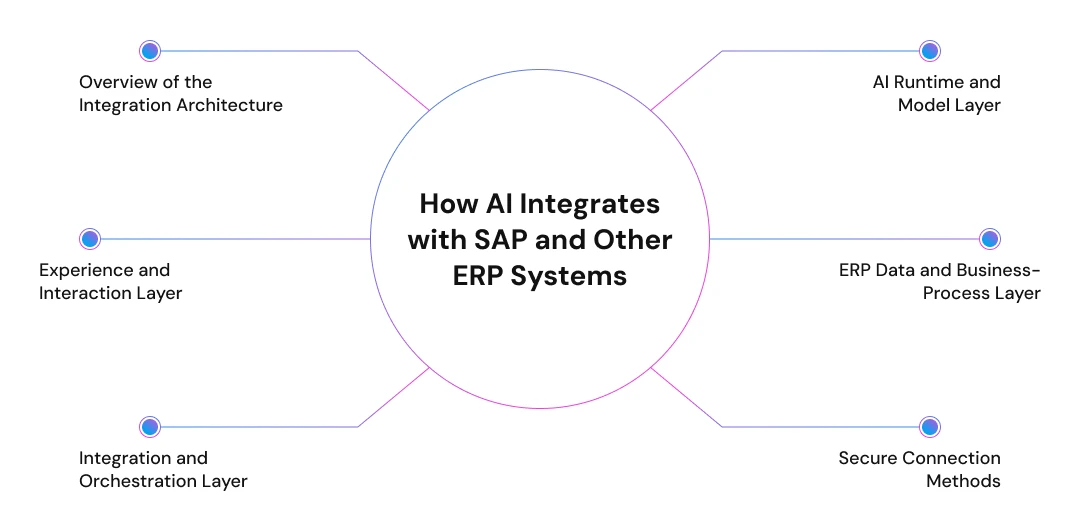
Overview of the Integration Architecture
An AI-ERP solution should use separate layers instead of one direct connection.
A user request or business event enters through an application, assistant, or automated trigger.
It then passes through integration services before reaching an AI model or agent.
Security controls validate access before the system retrieves ERP data or starts a business process.
Monitoring systems record requests, outputs, approvals, actions, errors, and results.
This layered design helps organisations restrict access, replace components, investigate failures, and scale integrations safely.
Experience and Interaction Layer
Employees may interact with AI through SAP Joule, custom chat interfaces, embedded ERP screens, or web applications.
Mobile applications, Microsoft Teams, and Slack can also provide access to approved AI capabilities.
Inventory changes, overdue invoices, equipment alerts, or other business events can start an AI-supported workflow.
Integration and Orchestration Layer
The integration layer controls how information moves between AI applications and ERP systems.
SAP Integration Suite, API management tools, enterprise middleware, and integration platforms can connect applications and route requests.
They can transform data, coordinate multistep workflows, and apply business rules before an ERP action occurs.
Validation checks confirm that requests use the correct format, permissions, and transaction rules.
Retry and error-handling processes manage failed requests without creating duplicate or incomplete transactions.
Middleware prevents AI models from receiving unrestricted access to sensitive ERP systems.
It creates a governed boundary for authentication, authorisation, monitoring, policy enforcement, and exception handling.
AI Runtime and Model Layer
The AI runtime performs analysis, generation, prediction, classification, or task planning.
SAP organisations may use SAP AI Core and the generative AI hub to manage models.
They may also use SAP-managed capabilities, third-party foundation models, or custom machine learning models.
Prompt management controls how generative AI systems interpret requests and produce responses.
Model routing directs each request according to cost, performance, or data requirements.
Output evaluation checks whether a response is accurate, relevant, safe, and suitable for the workflow.
Retrieval-augmented generation adds approved information before the model produces an answer.
This helps responses reflect business context rather than only training data.
ERP Data and Business-Process Layer
The data layer may include SAP S/4HANA, SAP ECC, SAP Business One, or non-SAP platforms.
AI applications can connect with finance, procurement, HR, manufacturing, inventory, sales, and supply chain processes.
Poor master data, excessive permissions, unclear ownership, and inconsistent rules can reduce output quality.
Secure Connection Methods
OData, REST, and SOAP APIs provide structured access to approved data and system functions.
SAP environments may also use RFC, BAPI, IDocs, or event-based connections for requirements.
SAP Cloud Connector can provide controlled access between cloud services and on-premise SAP environments.
APIs are preferable because they support defined permissions, validation, monitoring, and controlled behaviour.
Database views may suit read-only scenarios when approved APIs are unavailable.
Robotic process automation should remain a fallback because screen-based integrations are harder to secure and maintain.
Five Approaches to Integrating AI with SAP or ERP
Organisations can integrate AI with SAP or an ERP system in several ways.
The right approach depends on process complexity, interfaces, governance requirements, and the required level of customisation.
Use Native ERP AI Capabilities
Native ERP AI uses capabilities already delivered within the platform.
In SAP environments, these may include SAP Business AI, Joule, embedded predictions, document-processing features, and SAP-delivered AI agents.
This approach can reduce development effort because the AI works within existing applications, data models, and business processes.
It is often suitable for standard workflows, although customised requirements may exceed the flexibility of delivered features.
Build Custom AI Applications on SAP BTP
SAP-focused organisations can build custom AI applications on SAP Business Technology Platform.
SAP AI Core and the generative AI hub can support model access and management.
Integration Suite, SAP HANA Cloud, Joule Studio, and SAP Business Data Cloud can support integration, development, data access, and governance.
This model is useful when an organisation needs custom functionality without modifying the ERP core.
It can support clean-core principles while giving teams greater control over workflows, permissions, data access, and deployment.
Connect External AI Through APIs and Middleware
External AI can connect to ERP systems through APIs and middleware.
Organisations may use cloud AI platforms, third-party foundation models, private models, custom machine learning systems, or multi-cloud AI services.
This approach provides broader model choice and can support organisations operating multiple ERP platforms.
However, it requires stronger controls for authentication, data movement, model access, monitoring, vendor management, and transaction approval.
Integrate AI with SAP ECC or On-Premise ERP
Older SAP ECC and on-premise ERP systems can support AI integration.
Common options include RFC and BAPI, IDocs, OData where available, SAP Cloud Connector, hybrid integration, and secure middleware.
Restricted database access may also support specific read-only requirements when approved interfaces are unavailable.
This approach allows businesses to introduce AI without replacing the ERP.
Legacy interfaces, custom code, inconsistent data structures, and limited APIs may increase development, testing, and maintenance effort.
Use RPA When Supported Interfaces Are Unavailable
Robotic process automation can interact with ERP screens when supported APIs are unavailable.
A software bot can enter data, retrieve records, or move information by following the same interface steps as a user.
RPA should remain a fallback rather than the preferred integration method.
Screen changes can break the automation, while monitoring and transaction handling may be less reliable.
Maintenance requirements can also increase as workflows become complex.
High-Value AI Use Cases in SAP and ERP Systems
AI use cases create value when they address a defined workflow, use reliable data, and improve a measurable operational outcome.
Organisations should assess each opportunity against business value, implementation effort, data readiness, and risk.
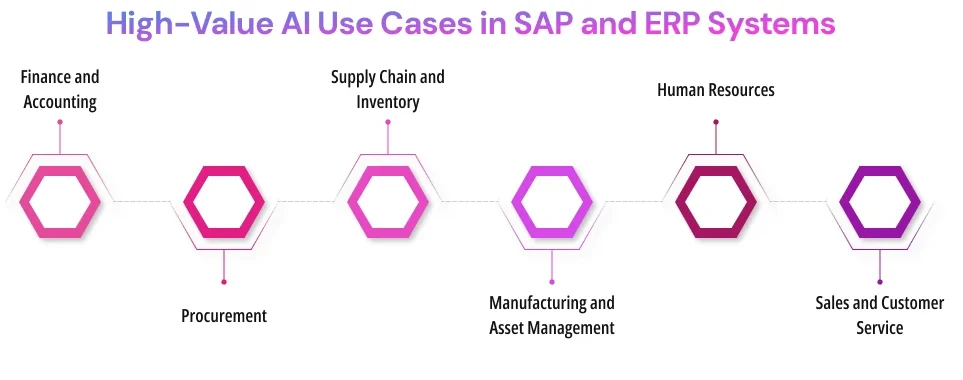
Finance and Accounting
Document-processing models can extract invoice fields and compare them with purchase orders and goods receipts.
This supports three-way matching while directing mismatches to employees for review.
Machine learning can identify possible duplicate payments, unusual transactions, and accounts that require collection attention.
Forecasting models may support cash-flow planning.
Generative AI can prepare accrual explanations and narrative financial reports using approved data.
These applications can reduce manual review and help finance teams identify exceptions earlier.
They can also prepare relevant information for financial decisions.
Final postings and adjustments should remain subject to established approval controls.
Procurement
Procurement teams can use AI to compare suppliers, summarise contracts, classify purchase requisitions, and analyse spending patterns.
Models can also identify supplier risks, recommend sourcing options, and prepare purchase orders using approved requirements.
These capabilities may support faster request handling, better spend visibility, and more consistent supplier evaluation.
Employees should approve purchases, contractual commitments, and supplier changes before the ERP records a transaction.
Supply Chain and Inventory
AI can combine ERP transactions, historical demand, supplier performance, inventory records, and external signals to support supply chain planning.
Forecasting models can predict demand, stockouts, shipment delays, and changing inventory requirements.
The system may recommend safety-stock levels, alternative suppliers, inventory transfers, or revised delivery plans.
Exception-management tools can prioritise disruptions according to customer impact, cost, urgency, and available recovery options.
Useful measures include forecast accuracy, stockout frequency, inventory carrying cost, order fulfilment, and on-time delivery.
Teams should monitor whether recommendations remain reliable as demand patterns and supplier conditions change.
Manufacturing and Asset Management
Manufacturers can apply AI to predictive maintenance, equipment anomaly detection, production scheduling, quality inspection, and work-order prioritisation.
Models may also forecast spare-parts requirements and analyse the causes of unplanned downtime.
Performance depends on accurate maintenance records, sensor readings, production data, quality results, and equipment history.
Suitable measures include downtime, maintenance cost, schedule adherence, defect rates, and mean time between failures.
Human Resources
Human resources teams can use employee-service assistants to retrieve policies, answer questions, and guide workers through approved processes.
AI may also support candidate matching, skills analysis, training recommendations, job-description preparation, document retrieval, and workforce planning.
These applications require strong privacy controls, fair evaluation methods, restricted access, and human review.
Hiring, promotion, compensation, and disciplinary decisions should not rely solely on automated recommendations.
Sales and Customer Service
Sales and service teams can ask natural-language questions about accounts, orders, inventory, invoices, and delivery status.
AI can prepare sales orders, draft quotes, summarise interactions, classify support cases, and route complaints to the correct team.
Models may identify customer risk, recommend products, or prepare personalised communications using approved CRM and ERP information.
Employees should retain control over pricing, contractual commitments, credits, refunds, and sensitive customer decisions.
Measures include response time, case-resolution time, order accuracy, quote turnaround, conversion rates, and customer satisfaction.
A prioritisation matrix can compare use cases by value, difficulty, data readiness, risk, and expected time to value.
A 10-Step Roadmap for AI-ERP Integration
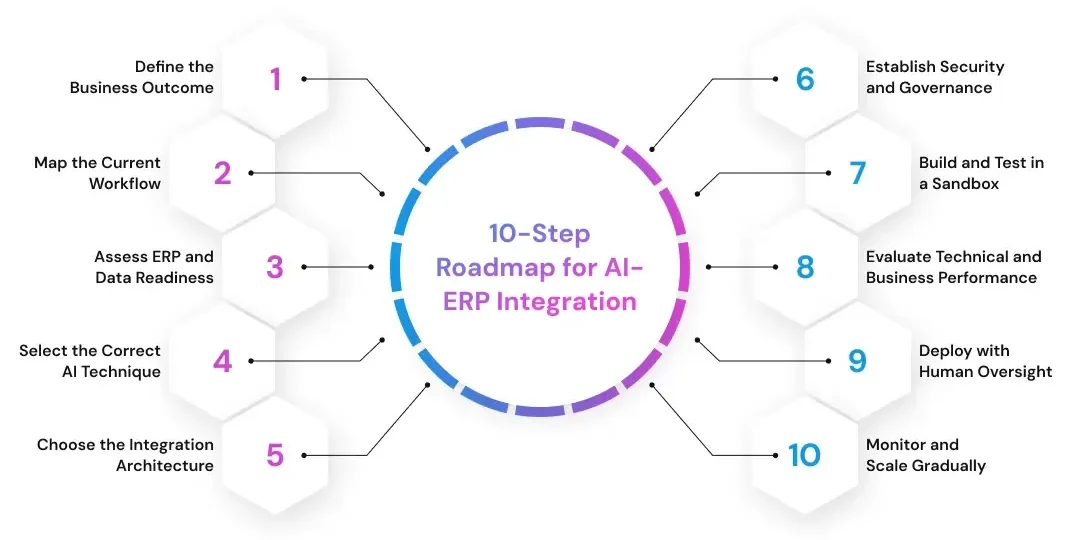
Define the Business Outcome
Start by selecting a measurable operational problem that affects cost, speed, quality, revenue, risk, or customer service.
Examples include reducing invoice-processing time, improving forecast accuracy, lowering inventory shortages, shortening financial close, reducing equipment downtime, or improving service-response time.
Define the current baseline, desired improvement, process owner, and timeframe before choosing any model, platform, or integration technology.
Map the Current Workflow
Document how the process begins, who performs each step, which ERP transactions are involved, and what data fields are required.
Record existing business rules, approval stages, decisions, exceptions, connected applications, and current performance measures.
This workflow map helps the project team identify where AI can add value and where deterministic automation may be more reliable.
Assess ERP and Data Readiness
Review API availability, master-data quality, historical data, missing information, duplicate records, data ownership, ERP customisations, and existing integrations.
The assessment should also cover security restrictions, retention requirements, access controls, and the availability of test environments.
Poor data quality can reduce model accuracy, create inconsistent recommendations, and increase the amount of manual review required.
Select the Correct AI Technique
Match the problem with the simplest technology capable of producing a reliable result.
Rules-based automation suits fixed logic, while machine learning supports pattern recognition and forecasting.
Document AI handles extraction, generative AI creates or summarises content, retrieval-augmented generation adds approved context, and AI agents coordinate tools and steps.
Do not use a large language model for deterministic calculations or fixed business rules that standard software can execute more consistently.
Choose the Integration Architecture
Decide whether the solution should use native ERP AI, SAP BTP, an external AI platform, or a hybrid architecture.
Choose between request-response and event-driven integration, then define whether the system requires read-only access or controlled write permissions.
Consider system complexity, data sensitivity, required customisation, scalability, latency, maintenance responsibility, and vendor dependency.
Establish Security and Governance
Define user roles, data classifications, model access, permitted tools, authorised transactions, approval thresholds, audit requirements, and escalation paths.
Assign ownership for the model, data, integration, and business process.
Governance should also specify retention rules, monitoring responsibilities, exception handling, and acceptable levels of automation.
Complete this work before the AI system receives access to production data or transaction capabilities.
Build and Test in a Sandbox
Develop the integration in a test ERP environment using synthetic, masked, or approved non-production data.
Use restricted credentials, controlled APIs, version management, and separate development, testing, and production systems.
This prevents experiments from creating financial postings, inventory movements, employee changes, or customer records in production.
The sandbox should represent real workflows and expose integration errors and unusual process conditions.
Evaluate Technical and Business Performance
Measure model accuracy, hallucination rate, incorrect tool selection, duplicate actions, response time, failure rate, and cost per transaction.
Track user adoption, process-cycle time, exception volume, and improvement against the business KPI.
Testing should include normal cases, unusual scenarios, incomplete data, conflicting instructions, and deliberate attempts to make the system behave incorrectly.
Evaluation should determine whether the workflow is ready for production, requires controls, or should remain manual.
Deploy with Human Oversight
Introduce confidence thresholds, approval queues, transaction limits, exception handling, rollback procedures, kill switches, escalation workflows, and audit logs.
Low-risk activities, such as preparing summaries or classifying documents, may run automatically.
Financial postings, employment decisions, supplier commitments, compliance actions, and irreversible transactions may require human approval.
Employees should understand what the system can do, when to review its output, and how to report problems.
Monitor and Scale Gradually
Monitor integration failures, model quality, data drift, process performance, security events, usage costs, employee adoption, and compliance issues.
Compare production results with the baseline and investigate changes in accuracy, cost, or user behaviour.
After proving value in one workflow, expand into connected processes such as procure-to-pay, order-to-cash, record-to-report, or plan-to-produce.
Gradual scaling makes it easier to reuse controls, improve governance, and avoid spreading unresolved problems across the ERP environment.
Validate Your AI-ERP Use Case Before Full Investment
Build a focused proof of concept to test data readiness, integration feasibility, model performance, security controls, and business value.
Start Your AI PoC
Security and Governance Requirements
Apply Least-Privilege Access
Begin with read-only access.
Limit permissions by user role, business unit, data field, transaction type, geographic region, and process stage.
A system that retrieves invoice details should not automatically receive permission to approve payments or change supplier records.
Separating information access from transaction execution reduces the impact of errors, misuse, or compromised credentials.
Protect the ERP Through Controlled Integration
AI models should not connect directly to production ERP systems.
Middleware and API gateways can enforce authentication, authorisation, rate limits, network restrictions, input validation, and output validation.
Secrets-management tools should protect credentials, tokens, and connection details instead of exposing them inside prompts or application code.
This controlled integration layer also gives security teams a central place to monitor access and block unsafe requests.
Address AI-Specific Risks
Security testing must evaluate both the software integration and the behaviour of the AI model.
Prompt injection may manipulate an assistant into ignoring instructions or using tools in an unintended way.
Other risks include sensitive-data exposure, hallucinated information, unauthorised tool calls, excessive agent permissions, incorrect transactions, model drift, and biased recommendations.
Poisoned documents may influence retrieval-augmented generation, while weak access controls can expose information across departments.
Teams should test adversarial prompts, manipulated documents, invalid requests, permission boundaries, and failure scenarios before deployment.
Maintain Complete Auditability
Record the user identity, request, retrieved data, model and version, generated output, approval, ERP transaction, and final result.
Logs should also capture failures, blocked actions, policy violations, retries, and rollback activity.
Complete records help teams investigate errors, evaluate performance, and demonstrate that required controls were followed.
Define Human Approval Points
Classify every AI-supported action according to its operational, financial, regulatory, and reputational risk.
Low-risk actions may run, while medium-risk actions may enter a review queue.
High-impact actions should require approval from an authorised employee before the ERP executes them.
Human oversight is particularly relevant for financial postings, employee decisions, supplier commitments, regulated records, and irreversible transactions.
How to Calculate AI-ERP Integration ROI
ROI analysis should compare measurable operational benefits with the full cost of building, deploying, and maintaining the integration.
Measure the Baseline
Collect data on labour hours, processing time, error rates, rework, downtime, service levels, delayed payments, and inventory carrying costs.
Include working-capital effects when the workflow influences receivables, payables, stock levels, or cash availability.
The baseline should reflect performance before AI is introduced.
Without this reference point, teams cannot determine whether the solution improved the process or simply changed how work is performed.
Calculate Potential Financial Value
Estimate annual value using verified workflow data rather than industry assumptions.
Annual benefit equals labour savings, avoided errors, reduced downtime, working-capital improvement, and incremental revenue attributable to the use case.
Calculate ROI using this formula:
ROI = (annual benefit − annual operating cost) ÷ total investment × 100
Separate measurable savings from benefits such as faster analysis, better employee experience, or improved decision consistency.
Include the Full Implementation Cost
Include integration development, ERP licences, API usage, cloud infrastructure, model consumption, data preparation, security controls, and testing.
Also account for monitoring, employee training, change management, support, model updates, and maintenance.
Compare the expected value, risk, and implementation effort across several use cases before selecting the first project.
This helps the organisation prioritise opportunities with benefits, manageable complexity, and measurable outcomes.
Common AI-ERP Integration Mistakes
Many AI-ERP projects fail because teams choose a model before defining the operational problem, required outcome, process owner, and success measure.
Connecting AI directly to production systems or granting write access too early can expose sensitive data and create incorrect transactions.
Poor master data can weaken recommendations, while generative AI may add unnecessary risk when fixed rules or standard automation would be more reliable.
Teams also make mistakes when they ignore workflow exceptions, test only ideal scenarios, or overlook prompt injection and tool-security risks.
Point-to-point integrations may work for one pilot but become difficult to govern, monitor, and scale across departments.
Usage metrics such as prompt volume or active users do not prove business value without improvements in cost, speed, accuracy, or service quality.
Projects may also struggle when organisations underestimate employee training, role changes, and adoption requirements.
Trying to automate an entire department in the first project increases complexity and makes failures harder to isolate.
Successful implementation depends on workflow design, data quality, integration architecture, security, and governance—not only model performance across the full implementation lifecycle in practice.
Native SAP AI vs Custom and Third-Party AI
The best approach depends on existing systems, process requirements, governance expectations, integration priorities, and long-term technology strategy.
| Criterion |
Native SAP AI |
Custom AI on SAP BTP |
Third-party or Hybrid AI |
| Deployment speed |
Faster when SAP provides the capability |
Moderate because custom development is required |
Varies by platform and integration scope |
| SAP business context |
Strong |
Strong when SAP data and services are configured correctly |
Must be added through integration |
| Customisation |
Limited to delivered options |
High |
High |
| Model choice |
SAP-supported options |
Broad through SAP AI services |
Usually broadest |
| Integration effort |
Lower for standard workflows |
Moderate |
Moderate to high |
| Governance |
SAP-aligned controls |
Enterprise control |
Depends on the architecture |
| Multi-ERP support |
Limited |
Moderate |
Strong |
| Legacy compatibility |
Product-dependent |
Strong with integration services |
Connector-dependent |
| Maintenance |
Mainly vendor-managed |
Shared responsibility |
Customer-provider responsibility |
| Vendor dependency |
Higher |
Moderate |
Varies |
Choose native AI for standard SAP processes with available functionality and faster deployment.
Choose SAP BTP for customised, SAP-centred applications requiring stronger control and governance.
Choose third-party or hybrid architecture for multi-platform environments, existing cloud investments, or specialised AI requirements.
The Future of AI-Powered ERP
AI-powered ERP systems will increasingly use agents to complete multistep workflows, respond to business events, and coordinate tasks across finance, procurement, supply chain, HR, and operations.
Natural-language interfaces will make ERP data easier to access, while domain-specific models can support specialised processes using business context.
Continuous evaluation will help organisations monitor model quality, data, integration performance, and outcomes.
Greater autonomy will still require restricted tool access, risk-based human approval, audit trails, security controls, and governance.
The objective is not to replace ERP systems with AI, but to make processes more predictive, accessible, and responsive while preserving control and data integrity.
Turn ERP Data Into Faster, Smarter Business Decisions
Prismetric builds predictive models, RAG systems, enterprise copilots, and AI agents for finance, procurement, inventory, manufacturing, and customer operations.
Talk to Our AI Experts
How Prismetric Can Help You Integrate AI with SAP or ERP Systems
Prismetric can help you identify where AI can create practical value within your ERP workflows. The process begins with understanding the business problem, users, available data, system limitations, and measurable project goals rather than selecting an AI model first.
Based on these requirements, the team can design an integration architecture connecting AI applications with ERP platforms, databases, APIs, cloud services, and internal tools. Depending on the use case, the solution may include machine learning models, generative AI, RAG systems, enterprise copilots, or AI agents.
Prismetric also combines AI development with backend engineering, application development, AI implementation, cloud deployment, security controls, and system integration. This approach helps move the project beyond an isolated AI demonstration and into a solution that can operate within existing business workflows.
Businesses can begin with a focused proof of concept or MVP before expanding into larger ERP processes. Prismetric supports planning, development, integration, testing, deployment, monitoring, and post-launch optimisation as the solution moves towards production.
Prismetric can support your AI-ERP initiative through:
- AI use-case discovery and readiness assessment.
- ERP data, API, and workflow analysis.
- AI integration architecture and model selection.
- Generative AI, RAG, copilot, and AI agent development.
- Predictive analytics and custom machine learning solutions.
- API, database, cloud, CRM, and ERP integration.
- Access controls, output testing, logging, and monitoring.
- Proof-of-concept and AI MVP development.
- Production deployment and ongoing optimisation.
Whether your organisation wants to automate document processing, improve forecasting, build an employee assistant, or introduce AI-supported ERP workflows, Prismetric can help plan and develop a solution around your existing systems, data requirements, and operational controls.
Frequently Asked Questions About Integrating AI with SAP or ERP Systems
AI can connect with SAP through embedded capabilities, SAP BTP, APIs, middleware, event services, and secure connections to on-premise systems.
The selected method should match the workflow, data sensitivity, SAP environment, and level of customisation required.
A custom application can use OpenAI models and tools to call approved SAP APIs or integration services.
ChatGPT should not receive unrestricted ERP access.
The integration should include:
- Authentication and role controls.
- Middleware or an API gateway.
- Input and output validation.
- Logging and approval rules.
OpenAI’s API supports tools for calling external functions, while SAP interfaces provide controlled access to business data and processes.
Yes, organisations can integrate AI with SAP ECC without immediately replacing the system.
Possible connection methods include RFC, BAPI, IDocs, HTTP services, middleware, and controlled database access.
SAP Cloud Connector can also link SAP BTP applications with approved on-premise resources without exposing the entire internal landscape.
No, an S/4HANA migration is not always required before beginning an AI project.
SAP ECC and other on-premise systems can support hybrid integrations through available interfaces and SAP Cloud Connector.
However, older customisations, inconsistent data, and limited APIs may increase implementation effort.
SAP BTP provides services for building applications, connecting systems, managing data, and operating AI capabilities.
Relevant components may include:
- SAP AI Core.
- Generative AI hub.
- SAP Integration Suite.
- SAP HANA Cloud.
- Joule Studio.
The generative AI hub operates within SAP AI Core and supports governed access to available generative AI models.
Joule is SAP’s AI experience for conversational access, contextual guidance, insights, and supported tasks across SAP applications.
A custom assistant is designed around organisation-specific data, interfaces, approval rules, and workflows.
Joule may suit supported SAP processes, while a custom assistant may be required for specialised or multi-system requirements.
The available interface depends on the SAP product, version, and business process.
Common options include:
- OData APIs for structured, synchronous access.
- SOAP APIs for message-based integration.
- BAPIs and RFC for ABAP-based systems.
- IDocs for asynchronous data exchange.
- Events for event-driven workflows.
SAP provides OData and SOAP interfaces for many S/4HANA processes, while BAPIs expose SAP business functions to external applications.
Begin with read-only access whenever possible.
Write access should be introduced only when the workflow has validation rules, transaction limits, audit logs, rollback procedures, and appropriate approvals.
High-impact financial, HR, supplier, or compliance actions should normally require human review.
AI-ERP integration can be designed securely, but no architecture removes every risk.
Organisations should apply:
- Least-privilege access.
- Encryption.
- Data masking.
- Secrets management.
- Prompt-injection testing.
- Output validation.
- Continuous monitoring.
SAP Cloud Connector uses controlled exposure and encrypted communication between SAP BTP and on-premise environments.
Choose a high-volume workflow with accessible data, clear ownership, measurable performance, and manageable risk.
Good starting points may include invoice extraction, support-case classification, document summarisation, demand forecasting, or employee knowledge retrieval.
Avoid automating irreversible decisions during the first project.
Yes, middleware can provide a common integration layer across SAP and non-SAP ERP platforms.
The AI application can use separate connectors and permissions for each system.
A shared data model may also be needed to reconcile differences in customers, suppliers, products, transactions, and business rules.
RPA follows predefined steps through applications or ERP screens.
An AI agent can interpret context, select approved tools, and coordinate several workflow steps.
RPA may suit stable interfaces, while agents support more variable tasks.
Both still require access controls, exception handling, monitoring, and human approval where risk is high.
Cost depends on the number of systems, data quality, interfaces, security requirements, model usage, and workflow complexity.
The estimate should include:
- Architecture and development.
- ERP and API access.
- Cloud and model consumption.
- Data preparation and testing.
- Security, monitoring, and maintenance.
A focused proof of concept can help validate feasibility before a larger investment.
Measure the operational outcome rather than only prompts, users, or generated responses.
Useful measures include:
- Process-cycle time.
- Error and exception rates.
- Forecast accuracy.
- Downtime.
- Cost per transaction.
- Employee adoption.
- Financial return.
Results should be compared with a verified baseline established before deployment.