MCP vs RAG: Explained with Key Differences
Key Takeaways
- RAG improves LLM accuracy by retrieving static content, while MCP enables real-time actions through live tools and data connections.
- RAG fits use cases like document Q&A, help bots, and knowledge assistants. MCP suits CRMs, analytics, and apps needing live access.
- RAG works with PDFs, wikis, and manuals and offers quick setup, but requires re-indexing to reflect content updates.
- MCP connects AI to APIs, databases, and platforms, enabling dynamic outputs, secure access control, and live task execution.
- Prismetric delivers full RAG and MCP integration to build secure, real-world AI workflows for businesses.
Large language models (LLMs) have come a long way. They no longer just answer questions. They power chatbots, drive workflows, make decisions, and even automate business operations. But for these AI systems to perform well in the real world, they need more than just a strong model. They need context.
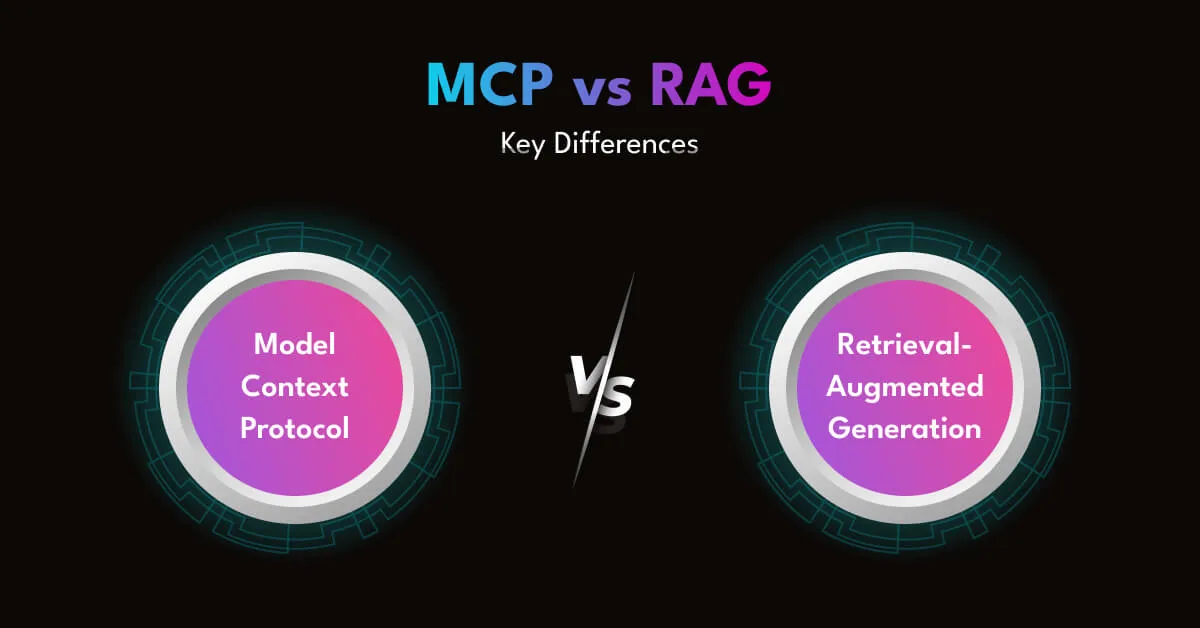
That’s where two powerful approaches come in: Retrieval-Augmented Generation (RAG) and Model Context Protocol (MCP).
Think of RAG as a librarian. It finds relevant information from a knowledge base and feeds it to the LLM in real time. RAG adoption has accelerated rapidly, with vector databases supporting RAG applications growing 377% year-over-year, showing how quickly teams are embracing context-rich AI systems. It’s perfect when your AI needs accurate answers from a large pool of documents.
Now, think of MCP as a multitool. Instead of just reading from a book, it lets the LLM act. It can call APIs, access tools, pull live data, or trigger workflows. It turns your model from a reader into a doer.
Both are game-changers. But they solve very different problems.
In this article, we’ll unpack how RAG and MCP work, when to use each, and what to consider when combining them. You’ll walk away with a clear, practical framework to help you choose the right architecture for your AI projects. 
What is Model Context Protocol (MCP)?
Model Context Protocol, or MCP, is a powerful way to make large language models smarter and more useful in real time. Instead of feeding the model static documents or pre-embedded knowledge, MCP connects the model directly to live data and tools. Think of it as giving your AI the ability to ask questions, fetch answers, and take actions on demand.
How It Works
MCP allows LLMs to securely interact with external systems through a structured protocol. It is made up of three key components:
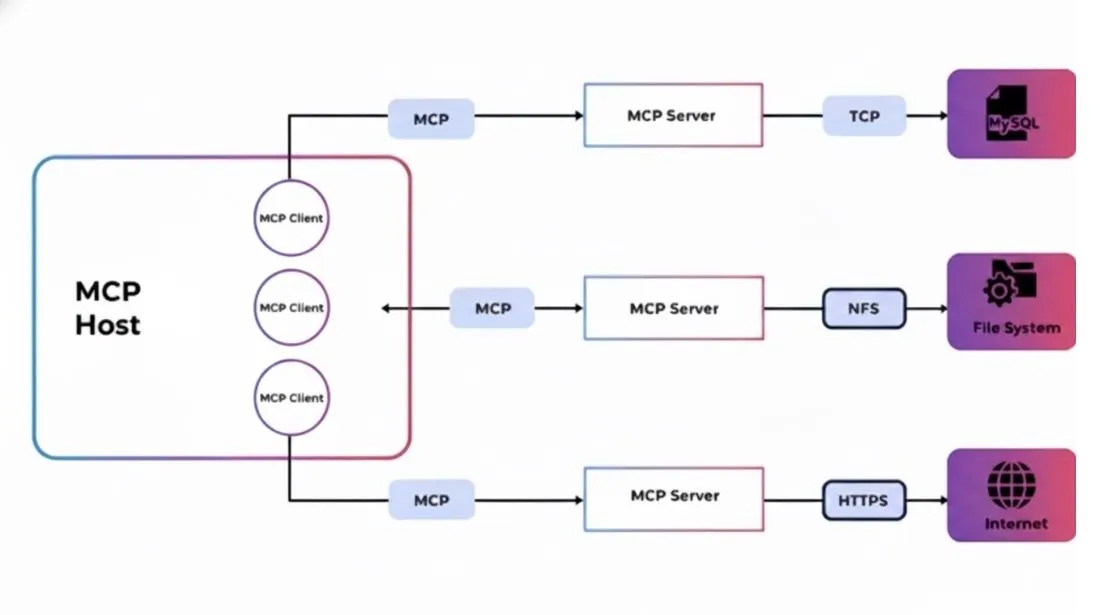
- MCP Client
Lives inside your AI-powered application. It handles user requests and forwards them to the MCP server.
- MCP Server
Hosts the tools and interfaces your model needs to use. This includes APIs, databases, internal platforms, or cloud services.
- Tools
Each tool connects to a specific resource or function. It could fetch live data, submit a form, or perform a task like sending a message or processing a payment.
Together, these parts enable an AI system to perform actions in real time, without relying on pre-indexed data or vector searches.
Real-World Example
Picture a healthcare platform that offers an AI assistant to doctors. A physician asks the assistant, “Show me the patient’s latest bloodwork and schedule a follow-up if any values are abnormal.”
Instead of pulling static information, the assistant uses MCP to:
- Query the electronic health record (EHR) system for the patient’s lab results.
- Analyze the values in real time.
- If needed, access the clinic’s scheduling API to book a follow-up appointment.
All of this happens dynamically, with zero hardcoding or manual steps.
This is what makes MCP so powerful. The AI doesn’t just provide an answer, it completes the task using live, secure data.
Why MCP Matters
MCP is essential when:
- Data is sensitive or private
Such as financial records, patient information, or user identities.
- Information changes frequently
Like order statuses, sensor readings, or business metrics.
- Context is user-specific
The model needs to know your details, not just general knowledge.
In these cases, traditional retrieval systems fall short. MCP shines because it fetches exactly what’s needed at the moment it’s needed, with strict control over access and permissions.
Built for the Real World
Platforms like TrueFoundry use MCP to offer secure, enterprise-ready integrations. Their setup includes:
- MCP Server to define tool schemas and capabilities.
- MCP Gateway for authentication, permissions, and secure tool access.
- AI Gateway that helps LLMs invoke tools using familiar APIs.
This design supports real-time interaction, granular access control, and full audit trails without exposing or storing sensitive data.
What Makes MCP Different
RAG retrieves information. MCP takes action.
With MCP, your AI can:
- Query live systems.
- Trigger workflows.
- Deliver personalized, current responses based on real-time inputs.
That makes it ideal for applications where accuracy, security, and timeliness are non-negotiable.
What is Retrieval-Augmented Generation (RAG)?
Retrieval-Augmented Generation, or RAG, is a method that helps large language models give better answers by connecting them to external knowledge sources. Instead of relying only on what the model learned during training, RAG gives it access to fresh, relevant information from a connected database or document set.
Think of RAG as your AI’s memory booster. When a user asks a question, the model doesn’t just guess. It searches a knowledge base first, pulls up the most relevant content, and then uses that to generate a more accurate, grounded response.
How It Works
RAG combines two key parts:
- Retrieval
The system uses an embedding model to turn documents into numerical vectors. When a user sends a prompt, the system converts that into a query vector and searches a vector database to find the closest matches.
- Generation
The retrieved content is sent to the language model as added context. The model then uses this information to craft a high-quality answer that’s more accurate and specific.
This allows the AI to “read before responding” giving it context it wouldn’t otherwise know.
Real-World Example
Let’s say your company offers a support chatbot trained on your internal help docs. A customer asks, “How can I migrate my account from one workspace to another?”
The model by itself might not have that specific information. But with RAG, it retrieves the exact migration guide from your documentation, adds that to the prompt, and responds with step-by-step instructions based on the latest policy.
This way, your chatbot provides helpful, accurate answers without needing to retrain the model every time your policies change.
Why RAG Matters
RAG is ideal when:
- You have a lot of unstructured content
Like articles, PDFs, wikis, manuals, or internal notes.
- Information changes frequently
But retraining the model is too expensive or time-consuming.
- Accuracy is key
Because hallucinations can damage trust, especially in finance, healthcare, or customer support.
RAG keeps your AI flexible. It works with whatever information you provide and can scale as your knowledge base grows.
Built for Knowledge-Driven Applications
RAG works especially well for:
- Customer support bots
That needs to pull up relevant help docs in real time.
- Enterprise search assistants
That must navigate large sets of internal documents.
- Internal tools
Where employees query policies, reports, or training content.
It’s fast, effective, and relatively easy to deploy using existing vector databases and open-source frameworks.
Also Read:
Top 10 RAG Development Companies in USA
RAG vs MCP: Key Differences
Both RAG and MCP make large language models smarter by giving them external context. But they work in very different ways.
RAG is designed to fetch information from static, unstructured content like documents, PDFs, or knowledge bases. It helps the model read before it responds.
MCP, on the other hand, connects the model to live, structured data like APIs, databases, and internal tools. It helps the model act in real time.
Choosing between the two depends on what kind of data your model needs, how fresh that data must be, and what your application is trying to do.
Here are the core differences between RAG and MCP:
| Feature |
RAG |
MCP |
| Best For |
Knowledge assistants, document Q&A, chatbots |
CRM lookups, analytics bots, operations assistants |
| Data Format |
Unstructured content (PDFs, docs, internal wikis) |
Structured data (APIs, databases, cloud tools) |
| Response Accuracy |
Based on how relevant retrieved text is |
Based on live, authoritative system data |
| Freshness of Data |
Fixed until re-indexed |
Real-time, fetched on demand |
| Security Model |
Data stored in vector DBs (may be encrypted) |
No storage; runtime access with OAuth2, RBAC, and scoped permissions |
| Setup Requirements |
Requires chunking, embedding, and vector indexing |
Requires defining tool interfaces and handling secure access |
| Latency |
Low (pre-indexed content enables fast lookup) |
Medium (depends on API or system response times) |
| Control Over Output |
Indirect; depends on quality of source content |
High; tools return structured, deterministic responses |
| Risk of Hallucination |
Moderate, especially with poor retrieval matches |
Lower; data comes from exact sources |
| Data Governance |
Harder to enforce granular control per user |
Built-in with authentication layers and access policies |
| Tool Invocation |
Not supported |
Core feature; AI can trigger specific tools |
| Adaptability to Change |
Requires reprocessing to reflect updates |
Instant access to most recent data |
RAG brings context to the model by retrieving information. MCP brings the model to the context by connecting it to tools and systems.
You can think of RAG as your AI’s research assistant. It looks up relevant facts and passes them along.
MCP is more like a digital operator. It interacts with live systems, fetches real-time data, and even triggers actions when needed.
Ready to Build AI That Works Smarter? Prismetric Integrates RAG and MCP for You
Most businesses today know they need AI. But knowing how to use it effectively, especially with technologies like RAG and MCP, is where things get tricky.
That’s where Prismetric steps in. We help you move beyond experimentation and into real-world AI success using a mix of Retrieval-Augmented Generation (RAG), Model Context Protocol (MCP), and other advanced solutions that make your AI actually useful.
Whether you’re building a smart assistant, an intelligent dashboard, or an automation engine that connects to live systems, we have the tools, the team, and the expertise to make it happen.
RAG as a Service Powered by Prismetric
Our RAG as a Service solution gives your AI access to the right knowledge at the right time. You bring the content. We take care of the complexity.
- Connect your documents, manuals, wikis, PDFs, or support content
- We handle chunking, embedding, and indexing using vector databases like Pinecone, Weaviate, or FAISS
- Your LLMs gain real-time retrieval capabilities with high accuracy and low latency
- No need for constant retraining when your content updates
We also provide analytics and monitoring to help you track usage and improve performance over time.
Live System Access with MCP-Based Integration
When your AI needs to do more than just fetch facts, we help you integrate Model Context Protocol (MCP) into your systems.
- Connect your AI to live APIs, internal tools, databases, or SaaS platforms
- Enable secure, real-time tool access for actions like lookups, submissions, or automation triggers
- Set up secure protocols using OAuth2, RBAC, scoped permissions, and enterprise identity tools like Okta or Azure AD
This setup is ideal for real-time operations, CRM tools, data dashboards, and any use case where timing and personalization matter.
AI Services That Connect the Dots
Our capabilities go beyond RAG and MCP. We offer a full suite of AI services to complete your intelligent ecosystem:
- LLM Strategy and Consulting
Guidance on choosing the right models and designing scalable architectures for your use case.
- Custom AI Development
End-to-end AI solutions tailored for industries like healthcare, retail, logistics, and finance.
- Chatbot and Virtual Agent Design
AI assistants that go beyond answering questions. They retrieve, act, and evolve with your business.
- Multilingual and Cross-Platform AI
Deploy your AI across languages, channels, and platforms including Slack, WhatsApp, and web apps.
- AI Monitoring and Observability
Tools to track prompt performance, cost efficiency, latency, and user engagement in real time.
Let’s Bring It All Together
Imagine this:
A support chatbot retrieves product information using RAG, pulls live customer data using MCP, and creates a personalized support ticket. All in one seamless, intelligent conversation.
RAG (Retrieval-Augmented Generation) and MCP (Model Context Protocol) both enhance large language models by giving them external context, but they do it in very different ways.
RAG retrieves unstructured information from a document database. It’s ideal for answering questions based on static knowledge, like help center articles or internal wikis. The model uses this information to generate more accurate and grounded responses.
MCP, on the other hand, allows the model to connect with structured data and tools in real time. It enables the AI to perform actions like querying a live database, calling an API, or submitting a form based on the user’s input.
In short:
RAG helps the model retrieve information.
MCP helps the model act on live data or systems.
Use Retrieval-Augmented Generation (RAG) when your AI needs to reference a large volume of static or semi-static content. This includes FAQs, policy documents, technical guides, and other text-heavy resources.
RAG is a great fit when:
- The data doesn’t change frequently
- You want quick and accurate answers from internal content
- You need to scale across multiple content types and languages
- Fine-tuning the model is too costly or unnecessary
Avoid RAG when your application needs real-time or transactional data. In those cases, MCP is the better choice.
Yes, and in many cases, combining RAG and MCP delivers the best results.
RAG provides contextual understanding by retrieving relevant information from a knowledge base. MCP enables real-time interaction by connecting to live systems like CRMs, databases, or APIs.
For example, an AI assistant could:
- Use RAG to pull the latest product documentation
- Use MCP to check a customer’s account details
- Combine both to deliver a personalized, context-aware response
This hybrid setup allows your AI to be both informative and interactive perfect for enterprise use cases like support automation, analytics assistants, or intelligent internal tools.
RAG improves accuracy by giving large language models access to up-to-date, relevant content at the time of the query.
Instead of relying only on what the model learned during training, RAG allows it to retrieve external documents that match the user’s question. These documents are then used as context in the prompt, which helps the model generate more informed and reliable responses.
This reduces hallucinations, increases factual correctness, and allows the AI to respond based on the latest knowledge without needing to retrain the model every time your content changes.
It’s especially effective in support bots, knowledge assistants, and internal tools that rely on consistent and trusted information.
Model Context Protocol (MCP) is ideal for enterprise use cases that require live, structured, and secure data access. It turns AI from a passive responder into an active agent that can fetch, update, or interact with real-time systems.
Here are some real-world examples:
- CRM automation: Pull customer data from Salesforce or HubSpot and take action instantly
- Financial reporting: Query live metrics from internal dashboards or databases
- IT operations: Trigger support tickets, system checks, or alerts using integrated tools
- Healthcare assistants: Access real-time patient records and schedule follow-ups securely
- E-commerce bots: Check inventory, apply discounts, or track orders using connected APIs
In each case, MCP helps your AI work with current data, respect user-specific access levels, and perform tasks that static retrieval alone can’t handle.
Both RAG and MCP can support real-time AI assistants, but the better option depends on what your assistant needs to do.
Use RAG when the assistant needs to answer questions based on existing content like documentation, training guides, or company policies. It’s fast, accurate, and works well with large amounts of text-based data.
Use MCP when the assistant needs to access live systems, retrieve user-specific data, or perform real-world actions like updating a CRM, booking a meeting, or processing a transaction.
For many advanced assistants, the most powerful setup combines both. RAG provides knowledge. MCP enables action. Together, they create assistants that are informative, dynamic, and truly useful.
Integrating RAG and MCP can be complex without the right strategy. RAG requires careful content preparation, including chunking, embedding, and indexing. MCP demands secure tool schemas, API integrations, and access control. Managing latency, security, and context coordination between the two can be tricky. Partnering with an experienced AI team can help you avoid these common pitfalls and accelerate deployment.
Prismetric offers end-to-end AI development and integration services, including RAG as a Service and MCP-based tool orchestration. We help you design, build, and scale intelligent systems that retrieve knowledge and act on real-time data. Whether you’re building an internal assistant, a customer-facing bot, or a full AI platform, our team ensures smooth integration, secure access, and reliable performance from day one.