Integrating LLMs with Enterprise Databases
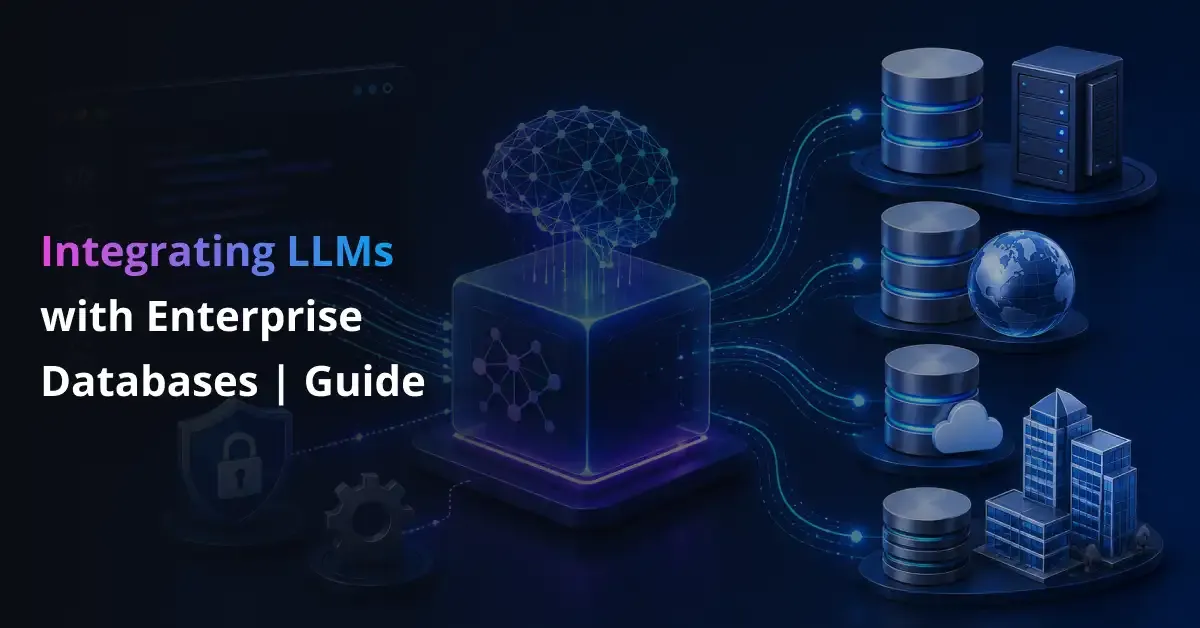
Enterprise teams increasingly want employees to ask questions about CRM, ERP, finance, operations, and analytics data in natural language. Large language models can make that possible, but connecting them to enterprise databases introduces a difficult balance: the model needs enough context to produce useful answers, while the organization must protect sensitive records, enforce permissions, and prevent unsafe queries.
Integrating LLMs with enterprise databases safely requires more than giving a chatbot database credentials. A production architecture needs an authenticated middleware layer that controls how requests reach business data. That layer can route each request through governed APIs, retrieval-augmented generation, Text-to-SQL workflows, or semantic tools. It should also apply least-privilege access, query validation, PII masking, rate limits, and audit logging before any result reaches the model.
The goal is not unrestricted data access. It is controlled, traceable access that helps users retrieve reliable information without weakening database security or governance.
What Does LLM–Database Integration Mean?
LLM–database integration is the process of allowing an LLM-powered application to retrieve, interpret, summarize, or act on information stored in enterprise systems. These systems may include relational databases, data warehouses, customer platforms, ERP applications, document repositories, and operational tools.
The integration can involve several forms of data:
- Structured data, including customer records, transactions, inventory tables, and financial metrics.
- Semi-structured data, such as JSON records, application logs, support tickets, and event streams.
- Unstructured data, including policies, contracts, manuals, reports, emails, and knowledge-base articles.
Organizations use these connections to support conversational analytics, employee knowledge assistants, customer-service copilots, automated reporting, anomaly investigation, and natural-language access to legacy systems.
Grounding an LLM with enterprise data is different from training or fine-tuning it. Training changes the model’s internal parameters. Grounding supplies approved, current information while the application is processing a request. This distinction matters because enterprise records change frequently and may be subject to access restrictions.
The LLM should not become the system of record. The database remains authoritative, while the model provides a language-based interface for accessing and explaining permitted information.
Connect LLMs to Enterprise Data Without Compromising Security
Prismetric builds governed integration layers with authentication, least-privilege access, query validation, data masking, and complete audit trails.
Discuss Your Integration
How LLM–Database Integration Works: A Secure Reference Architecture
A secure LLM integration architecture separates the model from the database through a controlled application and middleware layer. Instead of allowing the model to open a database connection, the system evaluates each request before deciding which data source, query, or tool may be used.
A typical request follows this sequence:
- A user asks a question through an enterprise application or conversational interface.
- An identity provider authenticates the user.
- The application sends the request and the user’s identity to the middleware.
- A policy engine checks which data, tools, actions, and records the user is permitted to access.
- A router selects an approved REST API, RAG retriever, Text-to-SQL pipeline, or semantic-layer tool.
- The system validates generated parameters, tool calls, or SQL before execution.
- An approved request runs against curated views, an analytics environment, or a read replica.
- The response layer removes restricted fields, masks sensitive data, and limits the amount of information returned.
- The LLM converts the approved result into a clear answer.
- The platform logs the request, policy decision, query, response, latency, and user identity for auditing.
This architecture usually includes an API gateway or orchestration layer, an identity and access service, a data catalog or schema registry, a semantic layer, a query validator, a response sanitizer, and an observability system.
Each component addresses a different enterprise requirement. Identity controls determine who can ask. The policy layer determines what they can access. Validation controls determine what may run. Data masking determines what may leave the source system. Logging provides the traceability needed for security reviews, troubleshooting, and compliance.
The result is a governed bridge between a probabilistic model and authoritative business data.
Four Ways to Connect LLMs to Enterprise Databases
There is no single integration pattern that fits every enterprise use case. The right approach depends on how predictable the request is, where the information lives, how much flexibility users need, and how much risk the organization can accept. Most production systems use one or more of the following patterns.
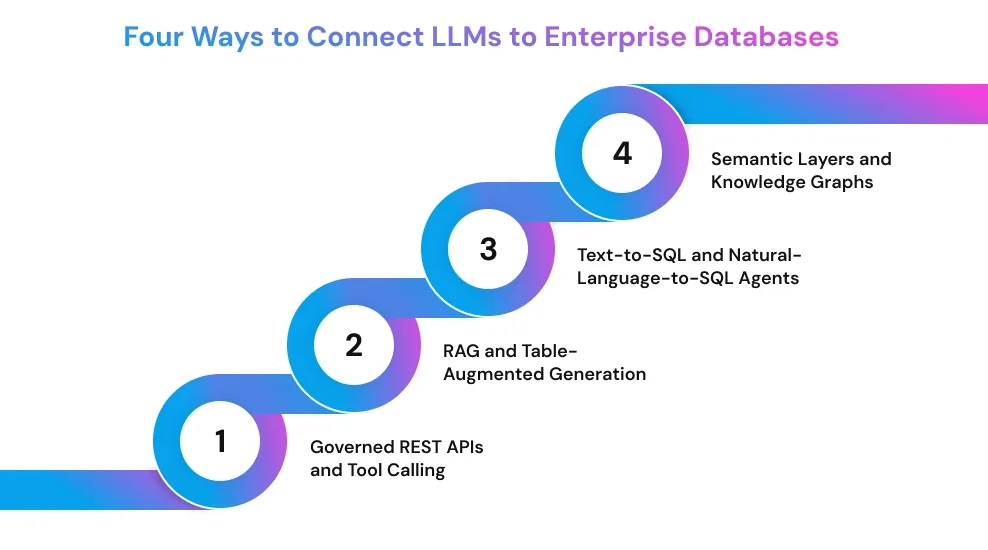
Governed REST APIs and Tool Calling
Governed APIs expose specific business operations without giving the LLM direct access to database credentials or the underlying schema. Instead of generating an unrestricted query, the model calls an approved function such as get_customer_balance, find_delayed_orders, or summarize_monthly_sales.
The API validates parameters, applies the user’s permissions, executes a parameterized query, and returns only the fields required for the task. This makes behavior more predictable and gives security teams a clear point for authentication, authorization, rate limiting, masking, and audit logging.
This approach works well for repeated, high-value workflows where the required action is already understood, particularly when businesses are using AI workflow automation services to connect models with approved systems, APIs, and business processes. It is less flexible for open-ended analysis because developers must define each endpoint or tool in advance.
A Model Context Protocol server can standardize how an LLM discovers and calls these tools. However, MCP does not replace access controls. The server still needs authentication, authorization, input validation, least-privilege database access, and detailed logging.
RAG and Table-Augmented Generation
Retrieval-augmented generation retrieves relevant information from approved sources before the LLM produces an answer. Conventional RAG works well for unstructured content such as policies, manuals, contracts, support articles, and technical documentation. A retriever finds relevant passages, and the model uses them as context.
Enterprise questions often require structured facts as well. Table-Augmented Generation extends the same principle to rows, fields, aggregates, and tabular results. For example, an assistant may retrieve an order status from a transactional system and combine it with a shipping policy from a document repository.
Vector search is useful for finding semantically related content, but it should not replace the system of record for live balances, inventory, pricing, or transactions. A hybrid approach can use semantic retrieval for discovery and SQL or governed APIs for authoritative facts.
Text-to-SQL and Natural-Language-to-SQL Agents
Text-to-SQL converts a user’s natural-language question into a database query. It is useful for ad hoc analytics because users can ask questions that were not anticipated when the application was designed.
A safe workflow starts by identifying the user’s intent and retrieving only the relevant schema. The model then creates a query using approved tables, columns, joins, and business definitions. Before execution, a validator should parse the SQL, block modification commands, enforce a single statement, estimate query cost, and apply row and time limits. The query should run through a read-only account against a controlled database environment.
The system must also validate the result. A syntactically correct query can still answer the wrong business question. Ambiguous requests should trigger clarification rather than an unsupported assumption.
Semantic Layers and Knowledge Graphs
Enterprise schemas rarely use the same language as business users. A finance leader may ask for “net revenue,” while the database contains several fields, adjustment rules, and joins needed to calculate it.
A semantic layer maps business terms to approved metrics, dimensions, relationships, and access policies. A knowledge graph can add explicit relationships between customers, products, suppliers, locations, and business events. These layers help the LLM interpret intent without exposing every raw table or relying on the model to infer organizational definitions.
This pattern is valuable when schemas are large, poorly documented, distributed across several systems, or interpreted differently by different departments. It improves consistency, but it requires ongoing ownership as definitions and source systems change.
Mature implementations often combine these patterns. A semantic layer may guide a Text-to-SQL pipeline, while governed APIs handle sensitive operations and RAG supplies supporting documents.
How to Choose the Right Integration Pattern
The right pattern depends on the question, data sensitivity, flexibility, and acceptable risk.
| Pattern |
Best for |
Flexibility |
Risk |
Freshness |
Effort |
| Governed API |
Repeated tasks |
Low–medium |
Lowest |
Real time |
Medium |
| RAG or TAG |
Documents |
Medium |
Low–medium |
Variable |
Medium |
| Text-to-SQL |
Open analytics |
High |
Higher |
Real time |
High |
| Semantic layer |
Complex metrics |
High |
Medium |
Real time |
High |
Use governed APIs for predictable actions such as checking an order or retrieving an account summary. Choose RAG when answers depend on policies, manuals, contracts, or other text-heavy sources.
Text-to-SQL suits users who need new analytical questions across relational data. It offers flexibility but requires stricter schema controls, query validation, and database protections.
A semantic layer helps when departments use different definitions for the same metric or when raw schemas are difficult to interpret.
Many enterprise applications use a hybrid approach. RAG may retrieve policy context, Text-to-SQL may calculate a live metric, and an API may perform the final approved action.
Security and Governance Controls for LLM Database Access
Enterprise database security cannot depend on the model following instructions correctly. An LLM should be treated as an untrusted client whose requests must pass through external controls before reaching any data source.
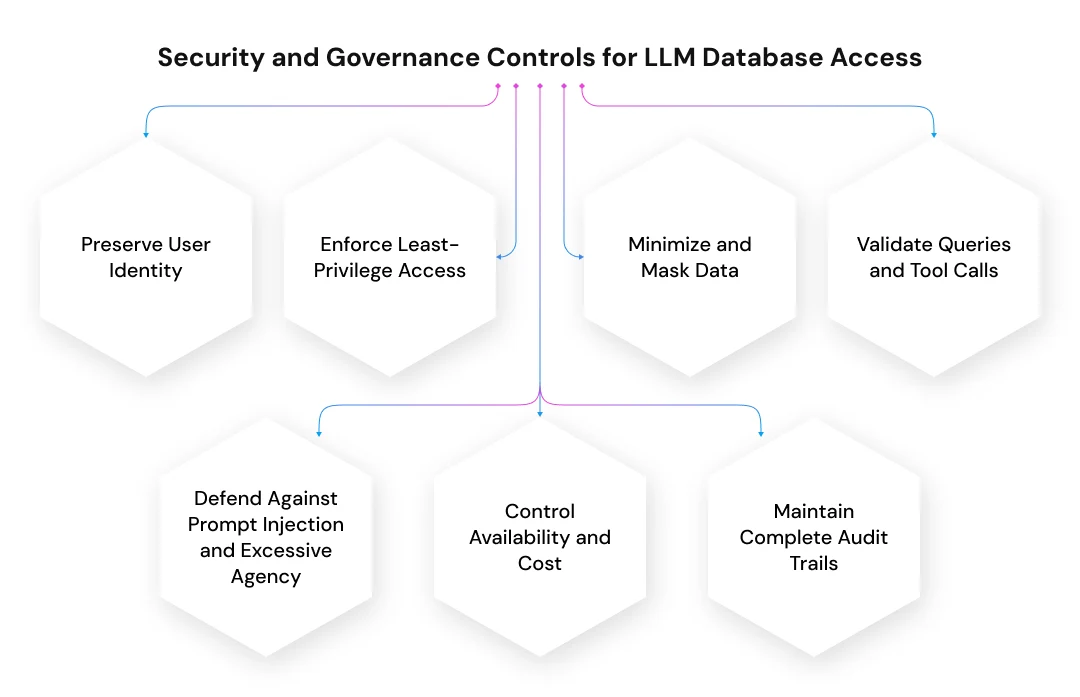
Preserve User Identity
The application should pass the authenticated user’s identity through every layer of the request. SSO, OAuth, or OpenID Connect can establish identity, while role-based or attribute-based access controls determine which tools, tables, records, and actions the user may access.
Database permissions should remain aligned with existing policies. Row-level security can limit users to permitted records, while column-level controls can protect sensitive fields. In multi-tenant systems, tenant isolation must be enforced by the application and database rather than inferred by the model.
Enforce Least-Privilege Access
Give each LLM application a dedicated database identity with only the permissions required for its use case. Read-only access is appropriate for most analytical and knowledge-retrieval workflows.
Organizations can reduce exposure further by using curated views, read replicas, analytics databases, and separate credentials for different applications. System catalogs, administrative tables, and unrelated schemas should remain inaccessible unless the workflow specifically requires them.
Minimize and Mask Data
The system should retrieve only the rows and columns needed to answer the question. Data classification policies can identify fields containing personal, financial, health, or confidential business information.
Before results reach the model, a response layer can redact, mask, or tokenize restricted values. The same controls should also inspect prompts and outputs to prevent users from submitting credentials or receiving information outside their permissions.
Validate Queries and Tool Calls
Every generated SQL statement, API parameter, and tool request should be validated independently of the model. Useful controls include parameterized queries, allowlisted tables and columns, SQL abstract syntax tree parsing, and single-statement enforcement.
The validator should block data definition and modification commands when the use case is read-only. It should also apply execution timeouts, row limits, resource thresholds, and query-cost checks. Result-shape validation can confirm that returned data matches the expected structure before it is included in the prompt.
Defend Against Prompt Injection and Excessive Agency
Prompt injection can manipulate an LLM into ignoring application instructions, calling unauthorized tools, or exposing retrieved data. Indirect injection can also enter through documents, database fields, or external content.
Security controls should separate instructions from retrieved content, restrict tool functionality, validate every action, and enforce authorization downstream. High-impact operations such as updating financial records, approving transactions, or changing customer data should require deterministic workflows and human approval.
Control Availability and Cost
Rate limits, concurrency controls, token budgets, result caching, circuit breakers, and database workload isolation can prevent one user or workflow from exhausting shared resources. Expensive or repeated queries should be blocked, rewritten, or routed to precomputed data.
Maintain Complete Audit Trails
Logs should record the user identity, original request, selected tool, retrieved schema context, generated query, policy decision, returned fields, latency, cost, and final response. These records support incident investigation, compliance reviews, performance analysis, and continuous improvement.
Step-by-Step Enterprise Implementation Roadmap
A successful implementation usually begins with a narrow, measurable use case rather than an open-ended goal such as giving the LLM access to all company data.
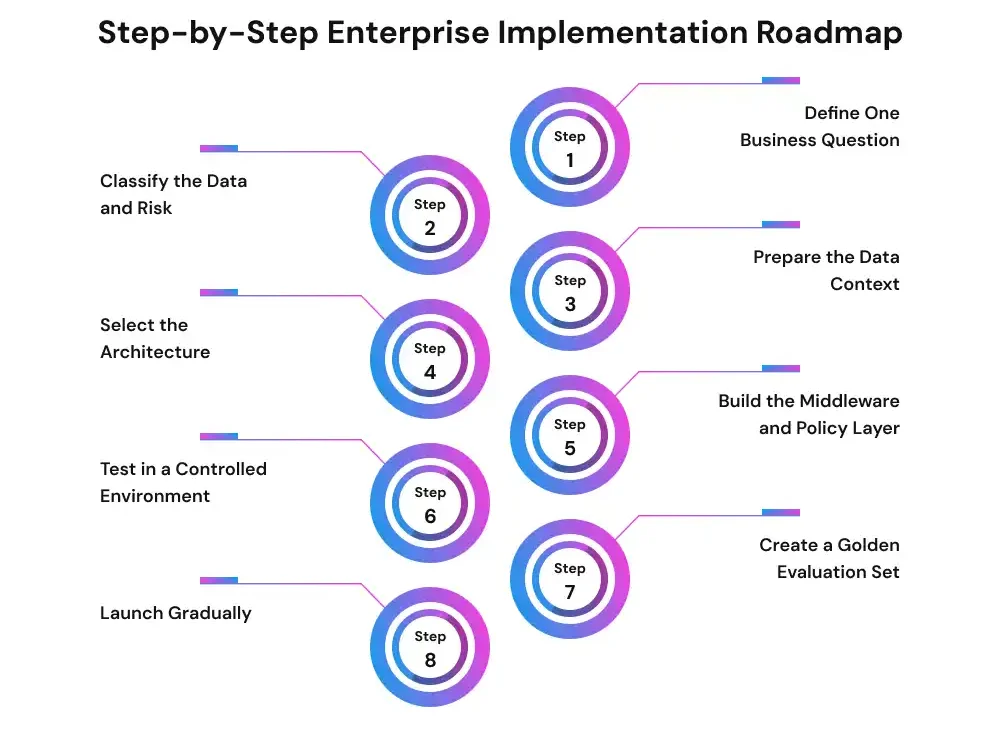
Step 1: Define One Business Question
Choose a workflow with clear users, data sources, and expected outputs. Examples include explaining delayed orders, summarizing account activity, or answering questions about approved policies. Define how the organization will measure answer quality, response time, and user value.
Step 2: Classify the Data and Risk
Identify the data owner, sensitivity level, permitted user groups, regulatory requirements, and retention rules. Determine whether the workflow needs read access, write access, or both. Write operations should be treated as a separate risk tier.
Step 3: Prepare the Data Context
Create curated views, table and column descriptions, approved join paths, business definitions, example questions, and verified queries. Apply classification labels to sensitive fields. Better metadata helps the model select relevant data without receiving the entire schema.
Step 4: Select the Architecture
Use governed APIs for predictable operations, RAG for document-heavy questions, Text-to-SQL for flexible analytics, and semantic layers for complex business definitions. Combine patterns when one request requires both structured and unstructured information.
Step 5: Build the Middleware and Policy Layer
Implement authentication, authorization, request routing, query validation, data masking, rate limiting, audit logging, and failure handling outside the LLM. Keep database credentials in a secure secrets-management system and rotate them according to enterprise policy.
Step 6: Test in a Controlled Environment
Begin with synthetic or masked data, curated test accounts, or a read replica. Test ambiguous questions, unauthorized requests, prompt-injection attempts, incorrect joins, large result sets, and computationally expensive queries.
Step 7: Create a Golden Evaluation Set
Build a collection of representative questions with approved answers, expected queries, permitted data, and required refusals. Evaluate whether the system interprets the request correctly, accesses the right source, produces the right query, and explains the result without unsupported claims.
Step 8: Launch Gradually
Start with internal users, read-only functionality, one business domain, and a limited set of tables or tools. Monitor real requests and expand access only when evaluation results, security reviews, and operational evidence support the change.
Validate Your Enterprise Data Assistant Before Production
Test your use case, data access, response accuracy, permissions, security controls, latency, and operating cost with a focused proof of concept.
Start Your AI PoC
Measuring Accuracy, Performance, and Cost
A query that executes successfully is not necessarily correct. The system may select the wrong table, misunderstand a business term, apply an incorrect filter, or produce a plausible explanation that is not supported by the result.
Public Text-to-SQL benchmarks are useful for model comparison, but they may not reflect private enterprise schemas, organization-specific terminology, incomplete metadata, or complex access policies. Each implementation needs an evaluation set built from its own data and workflows.
Useful production metrics include:
- Intent interpretation accuracy
- SQL execution success rate
- Answer correctness
- Authorization and refusal accuracy
- Unsupported-claim rate
- Human correction rate
- P50 and P95 response latency
- Database execution time
- Cost per successful answer
- Cache-hit and policy-block rates
Teams should review both technical performance and business usefulness. A fast answer has limited value if it retrieves the wrong metric or omits an important restriction.
Performance can often be improved by retrieving only relevant schema information, caching safe and non-personalized results, routing simple requests to smaller models, precomputing common metrics, inspecting query plans, and limiting result size. Monitoring should also detect changes in model behavior, prompts, schemas, permissions, and source data.
Common LLM–Database Integration Mistakes
Many integration failures come from treating the model as a trusted database user. Direct access to a production database can expose sensitive records, create expensive queries, and bypass existing controls.
Other common mistakes include:
- Executing generated SQL without parsing or validation
- Sharing the full schema in every prompt
- Using one privileged service account for all users
- Relying on prompt instructions as a security boundary
- Copying transactional data into a vector database without a clear need
- Returning more rows or fields than the user requires
- Allowing write operations without confirmation or transaction controls
- Ignoring stale cache results
- Testing only whether a query runs rather than whether it answers the right question
- Launching across several departments before validating one domain
- Failing to monitor changes in models, prompts, schemas, and permissions
A safer approach limits access, validates every action, and expands gradually based on evidence.
How Can Prismetric Help Integrate LLMs with Enterprise Databases?
Connecting an LLM to enterprise data requires more than model selection. Organizations need a clear use case, reliable data access, suitable architecture, and controls that fit workflows. Prismetric can help plan and develop LLM-powered applications around these business and technical requirements.
Its generative AI services include connecting models with databases, CRMs, ERPs, APIs, dashboards, documents, and internal systems. Depending on the use case, the solution may use governed APIs, retrieval-augmented generation, enterprise copilots, or custom LLM workflows.
Prismetric can support implementation through:
- Use-case discovery and data-readiness assessment
- LLM, RAG, API, and application architecture planning
- Integration with enterprise databases and business platforms
- Prompt, output, edge-case, and workflow testing
- Deployment, monitoring, cost control, and optimization
This end-to-end approach can help businesses move from a proof of concept to a production-ready solution. The goal is to make enterprise data easier to access while supporting the security, reliability, and governance required for operational use.
Turn Complex Business Data Into Clear, Reliable Answers
Prismetric integrates LLMs with databases, CRMs, ERPs, APIs, documents, and analytics systems using RAG, Text-to-SQL, semantic layers, and governed tools.
Talk to Our AI Experts
Closing Thoughts
Integrating LLMs with enterprise databases is not mainly a SQL-generation problem. It is an architecture, security, and governance challenge. The strongest implementations place middleware between the model and business data, choose the integration pattern according to the task, enforce least privilege, validate every request, and evaluate performance on real enterprise workflows. With these controls in place, organizations can provide natural-language access to trusted data without giving the model unrestricted authority.
Frequently Asked Questions
Technically, yes. However, production systems should place middleware between the model and the database. The middleware can authenticate users, enforce permissions, validate requests, limit results, mask sensitive fields, and record each action for auditing.
Governed APIs or narrowly defined tools usually provide the strongest control because they expose only approved operations. When users need flexible analysis, a validated Text-to-SQL pipeline can be used with read-only access, allowlisted schemas, query parsing, cost limits, and result filtering.
RAG retrieves relevant context from approved sources before the model answers. Text-to-SQL converts a natural-language question into a relational query. RAG suits documents and knowledge bases, while Text-to-SQL is better for live calculations, filters, joins, and structured analytics.
Not always. A vector database is useful when the application needs semantic retrieval across documents or text-heavy records. Live balances, inventory levels, prices, and transactions should normally come from the authoritative source through SQL or governed APIs.
MCP can standardize how an LLM discovers and calls approved tools. It does not replace authentication, authorization, validation, database permissions, or logging.
It can support controlled write workflows, but the risk is higher. Use deterministic tools, explicit authorization, transaction boundaries, validation, and human approval for sensitive changes.