Building an Enterprise RAG App: Cost, Timeline, Challenges, Compliance, and Common Mistakes
A basic retrieval-augmented generation prototype can be built in days. An enterprise RAG application takes longer because the real work involves data preparation, system integration, access controls, evaluation, security, and ongoing operations.
Illustrative Planning Ranges
| Project stage |
Estimated timeline |
Estimated development cost |
| Technical proof of concept |
2–4 weeks |
$15,000–$40,000 |
| Production MVP |
6–12 weeks |
$50,000–$150,000 |
| Enterprise deployment |
3–6 months |
$150,000–$500,000+ |
| Regulated or global platform |
6–12+ months |
$300,000–$1 million+ |
These figures are planning estimates, not fixed prices. The final cost depends on data quality, source-system complexity, user volume, deployment requirements, compliance obligations, and expected answer accuracy.
A RAG application retrieves relevant information from approved business sources and provides it to a large language model as context. This helps the model generate more grounded and traceable responses without retraining it whenever business information changes.
This guide explains the architecture, cost drivers, development timeline, implementation challenges, compliance requirements, and common mistakes enterprises should consider before moving a RAG application into production.
Should Your Enterprise Build a RAG Application?
RAG is useful when employees or customers need answers from large volumes of business information that changes frequently. It allows an AI system to retrieve approved content before generating a response.
Your organization may already have the required data in policies, manuals, contracts, support tickets, knowledge bases, research reports, or product documentation. The bigger question is whether that data is accurate, accessible, and properly governed.
When RAG Is a Good Fit
RAG may be suitable when your application needs to:
- Answer questions using private enterprise knowledge
- Provide citations or links to supporting sources
- Search across disconnected document repositories
- Reflect updated information without retraining a model
- Help employees review policies, contracts, or technical documents
- Support customer service, research, compliance, or sales workflows
For example, a support assistant can retrieve product documentation and approved troubleshooting steps before preparing a response. This can help agents find relevant information without manually searching several systems.
Build a RAG Application Your Enterprise Can Trust
Prismetric develops secure RAG solutions with governed data ingestion, accurate retrieval, source citations, permission controls, and continuous evaluation.
Discuss Your RAG Project
When RAG May Not Be the Right Approach
RAG should not become the default solution for every AI project. A traditional database query, search engine, API integration, or workflow automation system may provide a more reliable result.
It may not be suitable when source documents are outdated, contradictory, or poorly managed. Retrieval cannot fix information that is missing, incorrect, or no longer approved for use.
RAG is also a poor fit for decisions that require deterministic rules or guaranteed outputs. Financial approvals, clinical decisions, and compliance actions may still require structured systems and human review.
RAG Compared With Other Approaches
| Approach |
Best suited for |
| RAG |
Answers based on changing enterprise knowledge |
| Fine-tuning |
Adjusting model behavior, tone, or task performance |
| Long-context prompting |
Processing a limited set of documents in one request |
| Enterprise search |
Finding documents without generating an answer |
| API or database access |
Retrieving structured, real-time information |
| Hybrid architecture |
Combining documents, databases, tools, and business rules |
What a Production RAG Architecture Actually Contains
A demo RAG application may only need a document loader, embedding model, vector database, retriever, and large language model. That is enough to prove the concept, but not enough to support enterprise users.
A production RAG system must control how information enters the platform, who can retrieve it, how answers are evaluated, and what happens when source content changes or is deleted.
Offline Ingestion Pipeline
The offline pipeline prepares business information before users submit questions. It converts documents and records into searchable content while preserving source, ownership, version, and permission data.
A typical ingestion workflow includes:
- Source connectors: Collect content from systems such as SharePoint, Google Drive, Salesforce, databases, help desks, and document repositories.
- Parsing and OCR: Extract text, tables, headings, and metadata from PDFs, images, spreadsheets, presentations, and scanned files.
- Cleaning and normalization: Remove duplicate content, navigation text, broken characters, and formatting that could reduce retrieval quality.
- Chunking: Divide documents into smaller sections based on headings, paragraphs, pages, or semantic boundaries.
- Metadata enrichment: Attach details such as document owner, department, publication date, source URL, version, and confidentiality level.
- Sensitive-data controls: Detect or redact personal, financial, medical, or confidential information when business and compliance rules require it.
- Embedding generation: Convert each approved content segment into a numerical representation that supports semantic search.
- Indexing: Store text, embeddings, metadata, and access-control information in a searchable index or vector database.
- Permission synchronization: Preserve source-system permissions so users only retrieve content they are authorized to access.
- Update and deletion workflows: Reprocess changed documents and remove expired, revoked, or deleted information from the index.
Online Query Pipeline
The online pipeline manages what happens after a user submits a question. Its purpose is to retrieve useful evidence and produce an answer within the required accuracy, security, latency, and cost limits.
The workflow may include:
- Authenticate the user and identify their role, department, tenant, or access rights.
- Classify or rewrite the query when the original wording is incomplete, ambiguous, or too broad.
- Apply permission filters before retrieving document content.
- Search using semantic retrieval, keyword retrieval, metadata filters, or a hybrid approach.
- Rerank the results so the most useful evidence appears first.
- Assemble a controlled context window from the selected passages.
- Apply prompt instructions, policy checks, and output restrictions.
- Send the approved context and user question to the language model.
- Generate an answer with citations, confidence indicators, or an abstention when evidence is insufficient.
- Log the interaction for evaluation, security review, feedback, and system monitoring.
For enterprises, relevance and authorization are separate requirements. A document may be relevant to a question but still be restricted, so access controls must be enforced before its content reaches the model.
The architecture also needs a cross-functional governance layer covering evaluation, observability, encryption, audit logging, model management, incident response, and ongoing cost monitoring.
How Long Does It Take to Build a RAG Application?
A basic RAG prototype can take two to four weeks. A production-ready enterprise system usually requires several months because teams must address data quality, integrations, permissions, evaluation, security, and deployment.
The timeline depends less on the number of models or frameworks involved and more on how prepared the organization is. Clean data, clear business goals, and existing access controls can reduce development time significantly.
Typical RAG Development Timeline
| Project phase |
Typical planning range |
Primary output |
| Use case discovery |
1–2 weeks |
Defined business problem and success criteria |
| Data and permission audit |
1–3 weeks |
Source inventory, access model, and risk assessment |
| Technical proof of concept |
2–4 weeks |
Working retrieval and generation baseline |
| MVP development |
4–8 weeks |
Application, integrations, citations, and evaluation |
| Security and compliance review |
2–8 weeks, often parallel |
Approved controls and supporting evidence |
| Controlled pilot |
2–6 weeks |
Feedback and performance data from real users |
| Rollout and optimization |
Ongoing |
Monitoring, adoption, and system improvements |
Some phases can run in parallel. For example, security teams can review access controls while engineers improve retrieval quality and application performance.
What Can Shorten the Timeline?
Development moves faster when the first release focuses on one defined workflow and a limited set of trusted data sources.
The following conditions can reduce implementation time:
- A single, well-maintained document repository
- Clear ownership of source content
- Existing identity and access management
- A representative set of user questions
- Managed model and vector database services
- An existing application that can host the RAG capability
- Limited regulatory and data residency requirements
A customer support assistant using approved product documentation will usually be easier to build than a system that searches contracts, emails, financial records, and internal policies across several departments.
What Can Extend the Timeline?
Poorly structured data is one of the most common reasons RAG projects take longer than expected. Scanned PDFs, complex tables, duplicate files, and outdated document versions require additional processing and testing.
Other timeline drivers include:
- Integration with SharePoint, CRM, ERP, or legacy systems
- Document-level or row-level access controls
- Multilingual content
- On-premises or private cloud deployment
- Multi-region data residency requirements
- Legal, privacy, or model risk reviews
- Limited availability of domain experts
- No existing evaluation dataset
Add a Go-or-No-Go Decision Point
Enterprises should not move directly from discovery into full development. The team should first confirm that the available data can support reliable answers.
If the source information is incomplete, outdated, contradictory, or poorly governed, improving content quality may provide more value than building the RAG application immediately.
Validate Your RAG Use Case Before Full-Scale Investment
Test your enterprise data, retrieval quality, model performance, access controls, latency, and expected business value with a focused proof of concept.
Start Your RAG PoC
How Much Does a RAG Application Cost?
A RAG application can cost anywhere from $15,000 for a limited proof of concept to more than $500,000 for a secure enterprise deployment. Regulated, global, or highly customized platforms may cost more.
The final budget depends on data volume, source-system complexity, retrieval accuracy, integrations, security controls, user traffic, deployment model, and compliance requirements.
Typical RAG Development Cost by Project Stage
| Project stage |
Illustrative cost range |
What it may include |
| Technical proof of concept |
$15,000–$40,000 |
One use case, limited data, basic retrieval, and a simple interface |
| Production MVP |
$50,000–$150,000 |
Multiple data sources, evaluation, citations, authentication, and deployment |
| Enterprise implementation |
$150,000–$500,000+ |
Advanced integrations, access controls, monitoring, security, and scaling |
| Regulated or global platform |
$300,000–$1 million+ |
Private infrastructure, auditability, regional controls, and formal validation |
These figures are planning ranges rather than fixed prices. A reliable estimate requires a review of the use case, data environment, integration requirements, and expected production workload.
One-Time Development Costs
The model and vector database are only part of the initial investment. Much of the budget goes toward preparing enterprise data and connecting the application to existing systems.
One-time costs may include:
- Business discovery and solution architecture
- Data and permission audits
- Source-system connectors
- Document parsing and OCR
- Cleaning, deduplication, and metadata enrichment
- Chunking and retrieval experiments
- Application and interface development
- Authentication and authorization
- Evaluation dataset creation
- Security and compliance testing
- Cloud or private infrastructure setup
- User testing, training, and rollout
A project that uses one clean document repository will cost less than a system that connects to SharePoint, Salesforce, internal databases, email archives, and legacy applications.
Ongoing Operating Costs
Enterprise RAG systems continue to generate costs after launch. Teams must pay for model usage, data processing, storage, monitoring, maintenance, and system improvements.
A practical cost model is:
Monthly RAG cost = ingestion and reindexing + embeddings + vector storage and search + reranking + LLM usage + monitoring + support
Embedding costs usually increase when the organization adds or frequently updates large document collections. Generation costs depend on query volume, context length, response length, and model selection.
Retrieving more content can improve answer coverage, but it also increases token usage and latency. Teams should measure cost per successful answer rather than focusing only on the price of an individual API request.
Hidden Costs Enterprises Often Miss
Changing the chunking strategy may require the entire document collection to be processed and indexed again. This creates extra compute, engineering, and testing costs.
Other commonly overlooked expenses include:
- OCR for scanned documents, tables, and images
- Synchronizing source-system permissions
- Creating representative evaluation questions
- Processing document updates and deletions
- Testing for prompt injection and data leakage
- Storing logs for audits and investigations
- Supporting multiple models or vendors
- Reviewing low-confidence or high-risk responses
- Maintaining connectors when external systems change
- Managing document ownership and freshness
The lowest-cost architecture is not always the most economical option. A cheaper model or retrieval system may create more failed searches, manual reviews, and support requests.
For enterprise planning, the better question is not simply, “How much does each query cost?” It is, “How much does it cost to deliver a useful, secure, and evidence-backed answer?”
The Hardest RAG Implementation Challenges
Most RAG projects do not fail because the language model is incapable. They fail because the system retrieves incomplete, outdated, poorly structured, or unauthorized information.
The challenge is not simply finding a document. The application must retrieve the right evidence, preserve access controls, generate a grounded response, and perform consistently across real user questions.
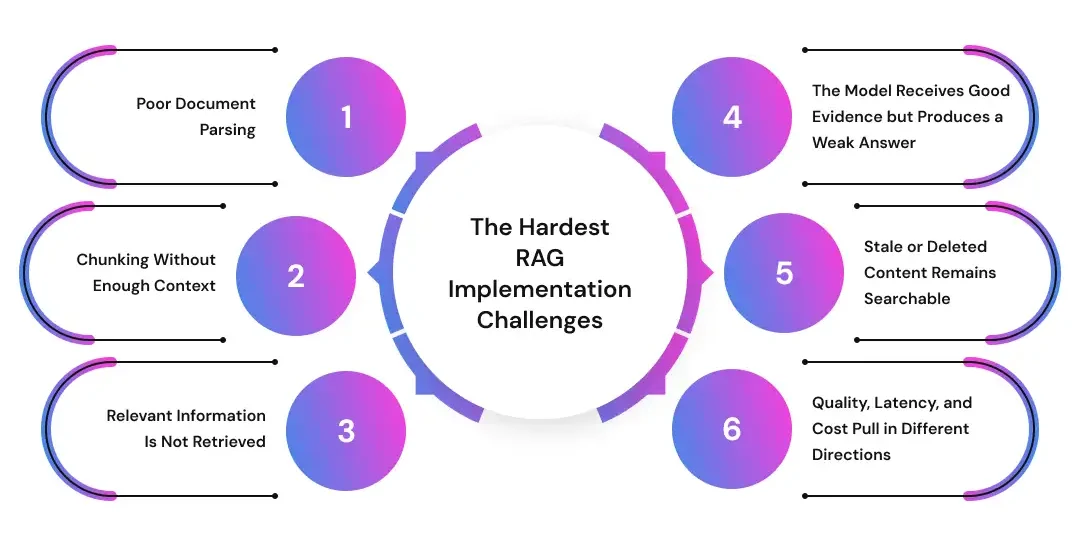
Poor Document Parsing
Symptom: The application misses important information, combines unrelated text, or generates answers that ignore tables, headings, and footnotes.
Cause: PDFs, scanned files, presentations, and spreadsheets often lose structure during extraction. A parser may capture the text while removing the relationships that give it meaning.
Recommended approach: Test parsing by document type. Use OCR where required, preserve section headings and tables, and route complex files through specialized processing workflows.
Metric to monitor: Percentage of documents and fields extracted correctly.
Chunking Without Enough Context
Symptom: Retrieval returns a relevant sentence but excludes the definitions, conditions, or exceptions needed to answer the question accurately.
Cause: Fixed-size chunking may separate related information or combine several unrelated topics. One chunking method rarely works equally well for contracts, policies, support tickets, and technical manuals.
Recommended approach: Test section-based, semantic, and parent-child chunking. Store useful metadata and allow the retriever to return surrounding context when required.
Metric to monitor: Retrieval recall for representative business questions.
Relevant Information Is Not Retrieved
Symptom: The required answer exists in the source data, but the system retrieves less useful content.
Cause: Embeddings may not capture company terminology, acronyms, product codes, names, or exact phrases. Poor metadata and missing filters can make the problem worse.
Recommended approach: Combine semantic retrieval with keyword search, metadata filtering, query rewriting, and reranking. Test performance across different question categories rather than relying on a few demonstrations.
Metric to monitor: Recall@k, precision@k, or the percentage of questions for which the correct evidence appears in the retrieved results.
The Model Receives Good Evidence but Produces a Weak Answer
Symptom: The application retrieves the right content but generates an incomplete, unsupported, or confusing response.
Cause: The prompt may contain too much context, conflicting documents, poorly ordered evidence, or unclear instructions about citations and abstention.
Recommended approach: Limit context to the most useful passages, prioritize current sources, identify conflicting information, and instruct the model to decline when the evidence is insufficient.
Metric to monitor: Answer faithfulness, citation accuracy, and abstention accuracy.
Stale or Deleted Content Remains Searchable
Symptom: The application cites an expired policy, an outdated product manual, or a document that has already been removed from the source system.
Cause: The ingestion process may add content without reliably handling updates, version changes, and deletions.
Recommended approach: Define refresh schedules, preserve version data, track source ownership, and remove deleted content from every relevant index.
Metric to monitor: Content freshness and deletion-processing success rate.
Quality, Latency, and Cost Pull in Different Directions
Symptom: The application becomes too slow or expensive after retrieval quality improvements are introduced.
Cause: Query rewriting, larger retrieval sets, reranking, longer prompts, and more capable models can improve results while increasing response time and token usage.
Recommended approach: Set clear acceptance thresholds for accuracy, latency, and cost. Optimize the full workflow instead of choosing the cheapest model or database in isolation.
Metric to monitor: Cost per successful answer, p95 latency, and task-completion rate.
A production RAG system needs continuous evaluation. Teams should measure retrieval quality, grounded generation, security, performance, cost, and business outcomes before each major release.
RAG Security, Privacy, and Compliance Requirements
Adding citations to an AI-generated answer does not make a RAG application compliant. Compliance depends on how the system collects, stores, retrieves, processes, logs, and deletes information.
Enterprises should evaluate these requirements during architecture planning. Adding controls after deployment can require major changes to the data pipeline, vector index, access model, and application workflow.
Controls Before Data Ingestion
The ingestion pipeline should only process content that has a defined business purpose and an approved owner. Indexing every available document increases privacy, security, and retrieval risks.
Teams should classify the data before creating embeddings. This includes identifying personal information, financial records, health data, intellectual property, confidential communications, and documents subject to retention rules.
For organizations subject to the GDPR, the architecture should support principles such as purpose limitation, data minimization, accuracy, storage limitation, security, and accountability.
Relevant controls may include:
- Data classification and source approval
- Encryption in transit and at rest
- Sensitive-data detection or redaction
- Document ownership and retention metadata
- Regional storage and processing controls
- Deletion and correction workflows
- Vendor and subprocessor reviews
Controls During Retrieval
Authentication confirms who the user is. Authorization determines which documents, records, and content segments that user can access.
Permission filters should be applied before retrieved content enters the model context. Prompt instructions alone should never be used to protect restricted information.
OWASP identifies prompt injection, sensitive-information disclosure, and vector or embedding weaknesses as important risks for RAG applications. These weaknesses can contribute to unauthorized retrieval, cross-user leakage, data poisoning, or manipulated outputs.
Enterprises may need:
- Role- or attribute-based access controls
- Tenant and department filters
- Source-system permission synchronization
- Prompt injection testing
- Retrieval and access logging
- Cross-tenant leakage tests
- Alerts for unusual search or download behavior
Controls During Generation and Delivery
The application should instruct the model to answer only from approved evidence and decline when the retrieved information is insufficient. High-risk workflows may also require human review before an answer triggers an action.
Teams should validate citations, redact sensitive outputs, restrict external tool access, and record the model, prompt, retrieved context, and policy version used for each response.
Regulations and Governance Frameworks
The applicable requirements depend on the industry, location, data type, and intended use. Relevant obligations may include the GDPR, the EU AI Act, HIPAA, financial-services regulations, and internal model-risk policies.
From August 2, 2026, Article 50 of the EU AI Act introduces transparency obligations for certain interactive and generative AI systems, including requirements to inform people when they are interacting with AI.
Organizations can also use the NIST AI Risk Management Framework Generative AI Profile to structure risk assessment, governance, testing, and monitoring activities.
Compliance Evidence to Maintain
A production RAG program should maintain a data-flow diagram, system inventory, access-control test results, evaluation reports, vendor records, retention policies, red-team findings, incident procedures, and change history.
These records help the organization demonstrate how the system works, what risks were assessed, and which controls remain active throughout its lifecycle.
Everything Enterprises Get Wrong About RAG
Many enterprise RAG projects underperform because teams focus on the model before addressing the business workflow, source data, permissions, and evaluation process.
A strong prototype can still fail in production when it cannot handle outdated documents, conflicting information, real user behavior, or enterprise access requirements.
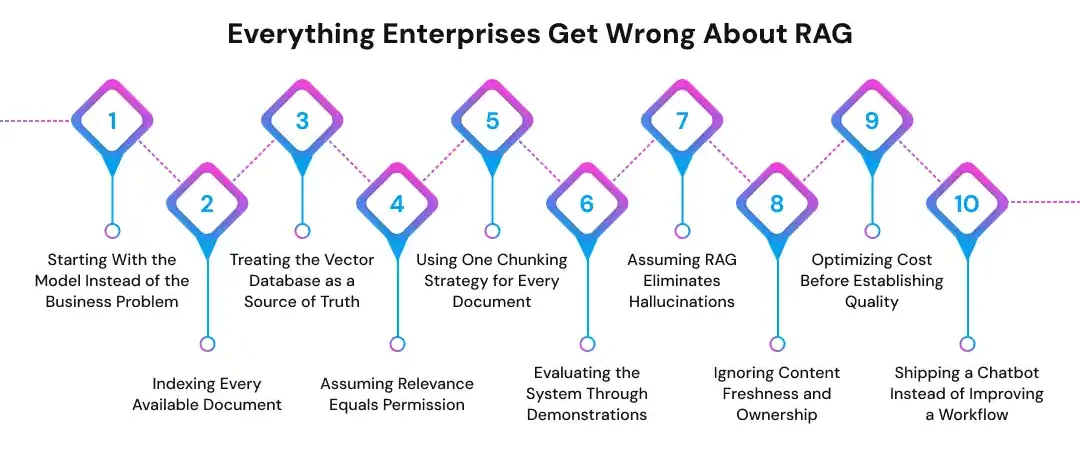
1. Starting With the Model Instead of the Business Problem
Teams often begin by comparing large language models, embedding models, and vector databases. This creates technical activity without a clear definition of success.
Start with the workflow, user, decision, and business outcome. Define what a useful answer looks like, which failures are acceptable, and when human review is required.
2. Indexing Every Available Document
More content does not automatically improve retrieval. Large collections often contain duplicate files, expired policies, drafts, and information that no longer reflects current operations.
Index only approved and useful content. Assign an owner to each source and define how the system will process updates, corrections, and deletions.
3. Treating the Vector Database as a Source of Truth
A vector database stores searchable representations of content, but it should not replace the original business system.
Every retrieved passage should remain connected to its source, version, owner, and access policy. This allows users and administrators to verify where an answer came from.
4. Assuming Relevance Equals Permission
A document may be relevant to a query but restricted from the user asking the question. Semantic similarity does not provide authorization.
Apply access controls before content enters the model context. Permission checks should reflect the source system, user identity, department, role, or tenant.
5. Using One Chunking Strategy for Every Document
A fixed chunk size may work for simple articles but fail for contracts, technical manuals, policies, spreadsheets, and support records.
Test chunking strategies by document type and question category. Preserve headings, section relationships, metadata, and surrounding context where they affect meaning.
6. Evaluating the System Through Demonstrations
A few successful questions can make a prototype appear more reliable than it is. Real users will ask incomplete, ambiguous, and unexpected questions.
Create a versioned evaluation dataset that reflects actual workflows. Test retrieval quality, citation accuracy, groundedness, latency, cost, and permission enforcement.
7. Assuming RAG Eliminates Hallucinations
RAG can improve grounding, but it cannot guarantee factual answers. The retriever may return weak evidence, and the model may misinterpret or overstate the available information.
Require evidence-backed responses, validate citations, and allow the system to abstain. High-impact decisions may still need human approval.
8. Ignoring Content Freshness and Ownership
A RAG system can produce outdated answers when source content changes but the index does not.
Define refresh schedules, deletion workflows, ownership rules, and freshness targets. The application should also identify which source takes priority when documents conflict.
9. Optimizing Cost Before Establishing Quality
Choosing the cheapest model or retrieving fewer passages may reduce API spending while increasing failed answers and manual review.
Establish an acceptable quality baseline first. Then reduce token usage, model size, retrieval depth, and infrastructure cost without falling below that threshold.
10. Shipping a Chatbot Instead of Improving a Workflow
A standalone chat interface may attract attention but fail to create lasting business value.
RAG becomes more useful when integrated into support, research, claims, sales, compliance, or employee workflows. The system should help users complete a task, not simply generate text.
Should You Build, Buy, or Use a Hybrid RAG Platform?
The right approach depends on how specialized the workflow is, how sensitive the data is, and how much control the organization needs over retrieval, deployment, and governance.
Enterprises should compare time to market, customization, integration effort, operating cost, vendor dependency, security, and internal technical capacity.
Build a Custom RAG Application When
A custom solution may be appropriate when retrieval quality creates a competitive advantage or the workflow requires specialized business logic.
It is also useful when the organization needs custom permissions, private deployment, unique data connectors, advanced evaluation, or strict data residency controls.
Custom development provides more control, but it requires engineering, security, data, and operational ownership after launch.
Buy a RAG Platform When
A commercial platform may be suitable for standard document search, internal knowledge assistance, or customer support use cases.
This approach can reduce initial development time when the platform already supports the required data sources, identity systems, security controls, and deployment model.
The organization should still evaluate data handling, model choices, access controls, auditability, pricing, export options, and vendor lock-in.
Use a Hybrid Approach When
Many enterprises benefit from buying commodity components while developing the parts that reflect their own workflows and risk requirements.
A hybrid architecture may use managed models, cloud infrastructure, or vector search while keeping ingestion logic, permission enforcement, evaluation, and user experience under internal control.
This approach can balance speed and flexibility without requiring the team to build every component from the ground up.
Minimum Team Responsibilities
A production RAG initiative typically needs ownership across product, domain expertise, data engineering, application development, platform operations, security, privacy, and quality assurance.
Not every role must be full-time. However, each responsibility should have a named owner who can make decisions and maintain the system after deployment.
A Realistic 90-Day Enterprise RAG Implementation Plan
A 90-day plan can help an enterprise move from concept to controlled pilot without rushing into full deployment. The goal is to validate the use case, data, security, retrieval quality, and business value before scaling.
Days 1–30: Define and Prepare
Choose one high-value workflow with a clear user group, business problem, and measurable outcome.
During this phase, the team should:
- Inventory data sources and access permissions
- Identify content owners
- Create 100–300 representative questions
- Define quality, latency, cost, and security targets
- Select the initial architecture and deployment model
- Establish go-or-no-go criteria
The project should pause if the source data is incomplete, outdated, or unsuitable for reliable retrieval.
Days 31–60: Build and Evaluate
Develop the ingestion pipeline, retrieval workflow, application interface, and access-control layer.
The team should compare chunking, search, reranking, and model options against the evaluation dataset. It should also add citations, abstention rules, logging, and security tests.
Days 61–90: Pilot and Harden
Release the application to a limited group of real users and monitor how it performs in actual workflows.
Track retrieval failures, unsupported answers, latency, cost, access-control issues, and user adoption. Use the results to decide whether to scale, redesign, purchase a platform, or stop the project.
A successful pilot should demonstrate more than technical accuracy. It should show that the RAG application improves a real business process within acceptable risk and cost limits.
Move Beyond a Basic Document Chatbot
Prismetric builds production-ready RAG applications for enterprise search, customer support, document analysis, research, and internal knowledge workflows.
Talk to Our AI Experts
How Prismetric Can Help You Build an Enterprise RAG Application
Prismetric can help you move from use-case discovery to a production RAG application by assessing business goals, data sources, user requirements, and deployment constraints. This helps define whether RAG is appropriate and what the first release should include.
Its RAG services cover data preparation, retrieval system development, LLM integration, custom knowledge bases, and performance monitoring. The team can connect the application with enterprise systems so users can access relevant information within current workflows.
For production deployment, Prismetric can support architecture design, vector search, prompt development, access controls, cloud deployment, and ongoing optimization. The focus should remain on retrieval quality, response traceability, security, latency, and operating cost rather than model selection alone.
This approach is useful when your organization needs more than a document chatbot. Prismetric can help design a RAG solution around customer support, internal knowledge retrieval, research, document analysis, or domain-specific workflows, with evaluation and governance included from the start.
Frequently Asked Questions About Building a RAG Application
A limited proof of concept may cost $15,000–$40,000, while a production MVP may range from $50,000–$150,000. Enterprise platforms with advanced integrations, security, and compliance controls can cost $150,000–$500,000 or more.
A technical prototype usually takes two to four weeks. A production MVP may require six to twelve weeks, while a complex enterprise deployment can take three to six months or longer.
The timeline depends on data quality, integrations, access controls, evaluation requirements, and regulatory reviews.
The hardest part is usually not connecting the language model. The bigger challenges include:
- Parsing complex enterprise documents
- Selecting an effective chunking strategy
- Retrieving the correct evidence
- Preserving user permissions
- Evaluating answer quality
- Keeping indexed content current
No. RAG can reduce unsupported answers by giving the model relevant business information, but it does not guarantee accuracy.
Retrieval may return incomplete evidence, and the model may still misinterpret the available context. Citation validation, abstention rules, evaluation, and human review remain necessary.
Not always. Small applications may use FAISS, PostgreSQL with vector extensions, or an existing enterprise search platform.
A dedicated vector database becomes more useful when the system requires large-scale semantic search, metadata filtering, low-latency retrieval, or managed infrastructure.
RAG and fine-tuning solve different problems. RAG gives a model access to current or private knowledge, while fine-tuning adjusts how the model behaves or performs a specialized task.
Some enterprise applications use both approaches when they need domain-specific behavior and access to frequently changing information.
A RAG architecture can support compliance, but the technology is not compliant by default.
Organizations still need data minimization, encryption, access controls, retention policies, audit logs, vendor reviews, deletion workflows, and human oversight where required.
Teams should evaluate both technical performance and business value.
Useful measures include:
- Retrieval recall and precision
- Answer faithfulness
- Citation accuracy
- Abstention accuracy
- Response latency
- Cost per successful answer
- Permission-leakage rate
- User task-completion rate
Buying may provide faster deployment for standard document-search use cases. Custom development provides more control over workflows, permissions, integrations, deployment, and evaluation.
A hybrid approach often works well because enterprises can use managed infrastructure while building the components that reflect their data, security, and business requirements.
Yes, but each format may require a different processing approach. Scanned documents need OCR, while spreadsheets and tables require structure-aware extraction.
The application should test parsing quality by document type before content is indexed. Poor extraction will reduce retrieval quality even when the model performs well.
Common causes include poor source data, unclear business goals, weak evaluation, missing access controls, outdated content, and unrealistic expectations about hallucinations.
Enterprises also struggle when they launch a general chatbot instead of integrating RAG into a defined workflow with measurable outcomes.