Appsmith vs Retool: Which Internal Tool Builder Is Better?
Let’s be honest, choosing the right internal tool builder can sometimes feel like a gamble.
You’ve probably wondered more than once:
Should I build with Appsmith or go with Retool?
Both are popular for building internal tools, dashboards, and admin panels, but they have their own strengths and weaknesses.
What if you choose the wrong one?
That could mean higher costs, slower development, messy workflows, and tools your team outgrows too quickly.
That’s exactly why I wrote this blog.
In this blog, I’ll walk you through Appsmith vs Retool, and compare them across the only things that actually matter today:
- Which one is easier to use?
- Which one gives you more control?
- And most importantly, which one actually works better for building internal tools?
Let’s break it down.
Appsmith vs Retool at a Glance
Here’s a quick side-by-side view of how Appsmith and Retool stack up.
This table will give you a simple idea of where each platform performs better, where they overlap, and which one may make more sense for your team.
| Category |
Appsmith |
Retool |
Winner |
| Best for |
Open-source internal tools, self-hosted apps, and cost-sensitive teams |
Enterprise internal tools, fast prototyping, and complex workflows |
Depends |
| Pricing model |
Simple per-user pricing with a free community edition |
Builder, internal user, and external user pricing |
Appsmith for simplicity; Retool for user-type flexibility |
| Free plan |
Strong for small teams and open-source usage |
Strong for small teams, with app and workflow limits |
Tie |
| Self-hosting |
One of its biggest strengths |
More enterprise-focused |
Appsmith |
| UI components |
Solid core widget library for common internal tools |
Larger component library with more ready-made options |
Retool |
| Custom components |
Custom widgets using HTML, CSS, and JavaScript |
Custom React components |
Tie, depending on your developer stack |
| Workflows |
Available, but more code-first |
More mature visual workflow builder |
Retool |
| Native mobile apps |
More focused on responsive web apps |
Native mobile app builder |
Retool |
| Built-in database |
No primary built-in app database |
Retool Database |
Retool |
| Git/version control |
Strong Git support across plans |
Stronger source control features on higher tiers |
Appsmith for accessibility; Retool for enterprise governance |
| Security |
Strong self-hosting and enterprise controls |
Strong managed enterprise security |
Tie |
| Best fit |
Startups, developer teams, and self-hosted organizations |
Mid-market teams, enterprises, and ops-heavy teams |
Depends |
At a high level, Appsmith is better if you care about open-source flexibility, self-hosting, and keeping costs under control.
Retool is better if you want a more polished builder, more ready-made components, stronger workflow tools, and enterprise features that are easier to manage out of the box.
Build Smarter Internal Tools with Experts
Prismetric helps you create custom dashboards, admin panels, workflows, and internal apps that fit your business needs.
Get Started for Free
Appsmith vs Retool: Feature-by-Feature Comparison
I compared Appsmith and Retool across the areas that usually matter most when you’re building internal tools: pricing, app building experience, self-hosting, data connections, workflows, security, and long-term flexibility.
Each section includes a clear comparison table, what stands out in each tool, real user feedback, and a winner for that specific round.
Let’s start with the first three areas: pricing, app builder experience, and self-hosting.
Appsmith vs Retool: Who Has the Better Pricing?
Pricing is where Appsmith and Retool start to feel very different.
Both tools have free plans, and both can work well for small teams. But once you add more users, builders, viewers, environments, permissions, workflows, and enterprise features, the real cost can change quickly.
Here’s the current breakdown from their official pricing pages.
| Feature |
Appsmith |
Retool |
| Free plan |
$0, up to 5 users on cloud |
$0, up to 5 users |
| Paid team plan |
Business: $15/user/month |
Team: $10/builder/month + $5/internal user/month |
| Business plan |
Included as Appsmith Business |
Business: $50/builder/month + $15/internal user/month |
| Enterprise plan |
$2,500/month for 100 users |
Custom pricing |
| Open-source edition |
Yes, Community edition is free |
No |
| Developer pricing |
No separate builder pricing |
Builders cost more than internal users |
| External user pricing |
Not the main pricing focus |
Available on Business and above |
| Pricing complexity |
Simple per-user pricing |
More flexible, but harder to estimate |
| Best for cost control |
Strong |
Depends on team structure |
Appsmith
Appsmith keeps pricing fairly simple.
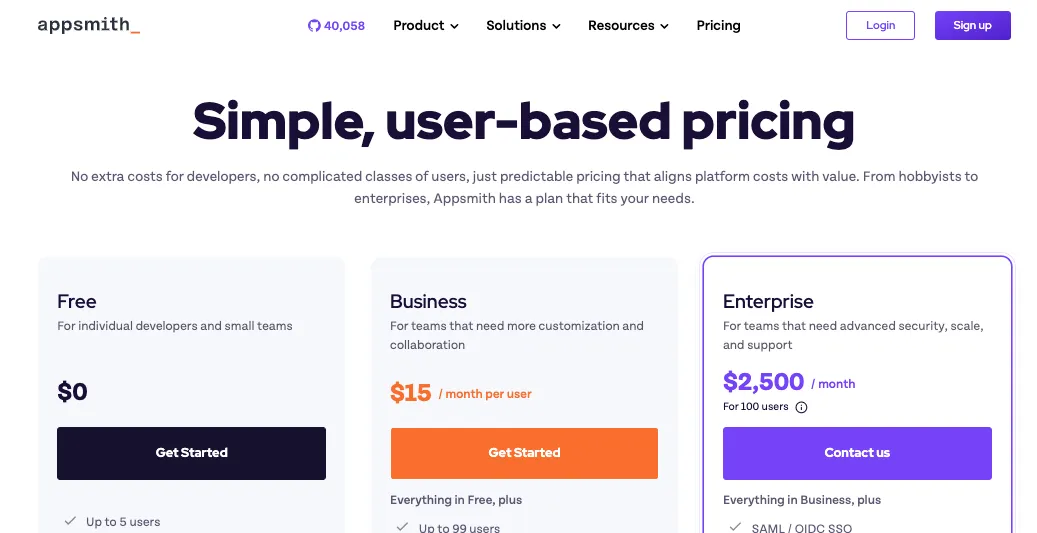
You have the Free plan, the Business plan, and Enterprise. The Business plan costs $15 per user per month, and it includes features like unlimited workspaces, unlimited Git repos, workflows, reusable packages, premium integrations, custom roles, audit logs, and email/chat support.
The part that stands out is the Community edition.
Appsmith is open-source, so teams that want to self-host and keep costs low can start without immediately committing to a paid SaaS plan. That’s a big reason many developers look at Appsmith as a Retool alternative.
This works well if you’re building:
- Internal dashboards
- Admin panels
- CRUD apps
- Support tools
- Database frontends
- Lightweight workflow tools
- Internal approval systems
The pricing is easier to understand because Appsmith doesn’t split users into builders, internal users, and external users. A user is a user.
That sounds boring, but it matters when you’re trying to forecast costs for a growing team.
If you have 40 people using internal tools and 5 developers building them, Appsmith’s pricing is easier to calculate. You don’t need to think too much about who counts as a builder, who only uses the app, or what happens when someone edits something once in a billing cycle.
But there is a catch.
The features that larger companies usually need, like SAML/OIDC SSO, SCIM, CI/CD, private app embedding, air-gapped deployment, dedicated support, and SLAs, sit in the Enterprise plan. So Appsmith can be very affordable early on, but enterprise-grade setups still need a serious budget.
One G2 reviewer said Appsmith “reduced my development time by at least 40%” and also mentioned using both the self-hosted and cloud versions successfully. source: G2
That matches Appsmith’s main pricing appeal: it’s not just cheaper for some teams, it can also reduce the amount of frontend work needed for internal tools.
Retool
Retool’s pricing is more flexible, but it takes longer to understand.
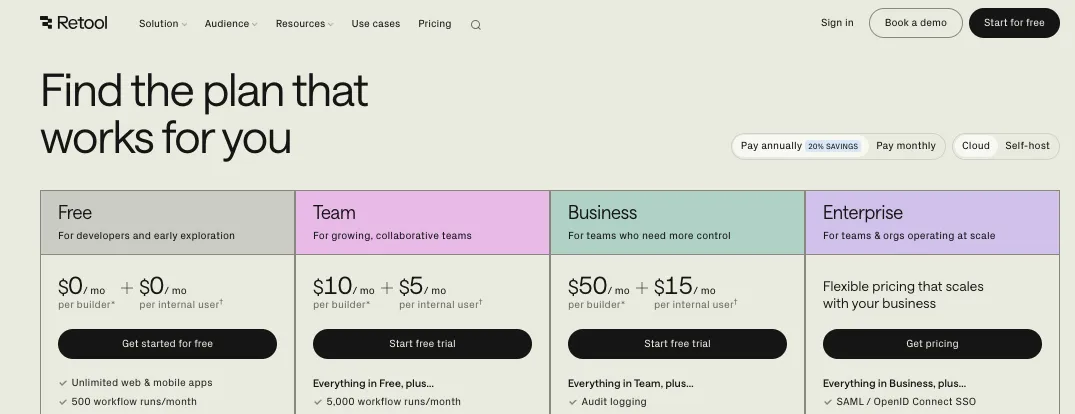
Instead of charging every user the same way, Retool separates users into different types:
- Builders: people who create, edit, and deploy apps or workflows
- Internal users: employees who use the apps for daily work
- External users: partners, clients, vendors, or public portal users
On the Team plan, builders cost $10 per month, and internal users cost $5 per month.
On the Business plan, builders cost $50 per month, and internal users cost $15 per month.
That structure can be useful if only a few people build apps and many people simply use them. For example, if you have 3 builders and 60 internal users, Retool’s pricing may feel more flexible than paying the same rate for everyone.
Here’s where it gets interesting.
Retool’s Business plan also unlocks things like audit logging, richer permission controls, portals, embedded apps, unlimited environments, unlimited modules, and access to external-user pricing. That makes it attractive for teams building internal tools plus partner portals or customer-facing operational tools.
But the pricing can become harder to estimate once you add:
- Builders
- Internal users
- External users
- AI credits
- Workflow runs
- Agents
- Enterprise features
- Self-hosted requirements
- Source control
- Custom branding
- SSO
Retool’s Free plan is generous for testing. It includes unlimited web and mobile apps, 500 workflow runs per month, 5GB of data storage, up to 5 users, Agent hours, and AI credits.
But many serious teams will quickly move toward Business or Enterprise, especially if they need stronger governance.
A G2 reviewer summed up the upside well: “Retool is a one stop shop for trying out an idea quickly.”source: G2
Another reviewer pointed out the scaling issue: “It can get expensive for a big team.”source: G2
That’s the trade-off with Retool. You get a polished platform with a lot already built in, but the bill can grow as your team and usage grow.
Who Wins This Round?
Appsmith wins for simple pricing and cost control.
If you want an open-source internal tool builder, predictable per-user pricing, and the option to self-host without starting on an expensive enterprise contract, Appsmith is easier to justify.
Retool wins for pricing flexibility.
If your team has a few builders, many internal users, and maybe external users for portals, Retool’s pricing model gives you more ways to structure access.
The gap both leave open: pricing still depends heavily on your real setup. A five-person team, a 100-person operations team, and a company building external portals will all get very different cost outcomes.
Appsmith vs Retool: Who Has the Better App Builder?
The app builder is where you’ll spend most of your time.
This is where you drag in tables, connect databases, build forms, write queries, add buttons, create dashboards, and turn messy internal workflows into something your team can actually use.
Both Appsmith and Retool are developer-friendly low-code platforms, but they don’t feel exactly the same.
| Feature |
Appsmith |
Retool |
| Builder style |
Drag-and-drop with JavaScript customization |
Drag-and-drop with deeper built-in components |
| Beginner friendliness |
Good for technical beginners |
Easier first impression for many teams |
| Developer usefulness |
Strong, especially for JavaScript-heavy teams |
Very strong, especially for ops and engineering teams |
| UI polish |
Clean, but more practical than polished |
More polished out of the box |
| App generation with AI |
Available through Appsmith AI features |
AI-native app builder experience |
| Components |
Solid core widget library |
Larger component library |
| Custom logic |
JavaScript-heavy |
JavaScript plus Retool-specific patterns |
| Best for |
Teams that want control and flexibility |
Teams that want speed and polish |
Appsmith
Appsmith’s builder feels like it was made for developers who don’t want to build every internal app from scratch.
You can drag in UI widgets, connect them to databases or APIs, and use JavaScript to control logic. For example, you can build a customer support dashboard that pulls records from PostgreSQL, updates a status through an API, and shows charts or tables for the support team.
That’s exactly where Appsmith makes sense.
It’s not trying to be a pure no-code app builder for everyone. It’s better suited for people who are comfortable with logic, queries, and data sources, but don’t want to spend days building repetitive frontend screens.
This works well if you need to build:
- Admin dashboards
- Internal CRUD apps
- Approval panels
- Data editing tools
- Customer support tools
- Inventory tools
- Internal reporting apps
- Back-office apps
The nice part is that Appsmith gives you enough structure to move fast, but enough freedom to customize with JavaScript when the default behavior isn’t enough.
That said, Appsmith can feel less polished than Retool in some places.
The UI builder is practical, but if you want a very refined enterprise app experience out of the box, Retool often feels smoother. Appsmith may also require more manual work when your app logic gets complex.
One Appsmith G2 reviewer said: “Its user interface is smooth and easy to navigate.” source: G2
Another reviewer liked the developer side and mentioned “built-in JavaScript support for logic.” source: G2
That’s a good way to understand Appsmith. It’s not just drag-and-drop. It’s drag-and-drop plus code where you need it.
Retool
Retool’s app builder feels more polished from the start.
You can build internal tools with tables, forms, charts, buttons, lists, modals, containers, file inputs, maps, and more. You can connect to databases, REST APIs, GraphQL APIs, SaaS tools, and internal systems.
For teams that build a lot of operational software, Retool’s builder can feel faster because so many common internal-tool patterns are already there.
For example, if you’re building an internal refund tool, you can connect Stripe, pull customer data from your database, add approval logic, and create a clean admin interface without designing every part from scratch.
Retool also has a stronger AI app-building story right now. Its pricing page describes the newer builder as AI-native, where you can describe what you need and generate a working app connected to your data, then refine it from there.
This is helpful if your team wants to move from idea to working prototype quickly.
Retool works especially well for:
- Operations dashboards
- Customer support tools
- Admin panels
- Finance workflows
- Sales ops tools
- Compliance review tools
- Database editing apps
- Internal approval systems
- Mobile field apps
But Retool still isn’t a pure no-code tool.
You’ll get the most out of it if someone on your team understands databases, APIs, JavaScript, and app logic. A non-technical founder can learn the basics, but deeper apps still need technical thinking.
One G2 reviewer said Retool’s drag-and-drop interface made it simple to build workflow tools. source: G2
Another reviewer said: “I build internal tools for a living.” They added that with Retool, coding from scratch no longer made sense for that use case. source: G2
That’s Retool’s strongest builder argument: it saves engineering time when the app is internal, data-heavy, and not worth custom-building from zero.
Who Wins This Round?
Retool wins for builder polish and speed.
If your goal is to ship a clean internal app quickly, Retool gives you more ready-made building blocks and a smoother app-building experience.
Appsmith wins for developer control and open-source flexibility.
If your team likes JavaScript, wants more ownership, and doesn’t mind doing some extra setup or customization, Appsmith gives you a lot of power without locking you into a fully proprietary platform.
The gap both leave open: neither tool is ideal for pixel-perfect public-facing apps. These platforms are best for internal tools, dashboards, admin panels, and operational software.
Need More Than Appsmith or Retool?
Prismetric builds custom internal tools with the right integrations, workflows, security, and long-term scalability.
Talk to Our Experts
Appsmith vs Retool: Who Has Better Self-Hosting?
Self-hosting is one of the biggest reasons people compare Appsmith vs Retool.
In plain words, self-hosting means you run the platform on your own infrastructure instead of only using the vendor’s cloud. This matters if your company cares about data control, privacy, compliance, internal networks, or avoiding SaaS lock-in.
Both tools support self-hosting in some form, but Appsmith makes it a much bigger part of its identity.
| Feature |
Appsmith |
Retool |
| Self-hosting focus |
Core strength |
Enterprise-focused |
| Open-source option |
Yes |
No |
| Deployment options |
Docker, Kubernetes, AWS, DigitalOcean, and more |
Docker, AWS, Azure, Kubernetes, and more |
| Best for |
Teams that want infrastructure control at lower cost |
Enterprises that want vendor-supported self-hosting |
| Data control |
Strong |
Strong on Enterprise |
| Setup responsibility |
More on your team |
More vendor-supported at Enterprise level |
| Air-gapped option |
Enterprise add-on |
Enterprise-focused |
| Best fit |
Startups, dev teams, regulated teams with DevOps support |
Large companies with security and procurement needs |
Appsmith
Appsmith has a clear advantage here because self-hosting is part of the product’s core story.
You can host Appsmith on your own server or cloud setup, and the docs describe deployment options like Docker, Kubernetes, AWS AMI, and DigitalOcean.
This is helpful if your team wants to keep internal tools close to your own databases, private APIs, and company infrastructure.
For example, if you’re building a dashboard on top of sensitive customer data, your security team may not want that data flowing through a third-party cloud app builder. With Appsmith, you can keep more control over where the platform runs and how it connects to your systems.
This is especially useful for:
- Regulated teams
- Startups trying to control SaaS costs
- Engineering teams that prefer open-source tools
- Companies with private databases
- Teams with strict data residency needs
- Organizations that want to avoid vendor lock-in
But self-hosting is not magic.
You still need someone to manage deployment, updates, backups, monitoring, security patches, and infrastructure costs. If your team doesn’t have DevOps comfort, Appsmith self-hosting can feel like extra work.
There is also a difference between “we can self-host” and “we can self-host safely in production.”
For a real production setup, you’ll need to think about:
- Server sizing
- Backups
- SSL certificates
- Access control
- Database security
- Network rules
- Monitoring
- Upgrade planning
- Disaster recovery
A Reddit user discussing internal tool builders said they preferred Appsmith to Retool because of its “smooth UI.” source: Reddit
That small comment actually reflects why Appsmith gets attention in self-hosted communities: it gives teams a practical way to build internal tools without immediately buying into a heavier SaaS platform.
Retool
Retool also supports self-hosting, but it is positioned more toward enterprise customers.
Retool’s self-hosting page says Enterprise customers can deploy Retool on their own infrastructure. It also mentions deployment options like local Docker, AWS, Azure, and Kubernetes.
This makes sense for larger companies.
If you’re a bank, healthcare company, logistics platform, or enterprise SaaS team, you may want Retool’s polished app builder and governance features, but still need to run it inside your own VPC or behind your own VPN.
That’s where Retool self-hosting fits well.
It gives enterprise teams a way to use Retool while keeping apps closer to private databases and internal APIs.
Retool self-hosting is better suited for teams that need:
- Vendor-backed enterprise deployment
- Private networking
- Security reviews
- Compliance controls
- Larger internal app programs
- Central governance
- Enterprise support
- Procurement-friendly contracts
The downside is cost and access.
If you’re a small startup that just wants a free or low-cost self-hosted internal tool builder, Retool is usually not the first choice. It’s better when your company already has the budget and security requirements to justify an Enterprise plan.
One Reddit commenter put it bluntly: “Retool also starts getting prohibitively expensive.” source: Reddit
That doesn’t mean Retool is bad. It just means Retool’s self-hosting story is built for a different buyer.
Who Wins This Round?
Appsmith wins for self-hosting.
If your main priority is open-source control, lower-cost deployment, and the ability to run your internal tool builder on your own infrastructure, Appsmith is the clearer choice.
Retool wins for enterprise-supported self-hosting.
If you’re a larger company and want a polished internal software platform with vendor support, security reviews, governance, and enterprise deployment options, Retool is still a strong fit.
The gap both leave open: self-hosting always comes with maintenance. Appsmith gives you more control, but also more responsibility. Retool gives you a more enterprise-ready path, but usually at a higher cost.
Appsmith vs Retool: Who Has Better UI Components and Customization?
The UI builder is only useful if the components can handle real internal-tool work.
Tables, forms, charts, buttons, modals, filters, file uploads, and detail views sound basic, but they decide how quickly you can turn raw data into a tool your team can actually use.
I compared both platforms from the angle that matters most: how much you can build before you hit a wall.
| Feature |
Appsmith |
Retool |
| Core UI widgets |
Yes |
Yes |
| Tables and forms |
Yes |
Yes |
| Charts and dashboards |
Yes |
Yes |
| Modals and containers |
Yes |
Yes |
| File upload support |
Yes |
Yes |
| Maps and advanced display components |
Available |
Stronger library |
| Custom widgets/components |
Custom widgets with HTML, CSS, and JavaScript |
Custom React component libraries |
| Styling flexibility |
Good, but can feel practical |
More polished out of the box |
| Best for |
Developer-controlled internal tools |
Polished enterprise tools and complex interfaces |
Appsmith
Appsmith gives you the core widgets you need to build internal tools without starting from a blank React project.
You can add tables, forms, buttons, inputs, charts, modals, containers, file pickers, and other common UI pieces. For a lot of internal dashboards and CRUD apps, that is enough.
For example, you can build a customer management dashboard with:
- A table showing customer records
- A form to update account status
- A button to trigger an API call
- A chart showing usage or revenue
- A modal for approval notes
- A file picker for document uploads
That covers a lot of real business apps.
Where Appsmith gets more interesting is custom widgets.
If the default widgets don’t cover your use case, you can create a custom widget using HTML, CSS, and JavaScript. This is helpful when you need something very specific, like a custom calendar view, a special data card, a visual approval step, or an embedded internal component that doesn’t exist in the standard widget library.
This is one of Appsmith’s biggest strengths for developer teams.
You don’t have to wait for the platform to add every component. If your team can write basic frontend code, you can extend the UI yourself.
But Appsmith’s interface can feel more functional than polished.
It gets the job done, but Retool often feels smoother when you’re building complex layouts or trying to make an internal app look more refined quickly. Appsmith also may need more manual styling if you want a highly branded interface.
One Appsmith G2 reviewer said they liked “the easy drag-and-drop feature and instant integration with almost anything.” source: G2
That is the Appsmith experience in a nutshell. It gives you enough building blocks to move fast, then lets you use code when the standard widgets are not enough.
Retool
Retool has a stronger component library out of the box.
You get the usual internal-tool components like tables, forms, buttons, charts, containers, modals, inputs, lists, file uploaders, and detail views. But Retool generally feels more complete when you’re building bigger operational tools.
This matters when your app is not just one dashboard.
For example, if you’re building a refund review system, you may need:
- A searchable customer table
- A transaction detail panel
- A notes section
- A status dropdown
- A manager approval button
- A file preview area
- A timeline of past actions
- A chart showing refund trends
- A modal for escalation
Retool makes this kind of interface feel faster because more layout and interaction patterns are already available.
Retool also supports custom components, but the newer recommended path is more developer-heavy. You can build custom component libraries using React and TypeScript, then deploy them into Retool.
This is powerful if your engineering team already works in React.
It means you can create reusable components that match your company’s design system or internal workflows. For example, a logistics company could build a custom shipment tracker component and reuse it across multiple Retool apps.
But it is not as beginner-friendly as dropping HTML and CSS into a simple custom widget.
So here’s the real difference:
- Appsmith custom widgets feel more approachable for lightweight frontend customization.
- Retool custom component libraries feel stronger for mature teams that already have React developers.
A Retool G2 reviewer said Retool helps them build “intuitive and multi-functional interfaces in a very short amount of time.” source: G2
That matches what Retool does well. It gives teams a polished set of components, then gives developers deeper customization if they need it.
Who Wins This Round?
Retool wins for UI components and polish.
If you want more ready-made components, smoother layouts, and a faster path to professional-looking internal tools, Retool has the edge.
Appsmith wins for simpler custom widgets.
If your team wants open-ended UI customization with HTML, CSS, and JavaScript, Appsmith feels more accessible.
The gap both leave open: neither tool is built for pixel-perfect public websites. You can make nice internal apps, but if you’re building a marketing site, SaaS frontend, or customer-facing product experience, you’ll probably want a different tool.
Appsmith vs Retool: Who Handles Data Sources and Integrations Better?
Most internal tools are just nice interfaces sitting on top of messy data.
That data might live in PostgreSQL, MySQL, MongoDB, Google Sheets, Salesforce, Stripe, an internal REST API, or a random tool your ops team adopted three years ago.
So the real question is simple: how easily can Appsmith and Retool connect to the systems your business already uses?
| Feature |
Appsmith |
Retool |
| SQL databases |
Yes |
Yes |
| NoSQL databases |
Yes |
Yes |
| REST APIs |
Yes |
Yes |
| GraphQL APIs |
Yes |
Yes |
| SaaS integrations |
Available |
Larger native catalog |
| Authentication for APIs |
Yes |
Yes |
| Query editor |
Yes |
Yes |
| Built-in database |
No primary built-in app database |
Retool Database |
| Best for |
Teams connecting to common databases and APIs |
Teams needing many ready-made integrations |
Appsmith
Appsmith is strong if your internal tools mostly connect to databases and APIs.
You can connect to popular databases, REST APIs, GraphQL APIs, and other external services. Once connected, you can write queries, pull data into widgets, update records, and use JavaScript to transform the response before showing it in your app.
That makes Appsmith a good fit for teams that already have their own backend systems.
For example, you can connect Appsmith to:
- PostgreSQL for customer records
- MongoDB for product data
- REST APIs for internal services
- GraphQL APIs for application data
- Google Sheets for lightweight team workflows
- S3 or cloud storage for files
- SaaS tools through APIs
This works especially well when your engineering team already controls the backend.
You don’t need the app builder to solve every integration problem for you. You just need it to connect cleanly to the systems you already use.
Appsmith also supports authenticated APIs, so you can store shared API settings like base URLs, headers, and authentication details instead of repeating them in every query.
That is helpful when you’re building multiple internal apps that talk to the same backend.
For example, if your company has an internal billing API, you can set it up once as a datasource, then reuse it across refund tools, finance dashboards, and admin panels.
But Appsmith’s integration catalog can feel smaller than Retool’s.
If your team relies heavily on a wide mix of SaaS tools, Retool may save time because more connectors are already packaged in a polished way.
One Appsmith G2 reviewer said the platform makes it easy to “connect to various data sources” and build apps quickly. source: G2
That is where Appsmith is strongest: connecting to data, building the interface, and letting developers control the logic.
Retool
Retool is one of the strongest low-code platforms for data connections.
It supports databases, REST APIs, GraphQL APIs, SaaS apps, internal APIs, and business tools. Retool’s docs mention integrations like Salesforce and PostgreSQL, and you can also connect to any REST or GraphQL API.
This is useful when your internal app needs to pull data from many places at once.
For example, a support dashboard in Retool could show:
- Customer details from PostgreSQL
- Subscription data from Stripe
- Tickets from Zendesk
- Usage events from BigQuery
- Notes from Salesforce
- Internal actions from a REST API
That is the kind of multi-source internal tool Retool handles well.
Retool also has Retool Database, which works as a lightweight backend for internal apps and prototypes. This is helpful if you don’t already have a database ready and just need somewhere to store operational data.
For example, a small ops team could use Retool Database to store:
- Approval requests
- Vendor records
- Manual QA results
- Inventory edits
- Internal task queues
You wouldn’t usually treat it like the main production database for a serious SaaS product, but for internal apps and quick prototypes, it can save time.
The main advantage with Retool is convenience.
You often spend less time figuring out how to connect things and more time building the actual tool.
But that convenience also creates more platform dependence.
The more your data connections, app logic, workflows, and internal processes live inside Retool, the more carefully you need to think about long-term vendor lock-in.
One Retool G2 reviewer said users can create internal tools quickly and connect to databases and APIs with ease. source: G2
That’s the reason Retool is popular with ops-heavy and engineering-heavy teams. It turns scattered business data into usable internal software faster than building everything from scratch.
Who Wins This Round?
Retool wins for integrations.
If you need a larger connector library, more SaaS integrations, and a built-in database for lightweight internal apps, Retool is stronger.
Appsmith wins for straightforward database and API-driven apps.
If your team mainly needs PostgreSQL, MySQL, MongoDB, REST APIs, GraphQL, and custom backend access, Appsmith gives you enough power without making the platform feel bloated.
The gap both leave open: integrations are not the same as clean data architecture. If your internal APIs are messy or your database permissions are poorly designed, both tools will expose that mess quickly.
Appsmith vs Retool: Who Has Better Workflows and Automation?
A lot of internal tools start as dashboards.
Then someone asks, “Can this also send an alert?”
Then, “Can it update the database automatically?”
Then, “Can it run every morning?”
Then, “Can it trigger when a webhook comes in?”
That is when workflow automation becomes important.
Both Appsmith and Retool can help you automate business processes, but Retool has a more mature visual workflow experience.
| Feature |
Appsmith |
Retool |
| SQL databases |
Yes |
Yes |
| NoSQL databases |
Yes |
Yes |
| REST APIs |
Yes |
Yes |
| GraphQL APIs |
Yes |
Yes |
| SaaS integrations |
Available |
Larger native catalog |
| Authentication for APIs |
Yes |
Yes |
| Query editor |
Yes |
Yes |
| Built-in database |
No primary built-in app database |
Retool Database |
| Best for |
Teams connecting to common databases and APIs |
Teams needing many ready-made integrations |
Appsmith
Appsmith Workflows combine code-based logic with node-based data-source connections.
That sounds technical, but the idea is simple.
You can create backend workflows that run tasks without someone clicking around inside the app every time.
For example, you could build a workflow that:
- Checks for pending refund requests every hour
- Pulls customer data from your database
- Sends the record to an internal API
- Updates the approval status
- Sends a Slack or email notification
- Logs the result for your team
That kind of automation is useful when your internal tools need to do more than display data.
Appsmith’s workflow approach feels developer-friendly. You can write JavaScript, connect to data sources, and build logic around your app’s real business rules.
This is helpful if your team wants flexibility.
You’re not forced into a purely visual automation builder where every step feels boxed in. You can use code when the workflow needs more control.
But Appsmith Workflows may feel less mature if you’re looking for a polished automation dashboard with lots of ready-made operational patterns.
It is better suited for technical teams that are comfortable thinking through the logic themselves.
You’ll probably like Appsmith Workflows if your team already says things like:
- “Let’s write a quick script for that.”
- “We can trigger this with an API.”
- “Let’s transform the response before saving it.”
- “We should make this run on a schedule.”
You may find it limiting if you want non-technical operations users to build and manage complex automations on their own.
One Appsmith G2 reviewer said they liked that Appsmith supports “custom JS functions,” which is exactly the kind of flexibility that matters for workflow logic. source: G2
Retool
Retool Workflows feels more complete for business automation.
You can use it to build scheduled jobs, webhook-based workflows, ETL tasks, alerts, approval flows, and background processes.
In plain words, it helps you automate the things your team currently does manually across spreadsheets, databases, APIs, and SaaS tools.
For example, you could build a Retool Workflow that:
- Runs every weekday at 9 AM
- Pulls new orders from a database
- Checks payment status through Stripe
- Flags suspicious records
- Sends a Slack alert to the operations team
- Updates a dashboard
- Creates a task for manual review
Retool supports schedule triggers, webhook triggers, and query-based triggers. That means a workflow can run at a set time, when another system sends data, or when a query finds something that needs action.
This makes Retool especially strong for ops-heavy teams.
If you have finance, support, sales ops, compliance, logistics, or customer success teams constantly moving data between systems, Retool Workflows can become a real command center.
Retool also fits better when workflows need human review.
For example, you can build an app where a manager approves a refund, then a workflow handles the backend steps after approval. That blend of app UI plus automation is one of Retool’s strongest use cases.
The downside is that Retool workflows add another layer to the platform.
You are not just building apps anymore. You are also building automations, triggers, scheduled jobs, and business logic inside Retool. That can be powerful, but it also means your team needs clean governance so workflows don’t become hard to track later.
One Retool G2 reviewer said the platform helps teams build workflow tools quickly using its drag-and-drop interface. source: G2
That is where Retool pulls ahead. It is not just an app builder. It is closer to an internal software platform.
Who Wins This Round?
Retool wins for workflows and automation.
Its visual workflow builder, schedule triggers, webhook triggers, query triggers, and stronger operational automation features make it the better choice for teams that want to automate real business processes.
Appsmith wins for code-first workflow control.
If your developers prefer writing JavaScript and connecting data sources directly, Appsmith Workflows can still be a strong fit.
The gap both leave open: workflow automation only works well if your business process is clear. If your team has messy approvals, unclear ownership, or inconsistent data, automation will make those problems move faster instead of fixing them.
Appsmith vs Retool: Who Has Better Security and Governance?
Security is where internal tool builders get serious.
It is one thing to build a dashboard for your team. It is another thing to let different users view, edit, approve, export, and update sensitive business data.
If your internal tool connects to customer records, payments, operations data, healthcare data, financial data, or admin controls, permissions are not optional.
Here’s how Appsmith and Retool compare.
| Feature |
Appsmith |
Retool |
| Role-based access control |
Yes |
Yes |
| Granular permissions |
Yes |
Yes |
| Audit logs |
Yes |
Yes |
| SSO |
Yes, higher plans |
Yes, higher plans |
| SCIM user provisioning |
Enterprise |
Enterprise |
| Self-hosted security control |
Strong |
Strong on Enterprise |
| Managed enterprise governance |
Good |
Stronger |
| Data ownership |
Strong with self-hosting |
Strong with Enterprise/self-hosted setup |
| Best for |
Teams that want infrastructure control |
Teams that want managed enterprise controls |
Appsmith
Appsmith’s biggest security advantage is control.
Because Appsmith is open-source and self-hostable, your team can run it inside your own infrastructure, closer to your private databases and internal APIs. That matters if your company does not want sensitive data passing through a third-party cloud builder.
This is useful for teams working with:
- Private databases
- Internal APIs
- Customer records
- Admin workflows
- Finance dashboards
- Support tools
- Regulated data
- Internal approval systems
Appsmith also supports role-based access control, granular access control, audit logs, SSO options, and enterprise user provisioning features.
In plain English, that means you can decide who can access what.
For example, your support team may only need to view customer records, while your finance team can approve refunds, and your engineering team can edit the actual app logic.
That kind of separation matters.
Without clear permissions, internal tools can quickly become risky. One wrong access setting could let someone edit data they should only view.
Appsmith’s self-hosting also helps if your security team wants more control over network rules, deployment, backups, database connections, and data residency.
But there is a trade-off.
More control means more responsibility.
If you self-host Appsmith, your team needs to manage:
- Server security
- Updates
- Backups
- SSL certificates
- User access
- Network rules
- Monitoring
- Incident response
- Database permissions
So Appsmith is strong for security-conscious teams, but only if they have the technical ability to run it properly.
One Appsmith G2 reviewer listed “Role-based access control (RBAC)” and “Self-hosted or Cloud options” as things they liked about the platform.source
That is exactly why Appsmith gets attention from developer teams. It gives you flexibility without forcing every team into the same hosted model.
Retool
Retool’s security story feels more enterprise-ready out of the box.
You get strong governance features like role-based access control, permission groups, audit logs, SSO, SCIM, environment controls, app permissions, and resource permissions depending on your plan.
This is helpful if you are not just building one internal tool.
Many companies use Retool as a full internal software layer. That means dozens of apps, many teams, multiple databases, approval flows, and business-critical workflows running inside one platform.
Retool is built for that kind of setup.
For example, a larger company might use Retool for:
- Finance approvals
- Customer support dashboards
- Compliance review tools
- Sales operations workflows
- Data correction tools
- Refund processing
- Vendor management
- Internal admin panels
In those cases, governance becomes just as important as speed.
You need to know:
- Who changed an app?
- Who ran a query?
- Who accessed a dashboard?
- Which group can edit production tools?
- Which users can access sensitive resources?
- Which apps are safe to share with external users?
Retool handles this well, especially on Business and Enterprise plans.
The main downside is that some of the best governance features sit behind higher tiers. So small teams may like Retool’s builder, but larger teams are usually the ones that get the full security experience.
One Retool G2 reviewer said: “Retool creates brilliant security solutions and enterprise controls.” source: G2
That sums it up well. Retool is especially strong when your company wants security controls that feel managed, documented, and ready for larger teams.
Who Wins This Round?
This round is a tie, but for different reasons.
Appsmith wins if you care most about self-hosting, infrastructure control, open-source flexibility, and keeping your internal tool builder close to your own systems.
Retool wins if you care most about managed enterprise governance, permission groups, audit logs, app-level controls, and a more polished security experience for large teams.
The gap both leave open: security still depends on your setup. A low-code platform cannot fix weak database permissions, messy access rules, or unclear internal processes.
Appsmith vs Retool: Who Has Better Git, Version Control, and Release Management?
Version control matters once your internal tools stop being small experiments.
When one developer is building a simple dashboard, clicking “deploy” manually may be fine.
But when multiple people are editing production tools, you need a safer way to track changes, review updates, roll back mistakes, and keep development separate from production.
That is where Git and release management become important.
| Feature |
Appsmith |
Retool |
| Git support |
Strong |
Strong |
| Branching |
Yes |
Yes, with source control setup |
| Rollbacks |
Yes |
Yes |
| Release history |
Yes |
Yes |
| CI/CD support |
Available on higher tiers |
Available with source control workflows |
| Multi-environment support |
Available |
Stronger on higher tiers |
| Best for developers |
Strong |
Strong |
| Best for enterprise release governance |
Good |
Stronger |
Appsmith
Appsmith has a strong developer-friendly approach to Git.
You can connect Appsmith apps to Git repositories, track changes, work with branches, roll back updates, and collaborate more like you would in a normal software development workflow.
This is useful because internal tools still need discipline.
Even if you are not writing a full custom React app, your internal tool may still contain:
- Database queries
- API calls
- JavaScript logic
- Permission-sensitive workflows
- Business rules
- App layouts
- Production data actions
You do not want those changes happening with no history.
With Appsmith’s Git support, teams can manage app changes more safely. A developer can make updates in a branch, test changes, and then merge them when ready.
This works well for engineering teams that already use GitHub, GitLab, Bitbucket, or another Git provider.
For example, if you are building an internal order management tool, you can update the refund approval flow in a separate branch instead of touching the live app directly.
That may sound like a small thing, but it helps avoid production mistakes.
Appsmith’s Git story also fits its open-source personality. It feels natural for developer teams that already think in commits, branches, and pull requests.
But Appsmith may still require more setup discipline from your team.
You need to decide:
- Who can merge changes?
- Which branch maps to production?
- How reviews happen?
- How rollback works?
- How environments are managed?
- Who owns the release process?
Appsmith gives you useful version control tools, but your team still needs to use them properly.
One Reddit user comparing Appsmith and Retool said they preferred Appsmith for its “smooth UI.” source: Reddit
That comment is not specifically about Git, but it shows why Appsmith appeals to developer-heavy and self-hosted communities: it feels practical, flexible, and less locked down.
Retool
Retool also has strong versioning and release management, especially for larger teams.
Retool supports app release history, source control, versioned releases, and workflows that help teams track changes before pushing updates to production.
This is useful when Retool becomes more than a small app builder.
If your company has many Retool apps across finance, support, operations, and compliance, you need a way to keep changes controlled.
For example, you may have:
- A development version of an app
- A staging version for testing
- A production version used by real teams
- Separate environments for API credentials
- Release approvals
- Rollback needs
- Audit requirements
Retool handles this kind of enterprise workflow well.
It also supports release history for apps and workflows, which helps teams understand what changed and when.
Retool’s source control features are especially useful for teams that want internal tools to fit into their broader engineering process.
One G2 reviewer said they liked Retool’s “Ability to connect with source control” and “kick off CI/CD.” source: G2
That is a big deal for enterprise teams.
It means Retool is not just a drag-and-drop builder sitting outside the engineering workflow. It can become part of how technical teams manage internal software.
The catch is access.
Some of Retool’s stronger release and governance features are more useful on higher plans, especially when you start dealing with multiple environments, self-hosting, source control, and enterprise workflows.
So small teams may not feel the full benefit right away.
Who Wins This Round?
Appsmith wins for accessible Git-based development.
If your team wants Git support, branches, rollbacks, and a developer-style workflow without overcomplicating things, Appsmith is a strong choice.
Retool wins for enterprise release management.
If you need app releases, workflow releases, source control, CI/CD-style processes, and stronger governance around production changes, Retool has the edge.
The gap both leave open: version control only helps if your team follows a process. If everyone edits production directly, even the best Git integration will not save you from messy releases.
Appsmith vs Retool: Who Has Better Mobile App Support?
Mobile support is one of the clearest differences between Appsmith and Retool.
Most internal tools are used on laptops. But some teams need mobile apps for field work, warehouse tasks, inspections, deliveries, audits, inventory checks, and on-site operations.
That is where Retool pulls ahead.
| Feature |
Appsmith |
Retool |
| Responsive web apps |
Yes |
Yes |
| Native mobile app builder |
Not the main focus |
Yes |
| iOS and Android support |
Web-based usage |
Native mobile apps |
| Push notifications |
Not a core strength |
Yes |
| Offline mode |
Not a core strength |
Yes |
| Barcode/scanner workflows |
Possible with custom work |
Stronger fit |
| Field operations use cases |
Limited |
Strong |
| Best for |
Desktop and web-based internal tools |
Mobile operations and field teams |
Appsmith
Appsmith is mainly built for web-based internal tools.
That means it works best when your team is using dashboards, admin panels, forms, and CRUD apps from a browser.
You can still build apps that are usable on smaller screens, and you can design responsive layouts for certain use cases. But Appsmith is not really trying to be a native mobile app builder.
This is fine for many teams.
A lot of internal tools do not need native mobile features.
For example, Appsmith works well for:
- Admin dashboards
- Support panels
- Data review tools
- Approval workflows
- Reporting screens
- Database editing apps
- Internal finance tools
- Operations dashboards
Most of those are better on desktop anyway.
If your team needs to review tables, compare records, edit forms, or analyze data, a web app is usually enough.
But if you need something that feels like a real mobile app, Appsmith may feel limiting.
For example, Appsmith is not the first choice if you need:
- Offline-first field apps
- Push notifications
- Barcode scanning
- Hardware integrations
- Native iOS or Android deployment
- Warehouse workflows
- On-site inspection apps
- Mobile apps for field technicians
You may be able to work around some of this with custom development, but that removes some of the reason for using a low-code internal tool builder in the first place.
Appsmith’s strength is not mobile-native tooling. Its strength is giving developers a flexible way to build internal web apps with control over data, logic, and hosting.
Retool
Retool is much stronger for mobile.
Retool Mobile lets teams build native mobile apps for iOS and Android. That makes it a better fit for teams that need internal tools outside the office.
This is useful for companies with people working in:
- Warehouses
- Retail stores
- Construction sites
- Logistics operations
- Field service
- Manufacturing floors
- Healthcare operations
- Delivery teams
- Inventory management
For example, a warehouse team could use a Retool mobile app to scan items, update inventory, upload photos, and send alerts to managers.
A field service team could use it to view job details, capture signatures, update task status, and submit inspection notes.
Retool also supports mobile-specific features like push notifications and offline mode. Offline mode matters when users may lose internet access while working in the field.
Retool also has docs around hardware integrations, including scanners and mobile device workflows, which makes it more serious for operational mobile use cases.
But here is the catch.
Retool Mobile is powerful, but it may not feel as flexible as building a custom native app from scratch.
A Retool community user said: “Retool mobile is much more limited especially with regards to UI/UX.” source: Community Retool
That is fair.
Retool Mobile is great when the goal is internal utility, speed, and operational function. It is not the right tool if you are trying to build a polished consumer mobile app.
Who Wins This Round?
Retool wins clearly for mobile apps.
If your team needs native iOS and Android apps, push notifications, offline mode, field workflows, barcode scanning, or mobile-first operations, Retool is the better choice.
Appsmith is better for web-based internal tools.
If your users mostly work from laptops and only need occasional mobile access through a browser, Appsmith can still work well.
The gap both leave open: neither tool should be your first choice for a polished consumer mobile app. These are internal tool platforms, not replacements for a full mobile product team.
Appsmith vs Retool: Who Is Better for External Apps, Portals, and Embedding?
This is where the comparison gets interesting.
Both Appsmith and Retool can help you build tools that live outside a normal internal dashboard. But they approach external access very differently.
If you want to build a customer portal, vendor portal, partner dashboard, or embedded admin tool, you need to think carefully before choosing either one.
| Feature |
Appsmith |
Retool |
| Public app sharing |
Yes |
Yes |
| Embedding |
Yes |
Yes |
| Private embedding |
Enterprise-focused |
Supported through external/embedded app options |
| External users |
More manual setup |
Stronger external-user model |
| White-labeled portals |
More limited |
Stronger |
| Customer/vendor/partner apps |
Possible |
Stronger fit |
| Best for |
Embedded internal tools with more control |
External apps and portals |
Appsmith
Appsmith supports embedding apps into existing applications.
That means you can build an internal tool or dashboard in Appsmith, then place it inside another product or internal portal using an embed link or iframe-style setup.
This can be useful when you already have a company portal and want to add an Appsmith-powered admin screen inside it.
For example, you could embed:
- A reporting dashboard
- A support admin panel
- A data correction tool
- A partner-facing status page
- A lightweight vendor form
- An internal operations panel
Appsmith also supports public apps and private app embedding features depending on the plan.
The advantage is control.
If you are self-hosting Appsmith, you can keep the app closer to your own infrastructure and design the surrounding system around your existing authentication, permissions, and internal app architecture.
But Appsmith is not as polished as Retool for full external-user management.
If you want to manage customers, vendors, or partners as external users with branded login flows, controlled access, and portal-style experiences, Appsmith may require more setup and custom work.
You can still build useful embedded tools, but you need to plan authentication, permissions, branding, and user access carefully.
This is better suited for technical teams that want control and do not mind handling more of the architecture themselves.
Retool
Retool is stronger for external apps and portals.
Retool External Apps, sometimes called Retool Portals, are designed for apps used by customers, vendors, partners, or other users outside your company.
This is useful when you want to take an internal workflow and expose part of it safely to an outside group.
For example, you could build:
- A vendor onboarding portal
- A customer document upload portal
- A partner reporting dashboard
- A client approval tool
- A tenant management portal
- A compliance submission portal
- A supplier update form
Retool can handle external user invitations, signup, permissions, white-labeling, and the app experience in a more structured way.
That saves time if you want Retool to manage more of the portal layer instead of stitching everything together manually.
Retool also supports embedded apps, which can be useful if you want to place Retool functionality inside an existing product or portal.
But pricing matters here.
External apps and external users can change your cost structure. Retool’s pricing model separates builders, internal users, and external users, so you need to calculate the real cost before building a portal around it.
This works well when the use case justifies the cost.
It may feel expensive if you are trying to launch a lightweight customer-facing app with many users and limited revenue.
A Reddit user talking about low-code platforms said they would rather write code than face “low code limitations and quirks.” source: Reddit
That warning applies here.
Retool is very good for external operational tools, but if you are building your main customer-facing SaaS product, you may eventually want more control than any low-code portal builder gives you.
Who Wins This Round?
Retool wins for external apps and portals.
If you want branded portals for customers, vendors, or partners, Retool has the stronger external-user model and a clearer path for building portal-style apps.
Appsmith wins for controlled embedding.
If your team wants to embed internal tools inside existing systems and prefers self-hosting, open-source flexibility, and more control over the surrounding architecture, Appsmith is still a strong option.
The gap both leave open: external apps need extra care. Authentication, permissions, data filtering, branding, and pricing can all become more complicated once users outside your company are involved.
Appsmith vs Retool: Final Feature Winner
After comparing both tools across pricing, app building, self-hosting, UI components, integrations, workflows, security, Git, mobile apps, and external portals, the pattern is clear.
Appsmith and Retool are not trying to win the same buyer in the same way.
Appsmith is better when your team wants control.
Retool is better when your team wants speed, polish, and a more complete enterprise platform.
Here is the final breakdown.
| Category |
Winner |
| Pricing simplicity |
Appsmith |
| Open-source flexibility |
Appsmith |
| Self-hosting |
Appsmith |
| App builder polish |
Retool |
| UI components |
Retool |
| Custom widgets/components |
Tie |
| Data integrations |
Retool |
| Workflow automation |
Retool |
| Security and governance |
Tie |
| Git and version control |
Tie |
| Native mobile apps |
Retool |
| External apps and portals |
Retool |
| Best for startups |
Appsmith |
| Best for enterprises |
Retool |
| Best for developer control |
Appsmith |
| Best for speed and polish |
Retool |
Who Wins Overall?
Retool wins if you want the most polished all-around internal tool platform.
It gives you a smoother app builder, stronger workflow automation, more ready-made integrations, native mobile apps, external portals, and enterprise governance features that are easier to manage at scale.
Appsmith wins if you want open-source flexibility and cost control.
It is better for teams that care about self-hosting, infrastructure ownership, simple pricing, custom widgets, Git-based development, and avoiding too much platform lock-in.
The simplest way to decide is this:
Choose Appsmith if your team says, “We want control, self-hosting, and lower long-term costs.”
Choose Retool if your team says, “We want to ship polished internal tools fast and we are okay paying for a more complete platform.”
For most startups, developer teams, and self-hosted organizations, Appsmith is the smarter first choice.
For mid-market teams, enterprises, operations-heavy companies, and teams building mobile or external apps, Retool is usually worth the higher price.
Build Internal Apps Without Platform Limits
Prismetric creates tailored admin panels, dashboards, portals, and workflow tools built around your exact business process.
Get a Free Consultation
My Final Verdict: Appsmith vs Retool
If I had to keep it simple, I’d say this:
Choose Appsmith if you want more control, lower costs, open-source flexibility, and the option to self-host your internal tools without getting locked into an expensive enterprise setup.
Choose Retool if you want a more polished builder, faster app creation, stronger workflows, native mobile apps, and enterprise features that are easier to manage out of the box.
For startups, developer teams, and companies that care about self-hosting, Appsmith is the smarter choice.
For larger teams, operations-heavy companies, and enterprises that need speed, governance, mobile apps, and external portals, Retool is usually worth the higher price.
So the real winner depends on what matters more to your team: control and cost savings, or speed and enterprise polish.
Frequently Asked Questions
The main difference is control vs polish.
Appsmith is more open-source, self-hosting friendly, and cost-conscious. Retool is more polished, enterprise-ready, and stronger for workflows, mobile apps, and complex internal tools.
Appsmith is better if you want open-source flexibility, self-hosting, and lower long-term costs.
Retool is better if you want a smoother builder, more ready-made components, stronger automation, and enterprise governance.
Yes, Appsmith is one of the strongest free and open-source Retool alternatives.
It works well if your team wants to build internal tools, admin panels, dashboards, and CRUD apps without depending fully on a paid proprietary platform.
Appsmith is usually cheaper for teams that want simple pricing, self-hosting, or many internal users.
Retool can still be cost-effective if you have a small number of builders and more users who only need to use the apps, not build them.
Yes, both tools support self-hosting, but they approach it differently.
- Appsmith makes self-hosting one of its core strengths.
- Retool supports self-hosting mainly for enterprise-level teams.
- Appsmith is usually easier to justify if self-hosting is your main priority.
No, Retool is not open-source.
It is a proprietary internal tool development platform. That means you get a polished managed experience, but you also get more vendor lock-in compared to Appsmith.
Retool usually feels easier at the start because the interface is more polished and the component library is larger.
Appsmith is still beginner-friendly for technical users, but it works best when you’re comfortable with basic JavaScript, databases, APIs, and app logic.
Both are developer-friendly, but in different ways.
Appsmith is better for developers who want more control, open-source flexibility, custom widgets, and self-hosting.
Retool is better for developers who want to ship polished internal tools quickly without building every UI and workflow from scratch.
Appsmith is usually the better first choice for startups.
It gives you lower costs, a free open-source option, and enough flexibility to build internal tools without spending too much early on.
Retool is usually stronger for enterprises.
It has a more polished experience for governance, permissions, audit logs, workflows, mobile apps, external portals, and large-scale internal tool programs.
Yes, both tools are great for CRUD apps.
CRUD simply means apps where users can create, read, update, and delete data. For example, customer records, order data, inventory items, support tickets, or internal approvals.
Retool has the stronger UI component library overall.
Appsmith gives you the core widgets you need for most internal apps, but Retool has more ready-made components and usually feels more polished when building complex interfaces.
This depends on your developer stack.
- Choose Appsmith if you want custom widgets using HTML, CSS, and JavaScript.
- Choose Retool if your team prefers building custom components with React.
- Both can be customized, but Retool’s approach is more suited to mature frontend teams.
Retool is better for workflow automation.
Its workflow builder is more mature and works well for scheduled jobs, webhooks, approvals, alerts, and operational automations.
Appsmith also supports workflows, but it feels more code-first and developer-led.
Retool is the better choice for mobile apps.
It has a native mobile app builder for internal field apps, warehouse tools, inspections, and operations workflows. Appsmith is more focused on web-based internal tools.
Yes, Appsmith can connect to common databases and APIs.
You can use it with SQL databases, NoSQL databases, REST APIs, GraphQL APIs, Google Sheets, and other data sources depending on your setup.
Yes, Retool is very strong for database and API connections.
It works well with SQL databases, REST APIs, GraphQL APIs, SaaS tools, internal APIs, and Retool Database for lightweight internal app data.
Appsmith is mainly designed to connect to your existing data sources.
It is not centered around a built-in app database in the same way Retool is with Retool Database.
Yes, Retool has Retool Database.
It is useful when you need a simple place to store data for internal apps, prototypes, approval tools, or lightweight operational workflows.
Both can be secure when set up properly.
Appsmith is strong if you want self-hosting and infrastructure control. Retool is strong if you want managed enterprise security, permissions, audit logs, and governance features.
Appsmith can replace Retool for many internal tool use cases, especially dashboards, admin panels, database frontends, and CRUD apps.
But Retool may still be better if your team depends heavily on mobile apps, external portals, advanced workflows, or a larger ready-made component library.
Retool is worth it if speed, polish, workflows, integrations, mobile apps, and enterprise controls matter more than saving money.
If your team only needs simple internal tools and wants to keep costs low, Appsmith may be the better value.
Choose Appsmith if you want control, self-hosting, open-source flexibility, and lower costs.
Choose Retool if you want speed, polish, automation, mobile support, external portals, and enterprise-ready governance.